

Bluebook is a 1990s paranormal title sequence for Resolume Arena and Avenue, and a crime-drama freeze-frame hit to go with it: one FFGL effect, SW Bluebook, that does to your clip what the opening titles of The X-Files (1993) did to theirs. A stuttering step-print, a zoom into a photograph until it’s mostly grain, a face pulled long, a hand that glows, a torch crossing a dark room, a cold teal grade and a line of text spelling itself out. The Freeze group is the other show’s trick, the freeze-frame from NCIS: press it and the frame on screen stops with a white flash, drains to black and white and pushes in.
Those titles were a run of treatments rather than a story, and every one of them works on any clip, so the plugin does the treatments and leaves the footage to you. Nothing from either show is in here: no footage, music, logo, lettering or text. It isn’t affiliated with or endorsed by anyone who made either of them.
It’s named after Project Blue Book, the US Air Force’s study of UFO reports from 1952 to 1969, which concluded there was nothing to see. Hence the default caption, NOTHING TO SEE HERE.
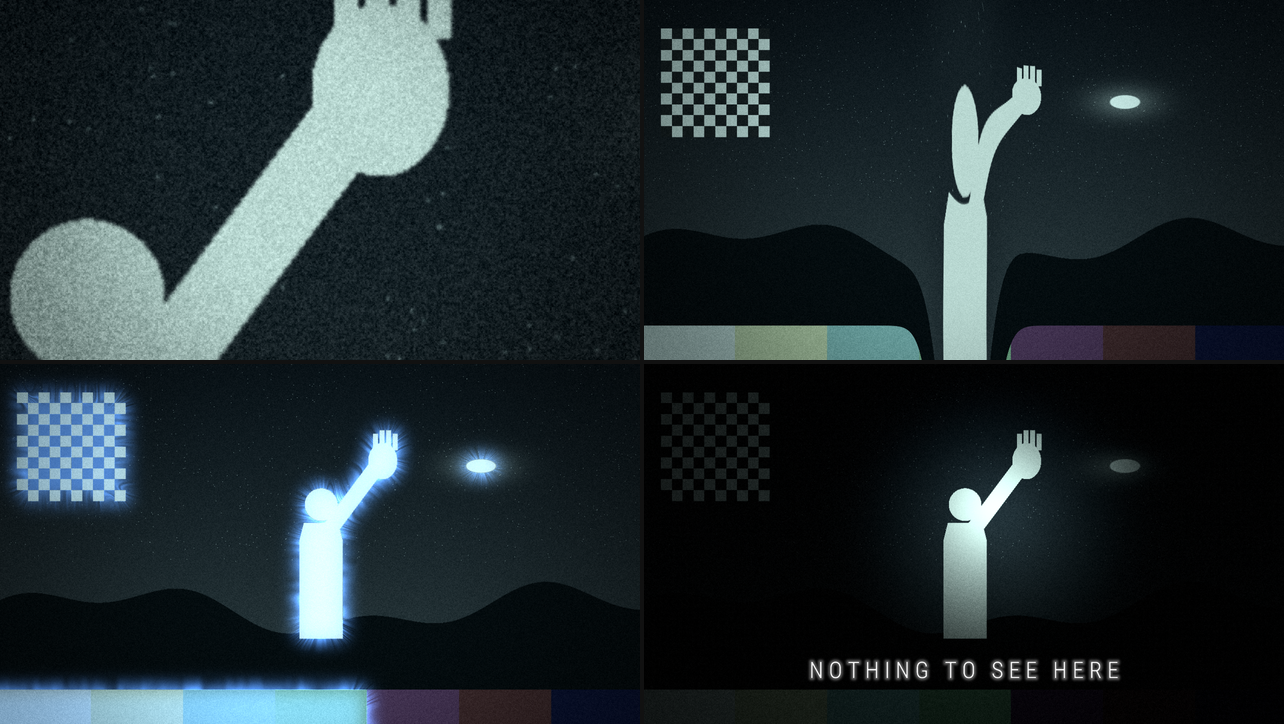
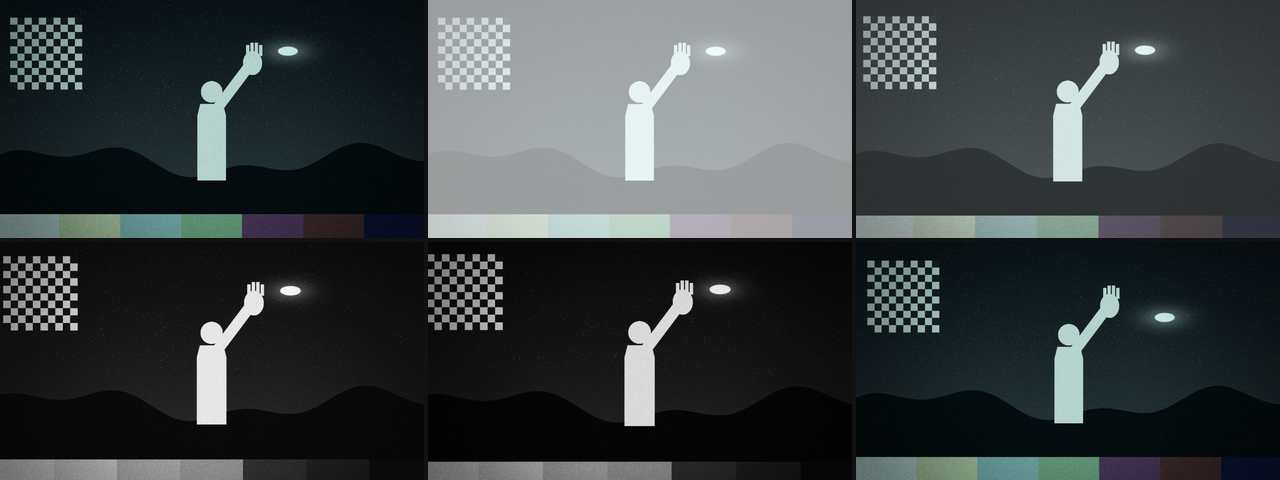
Rendered by bbtest, the offline harness, rather than captured from Resolume: the harness’s own
moving test card at 60 fps, 2 s in, each panel at 1280×720 and shown here at half size, with
every control at its default unless it’s named. Top left, Enlarge 0.75 (three generations of
four, 4.76×) with Enlarge X 0.6 and Enlarge Y 0.72, on the hand. Top right, Stretch 0.6 (3.4×),
Stretch Width 0.2 and Stretch Y 0.61. Bottom left, Aura 0.6 and Corona 0.8. Bottom right, Torch 1,
Torch Sweep 0, Torch X 0.55 and Torch Y 0.6, with Caption Show 1 and Caption Y 0.15.
Before you rely on this: it’s at v0.1.0, the first release, and very early days. Its behaviour is measured rather than asserted, by a harness (
bbtest) that drives the plugin’s own class in a headless GL context on one Apple Silicon Mac, at 640×360 and 320×180 and again on Apple’s software renderer. At 7 prints a second, every one of 59 frames shows the print and the dissolve the model says, and on Step On Beat and Bar at 120 BPM none of 250 frames is wrong. The smear rises as its half-life says to within one half-float ULP. Three generations of four at Magnify 4 measure ×2.8284, as 4^0.75 says. The aura falls off past the subject’s edge as a blurred edge does, to within 15%. The torch is centred on its aim to a pixel and leaves the room 3% of its light. The caption’s capitals are the height asked for, to the pixel. A freeze holds the frame bit for bit, and Freeze Push at the top pushes in ×1.2. Thirteen models that are wrong on purpose and 17 one-character changes to the shipped code are all caught, and all 50 controls thattools/sweep.pycan move change the picture. On a Mac it has been in Resolume Arena 7.28.1, the release build, driven over Arena’s REST API with Arena’s output read back as pictures, not played by anybody. Every control arrives as declared, Mix 0 is the effect bypassed to the bit, the same 38 controls change the picture, Step On prints at Arena’s tempo on Beat, 1/2 Beat and Bar (60 to 120 BPM), a Freeze press holds the grey frame for its 1.31 s and lets go, and a Caption survives a save and a reopen. On Windows it has been in Resolume: a CI build of the plugin, onwin-lab, a Windows VM of mine, in Resolume Arena 7.27.1 on software rendering (Mesa llvmpipe, no GPU). It loads, registers asSW Bluebook(BK01, an effect), every control is as declared (name, order, type, range and default), it renders, Arena’s log stayed clean and Arena survived the run. 38 of the plugin’s controls measurably changed Arena’s picture of a still (the subtle ones with Grain, Flicker and Weave off, since those make every grab a little different). 2 are inconclusive rather than dead: Torch Angle steers a beam that’s already moving, and Grain Size sizes grain that’s new every frame. 8 can’t act on a still at all and were left out: Step On, Step Rate and Dissolve (a still prints as the same still), Trail (a still smeared into itself is the same still), and Freeze Hold, Freeze Fade, Freeze Flash and Freeze Push (they only act during a timed freeze). Nobody has played it in a show, looked at how Arena’s inspector lays it out, tried it in Avenue or as a clip effect, or timed it inside Resolume. Try it on a spare layer before you put it in a show.This codebase was created with AI assistance, directed and reviewed by a human author.
Installing
Every download carries one effect, SW Bluebook (Bluebook.bundle on macOS, Bluebook.dll on
Windows). Drop it into Resolume’s effects folder and restart Resolume:
macOS    ~/Documents/Resolume Arena/Extra Effects/
Windows  %USERPROFILE%\Documents\Resolume Arena\Extra Effects\
Avenue uses the same layout under its own folder name. The effect then shows up in the effects browser as SW Bluebook.
The macOS download is a universal build (Apple silicon and Intel), as a .dmg or a .zip. It’s
Developer ID-signed and notarised, so the bundle just loads. The Windows download is an x64
installer or a .zip. The installer asks which folder to put the plugin in: give it the one
above. It isn’t code-signed, so it trips SmartScreen once: More info → Run anyway. Or skip
the installer, take Bluebook.dll out of the .zip and drop it into the folder by hand.
Every archive also carries ATTRIBUTIONS.md and OFL.txt, the licence for the caption’s typeface.
Start here
Put SW Bluebook on a layer with something in it and leave every control where it is. The defaults are what the sequence did to every shot: the clip step-printed at eight prints a second, each print dissolving in from the last and sitting a hair off where the last one sat, graded a cold teal with crushed blacks, grain, an exposure that flickers and a dark edge. It looks like something that has spent thirty years in a filing cabinet.
Then, in this order:
- Stutter to 0: the live clip comes back, still graded. Put it back to 1.
- Enlarge up slowly. The picture grows about the middle a generation at a time, softer and grainier with each one. Set Enlarge X and Enlarge Y on something in the clip and it grows about that instead. Put Enlarge back to 0.
- Stretch to 0.5: a column down the middle is pulled tall and pinched in at the waist, and it writhes. Move it onto a face with Stretch X and Stretch Y. Put Stretch back to 0.
- Aura to 0.6. Whatever is brighter than half grey gets a blue glow round it, with streamers running outwards (Corona). Silhouette takes the subject itself down. Put Aura and Silhouette back to 0.
- Torch to 1. The room goes dark and a beam crosses it every 3.2 seconds. Torch Sweep to 0 stops it at Torch X and Torch Y. Put Torch back to 0.
- Caption Show from 0 up to 1. NOTHING TO SEE HERE spells itself out across the middle of the frame. Type your own into Caption, and try Caption Style Legend.
- Press Freeze. The frame stops with a flash, drains to grey, pushes in and lets go after 1.3 seconds. Push Freeze Hold to the very top and it stays frozen until you press again.
One frame, in order
Each group is a stage of a small film lab, and they run in the same order every frame. Roughly: the clip is printed, enlarged and stretched, the aura picks its subject out of that, the grade and the torch go on, the glow goes over them, then the flicker, the dark edge and the grain, then the freeze’s grey and flash, and the caption over the lot.
| stage | what happens there | |
|---|---|---|
| 1 | the prints are taken, held and dissolved, and Trail smears the result. A freeze swaps the clip for the frame it caught here | |
| 2 | Enlarge, Freeze Push | one move: Freeze Push about the middle of the frame, the enlargement about Enlarge X and Y |
| 3 | Stretch | the column pulled long |
| 4 | Aura’s key | the subject is picked out of the picture as it now is: printed, enlarged and stretched, not yet graded |
| 5 | Silhouette, Contrast, Tint | the subject darkened, then the grade |
| 6 | Torch | lights the graded picture |
| 7 | Aura’s glow | added over the top, so the grade doesn’t tint it and the torch doesn’t light it |
| 8 | Flicker, Vignette | on everything so far, glow included |
| 9 | Grain | on the picture, not the glow |
| 10 | Freeze’s grey and flash | on everything so far |
| 11 | Caption | over the lot |
| 12 | Mix | the result over the clip |
Three things follow from the order. The freeze catches the print stage rather than the finished picture, so on a frozen frame the enlargement, stretch, aura, torch, grade and grain all keep working, and the grain keeps moving. The glow goes on after the grade and the torch, so a blue aura stays blue under a teal grade and glows in a dark room. And the caption is drawn last: it isn’t graded, it has no grain, and a freeze doesn’t turn it grey.
Everything that belongs to one shot starts switched off. Print and Film are on by default, because the sequence did them to every shot. Enlarge, Stretch, Aura, Torch, Caption and Freeze each belonged to one shot, so they start off, and the rest of each group does nothing until its stage is on:
| group | switched on by | default |
|---|---|---|
| Stutter above 0 | on | |
| Enlarge | Enlarge above 0, or Enlarge Run on Cycle | off |
| Stretch | Stretch above 0 | off |
| Aura | Aura above 0 (Silhouette works on its own) | off |
| Torch | Torch above 0 | off |
| Film | always on; each control at 0 (or Tint Natural) leaves its part out | on |
| Caption | Caption Show above 0 | off |
| Freeze | a press of Freeze | off |
With Stutter, Weave and every Film control at 0, Tint on Natural and the rest off, the clip comes through unchanged, to within one half-float step.
Every slider in the inspector runs from 0 to 1. The ranges in this guide are what those positions mean, and for the sliders that aren’t linear, where the middle is. Lengths on the picture are in shares of the frame’s height, so a setting means the same at 720p and at 4K.
The Print group
The step printer: instead of the clip, a run of held stills, each one dissolving in from the one before.
- Stutter: 0 to 1 (default 1). At 0 the live clip; at 1 the prints. Between, the prints over the live clip as a double exposure.
- Step On: Rate (the default: Step Rate prints a second), Beat (one a beat), 1/2 Beat (two a beat), 1/4 Beat (four a beat) or Bar (one a bar). The beat settings follow Resolume’s tempo and land on its beat: see Time and tempo.
- Step Rate: prints a second on Rate, 1 to 30 (default 8; the middle of the slider is about 5.5). Only used with Step On on Rate.
- Dissolve: how much of each print is spent dissolving in from the one before, 0 to 1 (default 0.35). At 0 the prints cut; at 1 each one is dissolving for its whole length. At the defaults a dissolve lasts 44 milliseconds.
- Weave: how far a print may sit off true, 0 to 1.2% of the frame’s height each way (default 0.36%, at 0.3). Every print lands somewhere new within that, as film does in a tired gate, and the whole picture shimmers by about an eighth of it on top, 24 times a second. Each print is blown up a touch (2.5% at Weave 1) so its edge never shows.
- Trail: a smear, given as its half-life: how long something bright takes to fade to half once it’s gone. 0 to 1.5 seconds (default 0, no smear). The slider is gentle at the bottom, where the detail is: its middle is 0.375 s.
The Enlarge group
The zoom into a photograph to find the thing in it. Each generation is a new enlargement of the last print: softer than the one before, a hair off where it was, and carrying the grain it was printed with, enlarged with it from then on. A few generations in, the grain is coarse and clumpy and the picture is mostly guesswork.
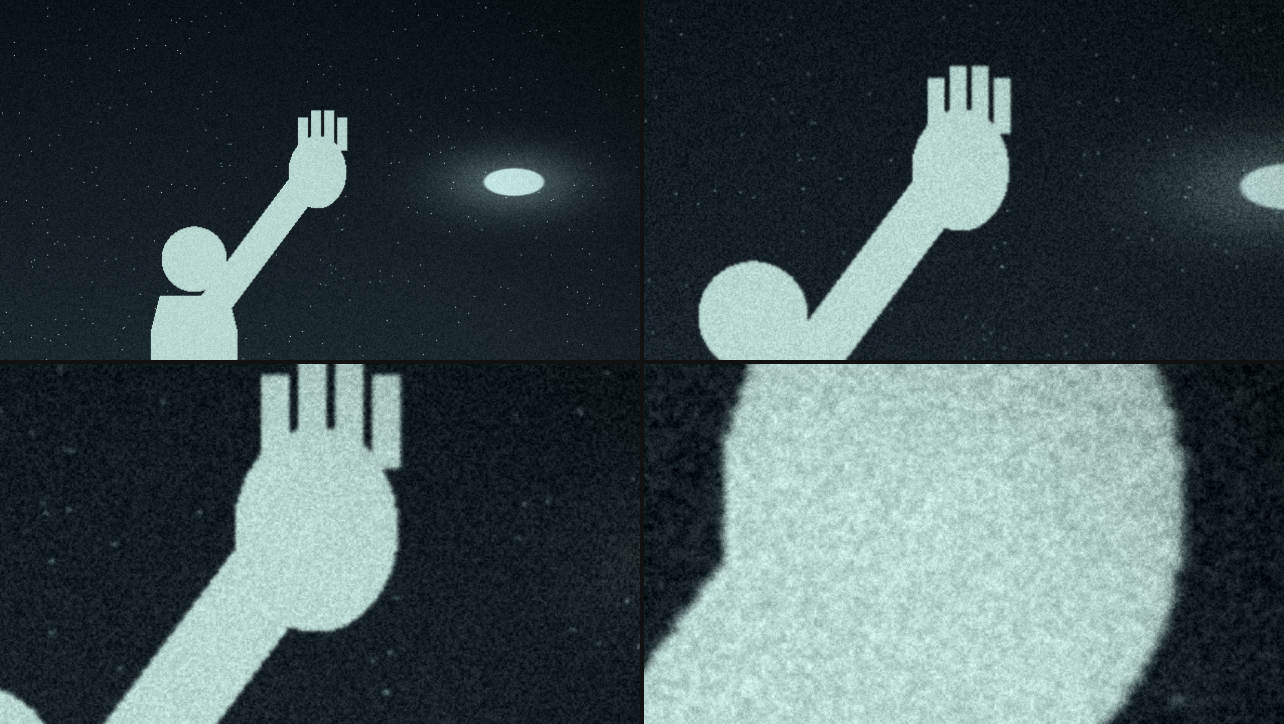
The harness’s card through Enlarge, rendered by bbtest at 1280×720, 2 s in, with Enlarge X 0.6,
Enlarge Y 0.72 and the default Magnify (8×) and Generations (4). Each panel is the same 640×360
patch round that point, at full size. Top left, Enlarge 0. Top right, 0.25: one generation, 1.68×.
Bottom left, 0.5: two generations, 2.83×. Bottom right, 1: all four, 8×. The live grain is the same
size in all four; the coarse grain is what the earlier generations left in their prints.
- Enlarge: how far in, 0 to 1 (default 0, off). The magnification is Magnify raised to the power of Enlarge, so at the default Magnify of 8×, 0.5 is 2.83× and 1 is the whole 8×, the last generation.
- Enlarge Run: Manual (the default: Enlarge says how far in) or Cycle: one generation further in on every print, and after the last, back out to the start. Cycle ignores the Enlarge slider. At the defaults a cycle is five prints, 0.625 seconds; on a beat Step On it moves a generation a beat.
- Magnify: the magnification at Enlarge 1, 1.5× to 24× (default 8×; the middle of the slider is 6×).
- Generations: how many enlargements the zoom is split into, a whole number from 1 to 8 (default 4). It doesn’t change how far in Enlarge goes. It changes how many layers of grain and how many small shifts the zoom picks up on the way, and on Cycle how many steps it takes.
- Enlarge X, Enlarge Y: the point that stays put while everything else grows away from it. Enlarge X runs across the frame from the left and Enlarge Y up it from the bottom; both are 0.5, the middle, by default. Put it on the thing you want to find.
Past 1.5× the picture is drawn with a soft cubic filter, which looks like an optical print rather than a screen of square pixels. Four generations in, the grain’s variance measures five times the live grain’s: one layer for each generation and the live one on top.
The Stretch group
The face pulled long: a vertical column of the picture drawn out up and down from a centre, pinched in at the waist, writhing a little.
- Stretch: how far the middle of the column is pulled, 1× to 5× (default 1×, off, at 0; the middle of the slider is 3×).
- Stretch Width: how wide the column is, 4% to 80% of the frame’s height (default 15%, at 0.45; the middle of the slider is about 18%). The pull falls to a little over a third of its strength at that distance either side of the column’s centre line, and fades out past it.
- Writhe: 0 to 1 (default 0.3). How much the pull wobbles along its length and sways from side to side, all the time. At 0 the stretch holds still.
- Stretch X, Stretch Y: the centre of the pull, 0.5 and 0.5 (the middle) by default. The column runs up and down through Stretch X; anything above Stretch Y is pulled up and anything below it pulled down. The middle of the column is also drawn narrower, down to about two-thirds of its width at 5×.
The pull reaches further than the column looks. Anything a long way above or below Stretch Y is drawn from nearer to it, so a horizon well below the face bows down towards the column, as in the top right of the picture at the top.
The Aura group
The glowing hand. Whatever counts as the subject gets a glow round it, outside it rather than on it, with streamers running outwards from its edges.
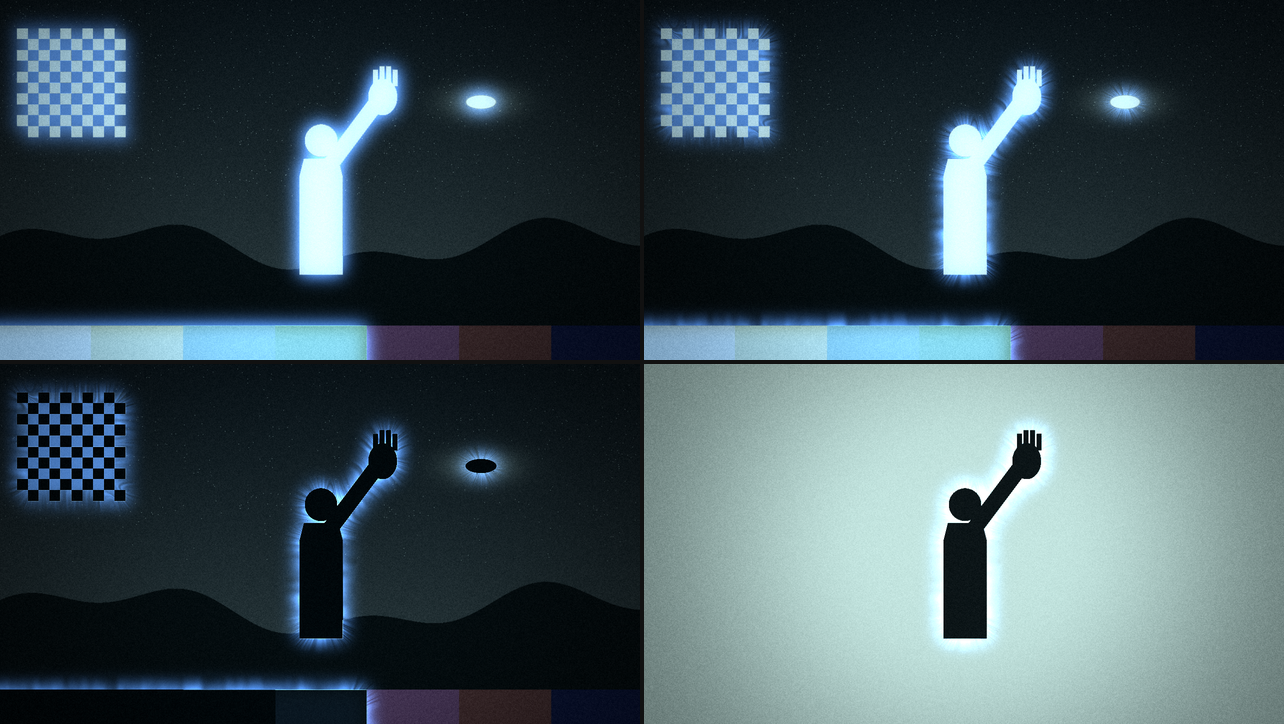
Rendered by bbtest at 1280×720, 2 s in, shown at half size, with Aura 0.6 throughout. Top left,
Corona 0. Top right, Corona 0.8. Bottom left, Corona 0.8 and Silhouette 1: the subject goes black
inside its own glow. Bottom right, Aura Key Dark and
Corona 0.8, on a still I made for it (the card’s figure in near-black on a pale light box), given
to the harness with --in.
- Aura: how bright the glow is, 0 to 1 (default 0, off).
- Aura Size: how far the glow spreads, 0.3% to 12% of the frame’s height (default 2.5%; the middle of the slider is about 1.9%). It’s the blur’s standard deviation, so the glow reaches two or three times that past the subject’s edge.
- Aura Key: what counts as the subject. Bright (the default): anything brighter than Aura Threshold. Dark: anything darker, for a hand against a light box. Alpha: the clip’s own alpha above Aura Threshold, for a clip that’s already keyed.
- Aura Threshold: 0 to 1 (default 0.5). The brightness (or alpha) where the subject starts, with a soft edge 0.05 either side of it.
- Aura Colour: Blue (the default), White, Green, Red or Violet.
- Corona: the streamers, 0 to 1 (default 0.5). They run outwards from the subject’s edges and crawl outwards over time. They only appear where there’s an edge to stream from, and never on the subject itself.
- Silhouette: takes the subject itself down, 0 to 1 (default 0). At 1 the subject is black, with Aura up or not, on any key: a black shape inside the glow, as in the bottom left of the picture above. Between, it’s darkened, and on the Bright key it keeps a little of the glow’s colour.
The key is judged on the picture as it comes out of the print, the enlargement and the stretch, before the grade, and worked out at a quarter of the frame’s size, so its edge is soft and very thin things barely register. A bright subject on the Bright key keeps a little of the glow, which tints it, as on the figure in the top row of the picture above, until Silhouette takes it away.
The Torch group
A dark room with a beam crossing it. It’s lit in linear light, so the hot middle looks like a lamp rather than a grey disc.
- Torch: 0 to 1 (default 0, off). At 1 the room outside the beam keeps 3% of its light and the middle of the beam gets about twice the clip’s own. Between, a mix: at 0.5 the room keeps about half.
- Torch Size: the beam’s radius, 4% to 80% of the frame’s height (default 22%; the middle of the slider is about 18%). At Torch 1 the light is down to half the clip’s own at that distance from the middle, and keeps falling past it.
- Torch Sweep: how long the beam takes to cross the frame. At 0, the bottom of the slider, it stands still at Torch X and Torch Y. Anything above that is a pass every 20 seconds (just off the bottom) to every 0.5 seconds (the top); the default, the middle of the slider, is 3.2 seconds.
- Torch Angle: which way the beam travels, 0 to 360° (default 0, left to right; 90° is bottom to top). Only used while it sweeps.
- Torch X, Torch Y: where the beam stands when it’s still; when it sweeps, the point its path crosses half way through each pass. Both are 0.5, the middle, by default. A pass starts and ends past the corners of the frame, so the beam is out of the picture at both ends of it.
The Film group
The grade, and the camera’s habits. The whole group is on by default.
- Tint: a duotone, from a shadow colour to a light one by brightness. Teal (the default: cold blue-green shadows, cool white light), Green (sickly fluorescent), Blue (night, moonlight), Amber (the map under the lamp), Silver (black and white) or Natural (the clip’s own colour, graded only by Contrast).
- Tint Amount: 0 to 1 (default 0.85). Does nothing on Natural.
- Contrast: 0 to 1 (default 0.5). Towards an S-curve that crushes the shadows and the highlights; at 1 it’s the whole curve.
- Grain: 0 to 1 (default 0.35). Strongest in the mid-tones, as film’s is, and new 24 times a second.
- Grain Size: 1 to 4 pixels at 1080 lines (default 1.6, at 0.35; the middle of the slider is 2). It scales with the frame’s height, so the grain is the same size on the picture at any output resolution.
- Flicker: 0 to 1 (default 0.3). The exposure moves by up to 16% × Flicker either way, 24 times a second, and now and then a frame drops by 30% × Flicker, as if the lamp nearly went. At the default that’s ±4.8%, with about one frame in seventy dropping 9%.
- Vignette: a dark edge, 0 to 1 (default 0.5). It starts a quarter of the way out from the middle and is darkest in the corners, which keep about 16% of their brightness at 1 and about 58% at the default.
The Caption group
A line of text revealed a letter at a time, in thin spaced capitals with a halo: centred as a title, or right-aligned as an evidence legend with a catalogue number underneath.
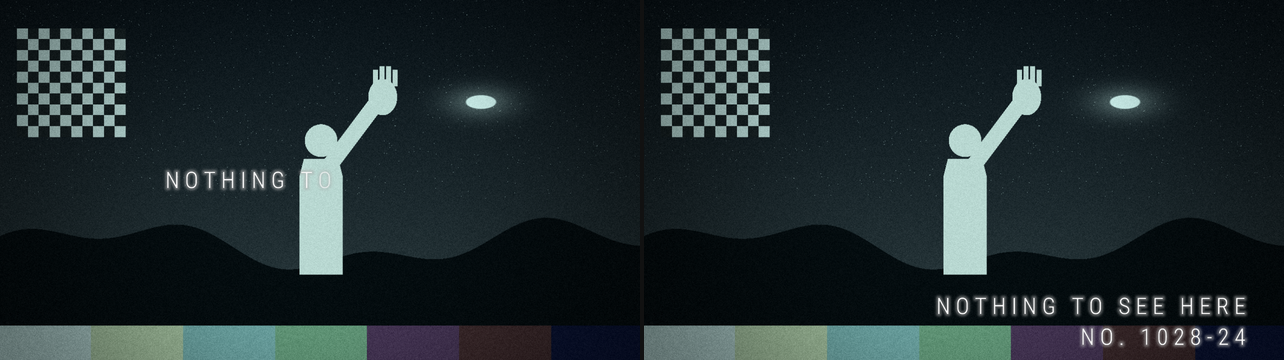
Rendered by bbtest at 1280×720, 2 s in, shown at half size. Left, Caption Show 0.5, with the
default Title style and Caption Y. Right, Caption Show 1, Caption Style Legend and Caption Y 0.15.
The number counts prints from 1013, and fifteen had been taken.
- Caption: the text, up to 48 characters (anything past that is dropped). Default NOTHING TO SEE HERE. Plain ASCII only: an accented letter or a curly quote comes out as a question mark. Each counts as one character. Lower case stays lower case, so type it in capitals for the look.
- Caption Show: 0 to 1 (default 0). At 0 nothing; at 1 every letter is in. Between, the letters fade in from the first, each over the space of three letters. It’s a slider so you can run the reveal from a clip’s timeline, a MIDI fader or Resolume’s own envelopes.
- Caption Style: Title (the default: centred) or Legend: right-aligned, ending 94% of the
way across, with a catalogue number on a second line. The number is
NO.and four digits that go up by one with every print, then two that change with each print and mean nothing at all. It’s revealed after the caption. - Caption Size: the height of the capitals, 1.5% to 15% of the frame’s height (default 4.5%; the middle of the slider is about 4.7%). Legend uses the same size.
- Caption Spacing: extra space after each letter, 0 to 0.6 of an em (default 0.24, at 0.4).
- Caption Glow: the halo, 0 to 1 (default 0.5).
- Caption Y: where the first line’s capitals are centred, 0 at the bottom to 1 at the top (default 0.5, the middle). Legend’s number sits 1.9 capital heights below.
The caption is drawn over everything else: no grade, no grain, no vignette, and a freeze doesn’t turn it grey. It does flicker with the exposure, at half strength, and Mix fades it with the rest. The typeface is Roboto Condensed Light, built into the plugin as a distance field, so there’s nothing to install and it’s sharp at any size.
The Freeze group
The freeze-frame hit. Press Freeze and the frame on screen stops with a white flash, drains to punchy black and white and pushes in slightly, then lets go after Freeze Hold, or stays until you press it again. It works on its own, with every other stage off.
Rendered by bbtest at 1280×720 and shown at a third of the size, with every Freeze control at its
default and Freeze pressed on frame 60 at 60 fps. Top row: frame 59; the press, frame 60, with
the flash at its full 0.6; and 0.1 s in (frame 66), the flash nearly gone and a third of the way
to grey. Bottom row: 0.3 s in (frame 78), all grey, as Freeze Fade says; 1 s in (frame 120),
pushed in by 5.7% of the 6% Freeze Push will reach; and frame 139, let go, the first frame past
the 1.31 s hold.
- Freeze: a press. It catches what the print stage showed on the frame before, so you get the frame you just saw. A press during a timed hold catches the clip as it is then, since what’s on screen is the freeze.
- Freeze Hold: how long a freeze lasts, 0.25 to 10 seconds (default 1.3; the middle of the slider is about 1.6). At the very top of the slider it latches instead: frozen until the next press, which lets go.
- Freeze Fade: how long the colour takes to drain to grey, 0 to 1.5 seconds (default 0.3). At 0 it cuts straight to grey.
- Freeze Flash: how bright the flash is at the press, 0 to 1 (default 0.6). It dies away fast, to about a third in 0.08 seconds and to almost nothing in a quarter of a second.
- Freeze Push: how far it pushes in, 0 to 20% (default 6%), about the middle of the frame. It eases in and gets most of the way in about a second, however long the hold.
With a timed hold, a press while a freeze is holding hits again on a new frame, the clip as it is at that press: the flash fires again, the new frame drains to grey, and the push starts over from it. So a pad hit on every beat gives a run of stills. Letting go is a cut straight back to the picture.
The Output group
- Mix: the result over the clip, 0 to 1 (default 1). At 0 the clip goes through untouched; at 1 none of it does, frozen frames included. Mix takes the caption with it.
The effect keeps the clip’s own transparency. The aura’s light and the caption make a clear area opaque where they fall.
Recipes
There’s no preset list in the plugin (Resolume saves parameter presets itself). These are starting points.
Every shot. The defaults. For the streaky version, Trail at 0.3 (a half-life of 0.135 s).
A jittery print. Step Rate 0.41 (4 prints a second), Dissolve 0 and Weave 1: hard cuts, each print up to 1.2% off true.
On the beat. Step On Beat and Dissolve 0.6: a print on every beat, dissolving in over the first 60% of it. Add Enlarge Run Cycle for a zoom that steps in a generation a beat and snaps back out every fifth.
Finding the thing in the photograph. Enlarge X and Enlarge Y on the thing, Magnify 0.85 (16×), and Enlarge on a fader or the clip’s timeline. Or Enlarge Run Cycle: one generation further in on each print, then back out.
The long face. Stretch 0.6 (3.4×), Stretch Width 0.2 (7%), Stretch X and Stretch Y on the face, Writhe 0.5.
The glowing hand. Aura 0.6, Corona 0.8. On real footage, raise Aura Threshold until the sky drops out of the glow and only the hand is left in it.
The black hand against the light. Aura Key Dark, Aura 0.6, Corona 0.8, on a dark subject against something bright. Silhouette 1 takes a mid-grey subject down to black.
A torch in the dark. Torch 1, Torch Size 0.72 (35%), Torch Sweep 0.33 (a pass every 6 seconds), Torch Angle 0.1 (36°, climbing from left to right) and Tint Blue.
An exhibit. Caption Style Legend, Caption Show 1, Caption Size 0.3 (3%), Caption Y 0.12, Tint Silver and Step On Bar: one print a bar, each with its own catalogue number. Type your own label into Caption.
A title. Caption Show on a fader or the clip’s timeline, 0 to 1 over a few seconds, and Caption Y 0.15.
The hit. Freeze on a MIDI pad or a key. For a harder one, Freeze Flash 1, Freeze Push 0.6 (12%) and Freeze Fade 0, which cuts straight to grey. Freeze Hold at the top holds it until the next press. Hit it on every beat, with Freeze Hold longer than a beat, for a run of stills: each press inside a hold freezes a new frame.
Time and tempo
This is what the code does and what the harness checks; Arena has only been seen running it as far as the Before you rely on this box says.
Everything that moves (the prints, the dissolves, the smear, the writhe, the streamers, the torch, the grain, the flicker and the freeze) runs on the effect’s own clock, which moves on by the host’s time since the last frame. A stall or a jump forward moves it on by a quarter of a second at most, and a step backwards passes no time. For the first few frames after it loads, while it works out whether the host counts in seconds or milliseconds (Resolume has been seen sending both), it runs on a steady clock of its own; four frames that agree settle it. The grain, the flicker and the weave’s shimmer change 24 times a second whatever the output’s frame rate, as film would.
Step On Rate prints Step Rate times a second on that clock. Beat, 1/2 Beat, 1/4 Beat and Bar follow Resolume’s bar phase, four beats to a bar: a print lands on each beat, half beat, quarter beat or bar line, and the dissolve runs from there. Bars are counted from the bar phase coming round. If the bar phase stops moving, so do the prints, and the picture holds the last one. Until it has seen the bar phase move at all, the effect prints at Resolume’s tempo on its own clock (120 BPM if no tempo has arrived), so the speed is right but the prints needn’t land on the beat. In Arena on a Mac the prints came at Arena’s tempo: every 0.505 s on Beat at 120 BPM, every 2.01 s on Bar at 120 and every 2.43 s at 100. Either way of printing would give those numbers, so whether they come from the bar phase, and land on Arena’s own downbeat, nobody has checked.
Enlarge Run Cycle and the Legend’s catalogue number both count prints, so on a beat Step On they move on with the beat.
Freeze takes no notice of the tempo. A timed freeze lets go when Freeze Hold has passed since the last press. At the top of Freeze Hold it latches: frozen until the next press, and that press only lets go.
Freeze and Resolume’s Bypass. Nothing in the code knows about Bypass. When Resolume stops calling an effect while it’s bypassed, the effect’s clock stops with it, and when it comes back it moves on by a quarter of a second at most. So a freeze bypassed halfway through picks up roughly where it was, and so does the torch’s sweep. Arena on a Mac does stop calling it: a freeze bypassed for half a second came back still grey and let go at about 1.7 s, not 1.35. A press that reaches it while it’s bypassed is acted on at the next frame it draws.
Performance
Measured by the offline harness on an Apple Silicon Mac (an M4 Max, macOS 26.4.1) with
bbtest --bench: the wall-clock time of a whole frame, CPU and GPU, with the GPU finished before
and after, averaged over 60 frames after 10 to warm up. The settings are the defaults (Print and
Film on) plus Aura 0.6, Enlarge 0.5, Stretch 0.4, Torch 0.6, Caption Show 1 and Trail 0.3, which is
everything but a freeze, on the harness’s still card. The first row is the run at the end of
tools/verify.sh for this release; the second is the spread over five runs on the day of
the release, on a GPU shared with other work, so the small numbers wobble.
| 720p | 1080p | 4K | |
|---|---|---|---|
| everything on, the verify run | 0.32 ms | 0.55 ms | 2.04 ms |
| everything on, five runs | 0.30 to 0.54 ms | 0.55 to 0.64 ms | 2.04 to 2.52 ms |
At 4K that’s about an eighth of a 60 fps frame. Lighter settings weren’t timed separately. These are macOS figures from the harness; nothing was timed inside Resolume, and the Windows run in Arena was on software rendering, which says nothing about speed.
Memory, worked out from the buffers rather than measured: about 556 MB of GPU memory at 4K and a quarter of that at 1080p. Nearly half of it is the smear’s two full-precision buffers, which are there whether Trail is up or not.
If it looks wrong
The effect does nothing at all. That’s what a shader that won’t compile looks like. The actual error is in the log:
macOS    ~/Library/Logs/bluebook/bluebook.YYYY-MM-DD.log
Windows  %LOCALAPPDATA%\bluebook\logs\bluebook.YYYY-MM-DD.log
It records the build, the GL vendor, renderer and version at load, which shader failed if one did, and at the 60th frame what unit the host’s clock arrives in.
It isn’t in the effects browser. Check the folder under Installing, including the one you gave the Windows installer, and that Resolume was restarted.
A control does nothing. Its stage is probably off: see Everything that belongs to one shot starts switched off. Also: Step Rate only counts on Step On Rate, Enlarge does nothing on Cycle, Torch Angle only matters while the torch sweeps, Tint Amount does nothing on Natural, the Freeze controls only act during a freeze, and Corona needs an edge to stream from.
The whole sky glows. On the Bright key anything brighter than Aura Threshold is the subject, and a bright sky counts. Raise the threshold, or use Dark or Alpha.
The glow misses thin things. The key is worked out at a quarter of the frame’s size, where a line a pixel or two wide is averaged in with what’s round it and can fall under Aura Threshold. A lower threshold lets it back in.
The ground dips under a stretch. The pull reaches well above and below Stretch Y. A narrower Stretch Width, or Stretch Y nearer the horizon, keeps it down.
The torch disappears for part of every pass. A pass starts and ends past the corners of the frame. Torch Sweep at 0 holds it still.
Bright things leave ghosts. That’s Trail.
The picture has stopped moving. With Stutter at 1 on a beat Step On, the prints stop when Resolume’s bar phase does. Or a freeze is latched (Freeze Hold at the top): press Freeze again.
Question marks in the caption. Only plain ASCII is drawn; anything else is a ?. Text pasted
from a word processor brings curly quotes and long dashes with it.
The caption is cut short. It stops at 48 characters.
The caption isn’t teal, grainy or grey in a freeze. It’s drawn after everything else (see One frame, in order). Mix still fades it.
The layer underneath shows through, or the glow covers it. The effect keeps the clip’s transparency, and the aura’s light and the caption make a clear area opaque where they fall.
Known limits
- Driven, not played. In Arena on a Mac it was driven over the REST API and its output read back, so nobody has looked at the inspector’s layout, tried Avenue or a clip effect, or seen how Arena’s Opacity sits with a freeze. On Windows it has only run in Arena on software rendering.
- The inspector shows slider positions, not seconds, percentages or prints a second. This guide gives the ranges, and where the middle of each slider is.
- Tried on a drawn test card, not much footage. How the Aura key copes with a real clip, where a bright sky is as bright as a hand, comes down to setting Aura Key and Aura Threshold, and I haven’t tried it on much.
- One of each: one beam, one stretched column, one subject for the aura, and one line of caption (and Legend’s number).
- Bars are four beats. Step On’s Bar is four beats and Beat a quarter of a bar, whatever the music is doing.
- sRGB in, sRGB out. The torch turns the picture into light to light it, and takes what Resolume hands over as sRGB-encoded.
- The caption is plain ASCII, 48 characters, in one typeface.
- Memory at 4K: about 556 MB of GPU memory, by the buffer sizes.
- Intel Macs: the universal download has an Intel half, built and signed, which has never run on an Intel Mac.
- No presets (Resolume saves parameter presets itself), and no OpenFX version.
About
The last group, About, has the plugin’s name, version, licence and maker (Bluebook v0.1.0 - MIT - Stoatworks Labs, stoatworks-labs.com), and buttons that open this user guide, the project
page, the source on GitHub and the support page in your browser.
To see it before you install it, there’s a browser demo, the plugin’s own shaders in WebGL2 with every control, and a 77-second video of the treatments and the freeze, rendered by the harness. The video is silent, and Freeze’s flash goes off three times.
Reporting something
If something’s wrong, shout at github.com/stoatworks-labs/bluebook/issues. A screenshot, the controls you changed, Step On and Resolume’s tempo if you’re printing on the beat, and the composition’s resolution and frame rate are usually enough. If the effect drew nothing, attach the log.
The treatments are the opening titles’ (the main title sequence by Castle/Bryant/Johnsen), and the freeze is the other show’s; the code is new, and nothing of either show is in it. The FFGL SDK, GLEW and the Roboto Condensed typeface it’s built on, and the published work it was checked against, are credited in ATTRIBUTIONS.md, which travels with the plugin.