

Burin draws vector artwork in Resolume Arena and Avenue, as a pair of FFGL plugins — and the same thing again as an OpenFX plugin for Resolve, Nuke, Natron and Vegas. Point it at an SVG and it draws it at the resolution the frame actually needs, rebuilt whenever that changes, so going in close stays sharp instead of turning into a bitmap.
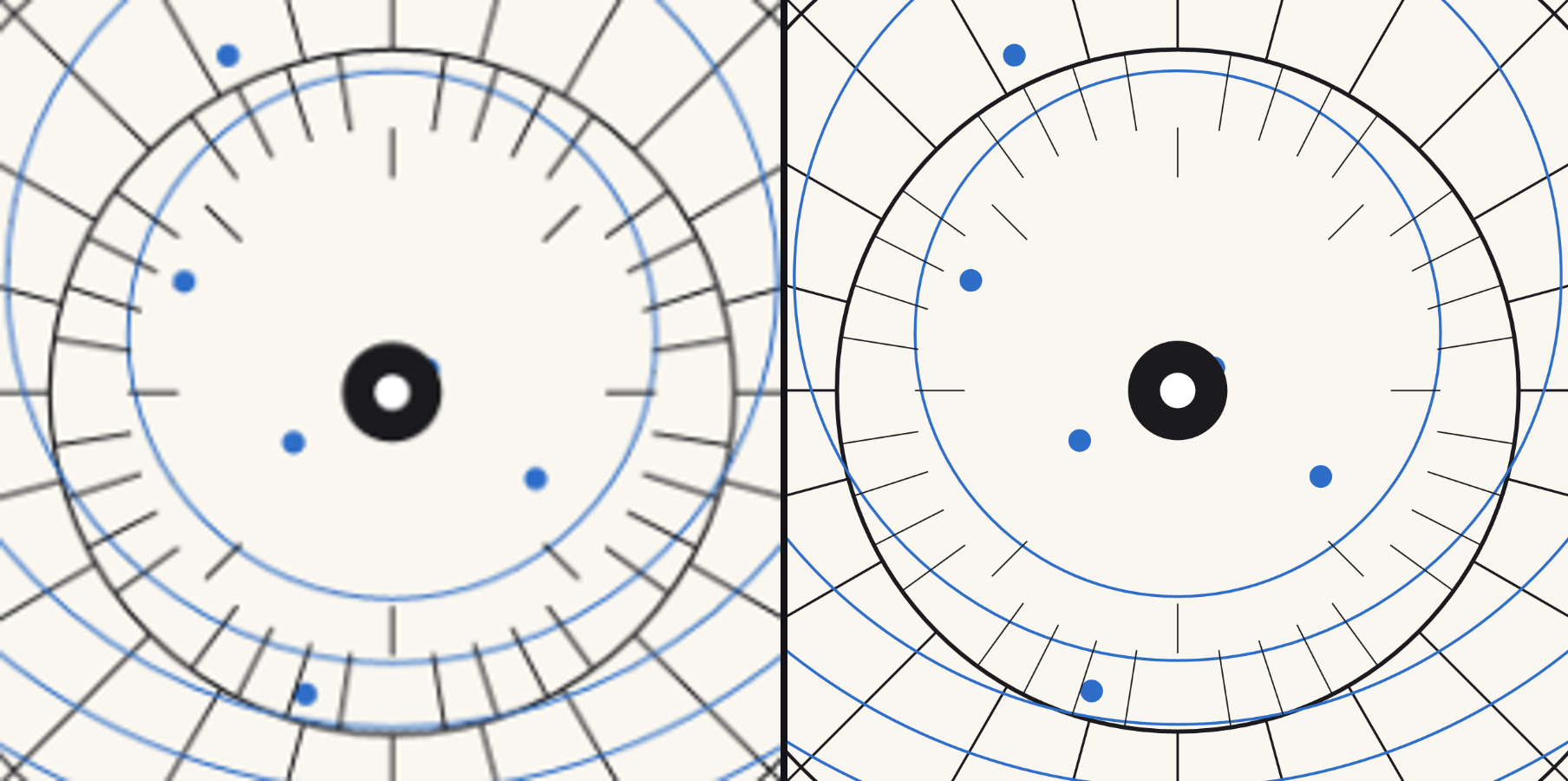
Both halves are the same drawing at the same 4.3× zoom. Left: a 900×900 export, magnified — which is what you get from a PNG. Right: the plugin, having re-rasterised at the size being shown.
Before you rely on this: the central claim — that zooming in stays sharp because the drawing is rebuilt at the size it is being seen at — is measured rather than asserted. A hard edge measures 1.0 px of alpha transition at 1×, 2×, 4×, 8×, 16× and 32×; the same raster left un-rebuilt measures 1, 3, 3, 7, 13 and 25 px across the same range. The GPU and CPU renderers agree bit-exactly, which is what keeps Resolume and Resolve honest against each other, and 37 parameters are swept end to end.
Both FFGL plugins load and render in Resolume Arena. The OpenFX build has not been loaded into Resolve, Nuke or Natron. Still open even in Arena: whether the twice-an-octave rebuild during a continuous zoom is visible in a room.
This codebase was created with AI assistance, directed and reviewed by a human author.
Read this before anything else: text
Live
<text>is not rendered — at all. The SVG parser has no text support whatever: no font loading, no glyph outlines, not even a stub. An SVG whose content is live text parses without error and draws an empty frame.
Convert text to outlines before exporting. Illustrator: Type → Create Outlines. Inkscape: Path → Object to Path. Figma: Outline Stroke / Flatten. Affinity Designer: Layer → Convert to Curves.
Also ignored: <use>, <image>, <clipPath>, <mask>, <pattern> and <filter>. The plugin
counts every one of these while loading and says so in its log, because “the plugin does
nothing” and “your file is mostly live text” are otherwise the same picture.
.svgz is deliberately not offered rather than accepted and then failed: it is gzipped SVG, and
the parser has no inflate.
What it does draw: paths, rectangles, circles, ellipses, lines, polylines and polygons, with flat colours or linear and radial gradients, strokes with their joins, caps, miters and dash patterns, and grouped transforms.
Installing
macOS    ~/Documents/Resolume Arena/Extra Effects/
Windows  %USERPROFILE%\Documents\Resolume Arena\Extra Effects\
Then in Resolume: Sources → Generators → Burin, or drop Burin Over on a clip. Point
Drawing at example-plate.svg from the repo’s docs/ folder to start with something.
The macOS builds are Developer ID-signed and notarised. The Windows builds are unsigned, but
plugin files are not gated the way .exe files are — only the installer trips SmartScreen, once.
OpenFX hosts
Copy Burin.ofx.bundle into /Library/OFX/Plugins (macOS),
C:\Program Files\Common Files\OFX\Plugins (Windows) or /usr/OFX/Plugins
(Linux).
Unusually for this kind of port, almost nothing is reimplemented: the picture is built by a CPU rasteriser in both builds — in Resolume the GPU only does the final transform and composite — so the document, the styling, the reveal, the motion and the scale ladder are the same code. A preset is the same look in Resolve as in Resolume because both read one table through one interpreter, not because two implementations were kept in step.
Sync there offers Free and Manual only, because an OFX host carries no tempo. Manual is the mode for keyframing Phase against the edit.
Two plugins, and which to reach for
Burin is a source: the drawing on its own background, on its own layer.
Burin Over is an effect: the same drawing over the incoming clip, with a Mix control. It exists because the obvious way to get a logo over footage — source on its own layer plus a blend mode — costs a layer and puts the drawing’s controls somewhere other than the clip they belong to.
There is deliberately no “use the incoming clip as the drawing” mode. A clip is a raster; the whole point here is that the source is not one.
Why it stays sharp, and what that costs
A bitmap zoomed eight times is eight times blurrier. A vector is not — but only if something re-rasterises it, and re-rasterising a thousand-path drawing every frame is not a budget a show has.
So the scale is snapped onto a ladder of half-octave rungs, and the drawing is rebuilt only when the rung changes. Between rebuilds the GPU scales what is already there, and never by more than half an octave. The ladder always rounds up, so the raster is always at least as fine as the screen needs and the hardware only ever shrinks it — which costs sharpness nothing, where enlarging by even 19% is plainly visible on a hard edge.
Two consequences worth knowing:
- The raster covers what is on screen, not the whole document. Zooming from 1× to 50× does not grow it. A small mark in the corner of a large artboard costs the size of the mark.
- A still frame never rebuilds, and a pan mostly does not. A six-octave zoom rebuilds thirteen times across six hundred frames; three hundred frames of pan cost four rebuilds.
The controls
Document — the file, whether it is framed by its declared artboard (Viewport) or by its ink (Content), how it is fitted, and Detail: how fine the raster is relative to the frame. Above 1× it is rasterised finer and downsampled, which beats the parser’s own antialiasing on thin diagonals. Below 1× it is the release valve on a heavy drawing.
Style — Draw picks fills, strokes or both, and it is exact rather than approximated: the parser keeps the two as separate paint on the same shape, so Stroke Only on artwork composed entirely of solids gives you the wireframe of something whose author never drew one.
Stroke Width scales what the file declared. Min Stroke px holds a floor in device pixels, and matters more than it sounds — the rasteriser drops a stroke entirely below a hundredth of a pixel, so without it, hairlines on a drawing being zoomed out vanish one shape at a time rather than fading.
Recolour replaces fill, stroke or both while keeping each shape’s own alpha; Colour Spread walks the hue across the shapes.
Isolate — a first shape and a count, as real integers, because they are counting your file.
Reveal — the write-on. Draw On draws strokes in along their own length; Retract takes them back toward where the pen started; Hold puts the Progress slider in charge, so a reveal can be keyframed or cued by hand. Stagger offsets each shape against the next, and Order decides the sequence — document order, reversed, longest first, shortest first, or a stable scatter. Fill Fade brings each shape’s fill up behind its own line.
Longest first is the one to try on a technical drawing: the structure arrives before the detail.
Motion — Zoom, Position, Rotate, and an excursion for each: Zoom Move, Drift X/Y, Spin. They share one clock — free, per beat, per bar, or off the Phase slider — and one Wave. The two drift axes are a quarter cycle apart, so a drawing with both set wanders rather than sliding along a diagonal.
Colour — tint, opacity, a background, and Mix on the effect build.
Preset — eight named looks. A preset never touches your file, the Bounds control, or the Isolate range: those describe your material, not a look.
Cost
Measured on a 464-shape drawing with the write-on running, which is the worst case because its pixels change every frame:
| frame | rasterise | composite |
|---|---|---|
| 1280×720 | 8.0 ms | 5.9 ms |
| 1920×1080 | 13.6 ms | 12.1 ms |
| 3840×2160 | 44.6 ms | 48.1 ms |
Only the rasterise column is paid in Resolume — the composite is a shader there — and only on a rebuild. Detail below 1× is the lever if a heavy drawing costs too much at 4K.
If it looks wrong
Every slider is at zero and nothing draws, on v0.1.5 or earlier. That is a bug, fixed in v0.1.6. Those builds told the host that every control’s default was 0 — Opacity included — so the source came up black and the effect passed the clip through untouched, no matter what drawing you picked. Update, or drag Opacity up and carry on. The log looks perfectly healthy in this state, because as far as the plugin is concerned it was asked for nothing.
The layer is empty and nothing errored. Almost certainly live text. Check the log; it counts what it had to skip.
Nothing appears when I pick a file. If the previous drawing is still on screen, the new path did not resolve — the plugin keeps what it had rather than blanking, and says so only in the log.
Hairlines disappear as I zoom out. Raise Min Stroke px. Below a hundredth of a pixel the rasteriser drops a stroke entirely, so they go one at a time rather than fading.
Stroke Only shows nothing. The artwork has no strokes — it was composed as filled shapes. That is the file, not the plugin.
It looks soft after a big zoom. It should not. If it does, note the zoom level and report it — that is the one thing this plugin exists to get right.
Diagnostics
One log, both builds. No crash handler — this runs inside somebody else’s process.
~/Library/Logs/burin/burin.YYYY-MM-DD.log          macOS
%LOCALAPPDATA%\burin\logs\burin.YYYY-MM-DD.log     Windows
~/.local/state/burin/logs/burin.YYYY-MM-DD.log     Linux
It covers the failures that look identical from outside: a file that would not open or parse, a file that parsed and contains nothing this renderer can draw (the important one — live text), a raster capped for size, and a shader that would not compile.