

This module puts LivePremier Plus on a
Stream Deck, or on any other Bitfocus Companion surface: GO with the next cue’s name written on
the key, Layer Lock, Send to a layer group, matrix crosspoints, HyperDeck transport, Triggers,
the Console and your @variables.
The README covers downloading it. This is how to set it up, what each key does, and what it means when one doesn’t.
Before you rely on this: the module has been driven end to end from Companion 5.0.7, against LivePremier Plus, Analog Way’s rack simulator and an emulated HyperDeck. It hasn’t met a real switcher, a real HyperDeck or a Stream Deck yet, so try it on yours before a show does. LivePremier Plus’s control routes are unauthenticated, like everything else it serves: anything that can reach it can GO your cue stack. On its default binding that’s only the computer it runs on.
This module was built with AI assistance, directed and reviewed by a human author. Not affiliated with or endorsed by Analog Way.
Two connections, on purpose
This module drives what LivePremier Plus adds to the switcher, and nothing else. The switcher’s own sources, memories and takes belong to Analog Way’s AWJ module, which talks to the frame directly. Run both. Two connections that could each set a source would be a show where nobody knows which one last did, so anything AWJ can say stays out of this one.
LivePremier Plus’s own Companion panel will add the pair for you, each pointed where it belongs.
Setting it up
You need LivePremier Plus 0.18.8 or newer, the first release with the Control API plugin, and Companion 5.0 or newer.
- Install the module. Download the
.tgzfrom the latest release, don’t unpack it, and in Companion open Modules and choose Import module package. It appears as Stoatworks Labs: LivePremier Plus. It isn’t in Companion’s module store, so Modules ▸ Manage won’t find it. - Switch on the Control API in LivePremier Plus, under Preconfig ▸ LivePremier Plus → Plugins. It’s off until you do.
- Add the connection. The quick way is LivePremier Plus’s Companion panel: point it at
Companion and press Add both to the show (or Only LivePremier Plus), or Add it to
the show when the show already has its AWJ connection. By hand, add LivePremier Plus in
Companion’s Connections and give it the address of the computer running LivePremier Plus,
not the switcher:
127.0.0.1and port8535on the same computer. - Keep a Web RCS page open through LivePremier Plus (below).
Companion on a different computer needs LivePremier Plus started with --host 0.0.0.0, so it
listens on the network rather than only on its own machine. Read On binding wide in
LivePremier Plus’s guide before you do.
Keep a page open
LivePremier Plus keeps no copy of the switcher on its server. The Timeline, the locks, the layer groups and your variables live in the Web RCS page you have open through it, so a key for any of those is handed to that page, which runs it exactly as its own buttons would. Preview lock, Layer Lock and the padlocks see a key press the same way they’d see a click.
- A tab in the background is fine. Put Web RCS behind the cue sheet; the keys still work.
- No page, no Timeline. The connection goes amber and says No LivePremier Plus page open, the GO preset turns grey, and a key pressed meanwhile is refused in the log rather than quietly ignored.
- Several pages: the first one opened runs the actions and the rest wait their turn. Close it and the next takes over.
Matrix, HyperDeck, Triggers, plugin switches and Run an address go straight to LivePremier Plus and need no page at all.
What the keys say
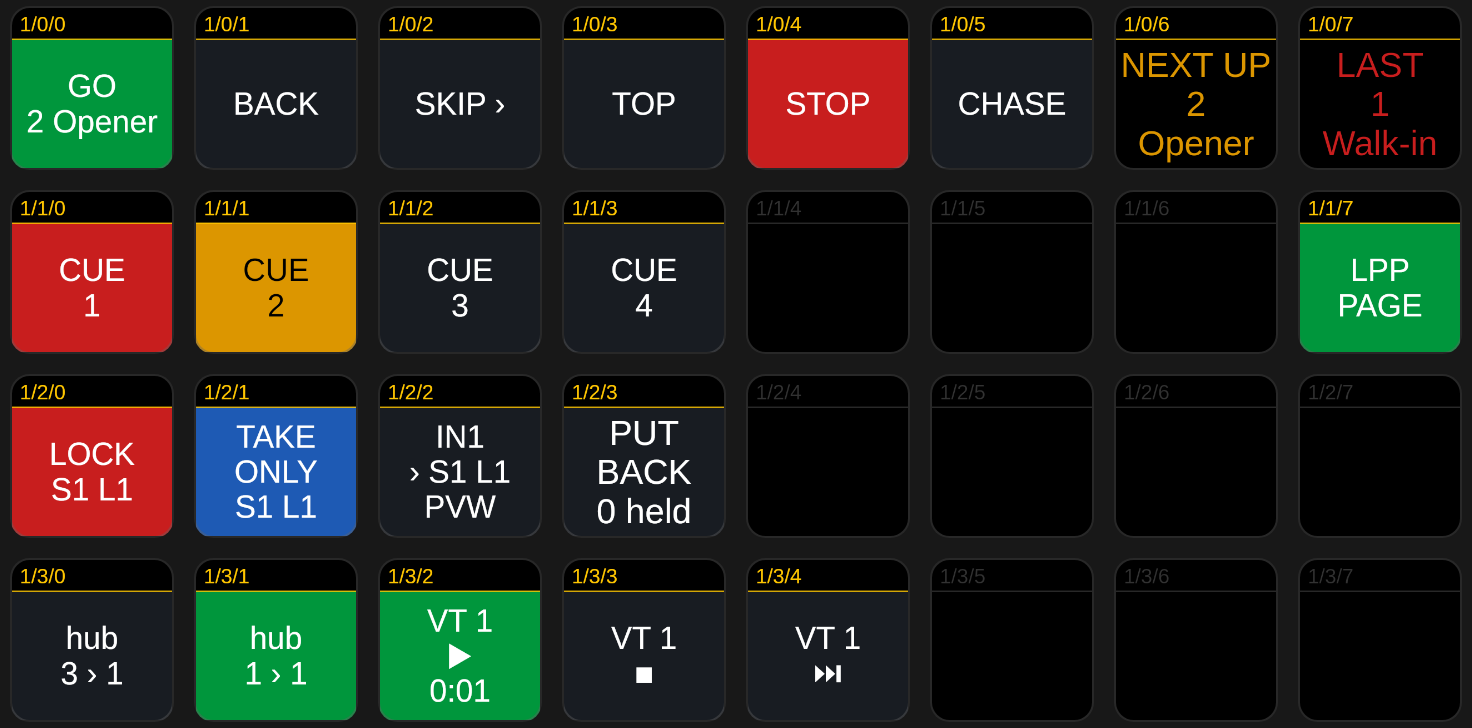
| Key | Means |
|---|---|
| GO, green, with a cue on it | That cue is the standby. GO fires it and moves on. |
| GO, amber | A pre-wait or follow is counting down. GO now fires it at once. |
| GO, grey | No page is open, so GO would press nothing. |
| A cue key, amber | That cue is the standby. |
| A cue key, red | That cue was fired last. |
| A lock key, red | That layer, or every layer of that group, is locked. |
| A route key, green | That crosspoint is routed. |
| A deck’s play key, green | That HyperDeck is playing. Its record key goes red while it records. |
| CHASE, green | Timecode chase is armed. The key shows the timecode arriving. |
| PUT BACK | Restore all: the number is how many things the cues’ triggers are holding. |
A key only lights on what LivePremier Plus has actually said. Until it has, every feedback is off and every variable is empty: a dark key is honest, a lit one on a guess isn’t.
Naming cues and layers
- A cue is the number the Timeline shows.
3matches3.0and03but not3.5;12ais fine. A cue with no number answers to its place in the list. - A layer is
S1/2(screen 1, layer 2),S1 L2also works,A1/1is an aux layer andS1/nativethe native background. A layer group is its name, in any case. - A source is an input number (
3),IN3,IMG2for a still, orNONE. - On / off is
on,offortoggle.
Companion variables work in these text fields too, so a cue can come from a variable.
Actions
Through the open page: Timeline GO, Back, Skip forward, Back to the top, Stop, Make a cue the standby and Fire a cue now (the standby doesn’t move); Timecode chase; Console Run a line; Layer Lock Lock / unlock and Take only this; Layer Groups Send a source, to preview or program; Variables Set.
Straight to LivePremier Plus: Matrix Route a crosspoint, and Feed a switcher input or Send a switcher output through the patch, so you name the switcher’s side and LivePremier Plus works out which router port is cabled to it; HyperDeck transport, for one deck or all of them; Triggers Send a trigger’s lines and Restore all; Run an address (any plugin address, with its arguments); and Plugin: Switch on or off.
The full list, with every option, is in companion/HELP.md, which is
also what Companion shows under the connection’s help button.
Presets
GO with the standby cue on the key, Back, Skip, Top, Stop and Chase, plus Next up, Last and Page open display keys; fire and standby keys for cues 1–12; lock and Take only keys for layer 1 of screens 1–4; inputs 1–8 sent to S1 layer 1 on preview; a row for the first router, when the show has one; transport for up to four HyperDecks; and PUT BACK.
They’re built from your show, so a router or a deck added later brings its keys with it.
Troubleshooting
| Symptom | Cause |
|---|---|
| Connection red, “Not connected” | Wrong address or port, LivePremier Plus isn’t running, or Companion is on another computer and LivePremier Plus wasn’t started with --host 0.0.0.0. |
| Amber: “Control API is off” | Switch it on under Preconfig ▸ LivePremier Plus → Plugins. |
| Amber: “No LivePremier Plus page open” | Open Web RCS through LivePremier Plus, not straight at the switcher. |
| A key did nothing | Look in the connection’s log: LivePremier Plus says why in its own words, “there is no cue 9”, “PGM is locked on S1”. |
| A send was refused | The padlock it would write past is shut on that screen. Preview lock shuts the preview padlock during a take, so a preview send waits for the take to land. |
| A variable was kept but shows an error | It doesn’t evaluate. References need their @: @gap * 2, not gap * 2. |
| LivePremier Plus’s panel says Companion has no “livepremier-plus” module | Import the package (step 1). It isn’t in the module store. |
See also
- README: downloading, and building the module yourself
companion/HELP.md: every action, feedback and variable- LivePremier Plus’s user guide and its Control API contract