

Copperlist is an Amiga cracktro, as an FFGL source for Resolume Arena and Avenue: copper bars, a sine scroller, a spinning cube, a chain of bobs, a three-layer starfield and colour cycling. It is not drawn to look like one. It emulates the parts of the Amiga’s chipset that made a cracktro look the way it did (chip RAM, the copper, 32 twelve-bit colour registers, five bitplanes, eight sprites and the blitter), and the demo is written against that emulation the way a vertical-blank routine was: clear the screen with the blitter, blit the scroller, the bobs and the cube, write a copper list, let the beam run. Every pixel on screen is a bit the blitter set or a colour the copper wrote at a beam position.
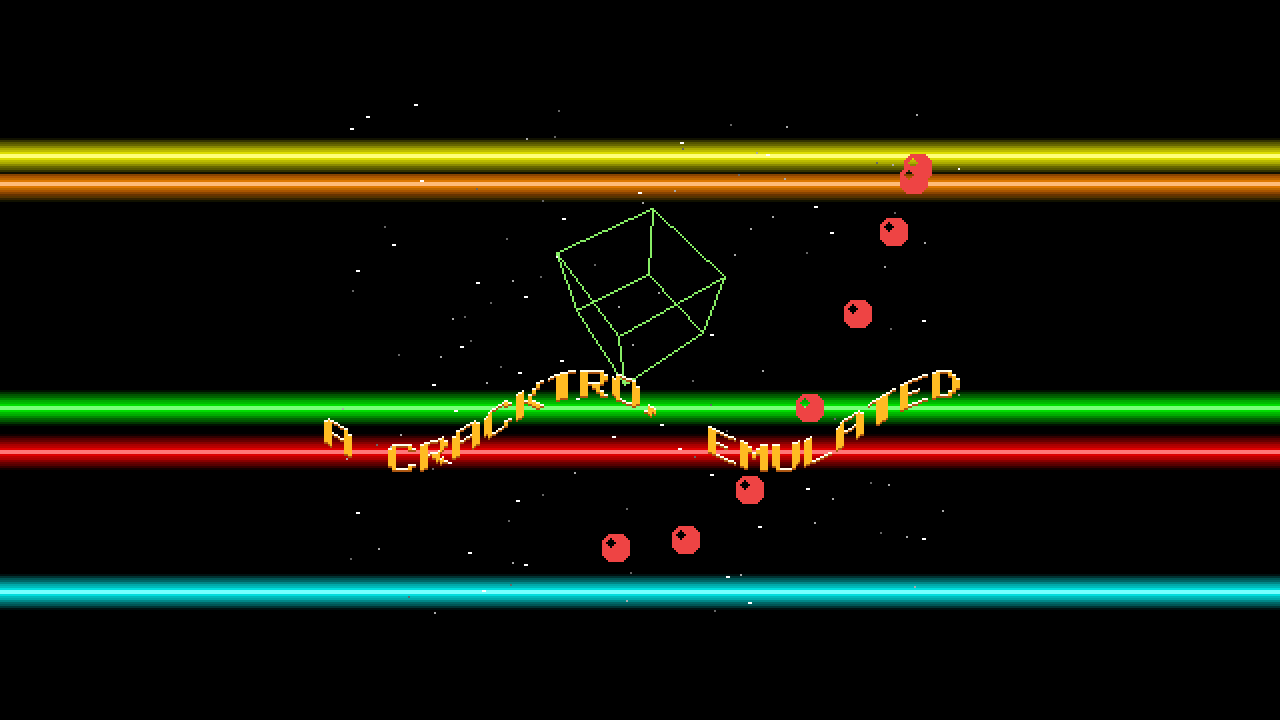
The defaults, 212 host frames in, at 1280×720 with Integer scaling (×2, letterboxed, the copper
bars running on into the border). Rendered by the plugin’s own offline harness (cptest), not
captured from Resolume.
Before you rely on this: released at v0.1.0, and honestly early. The chipset is measured rather than asserted, by a harness that drives the real plugin class and reads the emulated chip’s own memory and picture: on 8,544 bar lines every copper colour change lands on the manual’s four-pixel grid and none is closer than one MOVE (8 pixels); on 5,982 lines where bars cross, each ends on the last colour its copper list wrote and no pixel is a colour no MOVE wrote; 576 blitter lines equal an independent Bresenham pixel for pixel; the field number is exactly
floor(t × 50)(60 on NTSC) from Resolume’s ~499 million ms clock; every channel of 17.6 million output pixels is a multiple of 17; and a field reached by running is byte-identical to the same field reached by a jump. All 24 controls that can be swept change the picture. It has not been loaded into Resolume on macOS yet. The one host it has run in there is the fleet’s own test host,oxbow, which instantiates it and reads SW Copperlist / CP01 / source. On Windows, a build of v0.1.0 loads, registers and renders in Resolume Arena 7.27.1, with every control matching what the plugin declares — on software rendering, so that says nothing about a GPU. Because the picture never stands still, that test could not tell most controls’ effect from the motion itself; the harness shows every control changing the picture. Try it on a spare layer before you put it in a show.This codebase was created with AI assistance, directed and reviewed by a human author.
Installing
Every download carries one source, SW Copperlist. Drop it into Resolume’s FFGL folder and restart Resolume. Sources go in the same folder as effects:
macOS    ~/Documents/Resolume Arena/Extra Effects/
Windows  %USERPROFILE%\Documents\Resolume Arena\Extra Effects\
Avenue uses the same layout under its own folder name. SW Copperlist then appears among the Sources, not the effects.
The macOS download is a universal build (Apple silicon and Intel), as a .dmg or a .zip. It is
Developer ID-signed and notarised, so the bundle simply loads. The Windows download is an x64
installer or a .zip. It is not code-signed, so the installer trips SmartScreen once: More
info → Run anyway.
Start here
Put SW Copperlist on a layer and leave every control alone. The defaults are the whole cracktro: five Rainbow copper bars, the scroller carrying its own message, a wireframe cube, eight bobs on a Lissajous path and 40 stars a layer in three layers, on a PAL screen of 320×256 at 50 fields a second, scaled by a whole number and letterboxed. At 1080p that is ×4, a 1280×1024 picture in the middle of the frame; at 720p it is ×2.
Then:
- Text. Type your own message. It scrolls right to left, and wraps round when it runs out.
- Bar Count and Bar Height. More and taller bars overlap, and where they cross, one simply stops at the other’s edge. That hard edge is the point of the whole plugin: see Copper bars are register writes.
- Filled. The wireframe cube becomes a solid one with three shades.
- Bitplanes. Take them away and whole parts of the demo vanish, because the chip is no longer fetching the memory they are drawn in.
Every part can be switched off by the control that already says how many: an empty Text, Bar Count 0, Star Count 0, Bob Count 0, Colour Cycle 0. The cube, which has no count, has Cube On.
Copper bars are register writes
The Amiga’s copper is a tiny co-processor that waits for the video beam to reach a screen position (a WAIT) and then writes a value into a hardware register (a MOVE), usually a colour. A copper bar is nothing but colour-register writes at the start of scanlines, one colour per line, darkest at a bar’s edges and brightest in its middle. So, with nothing added:
- A bar is always horizontal, one line tall per colour step, because a write lasts until the next one, and the next one is on the next line.
- Two bars that cross cannot blend. A register holds one value, and the later write in the copper list is what the beam shows. The bars are written in order, so the higher-numbered bar is always the one in front where two cover the same line.
- A colour change in the middle of a line lands on the copper’s own grid. A WAIT resolves four low-resolution pixels, and each MOVE costs eight. You see this with Bar Wave above 0.
- 4,096 colours, and not one more. A colour register has four bits a gun, so every channel on screen is a multiple of 17.
The rest of the demo follows the same rule. The starfield is three sprites, one per layer, re-positioned by the copper on every line that has a star. The scroller and the bobs are blits into bitplanes at whole-pixel positions. The cube is the blitter’s line mode. Colour cycling is three colour registers rotated.
Fields, not frames
The emulation runs in fields: 50 a second on PAL, 60 on NTSC, counted from the host’s clock
as floor(time × rate). A composition frame shows whichever field its time lands in. It never
blends two fields and never interpolates one.
- At 50 fps on PAL, or 60 fps on NTSC, every frame is a new field and the motion is as smooth as the machine’s was.
- At 60 fps on PAL, one frame in six shows the same field as the frame before.
- At 30 fps on PAL, frames step one, two, two fields in turn, so the scroller moves by one or two of its whole-pixel steps a frame. The project video runs at 30 fps and shows exactly that.
If you want the smoothest scroll, match Standard to the composition’s rate: PAL at 25 or 50 fps, NTSC at 30 or 60.
At steady settings everything is a function of the field number, so the same time always shows the same field. The speed controls (Scroll Speed, Bar Speed, Spin X, Spin Y, Star Speed, Colour Cycle) are carried from the moment they change, so dragging one does not throw the text or the bars somewhere else. Changing Standard carries everything across to the new rate, so nothing jumps then either. If the clock jumps by more than four fields, a seek or a stall, the plugin draws the field it lands on rather than running every field in between.
For the first few frames after it loads, the plugin runs on its own steady clock while it measures whether the host counts time in seconds or milliseconds. Then it switches to the host’s. Resolume is expected to send milliseconds, which is the fleet’s measurement in other plugins, not this one’s.
The Text group
Text — the scroller’s message. The font has upper-case letters, digits, space and
. , ! ? ' - : ( ) / + * = # " &. Lower case is shown as upper case, and any other character as
?. Empty turns the scroller off. The default message says what the plugin is. It wraps
round: when the last character has scrolled on, the first follows it.
Scroll Speed — 0 to 8 whole pixels a field, 2 by default. At 0 the text stands still (the wave still moves). The text only ever moves by whole pixels, because each field it is blitted at an integer offset.
Wave Height — the peak of the scroller’s sine wave, 0 to 48 lines, linear; 0.4 (19 lines) by default. 0 is a flat scroller. Each column is its own blit, so the wave moves the text by whole lines, column by column, and a steep wave shears the letters into slivers, as a real sine scroller did. The wave travels along the text on its own, whatever Scroll Speed is. On NTSC the wave is limited to what fits the shorter screen.
Wave Length — columns per cycle of the wave, 40 to 640 on a logarithmic slider; 0.55 (184 columns) by default. The screen is 320 columns wide, so at the default a little under two cycles are on screen. Short wave lengths with a tall wave make the text hard to read.
Colour Cycle — how fast the font’s three colours (body, highlight and shadow) rotate through each other: off at 0, up to a step every other field at 1. 0.25 by default, a step every eight fields. It rotates three colour registers, which is the cheapest effect the machine has.
The Bars group
Bar Count — 0 to 8 copper bars; 5 by default. 0 turns them off. They sweep up and down the screen on one sine wave, evenly spaced around it.
Bar Height — 4 to 48 lines; 18 by default. One colour a line, brightest in the middle.
Bar Speed — how fast the bars sweep, from still at 0 to about 1.2 sweeps a second on PAL at 1. 0.35 by default, a sweep about every 2.4 seconds.
Bar Wave — 0 by default, the classic bar: every colour write in horizontal blank, so each bar runs the full width of the screen and on into the border. Above 0, each bar’s colour starts at a WAIT partway along the line instead, swinging along a wave down the bar, up to 64 pixels at
- Left of that WAIT the line is the background, so each bar’s left end steps, and every step is a multiple of four pixels, the copper’s grid. Where a bar starts left of the one before it, the copper needs no WAIT at all and the two colour changes sit one MOVE, eight pixels, apart: the closest the copper allows. With Bar Wave on, the bars no longer run into the left border.
Bar Palette — Rainbow (the default: red, orange, yellow, green, cyan, sky, blue, magenta), Fire (reds, oranges and yellows), Ice (blues and cyans) or Mono (whites and greys). Eight base colours a palette, one per bar.
The Stars group
Star Count — 0 to 64 stars a layer; 40 by default. 0 turns the starfield off. There is at most one star a line in each layer, because a layer is one sprite, re-armed by the copper at a new position on every line that has a star.
Star Speed — 1 to 4 whole pixels a field for the slowest layer; 1 by default. The three layers move at one, two and three times that, right to left.
Layers — 1 to 3; 3 by default. The front layer is the fastest and brightest (white), the next is grey and the back layer is dark grey. Fewer layers leave out the back ones, so with Layers 1 the one layer left is the front one, moving at three times Star Speed.
The stars are sprites, so they sit behind everything the blitter drew: the text, the bobs and the cube all pass in front of them.
The Cube group
Cube On — on by default. The cube is centred across the screen, 96 lines from the top.
Cube Size — half an edge from 10 to 36 pixels; 0.6 (26 pixels) by default.
Spin X and Spin Y — how fast it turns about each axis. 0.5 is still; either side turns it one way or the other, up to about three quarters of a turn a second on PAL at 0 or 1. The defaults, 0.62 and 0.70, turn it about a fifth and a third of a turn a second.
Filled — off by default: a green wireframe, twelve edges drawn by the blitter’s line mode, Bresenham with the manual’s octant table. On, each face that faces you is outlined one dot a row with exclusive-or and area-filled by the blitter, in three shades: lit, mid and shadow (opposite faces share a shade). The filled cube needs two bitplanes, see Bitplanes and the palette.
The Bobs group
Bob Count — 0 to 16 bobs (blitter objects: red balls 16 pixels across); 8 by default. 0 turns them off. Each is cut into its own bitplane through a mask, the way demo coders did it.
Bob Path — the path the chain follows: Lissajous (the default), Circle, Wave (left to right, rising and falling, wrapping at the edge) or Figure Eight.
The Machine group
Standard — PAL (the default): 320×256 at 50 fields a second. NTSC: 320×200 at 60. NTSC’s shorter screen scales by a larger whole number at many sizes (×5 at 1080p, against PAL’s ×4), so the picture gets bigger as well as shorter.
Bitplanes — 1 to 5; 5 by default. How many planes the display fetches. See Bitplanes and the palette: each plane holds one part of the demo, so fewer planes means fewer colours and fewer parts.
Scaling — how the 320-pixel-wide screen is put on the output:
| Scaling | Does |
|---|---|
| Integer (default) | The largest whole multiple that fits, centred and letterboxed. Every chip pixel is an exact block of output pixels. If not even ×1 fits (below 256 lines tall on PAL), it stays at ×1 and the top and bottom are cropped, the way a monitor’s overscan cropped them. |
| Fit | The largest scale that fits, nearest-neighbour, so the pixels stay hard but are not all the same size. |
| Fit Smooth | The same size as Fit, bilinear, so the pixels are softened. |
Pixel Aspect — Non-square (the default) or Square. An Amiga’s low-resolution pixel was not square: 1.0397 wide for each unit tall on PAL, 0.8571 on NTSC, derived from the machine’s pixel clock. Non-square draws it that way under Fit and Fit Smooth. Integer ignores it, because a whole multiple cannot be 1.04 wide.
Background — what is drawn outside the 320-pixel screen:
| Background | Outside the screen |
|---|---|
| Border (default) | The colour the beam left at the screen’s edges, carried out to the output’s edges, as a monitor’s border showed it. The copper bars run on across the whole frame. |
| Black | Black. The bars stop at the screen’s edges. |
| Transparent | Transparent, so the layer below shows round the screen. The screen itself stays opaque: its black is colour 0, not a key. |
Bitplanes and the palette
A pixel’s colour is the register numbered by its bits across all the bitplanes. The demo allocates the planes like this:
| Plane | Holds |
|---|---|
| 1 and 2 | The scroller: three colours, body, highlight and shadow |
| 3 | The bobs |
| 4 | The cube: the wireframe, or the filled faces with the first bit of their shade |
| 5 | The filled faces with the second bit of their shade |
So Bitplanes takes parts away from the top down. At 4 the filled cube loses its mid faces and its shadow faces take the lit shade. At 3 the cube is gone. At 2 the bobs go too. At 1 only the scroller is left, in one colour. The copper bars and the stars are not bitplanes, so they always stay.
Where two things overlap, the index is the OR of both, and the demo decides who wins by palette, as demo coders did: every index with a font bit set is given a font colour, so the text is always in front of the bobs, and the bobs are in front of the cube.
One overlap shows the machine through. The star sprites’ colour registers are 17 to 19, 21 to 23 and 25 to 27, and five bitplanes share them. Text crossing the filled cube’s mid and shadow faces is drawn in the star colours, white and dark grey, rather than the font’s. The machine shares those registers; so does this. The project video’s thumbnail was chosen on a frame where the text is clear of the cube for that reason.
How it works
Once per field, on the CPU, the demo does what a real one did in its vertical-blank interrupt: the blitter clears all five planes, blits the scroller a column at a time, cuts in the bobs, draws or fills the cube, and the demo writes a copper list into chip RAM. The copper list begins by rewriting every register the display uses, so a field depends on nothing left over from the one before. Then the emulated beam runs down the field, the copper executing its WAITs and MOVEs as it goes, and the display composes a 320×256 (or 320×200) picture from the bitplanes, the colour registers and the sprites, with a one-pixel ring of whatever colour the beam left at the edges.
The GPU does only the last step: it puts that picture on the output at the scale Scaling asks for, and draws the border. A wrong colour or a wrong pixel is never a shader’s doing.
Randomness is an integer hash and trigonometry a fixed-point table, so nothing a position depends on is a float, and the picture is the same on every machine.
What the emulation leaves out, because none of it shows: the 68000, audio, interrupts, and DMA slot contention. On a real machine, five bitplanes take memory slots during the display that would delay copper instructions inside it; here they are never delayed. It would only move where a Bar Wave bar starts, by a few pixels.
Performance
Measured by the offline harness on an M4 Max, fastest of five passes, with other builds loading the machine. The emulation costs about 0.86 ms a field on the CPU, whatever the output size; putting it on the output adds about 0.03 to 0.13 ms. With a new field every frame:
| ms/frame | % of a 60 fps frame | |
|---|---|---|
| 1280×720 | 0.89 | 5.3% |
| 1920×1080 | 0.89 | 5.3% |
| 3840×2160 | 0.99 | 5.9% |
A frame that lands on the same field as the one before costs only the draw. Nothing was timed inside Resolume, and nothing was timed on Windows.
If it looks wrong
The scroller judders. The composition’s frame rate is not a multiple of the field rate, so frames step different numbers of fields (see Fields, not frames). Match Standard to the composition: PAL for 25 and 50 fps, NTSC for 30 and 60.
The text is torn into slivers. Wave Height is high against a short Wave Length. That is a sine scroller at its limit, not a bug. Bring Wave Height down or Wave Length up.
Letters on the filled cube turn white or grey. Text crossing the cube’s mid and shadow faces uses the star sprites’ colour registers, which the machine shares with those bitplanes. See Bitplanes and the palette.
The cube, the bobs or the filled cube’s shading are missing. Bitplanes is below 5 (or Cube On is off, or Bob Count is 0).
The bars’ left ends are ragged and stop short of the left border. Bar Wave is above 0. That is the copper’s grid showing; set it to 0 for full-width bars.
Pixel Aspect does nothing. Scaling is Integer, which ignores it by design.
Background does nothing. Under Integer at a raster no wider than 320 pixels a whole multiple leaves no letterbox at the sides, so there is no outside to draw. At any real composition size there is.
Nothing is drawn at all. A shader that will not compile looks like that. The real message is in the log:
macOS    ~/Library/Logs/copperlist/copperlist.YYYY-MM-DD.log
Windows  %LOCALAPPDATA%\copperlist\logs\copperlist.YYYY-MM-DD.log
It records the GL vendor, renderer and version at load, whether the shader compiled, and what unit the host’s clock turned out to arrive in.
Known limits
- Not loaded into Resolume on macOS yet. On Windows it loads and renders in Arena, on software rendering, with every control as declared. How the 25 controls in six groups read in the inspector, how Resolume’s text field edits the message, and what Resolume’s clock does are inherited from the rest of the fleet, not measured here.
- Measured on one Mac’s GPU only. Integer scaling is argued to be exact on any GPU, not proved; the checks also pass on a software renderer.
- No DMA slot contention, as above, and the copper’s write takes effect at once where a real machine’s shows a few pixels later. Both would only shift where a mid-line colour change lands.
- The Text parameter is the scroller’s only switch, and an empty message is the only way to turn the scroller off.
- The blitter is instantaneous, and the demo does not race the beam. The picture is the same.
- No presets and no OpenFX version.
About
The last group, About, carries the plugin’s name, version, licence and maker, and buttons that open this guide, the project page, the source on GitHub and the support page in your browser.
Reporting something
github.com/stoatworks-labs/copperlist/issues. A screenshot, the Standard and Scaling settings, and the composition’s resolution and frame rate are usually enough.