

Databend is the frame as a sample stream through audio effects, for Resolume Arena and Avenue, as an FFGL effect. It is not a glitch filter with a list of looks. It does what an audio editor does when you open a picture in it: it reads the frame as one long stream of samples in the order the file lays them out, row by row, one plane after another or R, G, B per pixel, with a row stride that may carry padding, and runs real delay-line effects on that stream — echo, flanger, phaser, pitch shift — in the order the editor would, then exports the stream back to pixels through a sample format that wraps or clips past full scale. The echo that marches down the picture on a slant, the comb across the scanlines, the smear that keeps its energy, the ghost that comes back in the wrong colour: every one is what the stream does, not what somebody drew.
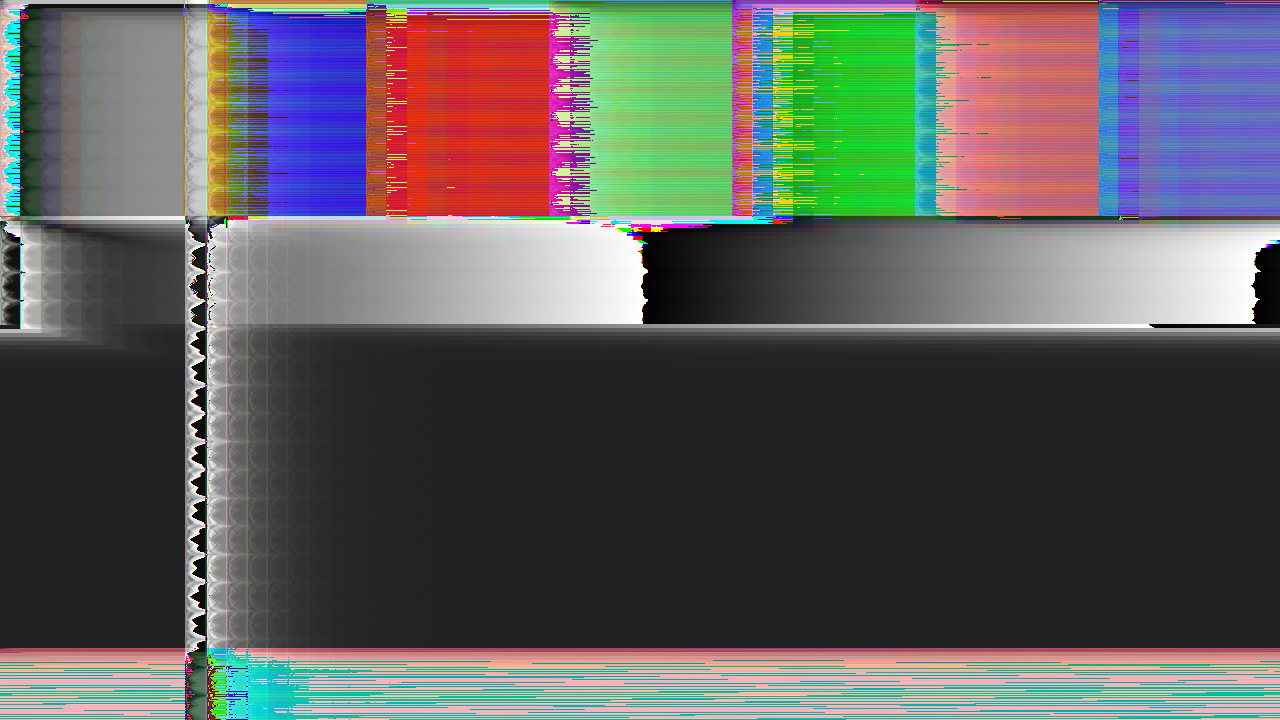
The repo’s test card through the plugin, rendered by the offline harness rather than captured from Resolume: Interleaved, 8-bit, Wrap, an echo four lines and 61 samples down at 0.6 feedback — off the defaults, because the defaults keep colour. Every colour in it is a red, green or blue sample that came back in the wrong slot.
Before you rely on this: released at v0.1.0, and honestly early. The effects are measured rather than asserted, by a harness that drives the real plugin class and reads each claim back out of the picture it made, at two rasters: an echo of one line and k samples lands one line down and k across, and moves with the row stride when the file has padding, with the whole picture matching the closed form to zero error; the nth echo sits at n·(k, 1) with amplitude m·gⁿ; in an interleaved file a delay of 1 mod 3 puts red’s echo in green, green’s in blue and blue’s in the next pixel’s red; the flanger’s ghost on every line sits where the LFO says at that line’s stream time; the phaser keeps a noise picture’s energy to 4 × 10⁻⁴ of it and matches a serial double run of the cascade within a bound it proves; an 8-bit file wraps past full scale, a 16-bit one wraps, a float one clips, exactly; and seven deliberate faults are shown to make those checks fail. All 25 controls are shown to change the picture. It has never been loaded into Resolume on macOS — the one host it has run in is the fleet’s own test host,
oxbow, for 120 frames. On Windows, in Resolume Arena 7.27.1 (win-lab, Mesa llvmpipe, no GPU, 2026-09-24): this release’s DLL loads from Extra Effects, registers asSW Databend/DB01/ effect, all 31 host controls match the declaration, it renders and Arena’s log stays clean: 9 of the fleet gate’s 9 checks, with 21 of the 26 controls moving the picture (ten under a precondition) and five inconclusive on the gate’s single frames (Rate, Depth, Flanger On, Phaser Rate and Line Padding: the LFOs’ phase advances every frame, so the gate’s noise floor covers them; the harness measures each against its closed form). Software rendering says nothing about a GPU or about speed. Try it on a spare layer before you put it in a show.This codebase was created with AI assistance, directed and reviewed by a human author.
Installing
Every download carries one effect, SW Databend. Drop it into Resolume’s effects folder and restart Resolume:
macOS    ~/Documents/Resolume Arena/Extra Effects/
Windows  %USERPROFILE%\Documents\Resolume Arena\Extra Effects\
Avenue uses the same layout under its own folder name. The effect then appears in the effects browser as SW Databend.
The macOS download is a universal build (Apple silicon and Intel), as a .dmg or a .zip.
It is Developer ID-signed and notarised, so the bundle simply loads. The Windows download is
an x64 installer or a .zip. It is not code-signed, so the installer trips SmartScreen once:
More info → Run anyway.
The editor sees a stream, not a picture
Each frame is read into a file the way an audio editor would read it, and the effects run on that file, in a fixed order, each with a bypass:
| stage | what it does | what comes out |
|---|---|---|
| stream | the frame’s RGB as one stream of samples in the file’s Layout, Line Padding samples of silence on the end of every line, Direction deciding what a line is |
a stream of L samples a line: Lp + p (Planar) or 3 Lp + p (Interleaved) |
| echo | x + m Σ gᵏ x[n − kD], D = Delay Lines × L + Delay Samples |
ghosts k lines down and m samples across, marching on a slant |
| flanger | a crossfade with the stream delayed by Base Delay + Depth × triangle(Rate), the LFO running in stream time |
a comb whose spacing changes line by line |
| phaser | a crossfade with a cascade of Stages all-pass sections whose pole an LFO sweeps from 0.9 down by Phaser Depth |
smooth content late, edges on time: a rightward smear with ringing, at unity gain |
| pitch | a crossfade with two taps that read the stream through a sawtooth delay in grains of Grain samples, at Ratio |
the line stretched or squeezed inside each grain, repeating or skipping at the seam |
| export | quantise to the Format, Overflow past full scale, back to the pixel |
the picture, with whatever wrapped |
The stream’s arithmetic is what makes the picture. An echo of D samples on a stream with L
samples a line comes back ⌊D / L⌋ lines down and D mod L samples across, so Delay Lines and
Delay Samples are the delay in the file’s own units, and Line Padding changes L without
changing the picture’s width — every echo lands further across. In an Interleaved stream each
pixel is three samples, so a delay that is not a multiple of three lands red’s samples in
green’s slot; and because hue lives at the stream’s period-3 frequency, every effect on an
interleaved stream rotates hue. In a Planar stream the three planes follow one another, so a
delay past a plane’s start reads the previous plane: the first lines of green carry echoes of
the last lines of red, and each plane sits at a different stream time under the LFOs, which is
why the phaser and flanger part the colours.
The format is the last word. An 8-bit unsigned file’s silence is black and its samples run 0 to 1; a 16-bit signed file’s and a float file’s silence is mid-grey and their samples run −1 to 1, so black is full negative. Past full scale an integer file wraps to the other end of its range or clips; a float file clips.
Start here
Put SW Databend on a layer or a clip. Out of the box you get a Planar 8-bit file that clips, an echo of 3 lines + 24 samples at 7/16 feedback and half mix, a flanger at 4 + 24 samples, and a four-stage phaser at a third: colour fringes at every edge, a soft comb, a rightward smear. Resolume’s bundled demo clips all survive it.
Then:
- Feedback → 1. Each ghost is 7/8 of the last and the train marches down and across the picture. Delay Samples → 300 and the slant steepens: the same lines, more samples.
- Layout → Interleaved with Delay Samples 61. Sixty-one is 1 mod 3, so red’s echo lands in green, green’s in blue and blue’s in the next pixel’s red: every ghost the wrong colour. 60 and they come back in their own. Whatever the delay, the picture’s hue turns.
- Echo On off, Flanger Mix → 0.5, Depth → 1. The comb is deepest at half mix. The LFO runs in stream time, and stream time is the scan, so the ghost’s offset changes line by line. Rate up and the comb tightens.
- Flanger On off, Phaser Mix → 1, Stages → 12, Phaser Depth → 1. Pure all-pass: the picture smears rightwards with ringing and keeps its energy, and the three planes part.
- Feedback 1, Echo Mix 1, Overflow → Wrap. The sum overshoots and every overshoot folds back to the other end of the range: the harsh look. Format → 16-bit signed and the silence is mid-grey, black is full negative, and the wraps are pastel.
- Pitch On with Ratio 0.25 (half): the line is stretched inside every grain. 0.75 (double): squeezed, repeating at the seams.
- Direction → Columns. The columns are the lines: the same echo, columns across and samples down.
Every slider is declared to the host as 0 to 1, except the four counts, which are integers. The value each position stands for is given with each control below. Every group’s mix is its own control, and the Output Mix crossfades the whole result with the untouched clip.
The Stream group
Layout — Planar or Interleaved; Planar by default. Planar is all of red, then all of green, then all of blue, each plane line by line; a delay past a plane’s start reads the previous plane. Interleaved is red, green, blue per pixel, three samples a pixel, so a line is 3 Lp + p samples; a delay that is not a multiple of three lands one channel’s samples in another’s slot, and every effect rotates hue. Interleaved is the signature look and it is one click away; it is not the default because it turns every clip pink.
Line Padding — 0 to 255 samples, an integer; 0 by default. Silence on the end of
every line: the row stride the effects never see. It changes L, so a delay of Delay Lines
lines lands Delay Lines × padding further across, and the slant of an echo train leans with
it. At 0 the stride is the picture’s width and an echo of exactly k lines is exactly k lines
down.
Direction — Rows or Columns; Rows by default. What a line is. Columns reads the frame column by column, so everything the effects do across the line they do down the picture.
Format — 8-bit unsigned, 16-bit signed or Float; 8-bit unsigned by default. The zero point and the range: an unsigned file’s silence is black and its samples run 0 to 1; a signed file’s silence is mid-grey and its samples run −1 to 1, so black is full negative. In a signed format an echo sum of a black background overshoots the bottom: with Wrap it folds to bright pastels, with Clip (or in Float, which always clips) it stays black — a float file at high echo feedback on a black-background clip is driven to black. The effects run in the editor’s float domain; the format quantises and overflows once, on export.
Overflow — Wrap or Clip; Clip by default. What an integer format does past full scale. Wrap folds the overshoot to the other end of the range (the harsh databend look); Clip holds it at the end. A float file clips whatever this says. Wrap is not the default because every phaser overshoot wraps and most of the demo clips flooded with fringes.
The Echo group
Echo On — on by default. Off, the echo stage is skipped.
Delay Lines — 0 to 32 lines, an integer; 3 by default. Whole lines of delay: the echo lands this many lines down.
Delay Samples — 0 to 4095 samples, an integer; 24 by default. Samples on top of the lines: the echo lands this many across. It runs past a line’s length so a whole line’s worth can be expressed without Delay Lines; a delay past the end of a line is a line down and the remainder across, as the arithmetic says.
Feedback — 0 to 7/8, as 7/8 × v; 0.5 by default, 7/16. Each echo is this much of the last. It never reaches 1, so every echo train ends: the plugin sums exactly as many taps as one code of the format can see (14 at the default in a float file).
Echo Mix — 0 to 1; 0.5 by default. How much of the echo train is added to the stream. At 1 with Feedback at 1 the sum runs to nearly eight times the picture and the format decides what happens.
The Flanger group
Flanger On — on by default. Off, the stage is skipped.
Base Delay — 0 to 64 samples, as 64 × v; 0.0625 by default, 4 samples. The delay the LFO sweeps up from.
Depth — 0 to 64 samples, as 64 × v; 0.375 by default, 24 samples. How far the triangle LFO sweeps the delay above the base. The ghost on any line sits at base + depth × triangle at that line’s stream time.
Rate — 0.05 to 20 Hz in stream time, as 0.05 × 400ᵛ; 0.5 by default, 1 Hz. The LFO’s rate at the file’s nominal 44.1 kHz; a 1080p planar frame is 6.2 million samples, 141 seconds of stream, so at 1 Hz one period is 44,100 samples, about 23 lines. Its phase carries across frames on a frame counter, so the comb moves.
Flanger Mix — 0 to 1; 0.3 by default. A crossfade, not a sum: the comb is deepest at 0.5, and at 1 the picture is the delayed stream alone.
The Phaser group
Phaser On — on by default. Off, the stage is skipped.
Stages — 2 to 12 all-pass sections, an integer; 4 by default. More stages, more notches, a longer smear.
Phaser Rate — 0.05 to 20 Hz in stream time, as 0.05 × 400ᵛ; 0.35 by default, 0.4 Hz. The sweep’s LFO, on the same frame counter as the flanger’s.
Phaser Depth — 0 to 1; 0.5 by default. How far the pole sweeps down from 0.9: at 0 it sits at 0.9, at 1 it sweeps to 0. A pole near 0.9 delays smooth content most.
Phaser Mix — 0 to 1; 0.35 by default. A crossfade; at 1 the picture is pure all-pass and keeps its energy exactly.
There is no phaser feedback, on purpose. See Known limits.
The Pitch group
Pitch On — off by default. On, two taps read the stream through a sawtooth delay in grains and crossfade.
Ratio — half to double, as 2^(2v − 1); 0.25 by default, half. Below 0.5 the line is stretched inside each grain; above, squeezed, repeating at the seams. At 0.5 the ratio is 1.
Grain — 64 to 4096 samples, as 64 × 2^(6v) made even; 0.5 by default, 512. The grain length. A grain longer than a line straddles lines.
Pitch Mix — 0 to 1; 1 by default. A crossfade. On a black background the two taps average content with black, so the picture dims at high mix; that is the crossfade, not a fault.
Output
Mix — 0 to 1; 1 by default. The whole result crossfaded with the untouched clip. At 0 the plugin returns the clip; at 1 the export alone.
How it works
Once a frame, the stream pass writes the file into a float buffer, one texel a sample; each effect that is on reads one stream buffer and writes the other (a bypassed effect is skipped, not copied); the display pass exports the last buffer to the format and puts it on the layer. Every coordinate is an integer computed in integers, every coefficient is computed in double on the CPU, and the LFOs are triangles of an integer counter, exact in float — which is what lets the harness hold every effect to its closed form.
The phaser is a recurrence over two to twenty-five million samples, which a GPU cannot run serially. It runs as a windowed restart: for each chunk of 16 samples a state pass re-runs the cascade from silence K samples earlier and writes its states; the main pass continues from that state for at most 16 steps. K comes from a proved bound on how fast a normalised lattice all-pass forgets a wrong start (each stage’s state error shrinks by the pole every sample, and the cascade is lossless, so the state energy never exceeds the input’s): the first window after which the error stays under half a code of the format. At the defaults K = 207 at 1080p; over the whole control range never more than 682. That window is where the render time goes.
Each frame is its own file for the delay memories: nothing of one frame reaches the next. The two LFOs alone carry their phase across frames, on a frame counter, as if the clip were one file, so the comb and the sweep move.
The output alpha is the larger of the clip’s own alpha and the exported pixel’s brightest channel, so content the effects move over a transparent area is visible.
Performance
Measured by the harness on an M4 Max (macOS 26.4, 2026-09-24), best of three runs of 60 frames after a warm-up, on a GPU shared with other work:
| raster | at the defaults | with the pitch shifter on as well |
|---|---|---|
| 1280 × 720 | 2.9 ms | 2.9 ms |
| 1920 × 1080 | 5.8 ms | 5.0 ms |
| 3840 × 2160 | 18.7 ms | 21.9 ms |
The phaser’s restart window is the cost (207 samples re-run once per 16-sample chunk at the defaults, from a bound that is rigorous and about twice as long as the error needs), and it scales with the raster. 4K is not real time with the phaser on (about 20 ms a frame, past a 60 fps frame’s 16.7 ms); turn Phaser On off at 4K, or run the layer at 1080p. Everything else is a few taps a sample. macOS figures only; the Windows build has run on software rendering, which says nothing about speed.
If it looks wrong
Everything has gone pink. Layout is Interleaved. Every effect rotates the hue of an interleaved stream, because hue lives at its period-3 frequency. That is the mechanism; Planar keeps colour.
The picture is flooded with fringes. Overflow is Wrap and something overshoots — the phaser does, at every edge. Clip, or lower the mix of whatever overshoots.
A signed format has gone grey, pastel or black. In 16-bit signed and Float the silence is mid-grey and black is full negative, so a black background is not silence: an echo sum of it overshoots the bottom, wrapping to pastels (16-bit, Wrap) or clipping to black (Float, or Clip). Use 8-bit unsigned for a dark clip, or lower Feedback and Echo Mix.
The echo does not land where the arithmetic says. Check Line Padding: it changes the stride, so a delay of k lines lands k × padding further across. And a delay past a line’s end is a line down and the remainder across.
The comb is faint. Flanger Mix is a crossfade and the comb is deepest at 0.5; at 1 the picture is the delayed stream alone, with no comb at all.
The pitch shifter dims the picture. Its two taps crossfade; on a black background they average content with black. Lower Pitch Mix.
A faint tinted line at the top of the frame. Planar: a delay past a plane’s start reads the previous plane, so the first lines of green carry echoes of the last lines of red. It is what a planar file does.
The first frame after a change looks different from the rest. The LFOs carry their phase across frames; nothing else does. Every frame is rendered from the start.
The phaser at 4K drops frames. See Performance: turn it off at 4K.
Something sits at its default and does nothing. Its group is bypassed (Echo On, Flanger On, Phaser On, Pitch On) or its group’s mix is 0.
Known limits
- Each frame is its own file for the delay memories. Databending a video file as one stream would let an echo reach the previous frame; this plugin keeps no frame history.
- No phaser feedback. A phaser’s feedback returns the last stage to the first, and for a swept coefficient there is no bound of the kind the restart window rests on — the error iteration diverges for any useful amount — so the only exact form is a serial pass over millions of samples, which a GPU cannot do in a frame. The control is left out rather than shipped unproved.
- The all-pass sweep’s top pole is fixed at 0.9; Phaser Depth sets how far below it the sweep goes.
- The alpha channel is not part of the stream. The file is RGB; the output alpha is the larger of the clip’s and the exported pixel’s brightest channel.
- The LFOs are triangles, at a nominal 44.1 kHz, so their values are exact; a sine would be the usual choice.
- 4K is not real time with the phaser on (Performance).
- Footage has been seen through the harness’s
--pipeon Resolume’s bundled demo clips, at two rasters, plus the release video. Nothing has been through a show. - No OpenFX port, no presets and no audio input. There is a browser demo at https://databend-demo.stoatworks-labs.com/, which runs the same shaders in WebGL with the window bound and the tap count ported to JavaScript; its page says what it does not do.
About
Every download carries an About block in the effect’s parameter list, with the version, the licence and buttons for this guide, the project page, the source and the ways to support the work.
Reporting something
Open an issue at https://github.com/stoatworks-labs/databend/issues with the Resolume version,
the platform, the layout and format you had set, and — if you can — the clip and the settings
that show it. The harness’s dbtest --pipe can reproduce any frame from a clip and a cue
sheet, which is the fastest route to a fix.