

Fax is the picture sent as a Group 3 fax over a noisy telephone line, for Resolume Arena and Avenue, as an FFGL effect. It does not draw fax artefacts over a clip. It scans each frame to black and white the way a fax machine did, codes it with a real ITU-T T.4 coder, sends the bits over a line that flips some of them, and decodes them with a real receiver. The streaks, the repeated lines, the squashed standard-resolution page and the page that arrives line by line are what the code does when it goes wrong, not what somebody drew.
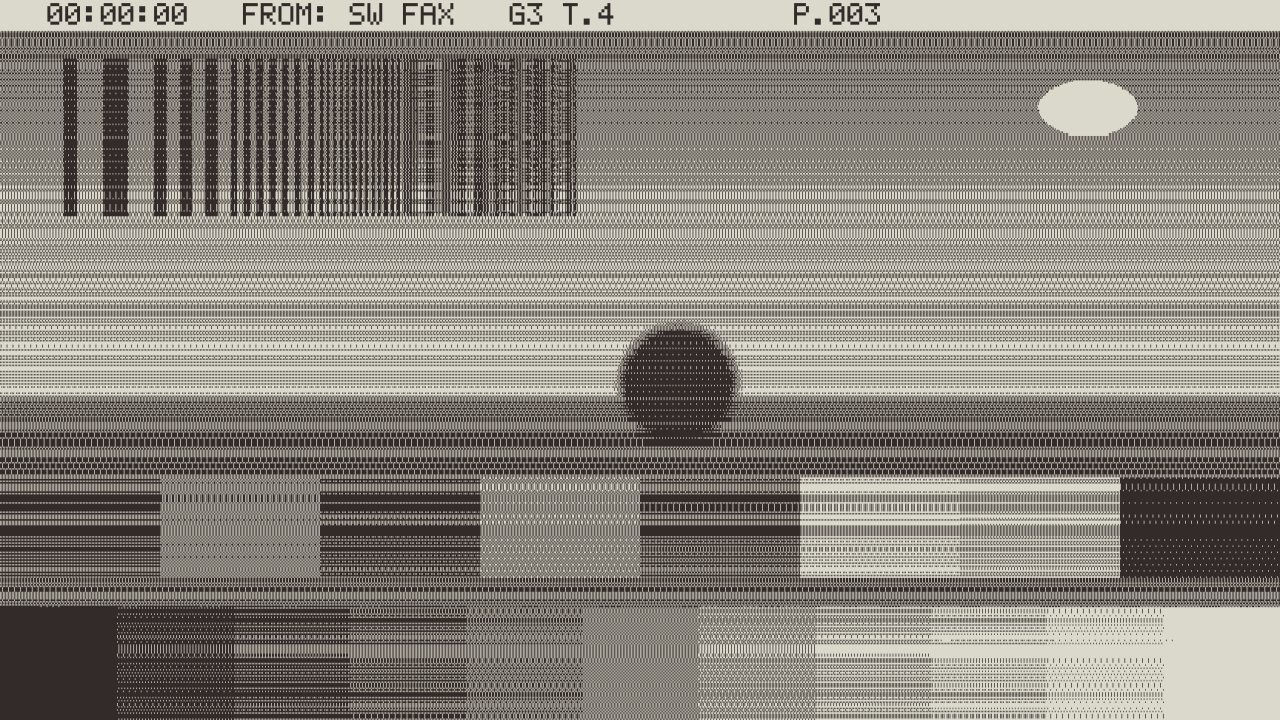
The repo’s test card through the plugin at its defaults, rendered by the offline harness rather than captured from Resolume.
Before you rely on this: released at v0.1.0, and honestly early. The fax is measured rather than asserted, by a harness that drives the real plugin class and reads each claim back, at two rasters and on Apple’s software renderer: all 204 code-table entries agree bit for bit with two independent transcriptions of T.4 (Go’s
x/image/ccittand pdfminer.six) and every run length round-trips at exactly the standard’s bits; Go’s CCITT decoder, which shares no code with the plugin, reads the plugin’s own streams back to its page with 0 of 100,656 bytes different; with a clean line the received page is the sent page, bit for bit, in MH and MR; each of 47 single bit errors in an MH line damaged that line from the error on and nothing else; an MR error never ran past the next one-dimensional line; every Repeat Line concealment is the line above; and in Page mode all 466 lines of a page arrive within 2 ms of their bit count over the baud. Nine deliberate faults are shown to make those checks fail, and all 13 controls are shown to change the picture. It has never been loaded into Resolume on macOS: the one host it has run in there is the fleet’s own test host,oxbow. On Windows, a build of v0.1.0 loads, registers and renders in Resolume Arena 7.27.1, with every control matching what the plugin declares (the fleet’s Arena gate, 9 of 9 checks) — on software rendering (win-lab, Mesa llvmpipe, no GPU), so that says nothing about a GPU or about speed. Eight controls were shown moving the picture there; Resolution, Coding, Bursts, Baud, Concealment and Header were inconclusive, because in Live mode every frame is a new page with new bit errors, so the picture never stands still long enough to measure them against. The harness’s sweep shows all 13 changing the picture. Try it on a spare layer before you put it in a show.This codebase was created with AI assistance, directed and reviewed by a human author.
Installing
Every download carries one effect, SW Fax. Drop it into Resolume’s effects folder and restart Resolume:
macOS    ~/Documents/Resolume Arena/Extra Effects/
Windows  %USERPROFILE%\Documents\Resolume Arena\Extra Effects\
Avenue uses the same layout under its own folder name. The effect then appears in the effects browser as SW Fax.
The macOS download is a universal build (Apple silicon and Intel), as a .dmg or a .zip.
It is Developer ID-signed and notarised, so the bundle simply loads. The Windows download is an
x64 installer or a .zip. It is not code-signed, so the installer trips SmartScreen once:
More info → Run anyway.
A fax does not send pixels
A Group 3 fax scans the page one line at a time, 1728 picture elements (pels) across 215 mm, and each pel is black or white. It does not send them. It sends run lengths: how many white pels, then how many black, then white, as variable-length codes from a table in the standard (the Modified Huffman code, MH), and it ends every line with an EOL, eleven zeros and a one, which no valid data ever contains.
In MR (Modified READ), most lines are sent as the differences from the line above: where each edge moved, by a pel or two, or a run coded afresh. That is far cheaper, but a line can only be decoded if the line above was, so every K lines one is sent plainly, as in MH, to let an error die out.
So the plugin puts each frame through the real thing, and the look falls out of it:
- A bit error desynchronises the rest of its line. The receiver reads the wrong code lengths from the error on, so the damage runs from the error to the right edge — and stops there, because the next line starts at the next EOL, which the receiver finds before it decodes anything.
- In MR the damage runs down, because each following line is decoded against a spoilt line above, until the next one-dimensional line: at most K lines, where T.4 sets K to 2 at standard resolution, 4 at fine and 8 at superfine. K doubles as the lines halve, so a wedge is always about the same height on screen, two or three lines of a 1080-line frame: at full frame it reads as a thicker streak rather than as a wedge.
- Concealment. A receiver that can tell a line is bad (a code that is not in the table, a line that does not come to 1728 pels, anything but fill before the EOL) prints the line above in its place — and in MR every line after it until the next one-dimensional line, because their reference is spoilt. That repeated line is the familiar fax glitch.
- Standard resolution is squashed. 8 pels a millimetre across but only 3.85 lines a millimetre down, so every line is twice as tall as a pel is wide. Fine is 7.7 lines, superfine 15.4.
- A page takes time to send, and white paper is cheap. In Page mode the page arrives line by line at the line rate, fast over blank paper and slow over detail, and never faster than the 10 ms a scan line must take at least.
Start here
Put SW Fax on a layer with a clip that has a subject on transparency — the bundled demo clips with the tank, the dancers, the astronaut, the rings, the metal sphere. Transparent areas scan as blank paper, so a subject on transparency prints as a picture on a sheet. Out of the box you get Live mode (a whole new page every frame), the 8 × 8 halftone, MR at 14400 bit/s, a little line noise with Repeat Line concealment, warm-grey thermal paper and the header line.
Then:
- Line Noise → 0.75, Concealment → Off, Coding → MH. The line now flips about one bit in a thousand. Each error streaks from where it landed to the right edge, and only that line. Turn Halftone off to see the streaks as clean lines on a bold picture.
- Concealment → Repeat Line. The streaks become copies of the line above: vertical stretches.
- Resolution → Fine, then Superfine. The lines halve, then halve again, and the halftone gets finer vertically. (Superfine halftone is not real-time: see Performance.)
- Mode → Page, Halftone off. Now the frame is captured and sent. It arrives from the top at 14400 bit/s over the last page, about five seconds for a bold picture on white, and then the next page begins. Baud → 2400 and the picture’s lines take six times as long; the blank paper barely slows, because at 14400 a blank line is already held to the 10 ms minimum.
- Fit → A4 Letterbox, and Paper → Plain, for a white A4 sheet on the desk.
Full-frame dark clips print nearly black. A plain threshold of 0.5 prints most of a dark clip solid, and the halftone only helps as far as the clip has mid-tones. Lower Threshold, or put a brightness or levels effect ahead of this one.
Every slider is declared to the host as 0 to 1. The value each position stands for is given with each control below.
The Scan group
Fit — Frame, A4 Crop or A4 Letterbox; Frame by default. How the frame lands on the page. Frame: the page is the frame, 1728 pels across its width and as many lines as its aspect gives (466 standard lines for 16:9). A4 Crop and A4 Letterbox put the frame on a whole A4 sheet (1143 lines at standard, 2287 fine, 4574 superfine), cropped to fill it or letterboxed inside it, and show the sheet whole, centred on a black desk.
Resolution — Standard, Fine or Superfine; Standard by default. 3.85, 7.7 or 15.4 lines a millimetre, against 8 pels a millimetre across. It also sets MR’s K: 2, 4 or 8. A finer page has more lines, so more bits, so it costs more CPU and takes longer in Page mode.
Threshold — 0 to 1, default 0.5. A pel is black where the BT.709 luma of the source under it, composited over white paper by the source’s alpha, is below this.
Halftone — on by default. Adds an 8 × 8 ordered dither (Bayer’s matrix) to the threshold, as fax photo modes did, so tones print as patterns of dots. A halftone page is far more expensive to code than a thresholded one — about 2.2 million bits for a standard 16:9 page against about 90,000 — which matters for the CPU cost and for Page mode.
The Line group
Coding — MH or MR; MR by default. MH codes every line on its own, so an error damages one line. MR codes most lines against the line above, with a one-dimensional line every K, so an error can run down to the next one.
Line Noise — 0 to 1, default 0.4. 0 is a clean line. Above 0 it is a bit error rate of 10^(−6 + 4 × value): 1 in a million at the bottom of the slider, 4 in 100,000 at the default, 1 in a thousand at 0.75 and 1 in a hundred at the top. At the default, a standard halftone page takes about ninety errors and a thresholded one about three. The error model is stated, not measured from any modem: independent bit errors, drawn from a hash of the page, the line and the bit, so a still clip in Live mode gets new errors every frame.
Bursts — 0 to 1, default 0. At 0 each error flips one bit. Above 0 each error event starts a burst of up to 1 + round(63 × value) bits, each flipped with probability one half, as a line hit drops out for a moment. The rate of events stays the bit error rate.
Baud — 2400, 4800, 9600 or 14400; 14400 by default. The line rate. It acts only in Page mode.
Mode — Page or Live; Live by default. Live: every frame is a whole new page, coded, sent and decoded at once, so the picture moves and the errors change every frame. Page: a frame is captured and sent at the baud rate, and line i appears when its EOL has arrived, written over the last page from the top; when a page ends, the next frame is captured. A blank standard page takes 4.66 s at 14400, a bold picture on white about five or six, and a halftone photograph about two and a half minutes — so in Page mode turn Halftone off unless that is the point.
The Receiver group
Concealment — Off or Repeat Line; Repeat Line by default. Off shows what was decoded: the pels up to where the decoder failed, and the colour it was in at the failure on to the right edge. Repeat Line prints the line above in place of a line it can tell is bad, and in MR every line after it until the next one-dimensional line.
Paper — Thermal or Plain; Thermal by default. Thermal is a warm grey that never was white, with a brown-black image; Plain is white paper and black toner. The colours were chosen by eye.
Header — on by default. The sending machine prints a header line into the top of the page
before it codes it — the time into the composition, FROM: SW FAX, G3 T.4 and the page
number — so the header breaks on the line with everything else. No real sender or number appears.
Mix — 0 to 1, default 1. Blends the whole output with the source. The paper is opaque: at Mix 1 the output’s alpha is 1 everywhere.
How it works
- Scan (GPU). For every pel of the page, the luma of the source pixels whose centres fall in its rectangle, composited over white by alpha, thresholded, with the dither if Halftone is on. Packed eight pels to a byte.
- Read-back. 216 bytes a line, about 100 KB for a standard 16:9 page.
- The sending machine (CPU). The header printed in, then T.4: MH, or MR with K from the resolution, fill up to the 10 ms minimum line time, EOLs, the MR tag bit, and RTC at the end.
- The line. Each bit flipped where a hash of (page, line, bit) falls under the error rate.
- The receiving machine (CPU). Every EOL found first, each line decoded from the stretch between two, bad lines flagged, concealed or shown as decoded. An error that happens to forge an EOL splits its line, and one that breaks an EOL merges two, so the page below moves by a line, as it did on paper.
- Print (GPU). Each output pixel covers some pels of the received page; it is mixed from paper and ink by the exact area the black pels cover.
The code tables were typed from the Recommendation by hand and are checked three ways: bit for
bit against two independent transcriptions (Go’s golang.org/x/image/ccitt and pdfminer.six),
against the standard’s code lengths, and by decoding the plugin’s own MH and T.6 streams with Go’s
CCITT decoder, which shares no code with the plugin. K is from T.4 (07/2003) §4.2.1.1.
Performance
Measured by the offline harness on an M4 Max, best of three runs of 60 frames, glFinish both
sides, on a machine shared with other work. The CPU half (read-back, sending machine, line,
receiving machine) runs on the render thread:
| 1280 × 720 | 1920 × 1080 | 3840 × 2160 | |
|---|---|---|---|
| Defaults (Live, halftone) | 10.4 ms | 9.2 ms | 10.7 ms |
| Live, Halftone off | 0.7 ms | 0.8 ms | 1.8 ms |
| Page, Halftone off, between pages | 0.03 ms | 0.04 ms | 0.06 ms |
| Live, superfine halftone | 32.2 ms | 31.9 ms | 32.7 ms |
At the defaults the fax costs about 9–10 ms a frame, more than half of a 60 fps frame, and nearly all of it is the coder and the decoder working through 2.2 million bits a page. That is the honest cost of coding a halftone page every frame; the defaults were kept because Resolume’s clips need the halftone to show their tones. If the composition is busy, turn Halftone off (under 1 ms), or use Page mode, which pays the coding cost once a page. Superfine halftone in Live mode is not real-time: about 32 ms a frame, around 31 fps at best. Page mode pays one CPU spike of the Live figure at the start of each page. Nothing was timed inside Resolume, and nothing was timed on Windows.
If it looks wrong
The picture is nearly all black. The clip is dark and full-frame. Lower Threshold, or put a brightness or levels effect ahead of this one.
There are streaks to the right edge. That is the line noise with Concealment off. Lower Line Noise, or set Concealment to Repeat Line.
Lines are repeated. That is Repeat Line concealing bad lines. Lower Line Noise, or set it to 0 for a clean line.
The picture is frozen, or updates from the top down slowly. Mode is Page. Choose Live, or turn Halftone off so a page takes seconds rather than minutes.
The frame rate dropped. Halftone at Superfine in Live mode is not real-time; at the defaults the CPU half is 9–10 ms a frame. Turn Halftone off or choose Standard.
The picture is a narrow sheet in the middle of black. Fit is A4 Letterbox or A4 Crop. Frame uses the whole frame.
The top of the picture is covered by text. That is the header line. Turn Header off.
SW Fax is not in the effects browser. Check the folder under Installing, and that Resolume was restarted.
The effect does nothing at all. A shader that will not compile looks exactly like that, and the real message is in the log:
macOS    ~/Library/Logs/fax/fax.YYYY-MM-DD.log
Windows  %LOCALAPPDATA%\fax\logs\fax.YYYY-MM-DD.log
Known limits
- Never loaded into Resolume on macOS, and nothing has driven the controls in a host there. How the CPU half behaves inside a busy composition, and what the host’s clock does over hours, are untested.
- The CPU half runs on the render thread. At the defaults it is 9–10 ms a frame; superfine halftone in Live mode is not real-time.
- No Error Correction Mode. Real Group 3 machines since the 1990s retransmit bad frames (T.30 Annex A) and never streak. This is the fax of the 1980s.
- The error model and the paper colours are stated, not measured: independent bit errors or bursts from a hash, not a recorded modem, and paper chosen by eye. The minimum line time is fixed at 10 ms, one of T.30’s values.
- MR’s wedge is about two or three lines of a 1080-line frame at every resolution, because K doubles as the lines halve. The harness measures it; at full frame it is hard to tell from a streak.
- Unarrived lines show the previous page in Page mode, so a new page overwrites the last from the top, where a real receiver feeds new paper.
- Premultiplied alpha was not established: whether Resolume hands an effect premultiplied textures moves a clip’s partly transparent edges by a pel or two.
- Only ever run on an Apple M4 Max, although the macOS build contains an Intel slice.
- No presets, no OpenFX version.
- There is a browser demo at fax-demo.stoatworks-labs.com.
It is a port to a web page, not the plugin: the shaders run in WebGL2, and the coder, the line
and the decoder are rewritten in JavaScript. Nothing checks that port on the page itself; in
the repository,
demo/tools/check_port.shcompares it bit for bit with the plugin’s own C++ on twelve test pages. The page is slower than the plugin and lists what it does not reproduce.
About
The last group, About, carries the plugin’s name, version, licence and maker, and buttons that open this user guide (stoatworks-labs.com/software/fax/guide/), the project page, the source on GitHub and the support page in your browser.
Reporting something
github.com/stoatworks-labs/fax/issues. A screenshot, the Scan and Line settings, and the composition’s resolution and frame rate are usually enough. If the effect did nothing, attach the log.