

Ferric puts the picture on tape. It is an FFGL plugin for Resolume Arena and Avenue that treats the video signal the way a cassette deck treats an audio one: an unsteady transport drags it past the head so the image leans, waves and tears in time; the oxide adds its own hiss and loses contact here and there; and the consumer sliding-band noise reduction that hid one under the other is in there too, with both ends of it under your control — which is where the interesting damage lives.
Two ideas hold it up, and they are worth ten seconds each because every control follows from one of them.
Wow and flutter is a timing error, and a picture read off tape is a signal with a clock. Every pixel gets a tape time — how far into the recording the head was when that pixel came off the oxide — and one error signal is evaluated there. Nothing else. Wow is slower than a picture so the whole frame leans; flutter fits a cycle or two into a picture so it draws a wave down the image, and that wave scrolls between frames because the clock moved. Scrape flutter fits many cycles in and becomes fine horizontal banding. Lines stretch as well as shift, because tape time varies along the line too.
Noise reduction is a round trip through a medium, not a filter. Encoding boosts quiet high-frequency detail before the tape so the tape’s own noise sits underneath it; decoding cuts it by the same amount afterwards and takes the hiss down with it. Nothing is removed. So the chain here is the real chain, in the real order — encode, tape, decode — and everything anybody recognises about the format is the two ends disagreeing.
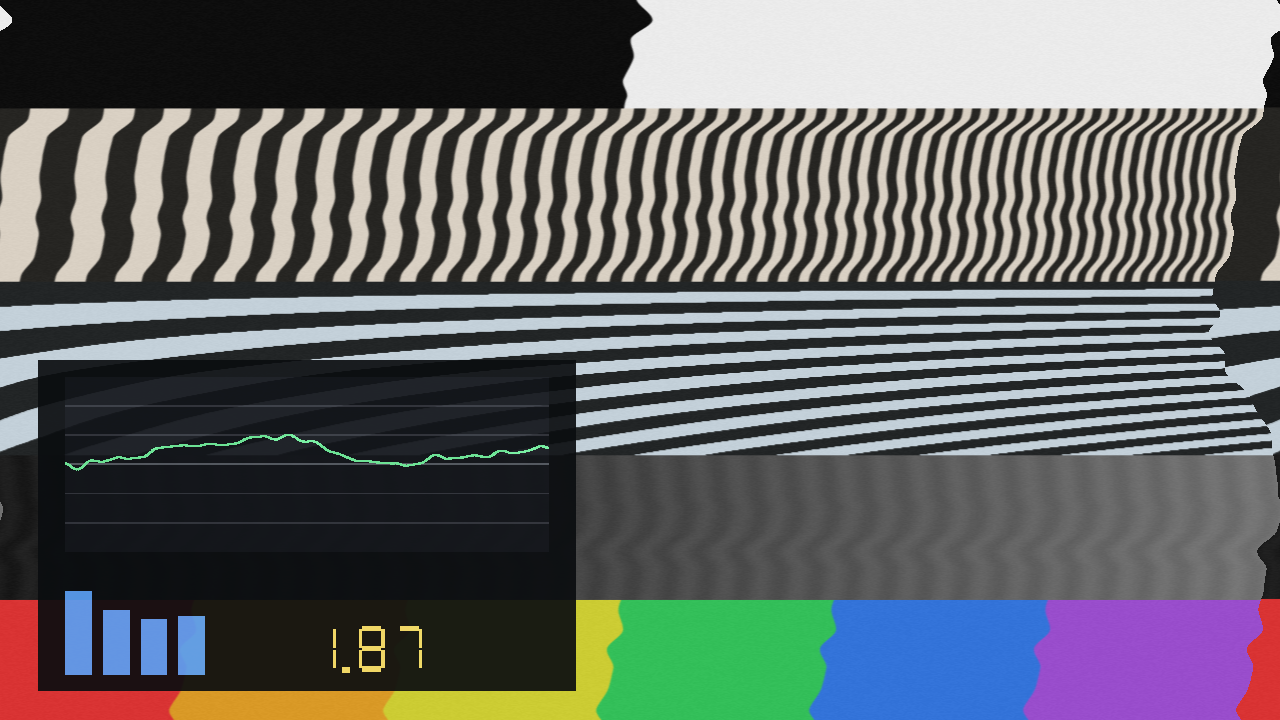
Default transport at a high Amount, with Show Trace on. The green plot is the error signal down the picture — the same shape the image is being torn by — and the readout is weighted wow and flutter as a percentage of a line period.
Before you rely on this: 23 automated checks pass from a clean universal build. The GLSL error signal agrees with an independent C++ implementation to 1.9e-05 over 6400 points, with a control case that must disagree; a neutral Ferric returns the picture bit-exactly; the compander moves vertical detail by 9.996 rms and horizontal detail by 0.000, which is the whole one-dimensional claim; and encode into decode cancels to within 1.31 rms.
It has been loaded and rendered in Resolume Arena 7.27.1 on both macOS and Windows — the Windows run on Mesa llvmpipe, a completely different GLSL compiler, which is what makes it worth doing. Both hosts read all 34 parameters correctly and both show the same weighted figure.
Still open: no operator has dragged a slider. Every control was driven over Resolume’s REST API, so the inspector’s layout and feel are unjudged. No NVIDIA or AMD driver has run it. There is no OpenFX build. None of it has been through a show.
This codebase was created with AI assistance, directed and reviewed by a human author.
Installing
macOS    ~/Documents/Resolume Arena/Extra Effects/     (Ferric.bundle)
Windows  %USERPROFILE%\Documents\Resolume Arena\Extra Effects\   (Ferric.dll)
Avenue uses the same layout under its own folder name. There is also a macOS disk image and a Windows installer, which put it there for you.
The macOS builds are Developer ID-signed and notarised, so there is nothing to clear. The
Windows builds are unsigned, but plugin files are not gated the way .exe files are — only the
installer trips SmartScreen, once.
Resolume scans the plugin folder at startup. If Ferric is not in the effects list, restart it.
Start here: Tape Speed is the control that matters
Everything else is a depth. Tape Speed decides how much of the error signal fits inside one picture, and it is what moves the effect between “the frame is leaning” and “the image has come apart into ribbons”.
There is an honest fiction underneath it. A real 625-line picture scans at 15625 lines per second, and at that rate audio-band flutter is a constant across the whole frame — no vertical structure, no wave, no tearing at all. Audio wow and flutter and video time-base error are simply not the same phenomenon. So Ferric does what it says on the tin instead — it runs a picture through a cassette transport, and a cassette transport does not scan at 15625 lines a second. Tape Speed is that fiction, exposed, from about two milliseconds of tape per picture to about two seconds.
Fast end, the frame is rigid and only wow survives. Middle, one or two flutter cycles fit down the picture and it looks like a tape. Slow end, a single cycle spans a few scanlines and it falls apart.
Turn on Show Trace while you set it. The plot’s horizontal axis is position down the picture, so the number of humps on the graticule is the number of waves in the image. It is the fastest way to land the look you want, and the meters underneath answer “is it hearing anything?” without leaving Resolume.
The transport
Machine multiplies your controls rather than replacing them, and sets the character:
- Cassette — wow dominates, soft flutter, scrape from the felt pressure pad.
- Reel to Reel — everything an order better, and what flutter is left runs faster.
- Video Head — dominated by a once-per-revolution component, so far more periodic than either tape machine.
- Failing — a slipping belt or a flat spot on an idler. Deep wow with a hard lurch on it. This is the one that is not trying to be a specification.
Wow (slow, leans the frame), Flutter (fits cycles into the picture — this is the one that makes it look like the thing the plugin is named after), Scrape (fine horizontal banding) and Drift (a slow random walk over seconds) are the four components. Amount scales all of them; Vertical decides how much of the slow part also rolls the frame, because a sync separator has a time constant and never sees flutter.
The tape
Hiss is not decoration and it is not zero by default. Noise reduction with no noise to reduce is an identity function with extra steps — the decode stage would have nothing to show for itself and half the plugin would look broken. The hiss is generated along the scan, one-dimensionally, so it comes out as horizontal grain rather than film-style speckle. That is what video noise looks like.
Dropouts are the oxide losing contact with the head: a run of a scanline going bright, tapered at both ends. Head Wear takes high frequencies off along the scan and widens the hiss with it.
Noise reduction: the good half
NR Type picks the curve — Type B (one band, forgiving) or Type C (two bands, an order quieter and far less forgiving). These are the well-known consumer sliding-band systems; they are somebody’s trademark and this is not their product, so they are called by the names the rest of the industry uses.
NR Mode is where the interesting damage is:
| What it sounds like, as a picture | |
|---|---|
| Encode + Decode | The honest chain. Nearly transparent with the levels matched — and that is the point, because then the effect is what the tape did. |
| Decode Only | As if the source had never been encoded. Dull, breathing, detail sucked out of the quiet parts. The most recognisable of the three. |
| Encode Only | As if nothing ever decoded it. Hard, glassy, edges screaming. |
Mistracking is the control most worth reaching for. It is the decoder’s level error in dB, centred at correct. Push it either way and the round trip cancels at some brightnesses and not others, so detail pumps as the shot changes — a tape recorded on one deck and played on another. Type C mistracks visibly by 4 dB where Type B shrugs it off, which is exactly the reputation the real ones have.
The processing is one-dimensional and horizontal, because tape has one frequency axis and it lands on the picture as the scan direction. Vertical edges pump; horizontal ones sit perfectly still. That asymmetry is the effect rather than a shortcut, and it is measured: 9.996 against 0.000.
Making it listen
Every reaction control is off by default. Dropped on a layer with nothing routed, this is an ordinary manual tape emulation and behaves like one.
There are three ways in, and they stack:
| What it does | |
|---|---|
| Beat Depth | Puts a sharp, decaying excursion straight into the error signal on the grid — the belt slipping. Not a modulation of something already running; a discontinuity. Only the second of those reads as mechanical. |
| Level Depth | Hands the transport’s own wow and flutter over to the music, so quiet passages run clean and loud ones fall apart. |
| Band Depth | Pushes the decoder off level with band energy, so the noise reduction breathes with the mix. Routed to treble by default, because that is what a sliding band is looking at. |
Route decides which band drives which. Natural gives the transport bass and the decoder treble, so both halves of the plugin are doing something at once — it is the one worth starting from. Depth is carved out of the setting rather than added on top, so at full Level Depth silence renders clean and a loud passage renders exactly what you dialled in.
Presets
Nine of them, and seven leave every reactive depth at zero so a preset picked with nothing routed still behaves. The two that do not have it in their names.
Clean Deck · Compact Cassette · Chewed Tape · Undecoded · Wrong Deck · Head Clog · Ribbons · Beat Slip · Breathing
Editing any control a preset covers drops the dropdown back to Custom and keeps your edit.
If it looks wrong
Nothing is happening. Amount is at zero, or Mix is. Turn on Show Trace — if the green plot is a flat line through the middle, the transport really is still.
It slides sideways but never tears. Tape Speed is too fast, so the whole error signal is nearly constant across one picture. Slow it down and watch the humps appear on the trace.
It tears but there is no wave down the picture. You are leaning on Wow and Drift, which are slower than a frame. Flutter is the one that fits cycles into a picture.
The noise reduction does nothing. Check NR Mode — on Encode + Decode with Mistracking centred it is supposed to be nearly transparent, because the two ends cancel. Try Decode Only, or move Mistracking off centre.
Turning the noise reduction on made no difference to the hiss. You are on Encode Only. The encoder runs before the tape, so it cannot touch a noise floor that does not exist yet — that is the pass order being right, not a bug.
The whole picture went dull. Decode Only, or Mistracking pulled well negative. That is the effect.
It reads as a detail sharpener rather than tape. Look at a horizontal edge — it should be completely untouched while vertical ones move. If both are moving, something is wrong and it is worth reporting.
Cost
Measured on an M4 Max: 0.34 ms/frame at 1080p and 0.70 ms at 4K, with Type C and dropouts both running. The compander is the expensive part and it costs the same whichever type is selected.