

Flipbook is a sprite sheet player for Resolume Arena and Avenue, as a pair of FFGL plugins — and the same thing again as an OpenFX plugin for Resolve, Nuke, Natron and Vegas. Point it at a page of stills, tell it the grid, and it plays the cells as an animation.
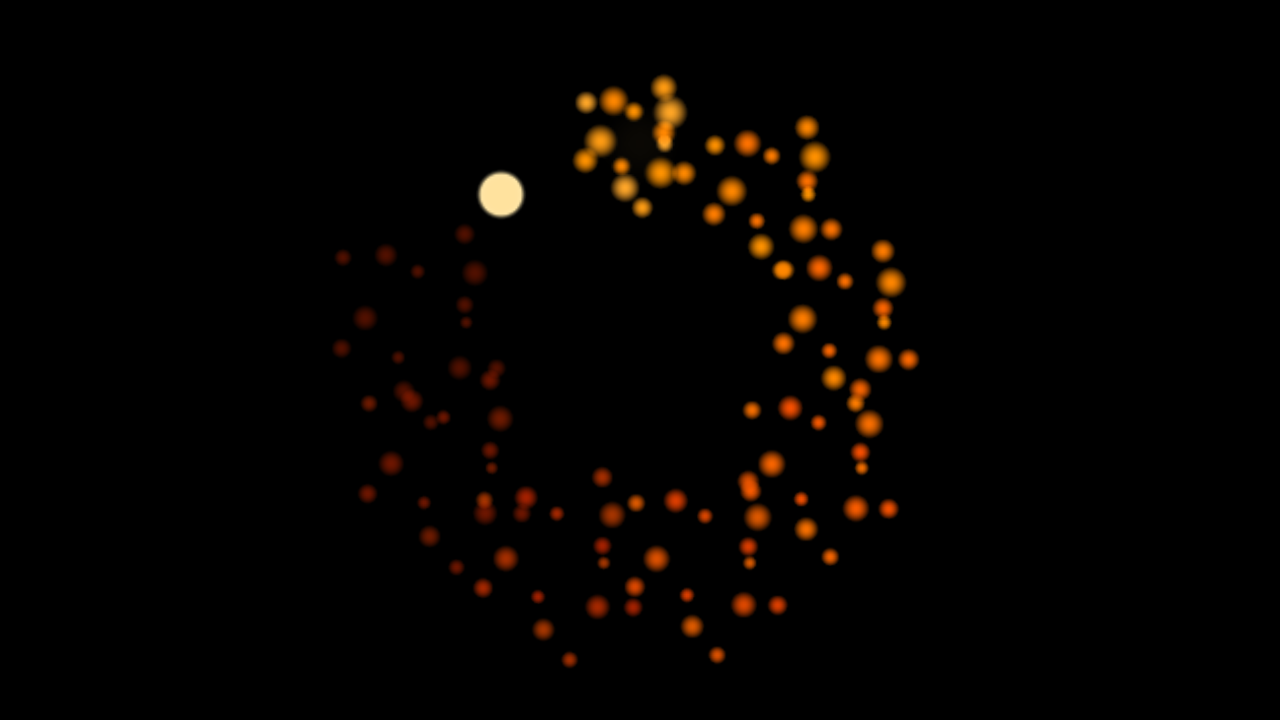
Nine copies on a ring with a one-frame stagger, so the burst travels round the circle and cools as it goes.
Before you rely on this: verified offline and measured rather than asserted. The cell on screen matched an independent prediction at 23 sampled times across 5 configurations, in Loop, Ping-Pong, Once and a run that wraps off the end of the sheet; every copy of 9, 8, 16 and 25 landed where the solver said, showing the frame the stagger said; a square cell stays square to within 2% at four aspect ratios; and no pixel of an interior cell carries any of its neighbour’s colour under either filter. All 39 parameters change the picture.
It has never been loaded into Resolume or Resolve. How the parameter groups land in the inspector, whether Beat and Bar lock against a real transport, and how usable Sheet From: Input Clip is once a real clip transform is in the way are all open. Try it on a spare layer first.
This codebase was created with AI assistance, directed and reviewed by a human author.
Installing
Drop both plugins into ~/Documents/Resolume Arena/Extra Effects (or the Avenue equivalent) and
restart Resolume. macOS builds are signed and notarised; the Windows builds are unsigned, and only
the installer trips SmartScreen.
example-sheet.png in this folder is a 5×4 burst that ships with the repo. Load it, set Columns 5
and Rows 4, and it plays — which is the fastest way to prove the path works before you go looking
for your own material.
OpenFX hosts
Copy Flipbook.ofx.bundle into /Library/OFX/Plugins (macOS),
C:\Program Files\Common Files\OFX\Plugins (Windows) or /usr/OFX/Plugins
(Linux). One bundle carries both plugins.
It is not a reimplementation: the sheet decoding, the frame selection, the placement and the parameter curves are the same source files. Only the per-pixel work is written twice, because the FFGL build does that on the GPU.
Two deliberate differences: Sync offers Free and Manual only, because OFX carries no tempo, and there is no “Sheet From: Input Clip” — an OFX host already has a file browser and a media pool, so the mode has nothing to offer there.
What it plays
Anything laid out on a uniform grid, which is most of what exists.
- VFX sheets — explosions, muzzle flashes, impacts, smoke. Usually 5×5 or 8×8, and often on white or black rather than with an alpha channel, which is what the Luma key is for.
- Game sprite sheets — a character’s walk, run and idle on separate rows. Start Frame and Frame Count pick out one run, so a 4-frame idle and an 8-frame run are two parameter sets on the same sheet.
- Pixel art, kept as pixel art. Set Sampling to Pixel and a 32 px sprite scales to a metre of LED wall with its edges intact.
- Pages of whole frames — rendered backdrops, geometric tiles. Fit: Fill covers the raster preserving the cell’s aspect; Stretch maps one cell onto it exactly, which is right when the cells are already the output’s shape.
- Animated GIFs. The file already knows its own frame count, so it brings its own grid and Columns and Rows are ignored.
Two plugins
| Flipbook | A generator. The sheet over its own background. |
| Flipbook Over | An effect. The sheet over the incoming clip — or the incoming clip as the sheet. |
“Sheet From: Input Clip” is the interesting half of the effect. Point it at a clip that is itself a sheet and Resolume’s own media management does the file handling: the sheet lives in the composition, moves with it, can be swapped from the deck, and can be a moving image rather than a still.
What you give up is exactness. The host has already scaled the sheet into the layer’s raster by the time the plugin sees it, so the cell boundaries are only as true as the clip’s transform. Use a file when the grid has to be right.
Why the loop point never drifts
The frame on screen is a pure function of the clock. Nothing is advanced, there is no counter, and no state is carried between frames.
That matters more here than it sounds. Twelve frames at twelve frames a second is one second of animation, and if you have cued that against a bar you expect the loop to land on the bar line every time. A player that advanced a counter once per rendered frame would instead run at whatever rate Resolume managed that night — fine in the preview, a quarter of a frame short per bar once the show gets heavy, and visibly adrift by the end of the track.
The same property is why Sync: Beat and Sync: Bar are one line rather than a second code path.
The controls
Sheet — the file, Columns × Rows, and which cells to play. Start Frame is the first
cell, counting left to right then top to bottom from 0. Frame Count is how many, with 0
meaning “to the end of the sheet”. A run is allowed to pass the last cell and come round to the
first, which is what a sheet whose animation straddles the last row needs. Sampling is Smooth
(bilinear) or Pixel (nearest).
Playback — Rate in frames per second, or per beat or per bar under those Sync modes. Mode is Loop, Ping-Pong or Once. Sync: Manual ignores the clock entirely and lets Phase drive the sequence, which is the mode for keyframing against an edit. Reset restarts the run, which is what Once wants.
Layout — Fit decides what “actual size” means for this sheet: Native keeps the cell’s own proportions on the frame’s short edge, Fill Frame covers the raster and crops, Stretch maps one cell onto the raster exactly. Scale then multiplies whichever it was, so 1.0 always means “the size Fit said”.
Copies — up to 64, arranged in a Grid, a Ring or a Scatter. Stagger offsets each copy’s position in the run by a fixed number of frames, which turns a field of sprites into a chase travelling through them. It is the control worth finding first.
Key — how the background comes off:
| Alpha | Trusts the file. Right for almost every PNG. |
| Luma | Removes what matches the key colour’s brightness — the white-backed JPEG sheets VFX packs ship as. |
| Colour | Removes what matches the key colour itself — a pixel-art sheet’s one flat backdrop. |
| None | The whole cell, opaque. |
If it looks wrong
A sliver of the neighbouring cell down one edge. The grid does not divide the sheet exactly. The log records this — see below.
Nothing appears and nothing errored. A sheet that would not load looks, from the outside, exactly like a plugin that does nothing. Check the log; it names the file and why.
Pixel art is blurry. Sampling is Smooth. Set it to Pixel.
The animation plays the wrong frames. Start Frame counts from 0, left to right then top to bottom, and Frame Count of 0 means “to the end”.
Copies all show the same frame. Stagger is 0. That is the control that makes a field into a chase.
Diagnostics
~/Library/Logs/flipbook/flipbook.YYYY-MM-DD.logIt records which file would not load and why, and when the grid does not divide the sheet exactly — which is the usual reason a sprite plays with a sliver of its neighbour down one edge.