

Flipdot is the picture on an electromagnetic flip-dot sign, for Resolume Arena and Avenue, as an FFGL effect. It does not draw a “dot-matrix look” over a clip. It runs a sign: a grid of small discs, black on one side and painted yellow, green or white on the other, each swung from one face to the other by a pulse through its coil, and each staying where it is with no power at all. A driver board scans the sign a line at a time and pulses only the discs that need to change. The wipe of a new picture across the sign, the discs caught edge-on as they turn, the shiver as they rebound and the dead dots of an old sign are what that hardware does, not what somebody animated.
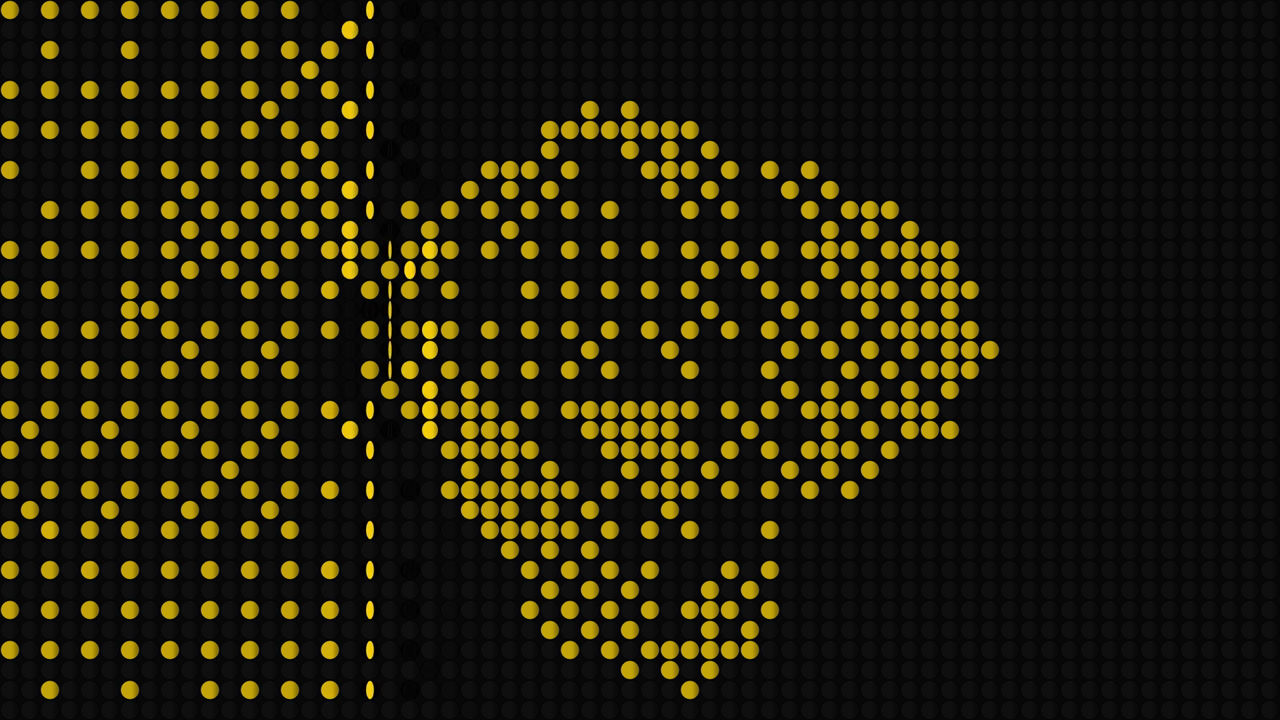
A frame of the project video: Update Now has just been pressed on a Manual sign. Rendered by the plugin’s offline harness from one of Resolume’s bundled demo clips, not captured from Resolume.
Before you rely on this: released at v0.1.0, and honestly early. The sign is measured rather than asserted, by a harness that drives the real plugin class and reads each claim back out of the picture, at two rasters and on Apple’s software renderer: after a whole-sign change every disc of line L finishes its swing on frame ⌈2.4 L + 6.5⌉ exactly, column by column, row by row, and with the host’s clock at 499,000,000 ms; Only Changes moves exactly the discs whose picture differs and Refresh All moves every one, the unchanged ones coming back bit for bit; with no update the sign holds its picture bit for bit; exactly round(f × N) discs are stuck; the colour face’s width follows the stated swing within 1.1 px against the harness’s own integration of the torques; a resize and a regrid keep every disc’s side; and loud audio on the first frame fires nothing. Ten deliberate faults are shown to make those checks fail, and all 19 controls are shown to change the picture.
The sign’s constants are chosen, not measured from a real sign: the swing’s torque law, the rebound’s restitution, the light and the colours. The onset detector’s constants were set on synthetic spectra, not on programme material through Resolume’s FFT. The sign and the dither run on the CPU after a read-back from the GPU, about 2 ms a frame at 1080p on the largest sign; what that read-back’s stall costs inside a real Resolume composition has not been measured.
It has never been loaded into Resolume on macOS: the one host it has run in there is the fleet’s own test host,
oxbow. On Windows, a build of this source loads, registers and renders in Resolume Arena 7.27.1, with every control matching what the plugin declares (the fleet’s Arena gate, 9 of 9 checks) — on software rendering (win-lab, Mesa llvmpipe, no GPU), so that says nothing about a GPU or about speed. Twelve controls, Arena’s own Opacity among them, were shown moving the picture there. The seven that act only while discs are moving (Scan, Scan Rate, Update, Interval, Flip Time, Rebound, Late) cannot act on the gate’s still carrier, where the sign settles once, so they were not tested there; Audio was not tested (no sound device). The harness carries those. Try it on a spare layer before you put it in a show.This codebase was created with AI assistance, directed and reviewed by a human author.
Installing
Every download carries one effect, SW Flipdot. Drop it into Resolume’s effects folder and restart Resolume:
macOS    ~/Documents/Resolume Arena/Extra Effects/
Windows  %USERPROFILE%\Documents\Resolume Arena\Extra Effects\
Avenue uses the same layout under its own folder name. The effect then appears in the effects browser as SW Flipdot.
The macOS download is a universal build (Apple silicon and Intel), as a .dmg or a .zip.
It is Developer ID-signed and notarised, so the bundle simply loads. The Windows download is an x64 installer or a .zip. It is not
code-signed, so the installer trips SmartScreen once: More info → Run anyway.
A flip-dot sign
A flip-dot sign is a board of small discs, each on an axle, each with a small magnet in it between the poles of a coil. A pulse of current one way swings the disc over to its colour face; the other way, to black. Then the current stops and the disc stays where it is, held by its magnet: the sign keeps its picture with no power. Bus destination blinds, stadium boards and old departure signs work this way, and the plugin runs that hardware:
- The driver scans. A real driver board does not pulse the whole sign at once. It reaches one column at a time (or one row), so a whole-sign change sweeps across the sign at the scan rate, and every disc of a line starts its swing the instant the driver reaches it. The plugin times this in double precision, inside the frame, not to the frame.
- Only what changes moves. The driver remembers what it last wrote and pulses only the discs whose picture changed. With Refresh All it pulses every disc, and the ones already showing the right face are driven hard into their stops and shiver.
- A swing takes time. A disc is driven from rest by a constant pull, arrives at the far stop at its fastest, and rebounds off it a few times, each rebound smaller. Half way over it is edge-on: a thin line, which lit from the side catches the light.
- One bit a dot. A disc is black or coloured, so a grey has to be a pattern: a hard threshold, a 4 × 4 Bayer dither, or Floyd–Steinberg’s error diffusion, at the pitch of the sign.
- Old signs. Some discs are stuck and never move; some coils are weak and swing late.
Nothing is animated. The sign is a state machine per disc on the CPU, and the picture is drawn from one angle per disc.
Start here
Put SW Flipdot on a layer with a bright clip: the metal sphere, the organic blob, the skulls, the AV Beat loops. Out of the box you get a 64 × 36 sign of yellow discs filling a 16:9 frame, swept column by column at 240 columns a second after the live clip, only what changes pulsed, 40 ms a swing with a small rebound, a few dead dots and slow coils, Bayer at a threshold of 0.25, lit from 24° off the viewer’s left.
Resolume’s bundled clips are dark (their mean brightness runs from 0 to 56 of 255), and the dark ones — the Bass and Synth loops, the astronaut, the tank — come out as a sparse sign of a few dots. That is a correct sign of a dark picture. Lift a dark clip with a brightness effect ahead of this one, or lower Threshold.
Then:
- Update → Manual. Change the clip. Nothing on the sign moves: the discs keep the old picture with no power. Press Update Now and the new picture wipes across. Lower Scan Rate to about 0.3 (30 columns a second) and the wipe takes two seconds; raise Flip Time and each disc takes longer to turn.
- Light → 0.75 and Flip Time → 0.87 (about half a second), Rebound → 1. Every change is now a slow swing: the disc narrows to a bright edge, lands, and bounces.
- Only Changes → off. Every disc is pulsed on every pass; the ones already right shiver in their stops.
- Scan → Row by Row. The picture comes down the sign instead of across it.
- Columns 128, Rows 72, Dither → Floyd-Steinberg. A finer sign, the tone as diffused dots.
- Stuck → 1, Late → 1. A fifth of the discs dead and half the coils weak.
Every slider is declared to the host as 0 to 1. The value each position stands for is given with each control below.
The Sign group
Columns — 4 to 192, default 64. Rows — 2 to 108, default 36. The size of the sign in discs. The pitch is square and as large as fits the output, and the sign is centred: 64 × 36 fills a 16:9 frame edge to edge, and any other shape leaves a transparent surround, so the layer below shows round it. Changing either re-maps the sign: each new disc takes the side of the old disc at the same place, so nothing is cleared.
Layout — Square or Offset; Square by default. Offset shifts every other row half a pitch across, as some signs are built.
Disc Size — 0 to 1, default 0.85. The disc’s diameter as a share of the pitch: 0.4 + 0.6 × value, so 0.91 at the default and touching its neighbours at 1.
Colour — Yellow, Green or White on black; Yellow by default. The paint on the colour face. The black face, the sign’s face and the recess round each disc stay dark.
The Driver group
Scan — Column by Column or Row by Row; Column by Column by default. Which way the driver reaches the sign: a column at a time, left to right, or a row at a time, top to bottom.
Scan Rate — 0 to 1, default 0.59. How many lines the driver reaches a second: 4 × 1000^value, from 4 to 4,000, geometric, 240 at the default (a 64-column sweep in 0.27 s). About 0.3 is 30 lines a second, 0.4 is 63, 0.8 is 1,000.
Update — Continuous, Interval, Onset or Manual; Continuous by default. When the driver makes a pass.
- Continuous: it sweeps for ever against the live clip, wrapping to the first line, so the sign chases the clip and lags it by up to one sweep. A column the driver has not reached again still shows what was there last time.
- Interval, Onset and Manual: each update latches the picture and starts one pass over it. An update during a pass latches the new picture at once (the lines not yet reached get it) and queues one more pass.
- Interval: an update every Interval, counted from when the mode was chosen.
- Onset: an update on each rise in the host’s audio spectrum (see Audio).
- Manual: an update each time Update Now is pressed.
A switch from Continuous to one of the others lets the pass in flight finish: at a slow Scan Rate it can still be running seconds later, and an Update Now pressed then gives the lines it has not reached the new picture first.
Interval — 0 to 1, default 0.65. Interval mode’s period: 0.1 × 100^value seconds, from 0.1 s to 10 s, 2 s at the default; 0.59 is 1.5 s, 0.5 is 1 s. A stall gives one update, not a burst.
Only Changes — on by default. On, the driver pulses only the discs whose picture changed since it last wrote them. Off (Refresh All), it pulses every disc on every pass; a disc already on the right face is driven into its stop and rebounds, a shiver, which is invisible at Rebound 0.
Update Now — a button. In Manual (and any other latched mode) it latches the picture and starts a pass.
Audio — the audio source for Onset, the host’s spectrum. Onset is one detector over all 64 of Resolume’s spectrum bins: a rise in the summed flux against a floor that follows over about a second, with a tenth of a second before it can fire again. It is primed on the first frame, so a clip triggered into loud audio does not fire at once. The constants were set on synthetic spectra; how the bins are scaled in Resolume has not been measured, and nothing here assumes it. With no audio routed, Onset never fires.
The Discs group
Flip Time — 0 to 1, default 0.39. The time a disc takes to first reach the far stop: 5 ms × 200^value, from 5 ms to 1 s, geometric, 40 ms at the default (2.4 frames at 60 fps). 0.74 is a quarter of a second, 0.87 half a second, 0.9 six-tenths.
Rebound — 0 to 1, default 0.5. The stop’s restitution: 0.6 × value, 0.3 at the default. At 0 a disc lands dead; at 1 it bounces back up to about 32° and settles in a few smaller bounces. Each rebound is shorter by the same factor; they stop once one would rise less than half a degree, and from then on the disc is exactly at its stop.
Stuck — 0 to 1, default 0.015. The share of discs that never move: 0.2 × value, 0.3 % at the default (7 of the 2,304 discs of a 64 × 36 sign). The stuck discs are a fixed, seeded set, about half of them jammed on the colour face; raising Stuck only adds discs to it. A disc freed by lowering Stuck stays where it was jammed until its picture next changes.
Late — 0 to 1, default 0.04. The share of discs on a weak coil: 0.5 × value, 2 % at the default. A weak disc swings 1.5 to 3 times slower than Flip Time, so it lands after its neighbours.
The Look group
Dither — Threshold, Bayer 4x4 or Floyd-Steinberg; Bayer by default. How the grey of each disc’s patch of the clip becomes one bit. Threshold: a hard cut. Bayer 4x4: an ordered 4 × 4 matrix, a regular pattern across the sign. Floyd-Steinberg: error diffusion, serpentine. Each disc reads the mean Rec. 709 luma of its cell, by the clip’s alpha, so a transparent area reads as black. In Continuous, Floyd–Steinberg re-diffuses the whole picture every sweep, so noise in a clip becomes discs flipping all over the sign.
Threshold — 0 to 1, default 0.25. The brightness that lights half the discs. It is a tone curve through black, (Threshold, one half) and white, for every dither: black stays black and white stays white whatever it is set to. Lower lights more of a dark clip.
Light — 0 to 1, default 0.3. Where the light is, in the horizontal plane: from the viewer at 0 to 80° off the left at 1, 24° at the default. Toward 1 the flat faces darken, the recess shades the far side of each disc, and a disc turning edge-on catches the light.
Mix — 0 to 1, default 1. Blends the whole output with the source. The sign is opaque inside its rectangle (a transparent area of the clip is black discs, not a hole), and the surround a non-matching shape leaves is transparent.
How it works
- Copy (GPU). The clip into a mipmapped buffer.
- Means (GPU), when a pass needs a picture (every frame in Continuous, on an update otherwise): one value per disc, the mean luma × alpha of its cell, from sixteen taps at a mip level fine enough for the pitch.
- Read-back of that grid to the CPU (192 × 108 values at most).
- Dither the grid to one bit per disc (CPU).
- Advance the sign by the frame’s time (CPU, double precision): the lines the driver reaches in this frame, at their exact times; each disc evolved to its visit, pulsed if it must change, and evolved to the end of the frame. A disc’s angle comes from the stated swing: from rest to the far stop under a constant pull, then rebounds off it.
- Upload the cosine and sine of every disc’s angle, and draw each disc (GPU) as a plate in a recess, narrowed by its angle and shaded by the light.
The sign is on the CPU because the look is timing: line L of a pass is reached L ÷ Scan Rate after the pass began, inside whatever frame that falls in, and Resolume’s clock cannot be carried in a GPU float. The dither is on the CPU because Floyd–Steinberg is serial.
Performance
Measured by the offline harness on an M4 Max, 60 frames after a 20-frame warm-up, glFinish both
sides, the largest sign the controls allow (192 × 108), Continuous with a new picture every frame
(a read-back and a dither every frame), the universal build, on a machine running other work;
the range of four verify.sh runs on 2026-09-25 (load average 3 to 6):
| 1280 × 720 | 1920 × 1080 | 3840 × 2160 | |
|---|---|---|---|
| 192 × 108, Continuous | 1.1–1.3 ms | 1.9–2.3 ms | 3.0–3.8 ms |
In Interval, Onset and Manual the read-back happens only on an update. It runs on the render thread, after a read-back that waits for the GPU to finish everything queued before it, the host’s own layers included. That stall inside a real Resolume composition has not been measured; on a busy composition it may cost more than these figures. Nothing was timed on Windows.
If it looks wrong
The sign is nearly empty, a few dots. The clip is dark; Resolume’s bundled clips mostly are. Lower Threshold, or lift the clip with a brightness effect ahead of this one.
The sign does not follow the clip. Update is Manual, Interval or Onset: the sign holds its picture until an update. Press Update Now, or choose Continuous.
Onset never fires. No audio is routed to the effect: choose a source under Audio.
Continuous lags, or part of the sign shows an old picture. At a low Scan Rate a sweep takes a while, and a column the driver has not reached again still shows what was there. Raise Scan Rate.
The whole sign flickers with Floyd–Steinberg. Error diffusion spreads a small change in the clip across the whole sign every sweep. Use Bayer, or a latched Update mode.
Some dots never change. Those are the stuck discs; lower Stuck to 0.
Some dots land late. Those are the weak coils; lower Late to 0.
The discs look dim and brown. Light is high: the faces are lit from the side. Lower it.
SW Flipdot is not in the effects browser. Check the folder under Installing, and that Resolume was restarted.
The effect does nothing at all. A shader that will not compile looks exactly like that, and the real message is in the log:
macOS    ~/Library/Logs/flipdot/flipdot.YYYY-MM-DD.log
Windows  %LOCALAPPDATA%\flipdot\logs\flipdot.YYYY-MM-DD.log
Known limits
- Never loaded into Resolume on macOS, and nothing has driven the controls in a host there. How Resolume’s clock arrives, whether it hands over straight or premultiplied alpha, and what the read-back costs inside a busy composition are untested.
- No real audio has reached it in a host. Onset’s constants come from synthetic spectra.
- The sign’s constants are chosen, not measured: the constant-pull swing, the latch pulling back at twice the drive, the restitution, the light, the paint and the recess.
- Refresh All’s shiver treats a pulse into a disc’s own stop as an impact at arrival speed. A real disc may not move visibly at all.
- A pulse mid-swing is queued, not a reversal: the disc lands and then swings back.
- Axles are vertical only: the face narrows sideways. Many signs pivot about a horizontal axle.
- Stuck discs are always at a stop, never jammed edge-on.
- The read-back is a stall once a frame in Continuous; a one-frame-late read would hide it at a frame of latency.
- Only ever run on an Apple M4 Max, although the macOS build contains an Intel slice.
- No presets, no OpenFX version, and no clatter: FFGL has no audio output.
- There is a browser demo at flipdot-demo.stoatworks-labs.com. It is a port to a web page, not the plugin: the shaders run in WebGL2 unedited, and the sign, the discs and the dither are rewritten in JavaScript (checked against the C++ frame by frame). It has no audio, so Onset never fires there. The page lists what it does not reproduce.
About
The last group, About, carries the plugin’s name, version, licence and maker, and buttons that open this user guide (stoatworks-labs.com/software/flipdot/guide/), the project page, the source on GitHub and the support page in your browser.
Reporting something
github.com/stoatworks-labs/flipdot/issues. A screenshot, the Driver and Discs settings, and the composition’s resolution and frame rate are usually enough. If the effect did nothing, attach the log.