

Genlock is an Amiga genlock, flaws and all, as an FFGL mixer for Resolume Arena and Avenue. It keys the computer’s colour 0 over incoming video the way the hardware did, and it cuts that key on the computer’s own pixel clock, which is not locked to the video. So the key lands a pixel or so away from the fill it belongs to. Every edge of the overlay gets a coloured fringe, the fringe crawls as the two clocks drift apart, and when the sync goes the overlay rolls. None of that is drawn on. It is what happens when a key is timed by the wrong clock.
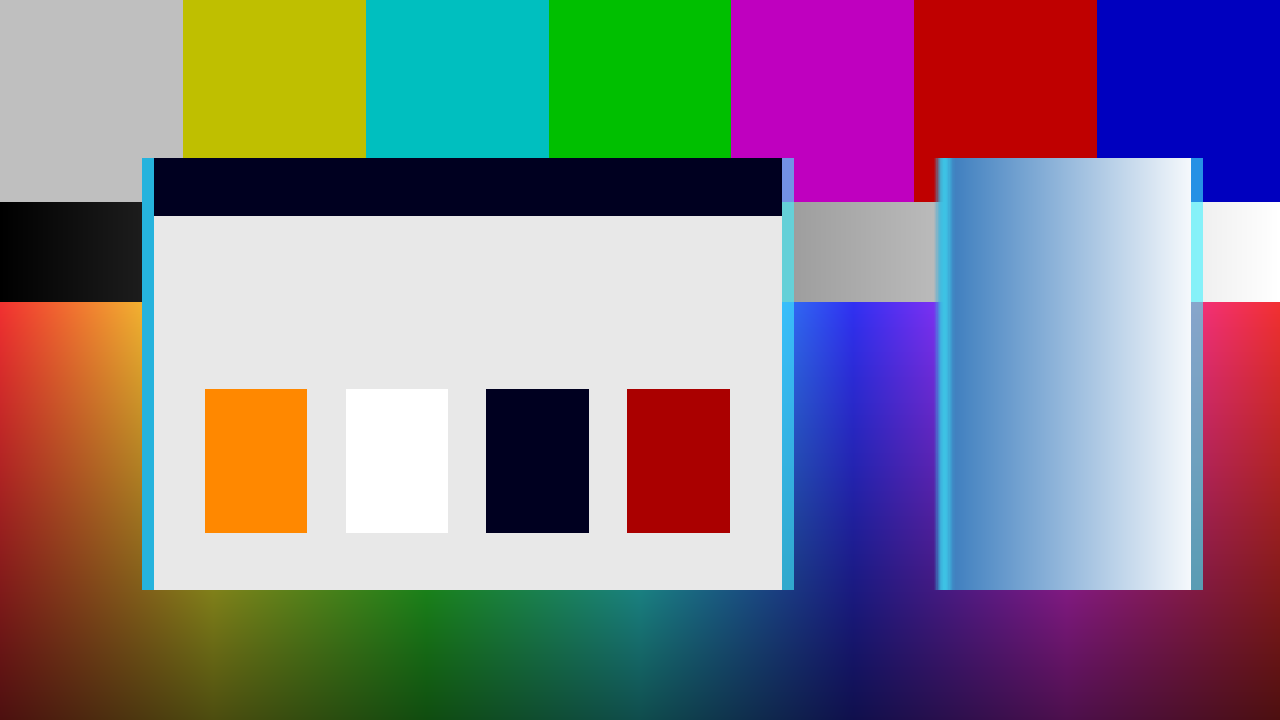
The repo’s two test cards through the plugin at a three-pixel key delay. This was rendered by the offline harness, not captured from Resolume. The band down each graphic’s edges is where the key and the fill disagree, and Edge Tint has coloured it.
Before you rely on this: released at v0.1.0, and honestly early. The timing is measured, not just asserted. An offline harness drives the real plugin with two inputs at two different sizes. A whole-pixel key delay moves the key exactly (0 of 164 bytes differ). The crawl follows the rate its clock error predicts to 0.0176 texels over 30 frames. The roll lands within 0.0000 rows at two rasters. All 21 controls the harness can sweep change the picture. It has never been loaded into Resolume on macOS. On Windows it loads in Resolume Arena 7.27.1, appears as a layer Blend Mode, is driven every frame with both inputs, and takes its Opacity from the layer’s opacity fader. That was measured on software rendering, and nobody has yet looked at its picture inside Resolume. Arena does not show the Key Source control, so there the key is always Colour 0. Try it on a spare layer first, and please report anything that misbehaves.
This codebase was created with AI assistance, directed and reviewed by a human author.
Installing
Download the build for your platform. For macOS there is a universal .dmg or
.zip, and for Windows an x64 installer or .zip. Put the plugin in Resolume’s
FFGL folder, then restart Resolume:
macOS    ~/Documents/Resolume Arena/Extra Effects/
Windows  %USERPROFILE%\Documents\Resolume Arena\Extra Effects\
Avenue uses the same layout in its own folder. It really is Extra Effects,
even though this is a mixer: Resolume Arena 7 has one FFGL plugin folder, and
sources, effects and mixers all load from it. There is no Extra Mixers.
In Resolume a mixer appears in a layer’s Blend Mode list (the same list Resolume uses for transitions), so you choose SW Genlock as the blend mode of the upper layer.
The macOS builds are Developer ID-signed and notarised, so the bundle loads
without any extra steps. The Windows builds are not code-signed. Plugin files are
not gated the way .exe files are, so Resolume loads them as normal. Only the
installer trips SmartScreen, and only once: More info → Run anyway.
It is a mixer, not an effect
An effect gets one picture. A mixer gets two, and Genlock needs both:
| Input | In the code | What it is here |
|---|---|---|
| Dest | the layer below | The incoming video: what the genlock locks to. It never moves. |
| Src | this layer | The computer’s picture: the fill, and the colour 0 the key is cut from. |
To patch it, put your video on a layer. Put the computer’s picture on the layer above it, meaning graphics on a flat background colour. Then set the upper layer’s Blend Mode to SW Genlock. Handed only one picture, the plugin declines to draw, and the log records it the first time (see Diagnostics).
The two layers do not have to be the same size. Each input is read at its own resolution, and every distance below is measured across the output picture.
Start here
The defaults are a working genlock. Put a graphic on a flat Workbench blue
background (#0055AA) on the upper layer and video below it. The blue turns into
video, and the graphic sits over it with a thin cyan fringe down its edges. The
fringe walks about one Amiga pixel a second and snaps back. If your graphic is on
black, set Key Source to Luma (not possible in Resolume, where Key
Source is hidden: put the graphic on a flat colour and use Colour 0 instead).
Next, try Key Delay. Push it further from zero and the fringe gets wider, and flipping the sign swaps which edge gets which kind of fringe. After that, take Clock Error up to watch the crawl turn into a blur, and pull Sync Quality below halfway to watch the overlay lose lock.
Key
Key Source: what counts as “show the video here”. The default is Colour 0.
In Resolume this control is missing. Resolume Arena 7.27.1 does not show Key Source in the mixer’s panel (the other 25 controls are all there), so in Resolume the key is always Colour 0, and Luma and Alpha cannot be chosen. Measured on Windows on 2026-09-23; why Arena hides it is not known. Put your graphic on a flat background colour and set Key Colour to it.
| Key Source | Video shows through where this layer is… |
|---|---|
| Colour 0 | close to Key Colour. This is the palette’s background colour, and it is what a real genlock keyed on. |
| Luma | darker than Tolerance, using Rec. 709 luma. Use this for graphics on black. |
| Alpha | more transparent than Tolerance. |
The key is measured on straight (un-premultiplied) colour. That way an antialiased edge is not mistaken for a darker colour.
Key Colour: the colour that becomes video. The host sees it as three
parameters, Key Colour Red, Key Colour Green and Key Colour Blue, and
can show them as one swatch. The default is Workbench blue, #0055AA. It is only
used when Key Source is Colour 0.
Tolerance: how far a pixel can be from the key colour and still be keyed, from 0 to 1. It is a fraction of the longest distance in the RGB cube. Under Luma and Alpha it is the threshold instead. The default is 0.12.
Softness: the width of the key’s soft edge, from 0 to 0.5 in the same units as Tolerance. At zero the key is a hard step.
Invert: swaps the two sides of the key. The graphic becomes the hole and the background becomes the fill.
Timing
Amiga Mode: Lores, Hires or Superhires. It sets how wide one “Amiga pixel” is: 1/320, 1/640 or 1/1280 of the picture width. That width is the same at every output resolution, so a one-pixel fringe is the same share of the frame at 720p and at 4K. It sits first in the group because it sets the unit Key Delay and Crawl Wrap are counted in. These two count the computer’s own pixel clocks, so each is half the distance in Hires and a quarter in Superhires. The speed of the crawl across the picture, and how far a tear throws a line, are timing errors in the video. They stay the same in every mode. The default is Lores.
Key Delay: how far the key lands from its fill, from −8 to +8 Amiga pixels of the current mode. The default is −1.
Negative lays the palette’s colour 0 over the video along the left edge of each graphic and cuts video into the graphic along the right; positive swaps them. Both really happened. At zero the key and fill line up, until the crawl moves it.
Clock Error: how far the Amiga’s clock is from the video’s, from 0.01 to 50 parts per million. The slider’s scale is geometric because everything interesting is at the low end. At 0.01 ppm the fringe takes about fourteen seconds to walk one lores pixel. Above about 1 ppm it moves more than seven pixels a second and stops looking like a crawl. At 50 ppm, which is an ordinary crystal’s tolerance, it is a blur. The default is about 0.13 ppm, or roughly one pixel a second.
Crawl Rate: multiplies the crawl without changing Clock Error, from 0 to 4. The default of 0.25 on the slider is ×1. At zero the fringe freezes wherever it is. This does not mean the clocks are locked. It just stops the crawl.
Crawl Wrap: how far the fringe walks before line sync pulls it back, from 1 to 16 Amiga pixels of the current mode. The slider is linear. A real genlock re-locks on every line, so the fringe does not drift away: it walks, snaps back and walks again. 1, the default, is a genlock that re-locks cleanly. 16 is the length of the PAL colour burst the genlock locks to. Past that, the device has lost lock, which is what Sync Quality is for.
Sync Quality: how well the genlock holds vertical lock, from 0 to 1. The default is 1, which is locked. At 0.5 and above there is no roll at all, and this is a hard switch, not a gradual fade. Below 0.5 the overlay rolls vertically at Roll Rate. Lines within about 6% of the picture height around the roll’s seam get thrown sideways. The further the quality drops, the further they go, up to 24 lores pixels at zero. The video underneath does not move, because the overlay is the part that has lost lock.
Roll Rate: how fast the overlay rolls once lock is lost, from 0 to 4 rolls a second. One roll is the whole picture height. The default is half a roll a second. The roll speed does not change with Sync Quality, but how hard the lines tear does.
Fader
Fader: a three-position switch, like the hardware had. The default is Overlay.
| Fader | Output |
|---|---|
| Video | The layer below, untouched. |
| Overlay | The keyed picture: the computer over the video. |
| Dissolve | A mix between the two, set by Dissolve. |
Dissolve: the dissolve knob, from 0 (all video) to 1 (all overlay). The default is 0.5. It only does anything at the Dissolve position.
Look
Fringe: how strongly Edge Tint colours the band where the key and the fill disagree, from 0 to 1. The default is 0.35. The fringe is there even at zero, because the disagreement itself is the artefact. Real hardware added chroma crosstalk on top of it, and this control sets how much of that you get. At a Key Delay of zero there is nothing to tint.
Edge Tint: the colour of that crosstalk. Like Key Colour, the host sees it as three parameters: Edge Tint Red, Edge Tint Green and Edge Tint Blue. The default is a cyan chosen by eye. This is styling, not a measured colour.
Opacity: the master blend against the layer below, from 0 to 1. At 0 the output is the video underneath. It is called Opacity, not Mix, because the FFGL SDK’s own mixer example says Resolume looks for a parameter with that name to use as the mix. It is true: in Resolume this is driven by the layer’s Opacity fader, and the Opacity slider in the mixer’s panel is overridden, so moving it does nothing. Use the layer’s fader. (Measured in Arena 7.27.1 on Windows, 2026-09-23. Whether the layer’s transition or autopilot moves it too has not been tried.)
How it works: the wrong clock
A genlock keys the computer’s background colour over incoming video, and the video sets the timing. The Amiga does not follow it. The key is cut on the Amiga’s own pixel clock (PAL lores, 7.09379 MHz), which runs freely a few parts per million away from the video’s clock. So the key is fetched a small distance from the fill it belongs to, and that distance keeps growing. The rate is the pixel clock times the fractional error, and the line sync pulls it back every time it reaches Crawl Wrap. That produces all three looks: the fringe from the fixed offset, the crawl from the error building up, and the roll when vertical sync is lost.
The shader never sees a clock: the host’s time is reduced on the CPU, in double precision, so a long session does not lose precision. If the host never sends a time, the crawl and roll run on the wall clock (right speed, arbitrary start).
Diagnostics
The plugin writes a small log:
macOS    ~/Library/Logs/genlock/genlock.YYYY-MM-DD.log
Windows  %LOCALAPPDATA%\genlock\logs\genlock.YYYY-MM-DD.log
The first line is written as soon as Resolume loads the file, before anything is created, and it names the path it was loaded from. A log that holds that line and nothing after it means Resolume found the plugin but never used it. No log at all means Resolume never looked in that folder.
After that it records the host’s name and version; the GL vendor and viewport when it was put on a layer; the sizes both inputs arrived at on the first frame; the first time it was called with one input, none, or a null or empty one (each logged once); whether the host drives the clock and in which unit (at frame 1, frame 300 and shutdown); beat and sample-rate calls; and the first 16 changes to Opacity.
The Opacity lines follow the layer’s Opacity fader, not the mixer’s own slider, which Resolume overrides. A shader that fails to compile shows up as a plugin that does nothing, and the reason is in this log.
Performance
It is one pass with three texture reads. The worst of five runs on an Apple M4 Max was:
| ms/frame | Share of a 60 fps frame | |
|---|---|---|
| 1280×720 | 0.020 | 0.1% |
| 1920×1080 | 0.036 | 0.2% |
| 2560×1440 | 0.054 | 0.3% |
| 3840×2160 | 0.118 | 0.7% |
Repeated runs vary by as much as a factor of two, because at this size the measurement itself costs about as much as the work. Take the ceiling, not the average. No timing has been taken inside Resolume.
Known limits
- Key Source is missing in Resolume. Arena 7.27.1 does not show it, so the key is always Colour 0 there; Luma and Alpha keying cannot be reached.
- Never loaded into Resolume on macOS. On Windows, Arena 7.27.1 drives it every frame (measured on software rendering, 2026-09-23), but no picture from inside Resolume has been checked. Whether Resolume ever hands it only one input, and whether a layer transition moves Opacity, are still open.
- PAL only, with no NTSC switch.
- Hires and Superhires are arithmetic, not observation, and the 16-pixel Crawl Wrap ceiling is derived from the colour burst, not measured on a genlock.
- The tear at the roll seam is a look, not a model, and premultiplied alpha is assumed for both inputs.
- No presets and no OpenFX port.
- There is a browser demo at genlock-demo.stoatworks-labs.com. It is a port to a web page, not the plugin: the shaders run in WebGL2 and any CPU half is rewritten in JavaScript. The page lists what it does not reproduce.
About
The About group at the bottom carries a credit line (name, version, licence, Stoatworks Labs) and buttons for this user guide, the project page, the source on GitHub, and the support page.
Report anything at github.com/stoatworks-labs/genlock/issues with a screenshot, your Resolume version and the day’s log. Because this is the fleet’s first mixer, the log’s first dozen lines are the most useful part.