

A private dashboard for every repo you own, because GitHub throws the numbers away.
GitHub’s own Insights tab shows you one repo at a time, and it forgets. Traffic views and clones are kept for fourteen days. Stars, forks and release download counts are worse: the API only ever reports the current total, so a star history does not exist unless something wrote the number down each day.
This writes the number down each day.
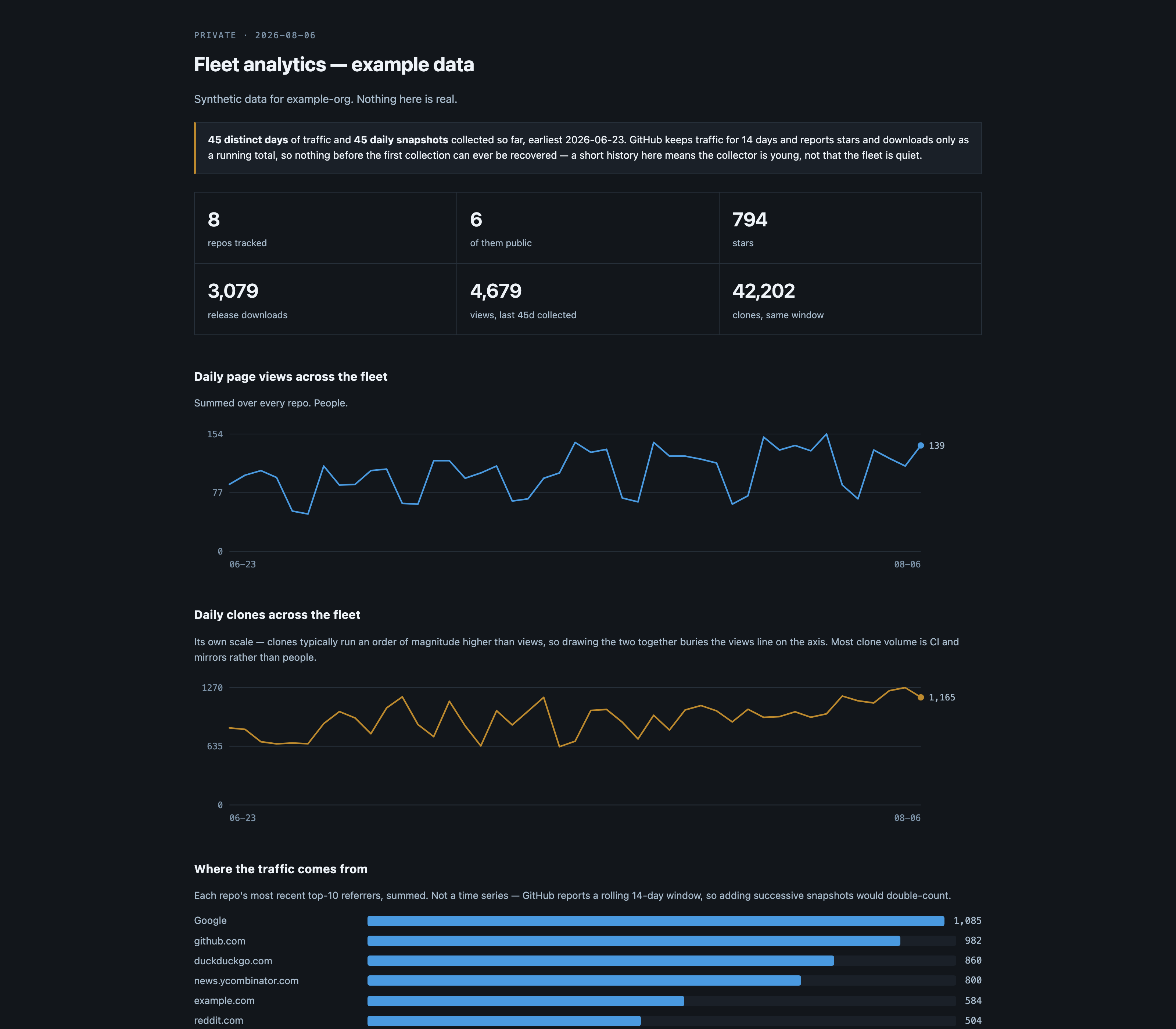
Before you rely on this: the collector and renderer run daily against a ~100-repo account and the outputs are the ones in use there. CI renders a bundled synthetic dataset on every push, which proves the renderer works; it does not exercise the GitHub API. The Worker is deployed and serving, but the deploy path is not covered by tests.
This codebase was created with AI assistance, directed and reviewed by a human author.
The one thing to understand before you start
A day you do not collect is a day gone forever. Not delayed — gone.
GitHub will not serve a traffic day older than 14 days, and there is no historical endpoint for stars or downloads at any age. If the nightly job fails for three weeks, those three weeks are a permanent hole, and running the collector twice afterwards will not fill it.
So: start collecting before you think you need it, and treat a red workflow run as data loss rather than as a flaky build. Everything else here is recoverable.
Two consequences that show up in how it behaves:
- Each run re-fetches the whole 14-day window and merges it over what is on disk, newest value winning, rather than appending only unseen days. GitHub revises the last day or two after the fact, so “append only new dates” would freeze a half-counted day forever. Merging is also what makes the collector safe to run twice in a day, or after a week of downtime.
- Traffic and snapshots are stored separately and must not be confused. Traffic is a per-day measurement GitHub attributes to a date: authoritative, mergeable, the only series that can be backfilled at all. Snapshots are point-in-time totals read on the day of the run — stars, forks, downloads. A gap in snapshots cannot be interpolated honestly, so the portal differences consecutive snapshots and shows a gap as a gap.
Setting it up
1. Put it somewhere with your data. Your collected data belongs in your repo, not in a
clone of this one — it is your history and it needs to be committed. Either copy the scripts in, or
keep this as a submodule and hold only your config and data/. Either way, data/ must be in a
repo you push to, because that is the history.
2. Configure. Set the owner to your GitHub username or org; everything else has a working default.
3. Get a token — and get the scope right.
Traffic endpoints require push access. A read-only token returns 403 on every single one of them, which is the most common way this appears broken, and it is not documented anywhere obvious.
A classic token with the repo scope, or a fine-grained one with Administration: read +
Metadata: read applied to all repositories.
No expiry, or diary the renewal — an expired token fails silently every night.
What you get
A single page, gated behind a password, covering every repo you own — public and private, in one table:
- Daily views and clones across the whole account, as far back as you have collected
- Where the traffic came from, aggregated across repos
- Release download counts, ranked
- A per-repo table with 30-day sparklines, sortable by any column
- An honest note at the top saying exactly how much history exists
And optionally a JSON summary of your public repos — stars, forks, downloads, releases — to feed a “what we’ve shipped” page on your own site.
Traffic is deliberately excluded from that public file. Views and clones say how many people looked and did not stay, which is nobody else’s business, and a public number invites gaming.
Cost
Roughly 4 minutes of Actions time a day per hundred repos, most of it spent pacing rather than working — the search API allows 30 requests a minute, so the loop deliberately sleeps between them. On a private repo that is about 120 minutes a month against the free allowance; on a public repo, nothing.
A scheduled edge Worker was the obvious alternative and does not work: the per-invocation subrequest limit is reached long before a hundred repos are done.
Things that will bite you
- A read-only token 403s on every traffic endpoint. Traffic needs push access.
public_repois notrepo. They are nested in GitHub’s token UI and trivially confused, and picking the narrow one does not produce an error — the API answers every request cheerfully, just about a smaller world. A run that quietly collects 78 of your 103 repos and reports success is worse than one that crashes, because the missing repos’ files are left untouched and simply stop updating behind a dashboard that still looks plausible. The collector compares each run against the previous index and refuses to write a materially smaller one; losing the private repos entirely is called out by name.--allow-shrinkoverrides it when repos really were deleted.- The org endpoint returns 404 for a personal account and always will. The collector tries the authenticated-user endpoint first, then the org one, then the public one — and prints which it used, because the public fallback silently drops every private repo rather than erroring.
- Traffic endpoints answer 202 while the day’s aggregation is in flight. The collector retries, and the scheduled run is deliberately off the hour.
- Two overlapping runs lose data. Both read, both merge, and the second push wins. The workflow sets a concurrency group.
- A push during collection makes the checkout stale. Collection takes about fifteen minutes; anything landing on your default branch in that window makes the push fail and throws the whole run away. The workflow rebases and retries three times before giving up loudly.
Trying it before you collect anything
A synthetic dataset ships with the repo, and rendering it produces exactly the screenshot above. Do that first — it separates “the renderer works” from “my token is wrong”, which is otherwise the same blank page.