

Lenticular is a printed lenticular sheet that shows one layer or the other, as an FFGL mixer for Resolume Arena and Avenue. The layer below and this layer are cut into strips and interleaved under a sheet of cylindrical lenses, and the layer’s opacity fader tilts the card. Each lens focuses the eye onto one point of the print, so the card flips from one picture to the other square on, flips back at the edge of the viewing zone, shows both pictures near the flip, bands into moiré when the print’s pitch misses the lens’s, and is stepped and ridged at the lens pitch. None of that is painted on: it falls out of the lens and the print.
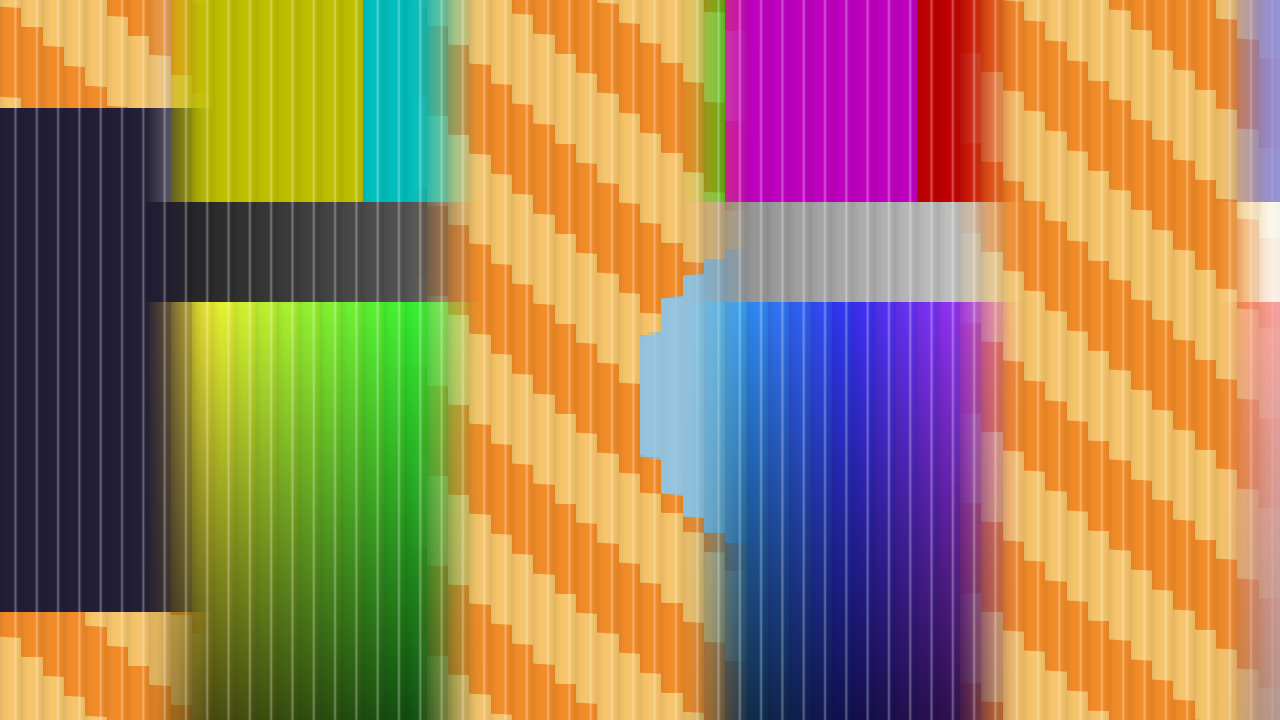
The repo’s two test cards through the plugin at Opacity 0.47 with the print detuned from 60 to 62.7 periods a width. Rendered by the offline harness, not captured from Resolume. Each 21-pixel lens shows one sample of whichever picture its focus lands on; the ridges catch the light as thin stripes; and because the print misses the lens, the flip happens in bands about a third of the picture apart.
Before you rely on this: released at v0.1.0, and honestly early. The optics are measured, not just asserted. An offline harness drives the real plugin with two inputs at two different sizes, on the GPU and on Apple’s software renderer. Tilted all the way, the card is A or B sampled at the lens pitch, 0 bytes wrong in all four channels. It flips square on and flips back at ±atan( 1 / 2F ) to 6e-8 rad. A pitch mismatch bands at 1 / | 1/p_L − 1/p_P |, measured by FFT to 0.0009 cycles per picture width, and the bands sweep by the predicted phase. A near viewer’s flip lands at D sin T to 0.001 px. Every check carries a negative control that fails, and all 11 controls change the picture. It has never been loaded into Resolume on macOS. On Windows, a build of v0.1.0 loads in Resolume Arena 7.27.1, is offered as a layer’s Blend Mode and as a transition, has its tilt driven by the layer’s opacity fader and by a layer transition, and hides only Squeeze, as designed — on software rendering, and no picture of it inside Resolume has been captured, so a correct render there is not yet shown. Try it on a spare layer first, and please report anything that misbehaves.
This codebase was created with AI assistance, directed and reviewed by a human author.
Installing
Download the build for your platform. For macOS there is a universal .dmg or
.zip (Apple silicon and Intel), Developer ID-signed and notarised so the bundle
simply loads (the signing happens on the maintainer’s Mac shortly after each release
is published, so a download made in the first minutes may need Open from the
context menu once), and for Windows an x64 installer or .zip. Every download carries one mixer, SW Lenticular. Put it in Resolume’s
FFGL folder, then restart Resolume:
macOS    ~/Documents/Resolume Arena/Extra Effects/
Windows  %USERPROFILE%\Documents\Resolume Arena\Extra Effects\
Avenue uses the same layout in its own folder. It really is Extra Effects, even
though this is a mixer: Resolume has one FFGL plugin folder, and sources, effects and
mixers all load from it. There is no Extra Mixers.
A mixer does not appear in the effects browser. In Resolume it appears in a layer’s Blend Mode list, beside Resolume’s own blend modes, and in the layer’s transition list. Choose SW Lenticular as the blend mode of the upper layer.
The Windows builds are not code-signed. Plugin files are not gated the way .exe
files are, so Resolume loads them as normal; only the installer trips SmartScreen,
once: More info → Run anyway.
It is a mixer, not an effect
An effect gets one picture. A mixer gets two, and Lenticular needs both:
| Input | In the code | In Resolume | What it is here |
|---|---|---|---|
| A | inputTextures[0] |
the layer below | Printed in each lens’s first strip. The card shows it tilted to Opacity 0. |
| B | inputTextures[1] |
this layer, the one whose Blend Mode is SW Lenticular | Printed in the second strip. The card shows it tilted to Opacity 1. |
Put one clip on a layer and the other on the layer above it, then set the upper layer’s Blend Mode to SW Lenticular. Handed only one picture, the plugin declines to draw. The two layers do not have to be the same size; each input is read at its own resolution.
Start here
The layer’s opacity fader tilts the card. Lenticular’s tilt is a parameter called Opacity, and Resolume drives a mixer parameter of that name from the layer’s own opacity fader. So once SW Lenticular is the upper layer’s blend mode, that layer’s opacity is the tilt: at 0 the card is turned to show the layer below, at 1 this layer, and at 0.5 it is seen square on, which is where it flips.
When you first choose SW Lenticular, you see this layer, through the lens. Opacity defaults to 1 and in Resolume the layer’s fader is usually at 1 anyway. It is not the plain clip: at every setting the picture is seen through the sheet, stepped at the lens pitch and ridged. That is the product.
Then, in this order:
- Tilt. Move the fader from 0 to 1 slowly. At the default Distance (a viewer five picture widths away) the flip does not happen all at once: its edge travels across the card, from one side to the other, around the middle of the fader.
- Distance all the way up, to infinity. Now every lens sees the card at the same angle and the whole card flips at once.
- Focus Spot and Bleed up, and the fader near the middle. Each lens now sees both strips, and the card shows both pictures: the ghost of a real card.
- Interleave Pitch a little away from Lens Pitch, and tilt again. The card flips in vertical bands that sweep across it: moiré.
- Angle Range up to 40°. The fader now turns the card past the edge of its viewing zone, and it flips back, and again.
Squeeze (on): whether each strip holds its picture’s band of one lens width, squeezed into half a lens as a real interleave does (on), or is a window on the picture where it is (off). Resolume Arena does not show a mixer’s first parameter, and Squeeze is first on purpose: its default is right if nobody can ever reach it. Checked in Arena 7.27.1: of the sixteen parameters, Squeeze is the one it hides, so in Resolume Arena the strips are always squeezed.
Interleave Pitch (4 to 480 periods across the picture width, geometric; 60 by default): how many A-and-B strip pairs the print has across the picture. It is on the same scale as Lens Pitch, so the same slider position is the same pitch, bit for bit: that is what “matched” means, and it is the default.
Bleed (0 to 1 strip; 0.1 by default): the ramp between two strips on the print, as a fraction of a strip. Higher softens the flip and widens the ghost.
Lens
Lens Pitch (4 to 480 lenses across the picture width, geometric; 60 by default). Each lens shows one column of its picture spread across its width, so the picture is stepped at this pitch: 60 across a 1920-wide composition is 32 pixels a lens. Move it with Interleave Pitch to keep them matched; move one alone for moiré.
Focal Length (0.5 to 6 lens pitches, geometric; 1.8 by default): where the print sits behind the lens. The viewing zone is ±atan( 1 / 2F ) either side of square on: ±15.5° at 1.8, ±22.6° at 1.2, ±9.5° at 3. Past the zone the next lens’s strips come round and the card flips back.
Focus Spot (0 to half a lens; 0.1 of a lens by default): the lens’s aberration. The eye sees the mean of the print across the spot, so near a strip edge it sees both pictures. At the ends of the tilt the spot sits wholly on one strip and this changes nothing; it shows around the flip.
Distance (from half a picture width to infinity at the top of the slider; five widths by default): how far away the viewer is. A near viewer sees each column at its own angle, so the flip travels across the card, landing at D sin T from the centre for a tilt T. At the top of the slider the viewer is at infinity and the whole card flips at once.
View
Opacity: the tilt. In Resolume this is the layer’s opacity fader, and the mixer’s own Opacity control is overridden by it; see Start here.
Angle Range (0 to 45°; 8° by default): how far Opacity 0 and 1 tilt the card either side of square on. At the default Focal Length, 8° lands the ends in the middle of each strip, as far from a flip as the lens allows. Above 15.5° the fader crosses the edge of the viewing zone.
Ridge Shine (0 to 1; 0.3 by default): the ridges’ highlight and edge shading, and a slight residual magnification in each lens. At 0 the lens is ideal.
Light Angle (−60° to +60°; 25° by default): where the light comes from, which moves the highlight across each ridge.
How it works: the lens and the print
Across the picture there are N_L lenses and, under them, N_P interleave periods, each an A strip then a B strip. A thin cylindrical lens of focal length F focuses rays arriving at angle t onto its focal plane at F tan t from its axis, and the print is in that plane. So the eye looking at a column under lens k sees the print at k + ½ + F tan t lens pitches, and the fraction of that point’s print period says which strip it is on: under a half, A; over, B.
With matched pitches and the viewer at infinity that fraction is the same under every lens, so the whole card flips at once: to B as tan t crosses 0, back to A as F tan t crosses ½. With mismatched pitches the fraction advances by N_P / N_L a lens instead of by a whole period, so the flip happens in bands W / | N_L − N_P | pixels apart that move as the card tilts. With the viewer at a distance D each column is seen at its own angle, so the flip lands at x = D sin T. The focus spot is a box; the coverage of the print across it is a closed form, so a spot wholly on one strip returns exactly that strip’s picture.
There is no clock and nothing is kept from one frame to the next: the card moves only when the fader, a control or the clips do.
Performance
It is one pass with two texture reads. The worst figures from the offline harness on an Apple M4 Max:
| ms/frame | Share of a 60 fps frame | |
|---|---|---|
| 1280×720 | 0.021 | 0.1% |
| 1920×1080 | 0.035 | 0.2% |
| 2560×1440 | 0.055 | 0.3% |
| 3840×2160 | 0.114 | 0.7% |
At this size the measurement costs about as much as the work, so take the ceiling. No timing has been taken inside Resolume.
If it looks wrong
The picture is always stepped and striped, even at the ends. That is the sheet. A lenticular card never shows the plain picture; Opacity 0 and 1 are A and B through the lens. Raise Lens Pitch for finer steps, lower Ridge Shine for fainter ridges.
The flip happens in stripes that will not go away. Interleave Pitch and Lens Pitch are not matched. Set them to the same slider value.
Moving the Opacity slider does nothing. That is Resolume overriding it with the layer’s opacity fader. Use the layer’s fader.
Focus Spot and Bleed do nothing. At the ends of the tilt the focus sits in the middle of one strip, so neither shows. Move the fader to the middle.
A transition with SW Lenticular pops at the end. Used as a layer’s transition, the card tilts from the old clip to the new one, but the new clip is still seen through the lens on the transition’s last frame, and then Resolume shows it plain. In Arena 7.27.1 the last transition frame had Opacity 0.94 to 0.99, never 1: the card was already showing the new clip, stepped and ridged, and the plain clip replaced it in one frame. It is the lens having no end stops, not a fault. To avoid it, use SW Lenticular as the layer’s Blend Mode and move the layer fader instead, or keep a lenticular look on the new clip afterwards.
The mixer does nothing at all. A shader that fails to compile looks exactly like that. The plugin writes a small log:
macOS    ~/Library/Logs/lenticular/lenticular.YYYY-MM-DD.log
Windows  %LOCALAPPDATA%\lenticular\logs\lenticular.YYYY-MM-DD.log
It records the host’s name and version and the file it was loaded from, the GL vendor, renderer and version, the first frame’s input sizes, each Opacity change (up to 400 an instance, numbered, so a transition’s own instances can be told from the layer’s), the last Opacity when an instance is freed, and an error line if the shader failed to compile.
Known limits
- Squeeze is hidden in Resolume. Arena does not show a mixer’s first parameter, so Lenticular puts Squeeze there on purpose, and in Resolume it is always on. Checked with Lenticular in Arena 7.27.1 on Windows: the one hidden control is Squeeze.
- The tilt is the layer’s opacity. In Resolume the mixer’s own Opacity slider is overridden by the layer’s opacity fader, so it cannot be set or automated separately. A layer transition does drive it (checked in Arena 7.27.1: a 2 s transition ran its own instance of the mixer from Opacity 0.007 to 0.944), and it ends with the pop described under If it looks wrong.
- Never loaded into Resolume on macOS. In Resolume on Windows it has run only on software rendering, and its picture there has not been captured. No graphics card but the Mac it was built on has run it.
- The optics are a model: a thin lens in air (no refraction into the plastic), a box focus spot, a print with linear ramps, the viewer’s eye as a point. The ridge highlight, the edge shading and the residual magnification are looks, not a measurement of any sheet.
- Vertical lenticules only, and two frames only: the ghost is the in-between.
- Output alpha is the seen picture’s: the mix of A’s and B’s alpha by how much of B the lens sees, with the ridge highlight laid over it.
- No presets and no OpenFX version.
- There is a browser demo at lenticular-demo.stoatworks-labs.com. It is a port to a web page, not the plugin: the shaders run in WebGL2, the parameter conversions are rewritten in JavaScript, and the two pictures are generated test clips. The page lists what it does not reproduce.
About
The last group, About, carries a credit line (name, version, licence and maker) and buttons that open this user guide, the project page, the source on GitHub and the support page in your browser.
Reporting something
github.com/stoatworks-labs/lenticular/issues. A screenshot, your Resolume version, the settings, the composition’s resolution and frame rate, and the day’s log are usually enough.