

Needle is four audio meters with the ballistics their standards actually specify, as an FFGL source for Resolume Arena and Avenue: a VU, a BBC-style peak programme meter, an LED bargraph and a magic eye, drawn live at the output’s own raster. The point of it is that the movement is not a free choice. A VU’s damping and natural frequency are solved in code from the two figures ANSI C16.5 gives, a PPM’s time constants from IEC 60268-10’s, and nothing was tuned until it looked right.
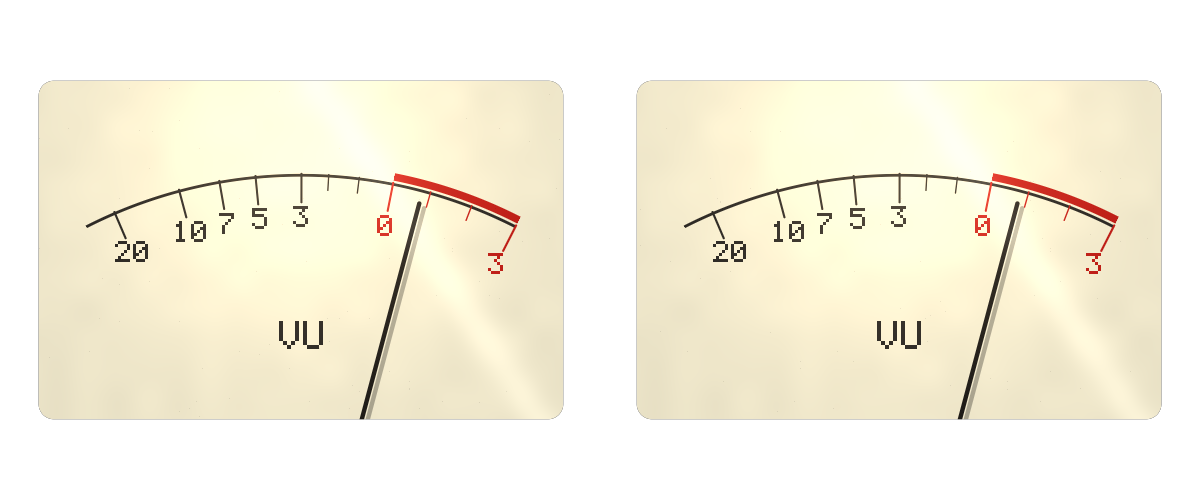
A stereo pair just past 0 VU, rendered by the plugin’s own offline harness (ndtest), not
captured from Resolume.
Before you rely on this: released at v0.1.0, and honestly early. The ballistics are measured rather than asserted, against the engine itself rather than against pixels: a step to 0 VU reaches 99 % in 300.000 ms and overshoots by 1.2500 % (the standard allows 300 ± 5 ms and 1.0–1.5 %); a PPM falls 20 dB in 2.800000 s; the bargraph’s ten thresholds, recovered by bisecting on the input, are 3.000000 dB apart; and the same half second of signal reads identically at 24, 30, 50, 60 and 144 fps. All 31 controls are confirmed to change the picture.
It has never been loaded into Resolume on macOS, and no real audio has reached it in a host. Everything above is the offline harness driving the real plugin class. Resolume hands a plugin a 64-bin spectrum, and nobody has measured whether those bins are magnitudes or powers, or what level a full-scale tone produces — so the calibration is nominal, and Bin Law exists to let you flip the one assumption that would otherwise be buried. On Windows, a build of v0.1.0 loads, registers as a source and draws its meters in Resolume Arena 7.27.1, with every control matching what the plugin declares — on software rendering and on a machine with no sound device, so the audio path has not been heard there either. Try it on a spare layer before you put it in a show.
This codebase was created with AI assistance, directed and reviewed by a human author.
Installing
Drop the plugin into Resolume’s FFGL folder and restart Resolume. Sources go in the same folder as effects:
macOS    ~/Documents/Resolume Arena/Extra Effects/
Windows  %USERPROFILE%\Documents\Resolume Arena\Extra Effects\
Avenue uses the same layout under its own folder name. SW Needle then appears among the Sources, not the effects.
The download is a universal macOS .dmg or .zip (Apple Silicon and Intel) and a Windows x64
installer or .zip. The macOS build is Developer ID-signed and notarised, so it simply loads.
The Windows build is not code-signed; plugin files are not gated the way .exe files are, so only
the installer trips SmartScreen, once: More info → Run anyway.
Start here
Needle reads exactly one thing from Resolume: the Audio input at the bottom of its panel, a spectrum of 64 bins that the host fills once per frame. There is no other way for audio to reach an FFGL plugin — no level, no peak, no samples. In the other Stoatworks plugins that declare the same input, Resolume draws it as its own audio-source picker (Local, Composition or External); needle has not been seen in Resolume yet, so check that it appears the same way. Point it at whatever Resolume is hearing — the composition’s audio, or an external input from the desk.
Needle adds every one of the 64 bins together and takes the square root. By Parseval’s theorem that is the signal’s power however the bins happen to be laid out in frequency, so the meter does not depend on Resolume’s bins being linear, logarithmic or anything else.
At the defaults you get one VU meter on a cream face, 62 % of the short side of the frame tall,
in the middle, over transparency. With nothing arriving the pointer rests at the left stop, and the
log says no audio on this layer -- every FFT bin is zero. Play something and it swings up.
Then calibrate it. Play programme at the level you want to call zero, or a line-up tone, and move Reference Level until the pointer sits on 0 VU. That one step matters more than any other, because what Resolume’s spectrum reads for a given tone is not known — see Bin Law, below.
The Meter group
Type — which instrument: VU, PPM, Bargraph or Magic Eye. Each is described in The four instruments. About a third of the controls below only act on one or two of them; each says which.
Count — Mono or Stereo Pair. A pair is two identical instruments side by side that move together as one panel when you rotate or move them. Both read the same audio: FFGL gives a plugin one spectrum, of the programme, so a stereo pair is the instrument people recognise rather than two measurements. Left and right will always agree.
Reference Level — the digital level the meter calls zero, from −40 dBFS to 0 dBFS. The default is −18 dBFS, EBU R68’s alignment level, and close enough to SMPTE’s −20 that you can find either. Zero means 0 VU on the VU, mark 4 on the PPM, the top LED on the bargraph and the point the magic eye shuts. Lower the reference and the meter reads higher.
Sensitivity — a trim of ±12 dB on the input, 0 dB at the middle. It is there because the absolute calibration of Resolume’s spectrum is unknown: Reference Level says what zero means, Sensitivity puts the programme where it should sit against it.
Bin Law — how the spectrum’s values are read: Magnitude (the default) or Power. Nobody has measured which of the two Resolume sends, and plugins in this fleet disagree with each other about it, so it is a switch rather than a guess. Magnitude takes the square root of the sum of the squared bins; Power takes the square root of the plain sum. To tell which is right on your rig, change a tone by exactly 10 dB at the source and watch the meter: with the right law it moves 10 dB; with the wrong one it moves 5 dB or 20 dB.
Standard — on by default. On, every ballistic constant comes from the specification, and Rise, Fall and Overshoot are not consulted at all — they are out of the model, not merely overridden. Off (“Free”), those three are yours. The result is then deliberately not a movement any more: a rise that differs from a fall is a switched system, and no mass on a spring does that. It is there because a meter that looks good on a beat is a legitimate thing to want.
The Ballistics group
Rise, Fall and Overshoot only act with Standard off. Peak Hold and Hold Decay act on both settings, because no standard specifies them.
Rise — how long a rising step takes to reach 99 % of where it is going, 20 ms to 2 s. The default is 300 ms, ANSI C16.5’s figure, so on the VU and the eye, Free and Standard rise alike. On the PPM and the bargraph it sets the same 99 % time for the detector — and 300 ms there is far slower than the standard PPM, whose integration time constant is 3.16 ms.
Fall — how long a fall takes, measured the way each instrument’s own standard measures it: the time to 99 % of a falling step on the VU and the eye, the time to fall 20 dB on the PPM and the bargraph. 50 ms to 20 s; the default is 2.8 s, IEC 60268-10 type II’s figure, so the PPM falls the same on both settings. A standard VU falls as fast as it rises, so in Free the VU and the eye fall much more slowly at this default than they do on Standard.
Overshoot — how far the VU and the eye swing past their target before settling back, 0.1 % to 50 %, and the default is the standard’s 1.25 %. It sets the movement’s damping, and it does nothing on the PPM or bargraph, whose detector is not a movement. The bottom of the range is not zero on purpose: zero is critical damping, and 0.1 % already looks the same.
Peak Hold — how long the bargraph’s hold bar sits at a peak, 0 to 10 s; the default is 1.5 s. At zero there is no bar at all. Bargraph only.
Hold Decay — how fast the hold bar comes down once its hold has run out, 0 to 48 dB a second; the default is 12 dB/s. Bargraph only.
The Look group
Face Red / Green / Blue — the instrument’s face, a warm cream by default. On the magic eye it colours the bezel the tube sits in; the tube’s green is fixed, because it is the phosphor.
Needle Red / Green / Blue — the pointer and the scale’s ink, near-black by default. On the bargraph it tints the unlit LEDs. It does nothing on the magic eye, which has no needle.
Scale Style — how much of a dial’s scale is drawn, on the VU and the PPM:
| Scale Style | Draws |
|---|---|
| Full | The arc, the marks, the numbers and the instrument’s name. |
| Marks Only | The arc and the marks, no text. |
| Plain | The arc alone, with the VU’s red band. |
| None | The face and the pointer only. |
Lamp — a warm bulb behind the face, brightest above the middle, lifting the black of the needle the way a real one does. 0.35 by default.
Glass — a single reflection streak across the top left, the way a curved cover catches a room. 0.25 by default; 0 is no glass.
Wear — an old meter. It is the one Look control that is not purely cosmetic. It dirties the face and dims the LEDs and phosphor, and it puts dry friction in the pivot of the VU and the eye. Friction is not more damping: a damped movement is slower but still arrives, while a worn one stops dead somewhere short, inside a dead band, and at a different place depending on which way it came. That is why people tap a tired meter. At Wear 1 the band is 3 % of full scale either side, and the pointer is measured to stop 2.0 % of full scale short of its target, both ways. At Wear 0, the default, the movement is bit-identical to a clean one — that is where the ANSI figures above are measured. The PPM and bargraph are not stuck by it, because their detector has no pivot to stick.
Persistence — how long the magic eye’s phosphor keeps glowing after the shadow has moved, 0 to 500 ms, 60 ms by default. It smears the shadow’s edge when the level moves quickly. Magic Eye only.
The Layout group
Size — the instrument’s height, from 15 % of the frame’s short side up to all of it. The default is 62 %. A VU or PPM window is 1.55 times as wide as it is tall, a bargraph a narrow column, and a magic eye square.
Position X and Position Y — where it sits, centred at 0.5. Each reaches half the short side of the frame either way from the centre; a higher Position Y moves it down.
Rotation — −180° to +180°, 0 at the middle of the slider. A stereo pair turns as one panel rather than orbiting the centre. The scale numbers are pixel-exact only at 0°; at any other angle they are resampled and pick up ragged edges.
Background — how opaque the colour behind the instrument is. The default is 0, fully transparent, so the meter sits over whatever is below it in the composition. The instrument’s own face is always opaque.
Back Red / Green / Blue — that background’s colour, near-black by default. It only shows with Background above 0.
Mix — fades the whole output, background and all, towards transparent. 1 by default.
The four instruments
VU — ANSI C16.5, also published as IEC 60268-17. A d’Arsonval movement is a mass on a spring with viscous damping, which has exactly two free parameters, and the standard makes exactly two statements: 99 % of a step to 0 VU in 300 ms, and an overshoot of 1.0 % to 1.5 %. Needle designs to the middle of that band and solves for the rest, giving a damping ratio of 0.812716986 and a natural frequency of 13.5119 rad/s (2.1505 Hz). The scale runs from −20 to +3 VU, with a red band from 0 up. 0 VU sits at 71 % of the arc, not in the middle, because a VU scale is linear in voltage: 1/10^(3/20) is 0.708. The needle overshoots a kick by 1.25 % and settles back because that is what the standard asks for.
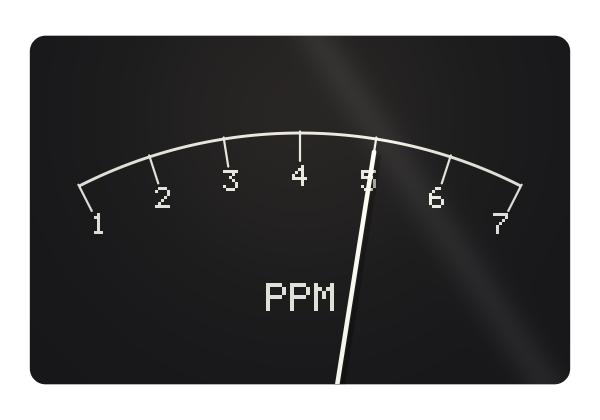
PPM — IEC 60268-10 type II, the BBC peak programme meter. Seven marks, numbered 1 to 7 and 4 dB apart, with mark 4 at the reference, and no red band: a PPM says where the peak is and leaves the judgement to you. The scale is linear in decibels, so the marks are evenly spaced. The fall-back is 20 dB in 2.8 s, which is a time constant of 1.2160 s, because an exponential decay in amplitude is a straight line in decibels. The integration is set so a 5 ms burst reads 2 dB below the same tone held, a time constant of 3.16 ms. The ballistics are the standard’s; the detector is not — see Known limits.
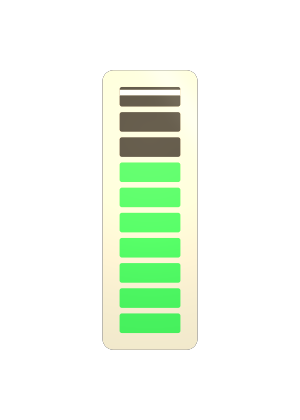
Bargraph — the LM3915’s ladder: ten LEDs, 3 dB a step. The top LED lights at the reference and is red, the two below it (3 and 6 dB of headroom) are amber, and the rest are green; the bottom one lights at −27 dB. The colours are fixed by the thresholds, not by a setting. It shares the PPM’s detector, because an LED meter and a moving-coil PPM off the same rectifier differ in the display, not the detector. The hold bar is the part nobody standardised, which is why Peak Hold and Hold Decay are yours on both settings of Standard.

Magic Eye — a 6U5 tuning indicator. A green fluorescent target with a shadow that is 100° wide with no signal, closing as the level rises across a 40 dB range and shutting at the reference level. Past that, the two wings sweep through each other and the overlap burns brighter — 15° of overlap at +6 dB — which is what anyone who has used one actually watches for. The target warms up from cold over the first few seconds, as a heater does. Only the 100° is a published figure; the mapping from level to angle, the warm-up, the persistence and the wear are this plugin’s own model. Nothing specifies a magic eye’s movement either, so on Standard it borrows the VU’s.
How it works
Once per frame Needle reads Resolume’s 64-bin spectrum, takes a level from the sum over every bin (read through Bin Law), and applies Reference Level and Sensitivity once. That level drives four instruments at once, whatever Type shows: the VU movement, the PPM detector the bargraph shares with it, the bargraph’s hold, and the eye.
Those instruments are integrated at 4800 steps a second, not once per frame. A frame is a twentieth to a seventh of the 300 ms the VU standard specifies, which is far too coarse to meet it and would make the answer depend on the frame rate. 4800 divides 24, 30, 48, 60, 120 and 240 exactly, and half a second of the same signal reads 0.712908590 at 24, 30, 50, 60 and 144 fps, with a spread of exactly zero.
Frame one takes no steps. A clip triggered 40 seconds into a composition is handed a clock that reads 40; Needle adopts that as its origin rather than integrating 40 seconds before anybody has seen a frame. Such a clip reaches 99 % in 300.24 ms, the same to 2.5 µs as one triggered at zero. The meters start at rest and swing up, as a meter does. A frame longer than a quarter of a second — a stall, a seek, a scrub — is treated as a quarter of a second.
The CPU works out every position; the shader only draws.
Performance
ndtest --bench measures under 0.03 ms a frame at every raster from 720p to 4K on Apple
Silicon — under a fifth of one per cent of a 60 fps frame. That is as precise as the measurement
gets: one pass is so cheap that the number is dominated by scheduling, and back-to-back passes at
4K have ranged from 0.020 to 0.077 ms. Nothing has been timed on Windows or inside Resolume.
Known limits
- Never loaded into Resolume on macOS, and no real audio has reached it in a host. How 31 controls in four groups present in Resolume’s inspector is untested.
- The calibration is nominal. Whether a full-scale tone produces a bin of 1.0 depends on the host’s window and normalisation, which the plugin cannot discover. Reference Level and Sensitivity are how you put the needle where your programme sits, and Bin Law is a guess you can flip.
- It is not a true-peak meter, and cannot be. A magnitude spectrum has no phase, so the peak inside the block cannot be recovered. The PPM and bargraph are driven by a block RMS: on a sine that reads 3.01 dB below a real PPM, and on peakier material — drums, speech, anything clipped — further below by that material’s crest factor.
- A transient shorter than a frame is already averaged before Needle sees it: there is one spectrum per frame. The PPM’s 3.16 ms integration is honoured by the engine but cannot be exercised by programme through this path.
- A stereo pair is two instruments on one spectrum. Both read the programme.
- Three quoted figures come from background knowledge and were not checked against a document: the PPM’s 2 dB for a 5 ms burst, the BBC PPM’s seven marks 4 dB apart, and the 6U5’s 100° shadow. Only the first can affect a ballistic claim.
- Free at the defaults is not identical to Standard. The VU’s rise and overshoot and the PPM’s fall match; the VU’s and eye’s fall and the PPM’s rise do not, because one Rise and one Fall control cannot match both instruments’ standards at once.
- Text is pixel-exact only at Rotation 0. No factory presets and no OpenFX port.
- There is a browser demo at needle-demo.stoatworks-labs.com. It is a port to a web page, not the plugin: the shaders run in WebGL2 and any CPU half is rewritten in JavaScript. The page lists what it does not reproduce.
If it does nothing
The pointer never moves. The commonest reason is that no audio is reaching the layer. Needle logs whether any did:
macOS    ~/Library/Logs/needle/needle.YYYY-MM-DD.log
Windows  %LOCALAPPDATA%\needle\logs\needle.YYYY-MM-DD.log
A line reading no audio on this layer -- every FFT bin is zero means the Audio input has nothing
on it. The log also records the build, the GL driver, the solved ballistic constants and what unit
the host’s clock arrives in.
It moves, but barely, or pins. Move Reference Level, then try the other Bin Law.
Needle Red/Green/Blue, Persistence or Peak Hold does nothing. Each only acts on some Types — see above.
About
The last group is the Stoatworks About block: a credit line, and buttons that open the user guide, the project page, the source on GitHub and the support page.
Reporting something: github.com/stoatworks-labs/needle/issues. A screenshot, the Type, and what the audio was is usually enough.