

Pattern is a tracker’s pattern editor written by the music as it plays, for
Resolume Arena and Avenue, as an FFGL source. It does not play music
and it does not animate a screen. It runs a tracker backwards: the row cursor runs on the
tracker’s own clock, four rows a beat at the default Speed, rate-locked to Resolume’s tempo,
and every onset the plugin hears in a channel’s band of the spectrum writes a note into that
channel on the current row. A busy passage fills the pattern, a sparse one leaves dots, and
after row 3F the cursor wraps and the next pass overwrites the last.
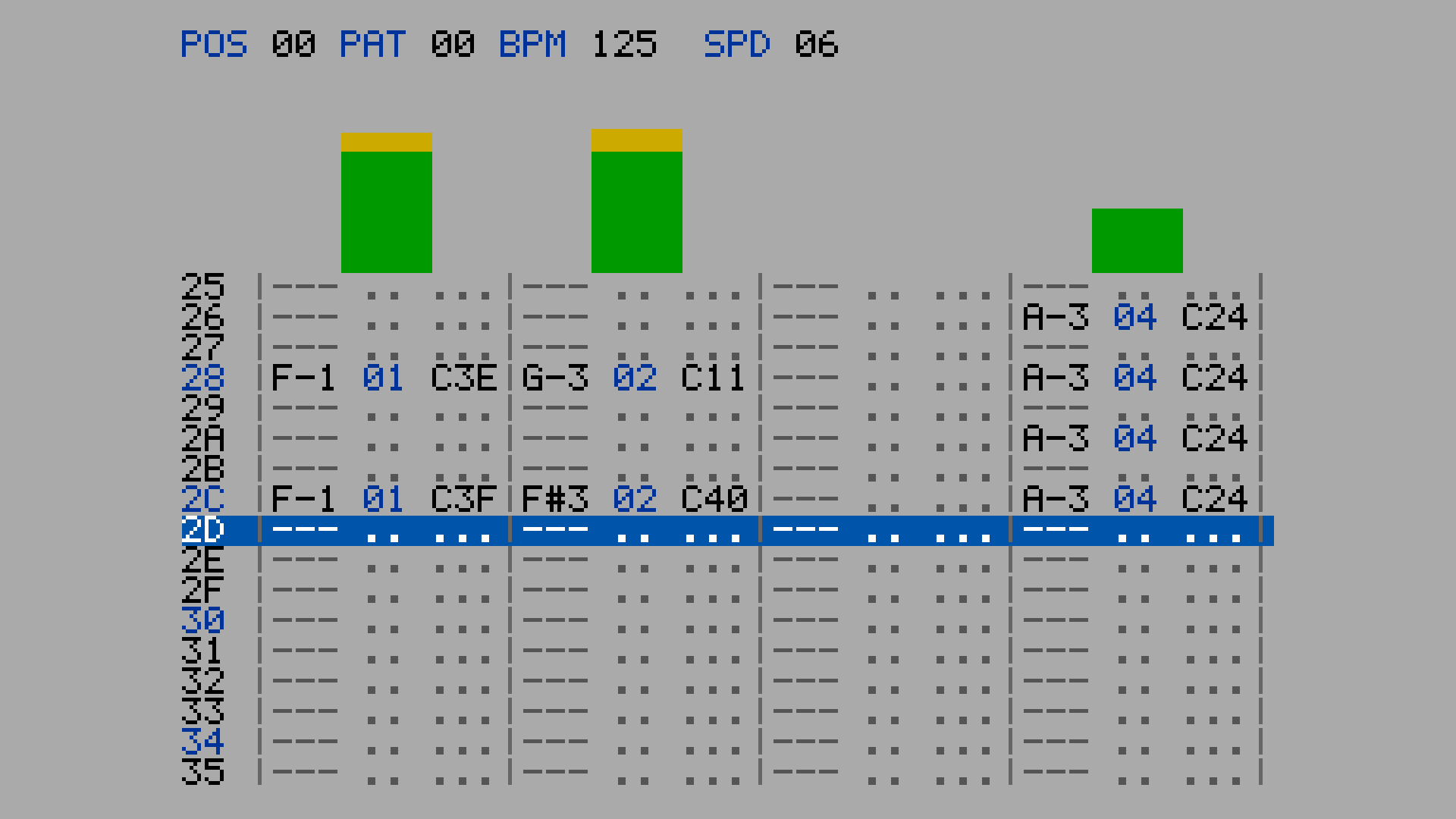
Four channels at 125 BPM, the harness’s own drum loop, rendered by the offline harness rather than captured from Resolume. Each channel column reads note, sample number and effect; the blue row is the cursor.
Before you rely on this: released at v0.1.1, and honestly early. The tracker is measured rather than asserted, by a harness that drives the real plugin class, and nine of its ten check groups open no GL context at all: the row cursor sits on floor(t / T) mod 64 on every one of 36,000 frames of a ten-minute run at 60 fps (and 30,000 at 50, 18,000 at 30) from a host clock at 499,000,000 ms, with swing and across a tempo change; a burst in band k writes exactly one note, in channel k, on the row current at that frame, at four and eight channels under both bin laws; loud audio already playing when the clip starts writes no false note in its first second; all 64 bins give the predicted note or
---under Linear and Log, folded and unfolded; the next pass clears, keeps and overwrites rows exactly; a metronome is detected within 1 BPM by 4.00 s at four frame rates, and so are 45 drum grooves rendered as audio from 80 to 170 BPM, at the right metrical level; and at 640 × 360 and 320 × 180, at Scale 1 to 4 and Auto, every scaled block is one colour and every probed glyph matches the font table bit for bit. Eight deliberate faults are shown to make those checks fail (one of them is v0.1.0’s own tempo detector), and a one-character change to the shipped shader fails 36 assertions. All 17 controls are shown to change the picture. It has never been loaded into Resolume on macOS, and no real audio has reached it in a host: the one host it has run in there is the fleet’s own test host,oxbow. On Windows, a build of v0.1.0 (the same code but for the tempo detector) loads, registers as a source and renders in Resolume Arena 7.27.1, with all 23 host controls matching what the plugin declares — on software rendering (win-lab, Mesa llvmpipe, no GPU), so that says nothing about a GPU. That box has no sound device, so its 12 audio-driven controls were not exercised there, and the Manual BPM could not be shown moving on the gate’s still picture (it changes three digits in the header). Try it on a spare layer before you put it in a show.This codebase was created with AI assistance, directed and reviewed by a human author.
Installing
Every download carries one source, SW Pattern. Drop it into Resolume’s effects folder and restart Resolume:
macOS    ~/Documents/Resolume Arena/Extra Effects/
Windows  %USERPROFILE%\Documents\Resolume Arena\Extra Effects\
Avenue uses the same layout under its own folder name. The plugin then appears under Sources as SW Pattern.
The macOS download is a universal build (Apple silicon and Intel), as a .dmg or a .zip.
It is Developer ID-signed and notarised, so the bundle simply loads. The Windows download is an x64 installer or a .zip. It is not code-signed, so the installer
trips SmartScreen once: More info → Run anyway.
The tracker runs backwards
A tracker plays a pattern of 64 rows. The rows advance at a rate set by two numbers: Speed, in ticks a row, and BPM, where a tick lasts 2.5 / BPM seconds. At the default Speed of 6 a row is 15 / BPM seconds, so there are four rows to a beat and a 64-row pattern is four bars. Each row holds one note per channel: a note name, a sample number and an effect.
FFGL gives a plugin no audio output, only the spectrum of what is playing, once a frame, as
64 bins. So Pattern cannot play a pattern; it writes one. The row cursor runs on the real
tracker clock, rate-locked to the host’s BPM. Each channel owns a band of the 64 bins. When the
energy in a band rises sharply, an onset, the plugin writes a note into that channel on the
row the cursor is on: the note’s pitch is the band’s loudest bin, read through the bin law
and folded into the tracker’s three octaves; its volume is a Cxx effect from how far the
onset stood over the band’s recent level; its sample number is the channel’s. The strongest
onset in a row wins the cell. Above each channel a VU bar is set by the note’s volume and falls
one step every 20 ms, the way a meter driven by the vertical blank falls.
That is the whole plugin, and the look follows from it:
| the rule | what comes out |
|---|---|
| the cursor runs on a clock, not an animation | it steps on the beat, four rows a beat at Speed 6, and a tempo change carries the phase across without a jump |
| nothing is written that was not heard | a busy passage fills every row; a sparse one leaves dots; silence leaves the pattern as it was |
| the ring: a row is cleared as the cursor enters it | after 3F the next pass overwrites the last; rows above the cursor are this pass, rows below it are the last; when the band drops out, its columns empty from the cursor down |
| one band per channel | each column is one part of the spectrum: at the defaults, below 1.1 kHz, 1.1 to 5.2 kHz, 5.2 to 12.7 kHz and above, at 44.1 kHz |
| the peak bin names the note | the note column is the pitch class of the loudest bin in the band, so a bass line reads as different notes and a snare reads as one |
It is not a MOD player. It draws no logos and no tracker’s name; the themes are named by colour, and the font is our own.
Start here
Put SW Pattern on a layer and play something with a beat. Out of the box you get four channels on the grey theme, the cursor on Resolume’s tempo at Speed 6, 17 rows visible, VU bars and the effects column, scaled to the largest whole number of pixels that fits the layer.
Then:
- Watch the cursor. It moves four rows a beat because it runs on the tracker clock. Change Resolume’s BPM and it follows; Speed → 3 and it runs eight rows a beat, a pass in under four seconds at 125 BPM; Speed → 12 and it crawls.
- Watch the ring. After row
3Fthe cursor wraps and starts overwriting. Mute a channel of your music and its column empties from the cursor down while the rows below still show the last pass. Keep Notes on and nothing is cleared: the pattern fills to solid over a few passes. - Channels → 8. The spectrum is split eight ways; the screen gets wider. Show Effects off narrows each channel to note and sample so eight fit at a larger Scale.
- Bin Law → Log and the same bins mean different notes: the low bins spread over more
of the pattern’s range. Turn Fold Octaves off and every pitch outside C-1 to B-3 shows
as
---, which is the honest answer and a duller picture. - Sensitivity down if every row is written, up if the pattern stays empty. Band Split moves the boundaries between channels towards or away from the low end.
- Tempo Source → Manual and the cursor runs on the BPM slider, whatever Resolume or the music is doing.
Every slider is declared to the host as 0 to 1, except the three counts, which are integers. The value each position stands for is given with each control below.
The Clock group
Tempo Source — Host, Detected or Manual; Host by default. Where the row clock gets its BPM. Host is Resolume’s tempo, delivered through the FFGL beat info; Detected is the plugin’s own estimate from the audio (see below); Manual is the BPM slider. The clock is rate-locked only: row 0 is wherever the clip started, not the host’s downbeat.
BPM — 60 to 200 (0 to 1 is 60 + 140 × the slider; 125 by default). Used only when Tempo Source is Manual.
Speed — 1 to 31, an integer, 6 by default. Ticks a row; a tick is 2.5 / BPM
seconds, so a row is Speed × 2.5 / BPM seconds and at 6 there are four rows a beat. The header
shows it as SPD.
Swing — 0 to 1; 0 by default. Delays every odd row by up to half a row (the slider is half a row at 1), so pairs of rows play long-short.
Rows — 64 or 32; 64 by default. The pattern’s length, and so the ring’s: at 125 BPM and Speed 6 a 64-row pass takes 7.68 s and a 32-row pass half that.
Keep Notes — off by default. On, a row is never cleared as the cursor enters it, so every pass adds to the last and the pattern fills to solid. Off, clearing is what makes a sparse passage leave dots and an arrangement change show as replacement.
The Listening group
Channels — 4 or 8; 4 by default. How many channels, and so how many bands the 64 bins are split into. Changing it re-lays the screen.
Bin Law — Linear or Log; Linear by default. What a bin means in hertz: under Linear the 64 bins run evenly from 0 to half the sample rate (a bin is 345 Hz wide at 44.1 kHz), under Log they run in equal ratios from 20 Hz to half the sample rate. Nobody has measured which Resolume does, so it is a switch. It changes the note each bin names and the frequencies at which the band boundaries fall, not which bins a channel gets.
Bin Value — Magnitude or Power; Magnitude by default. Whether the host’s bins are read as amplitudes or as powers (square-rooted). The other unmeasured fact about Resolume’s spectrum; Power makes quiet bins count for more.
Sensitivity — 0 to 1; 0.5 by default. The onset threshold, as a ratio over each band’s running level of change: about 12 at 0, 4.2 at the default and 1.5 at 1. Lower it if the pattern stays empty, raise it if every row is written.
Band Split — 0 to 1; 0.4 by default. Tilts the band boundaries towards the low end: the edges sit at (k / N)^γ of the way through the bins, γ from 1 at 0 (equal widths, which under Linear puts the whole of the music into channel 1) to 4 at 1. At the default four channels own bins 0-2, 3-13, 14-33 and 34-63.
Fold Octaves — on by default. A tracker’s range is C-1 to B-3, three octaves, and under
Linear at 44.1 kHz only the first three bins fall inside it. On, a pitch outside the range is
moved by whole octaves into it, so the note name is the pitch class the band’s peak has and
only the octave digit is a fiction. Off, an out-of-range pitch shows as ---.
Audio — the host’s audio input, the FFT buffer Resolume fills. Which layer or composition it listens to is chosen in Resolume’s inspector.
The Display group
Theme — Grey, Blue or Green; Grey by default. Three colour schemes, named by colour: black on grey with blue accents, light blue on navy, green on black.
Rows Visible — 3 to 33, an integer, 17 by default. How many pattern rows the screen shows; the cursor sits at the middle one (an even count has one more row below the cursor than above). Fewer rows make a shorter screen, which Auto scaling can then draw larger.
Show VU — on by default. The VU bar above each channel: 48 steps, set by each note’s volume, falling one step every 20 ms.
Show Effects — on by default. The Cxx volume column in each channel. Off, a channel is
note and sample only, about a third narrower, which is how eight channels fit at Scale 3 on a
1080p layer.
Scale — 0 to 8, an integer, 0 by default, which is Auto: the largest whole number of screen pixels per plugin pixel at which the whole screen fits the layer both ways, never less than 1. 1 to 8 are that many pixels per pixel, exactly; a screen that does not fit is centred and cropped. Scaling is always by whole pixels, so every glyph edge is a pixel edge.
The header
POS and PAT count passes (the pass modulo 128 and 64, in hex); there is no song and no
order list. BPM is the tempo the clock is running on, with * after it when Detected has
settled and ? while it has not. SPD is the Speed.
The clock, exactly
The row phase is base + (t − anchor) / T in double precision, where T is the row period
Speed × 2.5 / BPM, and the row is its floor with an allowance of a millionth of a row. When the
period changes, the phase is carried across at that instant and counted from there under the
new period, so a tempo change never jumps a row. Resolume’s host clock runs to hundreds of
millions of milliseconds; a phase kept in single precision fails on 2,400 of 36,000 frames at
that magnitude, which is why it is not.
A host time that goes backwards is treated as a loop point: the phase is carried across and no time passes, so a looping clip keeps its cursor moving rather than snapping to row 0. A jump forward of more than a whole pattern clears it.
The listening, exactly
Frame one primes the detector: the previous spectrum is set to the current one and each band’s
floor is seeded at an eighth of its level, so a clip that triggers on top of loud audio writes
nothing false in its first second and still hears a real onset a moment later. From then on
each band’s flux is the sum over its bins of the rise in magnitude since the last frame;
an onset is a flux that is rising, over a 50 ms refractory period, and above the band’s floor
(a one-second running mean of its flux) times the Sensitivity ratio. The volume is
64 × log2(flux / threshold) / 3, so an onset just over the line is C01 and one eight times
over it is C40.
Two consequences, both found filming the release video and both worth knowing:
- A quiet band hears the leading edge of any sharp transient. The detector reads the first frame that contains an onset, and the first few milliseconds of a click are broadband. A band with nothing of its own has a floor near zero, so a kick with a hard attack writes every channel until each band’s floor has learned the leak, about a second later. Sounds with soft attacks stay in their own columns; Sensitivity lowers the floor’s share but not the absolute floor.
- A band holding a sustained instrument adapts to it. A bass under a kick keeps that band’s floor high, so the kick can fail the ratio there while a quieter neighbouring band hears it through leakage and writes it instead. The note column then names the neighbour’s peak bin.
Detected tempo
With Tempo Source on Detected the plugin works out the beat from the audio itself. It keeps
three onset envelopes at 100 Hz, one each for the low end (below 400 Hz: kick, bass), the
middle (400 Hz to 5 kHz: snare, clap, most pitched parts) and the top (hats, cymbals), and
evens them out so a quiet clap counts as much as a loud kick. Once a second it looks at the
last six seconds for the period that repeats best together with its subdivision and its
grouping, and takes the fastest level that holds up: the beat rather than the half note, and
the beat rather than the eighths. A reading is used only when the one before it agrees within
2 %, so the first appears after about four seconds and a single stray reading never moves the
clock. The row clock follows the estimate, re-anchoring the phase each time it changes, and
the header shows ? until it has settled and * after. The three registers are fixed: the
Channels and Band Split controls do not change what the tempo detector hears.
Measured, through the offline harness’s own FFT (not Resolume’s):
- A metronome at 120, 100 and 150 BPM, at 24 to 60 fps, is found within ±1 BPM at 4.00 s and held for twelve seconds, with the row clock running at the detected tempo over a host saying 77.
- 45 drum grooves rendered as audio — kick on one and three with a clap on two and four and hats on the eighths; the same with the clap and hats far quieter; a kick on the “and” of two as well; a syncopated pluck over the top; each at 80, 90, 100, 110, 125, 140, 150, 160 and 170 BPM; and the release video’s four-on-the-floor house groove at 115 to 135 — all read within ±1 BPM of the right tempo (not its half or double) by 4.00 s and hold it, the worst error after that 0.26 BPM.
- The release video’s own soundtrack reads 124.5 to 125.0 for its whole length at 30 and 60 fps.
v0.1.0 read the half note. Version 0.1.0 summed all the audio into one envelope, where a loud kick outweighed the clap, and it read 62 for the video’s 125 BPM groove, 160 for a backbeat at 80 and 200 for one at 100. v0.1.1 replaces it; if you set up a show with v0.1.0 and switched to Host because of this, Detected is worth another try.
Still wrong, and printed by the harness rather than hidden: a breakbeat with ghost snares and sixteenth hats reads double at 80 BPM and half from 140 to 170; a four-on-the-floor with an off-beat bass reads double at 80 and 90, because its eighths really are a pulse at twice the tempo. Nothing has been measured through Resolume’s own FFT. For such material, and for anything the show depends on, use Host or Manual.
Performance
Measured by the offline harness on an Apple M4 Max, fastest of five passes of 200 frames with
the harness’s drum loop playing, glFinish both sides:
| ms/frame | % of a 60 fps frame | |
|---|---|---|
| 1280 × 720 | 0.041 | 0.2% |
| 1920 × 1080 | 0.054 | 0.3% |
| 3840 × 2160 | 0.128 | 0.8% |
One triangle, a font texture and a screen texture of at most 92 × 41 cells re-uploaded every frame; the tracker is a few hundred multiply-adds a frame on the CPU. Nothing was timed inside Resolume, and nothing was timed on Windows.
If it looks wrong
The pattern stays empty. No audio is reaching the layer: check the Audio input in Resolume’s inspector and the log (below), which says whether any bin was ever non-zero. If audio is arriving, raise Sensitivity.
Every row is written, in every channel. The music has hard transients (a quiet band hears the leading edge of any click, above) or Sensitivity is high. Lower it; a second of playing lets each band learn its floor.
All the notes are the same name. Under Linear at 44.1 kHz a band of a few bins has only a few pitches to offer, and a drum has one. Bin Law Log spreads the low bins; a melodic part in a wide band reads as different notes.
Every cell says ---. Fold Octaves is off and the pitches are outside C-1 to B-3, which
under Linear is nearly everything above 1 kHz. Turn it on.
The cursor does not move. The host is not sending time (the log says so), or Tempo Source is Detected and nothing has been detected yet: the clock then runs on the host’s BPM, or on 120 if the host never said.
The cursor runs at half or double the beat. Speed is not 6 (four rows a beat needs 6), or Detected has read the music at another metrical level (a breakbeat, or an off-beat bass at a slow tempo; see Detected tempo). Use Host.
The screen is cropped. Scale is fixed and larger than fits. Scale 0 is Auto.
The screen is tiny. Auto could only fit it at Scale 1: a small layer, eight channels or many rows visible. Fewer rows, four channels, or Show Effects off make it fit larger.
SW Pattern is not under Sources. Check the folder under Installing, and that Resolume was restarted.
It does nothing at all. A shader that will not compile looks exactly like that, and the real message is in the log:
macOS    ~/Library/Logs/pattern/pattern.YYYY-MM-DD.log
Windows  %LOCALAPPDATA%\pattern\logs\pattern.YYYY-MM-DD.log
It records the build, the GL driver, what unit the host’s clock turned out to be, whether any audio reached the layer, and which tempo the clock is following.
Known limits
- Never loaded into Resolume on macOS, and no real audio has reached it in a host. How Resolume lays out its 64 bins, whether they are magnitudes or powers, and what sample rate stands behind them are assumptions with switches (Bin Law, Bin Value) and the host’s own sample-rate call, 44.1 kHz when it never comes. The onset thresholds were set on synthetic spectra and a synthesised track through the harness’s own FFT, whose normalisation is not Resolume’s; Sensitivity is the hedge.
- Detected tempo has met a metronome, rendered grooves and one synthesised track, never music through Resolume’s FFT. It reads a breakbeat, and an off-beat bass at 80 to 90 BPM, at the wrong level. See above.
- A quiet band hears the leading edge of any sharp transient, and a band with a sustained instrument in it can miss a drum a neighbour hears. See The listening, exactly.
- Rate lock only. Row 0 is where the clip started, not the host’s downbeat: the FFGL
barPhaseis not used, because nothing has measured how Resolume drives it. - The note range is C-1 to B-3 with C-2 as middle C, one reading of the usual convention; nothing standardises it.
- The
Cxxvolume reads low on busy material (C01toC18on the harness’s track), because the floor adapts to a busy band and the strength is measured against it. A tuning question, not a correctness one. - The font is a 5 × 7 in a 6 × 8 cell, ours; a tracker’s wider 8 × 8 face was not drawn for this release.
- Checked at 640 × 360 and 320 × 180 in the harness, and only timed at 720p, 1080p and 4K. Only ever run on an Apple M4 Max, although the macOS build contains an Intel slice.
- No presets and no OpenFX version.
- There is a browser demo at pattern-demo.stoatworks-labs.com. It is a port to a web page, not the plugin: the shader runs in WebGL2 and the tracker, the screen builder and the band arithmetic are rewritten in JavaScript, fed a spectrum the page synthesises because a browser page has no host audio. The page lists what it does not reproduce.
About
The last group, About, carries the plugin’s name, version, licence and maker, and buttons that open this user guide (stoatworks-labs.com/software/pattern/guide/), the project page, the source on GitHub and the support page in your browser.
Reporting something
github.com/stoatworks-labs/pattern/issues. A screenshot, the Clock and Listening settings, what was playing, and the composition’s resolution and frame rate are usually enough. If the pattern never fills, attach the log.