

Photofinish is a strip camera for Resolume Arena and Avenue, as an FFGL effect. A photo-finish camera has no frame. It has one column of sensor with the film moving past it, so the horizontal axis of its picture is time, not space. Photofinish points that column at your clip. Anything standing still becomes a streak, anything moving is stretched or squashed by how fast it crosses, and anything going the other way comes out backwards. None of that is drawn on. It is simply what one column sampled over and over produces.
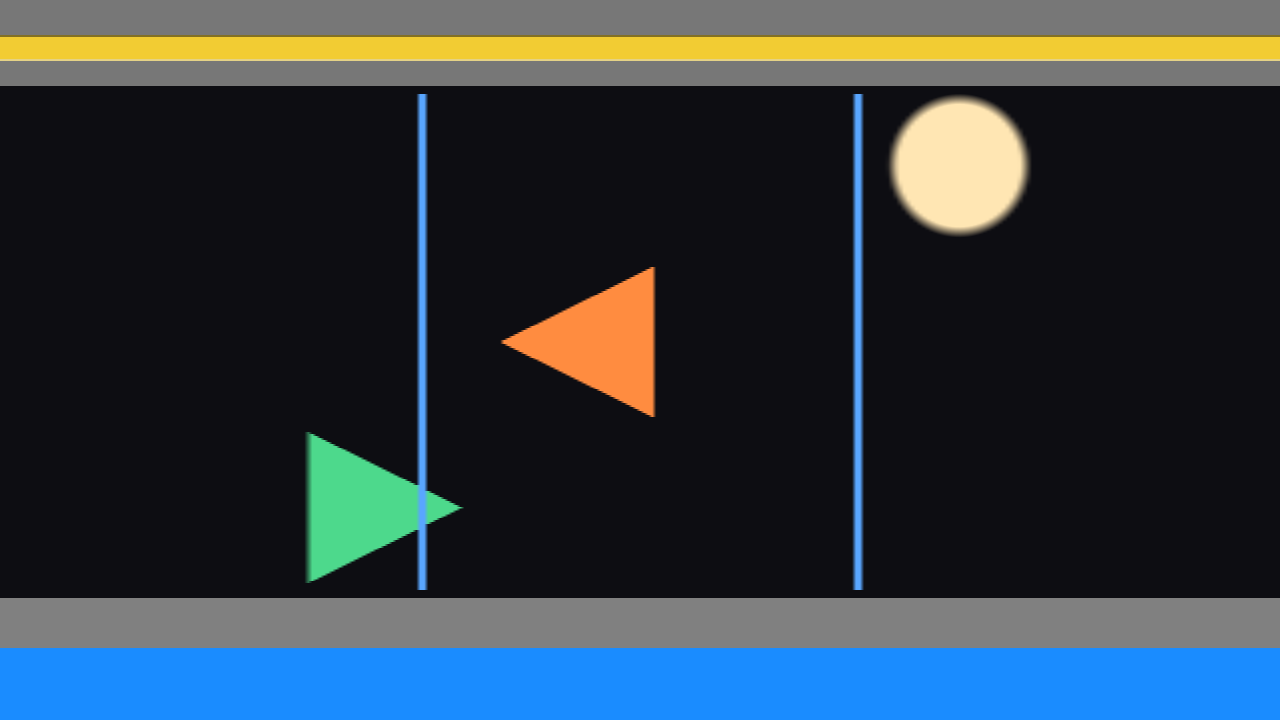
The demo card through the plugin, rendered offline by its own harness rather than captured from Resolume. Both arrows have the same shape in the source and both cross the slit at exactly the film speed, so both keep their true size. The orange one was travelling right and comes out mirrored. The thin blue lines are one bar crossing at three times the film speed, so each crossing is a third as wide. Everything that stood still is a flat streak.
Before you rely on this: released at v0.1.0, and honestly early. The behaviour is measured against its closed form rather than asserted. A moving object’s rendered width matches
b·c/vto within 0.016 of a column, and an object crossing at the film speed comes out at its own width to within 0.031 of a column at two different resolutions. A still picture renders as bit-for-bit constant streaks, and the same take started at t = 0 and at 499,217,238 ms (about 5.8 days into a session) comes out bit-identical. All 13 controls are confirmed to change the picture, and the bundle registers, instantiates and renders in the fleet’s own test host. But it has never been loaded into Resolume on macOS, so how the controls present in a real inspector is untested. On Windows, a build of v0.1.0 loads, registers and renders in Resolume Arena 7.27.1, with every control matching what the plugin declares — on software rendering, so that says nothing about a GPU. Try it on a spare layer first, and please report anything that misbehaves.This codebase was created with AI assistance, directed and reviewed by a human author.
Installing
Download the build for your machine from the releases page:
| macOS | A universal .dmg or .zip (Apple Silicon and Intel) containing Photofinish.bundle |
| Windows | An x64 installer, or a .zip containing Photofinish.dll |
Drop the plugin into Resolume’s Extra Effects folder and restart Resolume:
macOS    ~/Documents/Resolume Arena/Extra Effects/
Windows  %USERPROFILE%\Documents\Resolume Arena\Extra Effects\
Avenue uses the same layout under its own folder name. The plugin then appears under Effects as SW Photofinish.
The macOS build is Developer ID-signed and notarised, so the bundle simply loads. There is
nothing to clear and no xattr step. The Windows build is not code-signed. Plugin files are not
gated the way .exe files are, so Resolume loads the DLL normally, but the installer trips
SmartScreen once: click More info, then Run anyway.
Start here
Put Photofinish on a clip where something is moving, and leave every control alone. The defaults give a one-pixel slit down the middle of the picture, a film speed of about four columns per frame at 60 fps, and a strip as long as the picture is wide, scrolling. You should see the newest column appear at the right edge and the picture slide left. At 1920 wide, one whole sweep takes about eight seconds.
What to point it at:
- Things crossing the frame sideways. Traffic, dancers, a crowd walking past, a slow pan. Things crossing the middle of the picture are what the slit sees.
- A static shot shows only streaks. That is correct: a picture that is not moving is the same column over and over. Move the Slit Position to where the action is.
Then reach for Time Per Column. That is the film speed, and it is the control the whole effect hangs off.
The Slit group
The slit is the one column of sensor. These controls say where it is and what it looks through.
Slit Position is where the slit sits across the picture, from one edge to the other. On the Horizontal axis it is a vertical line and this moves it left and right. On the Vertical axis it is a horizontal line and this moves it up and down. The middle is the default.
Slit Width is how many source pixels wide the slit is, from 1 to 64. The scale is geometric, so most of the slider sits at the narrow end, and the middle of the slider is about 8 pixels. One pixel is the default. It looks like a blur control and it is not. A wider slit averages across the direction of travel. Because that direction is time in the output, the average is over the time an object takes to cross the slit, which makes it motion blur along the time axis. It does nothing at all along the slit, and that is how you can tell. Think of it as exposure time.
Slit Angle leans the slit. The middle of the slider is upright, and each end leans it to 45° one way or the other. The lean is measured in the picture’s own proportions, so it is exactly 45° on screen only on a square picture. On a 16:9 clip the ends are a little shallower or steeper than that. A leaned slit reads different rows at slightly different places across the picture, so something crossing the frame is caught at a different moment at the top than at the bottom.
Axis sets which way the film runs.
| Axis | The slit is | Time runs |
|---|---|---|
| Horizontal | a vertical line | left to right across the picture. The default. |
| Vertical | a horizontal line | top to bottom down the picture |
Vertical is the one for things that fall or rise. It also swaps the roles of the two axes: a static diagonal becomes a vertical streak, and moving things draw diagonal traces whose slope is their speed.
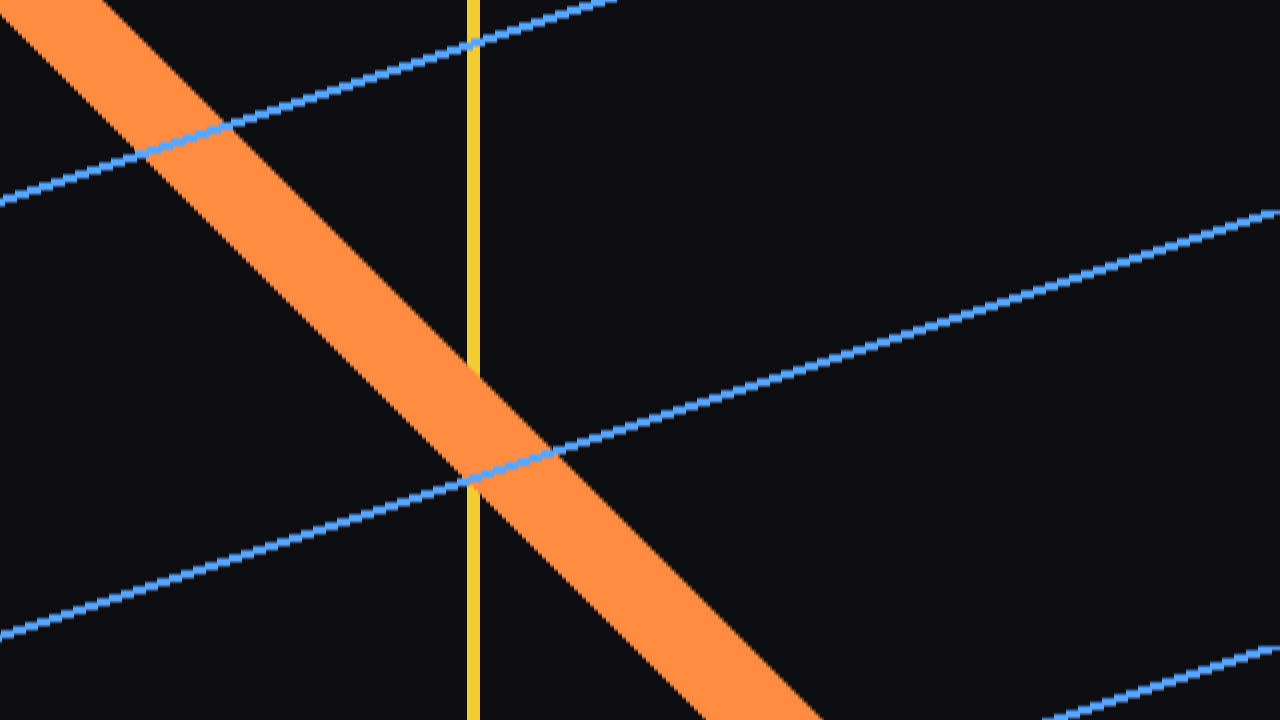
Direction sets which end of the strip holds the newest column.
| Direction | Newest column at |
|---|---|
| Forward | the right (Horizontal) or the bottom (Vertical). The default. |
| Reverse | the left (Horizontal) or the top (Vertical) |
This is what decides which way of travelling comes out mirrored. On Forward, things travelling right come out back to front and things travelling left do not. Reverse swaps them round. If the subject that matters looks backwards, flip Direction.
The Time group
Time Per Column is the film speed: how much of the clip’s time goes into each column, from 0.5 ms to 500 ms. It is the only rate in the plugin. The scale is geometric, so the middle of the slider is about 16 ms, which is roughly one column per frame at 60 fps. The default is about 4 ms, or four columns per frame at 60 fps.
This is the control that decides what everything looks like. An object comes out at its true proportions when it crosses the slit at the film speed. Anything slower is stretched and anything faster is squashed. So turn it until the thing you care about is the right shape, and everything else in the picture will be smeared or crushed around it. That is the look of a photo finish: the winner is normal and the crowd behind is not.
- Shorter than a frame (below about 16 ms at 60 fps): several columns are taken per frame, and the ones between two frames are built from the frames either side. See Interpolate.
- Longer than a frame: the strip stands still for a frame or two and then moves on a column. It never writes the same column twice.
Sweep Length is how many columns the strip holds, from 8 up to the full length of the picture along the time axis. It is a length, not a duration. One sweep takes Sweep Length × Time Per Column seconds. At the full length, one column is one output pixel. Anything shorter is magnified to fill the picture in blocks: each column is one instant, and a blend of two neighbours would be a moment nobody photographed.
Moving Sweep Length to a different step clears the strip and it builds up again from empty. Changing the length reshuffles what every stored column means, so starting over is the only honest answer. The slider is quantised to 48 steps so that a nudge usually changes nothing and a real move clears once.
Sync says where the film speed comes from.
| Sync | Film speed |
|---|---|
| Free | Time Per Column. The default. |
| Beat | One whole sweep per beat of Resolume’s tempo. Time Per Column is ignored. |
| Bar | One whole sweep per bar. Time Per Column is ignored. |
Under Beat or Bar the film speed is the beat or bar divided by Sweep Length. So a shorter strip also means slower film, and the full length at 120 bpm on Bar is about 1 ms per column. Sync sets a rate, not a phase: one sweep takes one bar, but the sweep does not start on the bar line. Locking the head to the bar line would make it jump on every tempo change or scrub and tear the strip.
Interpolate decides how columns that fall between two frames are made. It only matters when Time Per Column is shorter than a frame, which it is at the default.
| Interpolate | Between two frames |
|---|---|
| Nearest | Takes whichever frame is closer. Edges crossing the slit show as stair-steps. |
| Linear | Blends the two frames. The default, and smoother. |
Neither can invent what the host never delivered. If something crosses the slit in less than one frame, it was never over the slit in any frame the plugin was given, and it will not appear.
The Output group
Fill decides how the strip is laid out and what happens when it is full.
| Fill | What you see |
|---|---|
| Build | The write head marches across and wraps, writing in place. It builds up from empty the first time, then keeps sweeping, with a moving seam where the newest column meets the oldest. This is what a strip printer looks like. |
| Once | Fills the strip once and holds it. Nothing more is written. |
| Scroll | The newest column is always at the same edge and the whole picture slides. The default. |
Once has no reset button. To take another shot, move Sweep Length to a different step or change Axis. Either one empties the strip and it fills again.
Background is what a column shows before anything has been written to it. This is what you see while the strip first fills, and all the time on Build and Once until the head gets there.
| Background | Unwritten columns show |
|---|---|
| Black | Black. The default. |
| Source | The live clip, so the strip grows over the picture. |
| Transparent | Nothing, so whatever is on the layers below shows through. |
Mix crossfades with the untouched clip. At zero the clip passes through as it arrived. The default is fully on.
Freeze stops the film. No more columns are taken while it is on, so the strip holds exactly as it is, whatever the Fill mode. Turn it off and the film carries on from where it stopped.
How it works
There is one relation underneath everything. An object b pixels wide, crossing the slit at v
pixels per frame, photographed at c columns per frame, occupies
b · c / v columnsand each thing the effect is known for is that expression at a different value of v:
v = 0: a still object. Infinitely wide: a horizontal streak.vsmaller thanc: it crosses slowly and is stretched.vlarger thanc: it crosses quickly and is squashed.v = c: it comes out at its true proportions.vnegative: it is travelling the other way, and its leading edge reaches the slit first, so it lands at the older end of the strip. It comes out mirrored.
Each tick, the plugin copies one column from under the slit onto a ring of stored columns, and then lays the ring out across the picture in time order. Nothing else is involved. Nothing is warped, blurred or displaced on purpose, and the streaks, the stretching and the backwards runner are all consequences of that one substitution of time for space.
Performance
Measured on macOS, Apple Silicon only:
| ms/frame, default film speed | ms/frame, fastest film speed | share of a 60 fps frame | |
|---|---|---|---|
| 1280×720 | 0.17 | 0.20 | about 1% |
| 1920×1080 | 0.27 | 0.29 | about 1.7% |
| 3840×2160 | 0.96 | 1.03 | about 6% |
The fastest film speed takes 33 columns a frame instead of four, and the cost barely moves: a column is one pixel wide, so the frame is dominated by copying the picture in and laying the strip out.
Video memory is two picture-sized frame copies plus the ring, which at the full Sweep Length is another picture’s worth: about 25 MB at 1080p and about 100 MB at 4K, all at 8 bits per channel. Shorter Sweep Lengths make the ring smaller.
Known limits
- Never loaded into Resolume on macOS. Everything above was measured offline against the real plugin, plus one load in the fleet’s own test host. How the three groups read in Arena’s inspector, and whether Sweep Length clearing the strip mid-drag feels acceptable under a hand, is untested.
- The host’s clock unit is assumed, not observed. The plugin works out whether Resolume is sending seconds or milliseconds by watching the first few frames. That path has not been seen running in a real host. If the strip races across far too fast or barely moves, this is the first suspect, and the log says which unit it settled on.
- Sync has never seen a real tempo and does not align to the bar line. See Sync above.
- Nothing faster than a frame can be recovered. FFGL gives a plugin the frames the host sends and no way to ask for others.
- Slit Angle is 45° only on a square picture.
- No factory presets and no OpenFX version.
- There is a browser demo at photofinish-demo.stoatworks-labs.com. It is a port to a web page, not the plugin: the shaders run in WebGL2 and any CPU half is rewritten in JavaScript. The page lists what it does not reproduce.
- Never run on Intel (the universal build contains the slice; only Apple Silicon has run it), or on a machine without a GPU.
If it looks wrong
| What you see | Usually |
|---|---|
| Only streaks | Nothing is moving under the slit. Move Slit Position, or try Axis Vertical. |
| Everything squashed into slivers | The subject is faster than the film. Shorten Time Per Column. |
| Everything stretched into smears | The subject is slower than the film. Lengthen Time Per Column. |
| The strip keeps going blank | Sweep Length or Axis was moved, or the composition changed resolution. |
| It stopped | Freeze is on, or Fill is on Once and the strip is full. |
| The subject is back to front | Flip Direction. |
Diagnostics
The plugin writes a small log, and it is the single most useful thing to attach to a bug report:
macOS    ~/Library/Logs/photofinish/photofinish.YYYY-MM-DD.log
Windows  %LOCALAPPDATA%\photofinish\logs\photofinish.YYYY-MM-DD.log
It records the build, the GL driver, which shader failed to compile if one did, which clock unit the host turned out to be sending, and the ring’s shape every time it is rebuilt. The last two are invisible from the picture, and both change what every column means.
About
The About group at the bottom of the inspector carries the credit line and buttons that open the project’s pages in your browser. It does nothing to the picture.
Bugs and ideas: github.com/stoatworks-labs/photofinish/issues.