

Pilot is a ZX Spectrum tape loader for Resolume Arena and Avenue, as an FFGL effect. The clip arrives the way a Spectrum loaded a screen: in screen-memory order, at the baud rate, monochrome first and colour last, with the border striped by the loading signal itself. It is a transition in practice — but not a shape moving across the frame. It is an address order, and the pattern it makes is the one the hardware made, not one anybody chose.
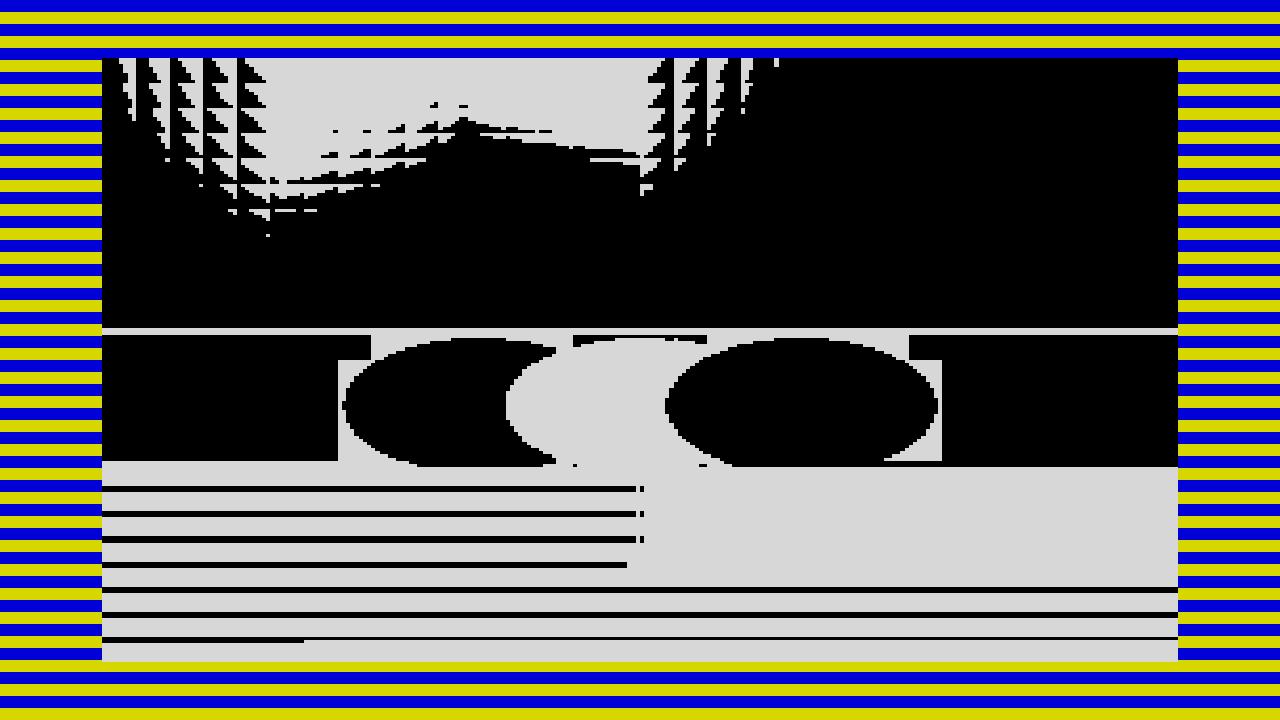
Rendered by the plugin’s own offline harness, not captured from Resolume.
Before you rely on this: released at v0.1.0, and honestly early. An offline harness driving the real plugin class proves the address order agrees with an independent derivation for all 6144 addresses, bitwise, and that the rendered frame matches it for all 49,152 screen pixels at 1920×1080 and 640×480, at six points in the load, with zero disagreements; all 14 controls are confirmed to change the picture. It has never been loaded into Resolume on macOS, so how the controls present in the inspector is untested. On Windows, a build of v0.1.0 loads, registers and renders in Resolume Arena 7.27.1, with every control matching what the plugin declares — on software rendering, so that says nothing about a GPU. Try it on a spare layer first, and please report anything that misbehaves.
This codebase was created with AI assistance, directed and reviewed by a human author.
Installing
Drop the plugin into Resolume’s effects folder and restart Resolume:
macOS    ~/Documents/Resolume Arena/Extra Effects/
Windows  %USERPROFILE%\Documents\Resolume Arena\Extra Effects\
Avenue uses the same layout under its own folder name. It then appears in the effects browser as SW Pilot.
The macOS download is a universal build (Apple silicon and Intel) as a .dmg
or a .zip; Windows is x64, as an installer or a .zip. The macOS build is
Developer ID-signed and notarised, so it simply loads. The Windows build is
not code-signed: the plugin file itself loads normally, and only the installer
trips SmartScreen, once — More info → Run anyway.
Start here
Put SW Pilot on a layer with a clip on it and leave every control alone. You get a Spectrum screen part way through loading: a black-and-white picture of your clip filling in, in bands, inside a border of yellow and blue stripes. That is the ZX 48 at its own rate, with Progress at 45% and Sync on Manual.
There is no trigger button. Where the load has got to is Progress, and nothing else:
- Manual (the default) — drag Progress from 0 to 1 and the tape plays through; drag it back to 0 and the load starts again. Scrub it by hand, map it to a fader, or animate it with Resolume’s own parameter animation.
- Clip time, Beat and Bar — the load runs by itself and loops: when it reaches the end it wraps straight back to the start and loads again. Progress is still live, as an offset: it sets where in the load the clock starts from.
Watch one whole load and three things happen that nobody designed. The picture does not wipe down the screen: it arrives in three thirds, each filling in as an eight-line venetian blind. It stays monochrome until about 89% of the way through, and then the colour lands all at once, because the colour bytes sit after the picture bytes on the tape. And the border stripes are the tape signal itself, so they move with the data.
The Machine group
Type — which loader: ZX 48, ZX 128, C64 turbo or Amstrad. This sets the nominal baud rate and the border’s colours and style (see The machines). The screen itself is a Spectrum display file whatever you pick.
Baud — a trim around the machine’s own rate rather than an absolute number: ×¼ at the bottom, the machine’s real rate at the centre (the default), ×4 at the top. It sets how fast the border stripes run and how long a load takes in Clip time sync. It does not change how fast the picture arrives in Manual — that is Progress’s job, on purpose: a real ZX 48 load is 37 seconds, and a 37-second transition you cannot scrub is no use to anybody.
Ink and Paper — the power-on attribute: the two colours the picture wears before its own colours arrive. Each is one of the Spectrum’s eight colours: Black, Blue, Red, Magenta, Green, Cyan, Yellow, White. A Spectrum powers up black ink on white paper, and so does this. They are also the colours the loading-error message is printed in, and Paper is what the Paper background shows.
Bright — Off, Auto (the default) or On. BRIGHT was one bit per character cell on the real machine, lifting that cell’s colours from 84% to full level. Off never sets it, so white is a light grey. On sets it on every cell, and on the power-on Ink and Paper too. Auto lets the picture decide, cell by cell: a cell whose brightest channel is above half way between the two hardware levels goes bright.
The Load group
Progress — where the load has got to, 0 to 1. The first stretch of it is the pilot tone (see Pilot Length), where the border is running and no picture has arrived yet; the rest is the tape, 6912 bytes of it. In the sync modes it becomes the offset the clock is added to.
Sync — what drives the load:
| Sync | One whole load takes |
|---|---|
| Manual | As long as you take to move Progress from 0 to 1. Nothing moves by itself. |
| Clip time | As long as the real tape: 6912 bytes at the current baud rate, plus the pilot tone. |
| Beat | One beat of Resolume’s tempo. |
| Bar | One bar, counted as four beats. |
Clip time is where the faithful behaviour lives. The tape really does run at the baud rate: at the defaults a ZX 48 load is about 37 seconds of data, 40 with its pilot tone. The other machines at their own rates take 25–30 seconds, and Baud stretches any of them from about a quarter of that to four times it. It runs from the clock Resolume hands the plugin, and loops.
Beat and Bar follow Resolume’s BPM and bar position, so a load starts on the beat or the bar line when Progress is at 0. With no tempo from the host they assume 120 BPM.
Error Rate — the chance that each block of the tape fails, from nothing (the default) up to one in two at the top of the slider. The tape is 27 blocks of 256 bytes. When a block fails, the Spectrum’s own report is printed over whatever had arrived —
R Tape loading error, 0:1— and the picture holds for one block’s worth of tape. Then the load starts again from an empty screen with whatever tape is left. The failures are seeded: the same settings fail in the same places every time, so scrubbing Progress back over a failure shows the same failure again, not a new roll of the dice. Even a low setting fails often over 27 blocks; halfway up the slider almost no load finishes.
Message On — whether the report is printed when a block fails. It does nothing at all unless Error Rate is up and a block has just failed. With it Off, a failure still holds and restarts the picture; it just does it silently.
The Border group
Border On — whether there is a border at all. Off is not a colour: it takes the border away, and the screen fills the whole composition. Border Width then has nothing to act on.
Border Width — how much of the composition the border takes off each edge, from none up to a quarter. The default is about 8%, which is close to what a Spectrum’s border was. The clip is squeezed into whatever is left, aspect and all, so the whole of it arrives framed — on a 16:9 composition a Spectrum pixel is wider than it is tall, as it was on a widescreen television.
Pilot Length — how much of the Progress range is spent on the pilot tone before the first byte lands, from none to half of it. The default is about 8%. During the pilot the screen shows only the Background and the border shows the machine’s pilot colours — red and cyan on a ZX 48 — changing to its data colours the moment the first byte arrives. At zero there is no pilot and the picture starts at once.
The machines
The border is not decoration. The Spectrum’s border was told the state of the tape signal and the beam painted it as it scanned, so the stripes are horizontal and there are baud ÷ 50 pairs of them from the top of the frame to the bottom — 30 on a ZX 48, 45 on a ZX 128, 40 on the Amstrad. Turn Baud up and there are more, thinner stripes.
| Type | Rate | Pilot tone | Data |
|---|---|---|---|
| ZX 48 | 1500 baud | red / cyan stripes | yellow / blue stripes |
| ZX 128 | 2250 baud | magenta / green stripes | white / black stripes |
| C64 turbo | 2400 baud | the whole border flashing | the whole border flashing |
| Amstrad | 2000 baud | bright cyan / blue stripes | bright red / yellow stripes |
Only the ZX 48 models a documented routine: its rate and its red/cyan then yellow/blue are the 48K ROM loader’s own. The other three are honest looks in the same shape. The ZX 128 is what 128K games actually shipped with — a fast loader on Spectrum hardware — rather than the 128’s ROM, which loaded exactly like the 48. The C64 turbo’s border is one colour at a time, changing once per byte at random and never to black, so it reads as a flicker rather than stripes. The Amstrad’s colours are chosen to be distinct, not measured from a machine.
The loading error
A real Spectrum did not clear the screen when a load failed. It printed the report over whatever had arrived and stopped. Pilot does the same: while the message is up, the picture freezes at what the failed attempt had reached; when it goes, the retry takes over from an empty screen. The report is drawn along the bottom character row of the screen, in the power-on Ink on Paper.
Because the retry starts with only the tape that is left, a load with Error Rate up can reach Progress 1 part-loaded — on a real machine you would rewind the tape and press play again. In Manual that is dragging Progress back; in the sync modes it happens on the next loop.
Output
Background — what an address that has not arrived yet shows:
- Paper (the default) — the power-on Paper colour, which is what a real machine showed.
- Black — black.
- Clip — the live clip, untouched. This turns the whole thing into a colour-and-quantise transition: the Spectrum version of the picture loads over the real one, in the Spectrum’s order.
It changes the screen area only, never the border.
Mix — dry/wet against the untouched clip. At 0 the output is the input, byte for byte, whatever everything else is set to — measured, not assumed. At full Mix the output is opaque.
How it works
The Spectrum’s screen is 6144 bytes of picture followed by 768 bytes of colour, and the picture is not stored top to bottom. The byte holding a pixel lives at
third × 2048 + line × 256 + character row × 32 + column byte— which third of the screen, then which of the eight lines inside a character cell, then which character row within that third. Fill the memory from the start of the tape to the end and the screen fills in that order: the first line of every character row in the top third, then the second line of each, and so on, then the middle third, then the bottom. That is the venetian blind. Pilot does nothing but fill the addresses in order.
The colour comes last because the 768 attribute bytes come last — one byte per 8×8 cell, giving that cell one ink, one paper and a BRIGHT bit. To make those, Pilot shrinks the clip to the Spectrum’s 256×192, splits each cell into its darker and lighter halves, and gives each half the nearest of the eight colours. Which half a pixel belongs to is settled from the picture, so the pattern of the monochrome phase does not change when colour arrives — only its two colours do.
Performance
Cheap, and nearly independent of the composition size, because the two expensive passes always run at 256×192 and 32×24. Measured on an M4 Max:
| Composition | ms/frame | Share of a 60 fps frame |
|---|---|---|
| 1280×720 | 0.09 | 0.5% |
| 1920×1080 | 0.21 | 1.2% |
| 3840×2160 | 0.36 | 2.2% |
Nothing has been timed on Windows or on an Intel Mac.
Known limits
- Never loaded into Resolume on macOS. Whether the four groups read sensibly in the inspector, whether Ink and Paper show as colour lists, and how Arena’s own textures behave are all untested.
- Baud does not drive the reveal in Manual. Use Clip time if you want the tape to take as long as a real one.
- The four machines are four looks. Only the ZX 48 models a real routine, and none has been compared against a real tape or an emulator. Every machine loads a Spectrum screen.
- Colours are recomputed every frame. On moving footage a cell’s two colours change during the load, which a real tape never could — its screen was converted once, before it was recorded.
- Clip time runs off Resolume’s clock and loops, rather than following the clip’s own playhead.
- Bar is always four beats.
- At the end of an error hold the picture jumps, for one frame, to the retry’s progress. A real machine drew the retry over the old picture.
- No factory presets and no OpenFX port.
- There is a browser demo at pilot-demo.stoatworks-labs.com. It is a port to a web page, not the plugin: the shaders run in WebGL2 and any CPU half is rewritten in JavaScript. The page lists what it does not reproduce.
If it looks like it is doing nothing
- Mix at zero is the clip, untouched — exactly.
- Progress inside the pilot tone shows only the Background and the border. Push it past Pilot Length.
- Background on Clip with Progress near 0 looks like the clip plus a border, because almost nothing has arrived yet.
- Message On does nothing until Error Rate is up and a block fails.
A shader that will not compile presents exactly as a plugin that does nothing, with the real message in the log:
macOS    ~/Library/Logs/pilot/pilot.YYYY-MM-DD.log
Windows  %LOCALAPPDATA%\pilot\logs\pilot.YYYY-MM-DD.log
About
The About group at the bottom shows the plugin’s name and version, with a row of buttons that open its links — the project page, the source and so on — in your browser.
Reporting something
github.com/stoatworks-labs/pilot/issues. A screenshot, the composition’s resolution and the settings you were on is usually enough.