

Polyhedral is two FFGL plugins for Resolume Arena and Avenue that throw polyhedral dice: SW Polyhedral, a source that throws them onto a table, and SW Dice Over, an effect that throws them over your clip. Press Roll and the dice come in over the edge of the frame, tumble, bounce off the frame’s edges and each other, and come to rest on a random result, or on the total you set, at exactly the Roll Time you set.
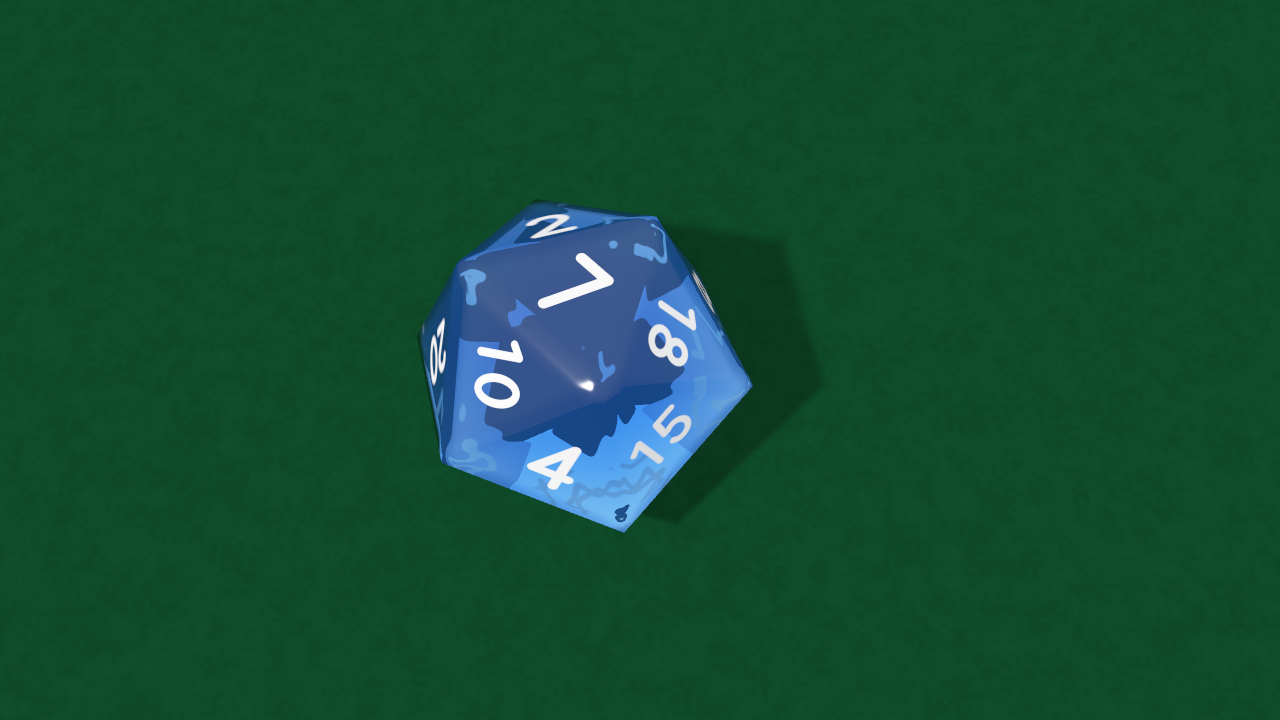
A gem d20 come to rest on 7: the numbers on the faces beneath show through, mirrored. Rendered by the plugin’s offline harness rather than captured from Resolume.
Before you rely on this: it’s v0.1.0, and still early days. What it does is measured rather than asserted, by a harness that drives the real plugin classes in a headless GL context. Every value of every die was thrown, 220 throws, and each time the value asked for came to rest on top; the harness then reads the number on top out of the rendered picture, in the built-in face and in an installed font, and gets it right every time. Turning a die by the symmetry that sets its result moves at most one pixel of its outline. The last die stops at exactly Roll Time from 0.5 to 8 seconds, and Random results pass a chi-square test for all seven dice. Ten models that are wrong on purpose are all detected, six one-character mutants of the shipped code are all caught, and all 43 controls across the two plugins measurably do something. It’s never been loaded into Resolume on macOS. The one host it’s run in on a Mac is the fleet’s own test host,
oxbow, for 120 frames through each plugin. On Windows, a build of v0.1.0 loads, registers and renders in Resolume Arena 7.27.1 with every control as declared, but on software rendering with no GPU. Try it on a spare layer before you put it in a show.This codebase was created with AI assistance, directed and reviewed by a human author.
Installing
Each download has both plugins in it, the source and the effect. On macOS they’re
Polyhedral.bundle and Polyhedral Over.bundle; on Windows, Polyhedral.dll and
Polyhedral Over.dll. Put both into Resolume’s effects folder and restart Resolume:
macOS    ~/Documents/Resolume Arena/Extra Effects/
Windows  %USERPROFILE%\Documents\Resolume Arena\Extra Effects\
Avenue uses the same layout under its own folder name. SW Polyhedral then shows up among the sources and SW Dice Over among the effects. (The effect isn’t “SW Polyhedral Over” because FFGL plugin names stop at 16 characters.)
The macOS download is a universal build (Apple silicon and Intel), as a .dmg or a .zip. It’s
Developer ID-signed and notarised, so the bundles just load. The Windows download is an x64
installer or a .zip. It isn’t code-signed, so the installer trips SmartScreen once: More
info → Run anyway.
Two plugins
- SW Polyhedral (a source) throws the dice onto a table. With Table on None (the default) there’s no table at all: only the dice and their shadows, on a transparent layer, so they land on whatever’s underneath.
- SW Dice Over (an effect) throws them over the clip it’s on. With Table on None the clip is the table, shadows and all. Its Texture list has one more entry, Clip, which puts the clip itself on every face of every die.
The effect declares every one of the source’s controls and adds Mix at the end, after About. A look built on one carries across to the other.
How a result is chosen
Every die in a set has the same shape seen from every face: for any two faces there’s a turn of the die that carries one onto the other and leaves the die looking just as it did. Polyhedral uses that. When you press Roll it throws the dice honestly, ahead of time (gravity, a knock at every contact, friction, bounce), until they come to rest. It reads which face ended up on top, and then draws each die turned by the one rotation that puts your number where that face is.
The outline, every bounce and every shadow are the throw’s own; only the numbers have moved round the die. So a Fixed result looks exactly as random as a Random one (your players don’t need to know), and a Random result is drawn by the plugin (every face equally likely) rather than left to how the throw happened to go.
A die that comes to rest cocked (leaning on another die or against the edge) is thrown again before you see anything, as at a table.
Start here
- Put SW Polyhedral on a layer above your content. You see a red marble d20 at rest.
- Press Roll (map it to a key, a MIDI note or a Stream Deck button). The die is thrown in from an edge and lands on a random number at Roll Time, 1.2 seconds later.
- Choose your Die and Count. A d20 for an attack, three d6 for damage, the d100 for percentile.
- For a predetermined outcome set Result to Fixed and Fixed Total to the number. Press Roll: the dice land on it.
- Pick a Texture, a Colour, and a Font from the fonts on your machine.
The roll starts a frame or two after the press: the throw is worked out on another thread first (about half a millisecond for one die, a few tens of milliseconds for a dozen).
The Roll group
- Die: D4, D6, D8, D10, D12, D20, D100. The d10 is numbered 0–9 and its 0 reads as 10. The d100 is two dice, a tens die (00–90) and a units die (0–9), read together: 37 is 30 and 7, and 100 is 00 and 0.
- Count: 1 to 6 dice (on the d100, 1 to 6 pairs).
- Roll: the button. A press while the dice are still rolling throws again.
- Roll Time: 0.4 to 8 seconds from release to rest, default 1.2. See Real dice are quick below.
- Result: Random (each die equally likely to show any face) or Fixed.
- Fixed Total: the total the dice show in Fixed, 1 to 600. Over several dice it’s split across them, every combination that makes it equally likely (three d6 for 12 might come up 4-4-4 or 6-5-1). A total the dice can’t make is clamped: two d6 can’t show 13, so they show 12.
- Seed: 0 to 9999. The same seed replays the same sequence of throws, roll by roll: load a composition and the first Roll does what it did last time.
- Auto Roll and Interval: throws by themselves, every 1 to 60 seconds (default 6). Switching Auto Roll on throws at once.
- Throw: where the dice come from, the Left, Right, Bottom or Top edge of the frame, Drop from above, or Any (a different one each roll).
- Spin: how fast they tumble as they leave the hand.
- Bounce: the table’s springiness, 0.1 (felt) to 0.8 (hardwood), default 0.5.
Real dice are quick
A real die thrown across a table this size is still in about half a second, however hard it’s thrown: most of its energy goes in the first few knocks. So a Roll Time longer than that plays the throw in slow motion (2 seconds is about a third of real speed), easing a little slower towards the end so the result lingers. That’s how a tabletop close-up gets filmed anyway, but it’s still slow motion rather than a longer throw. Below about half a second the throw plays faster than real time.
The Dice group
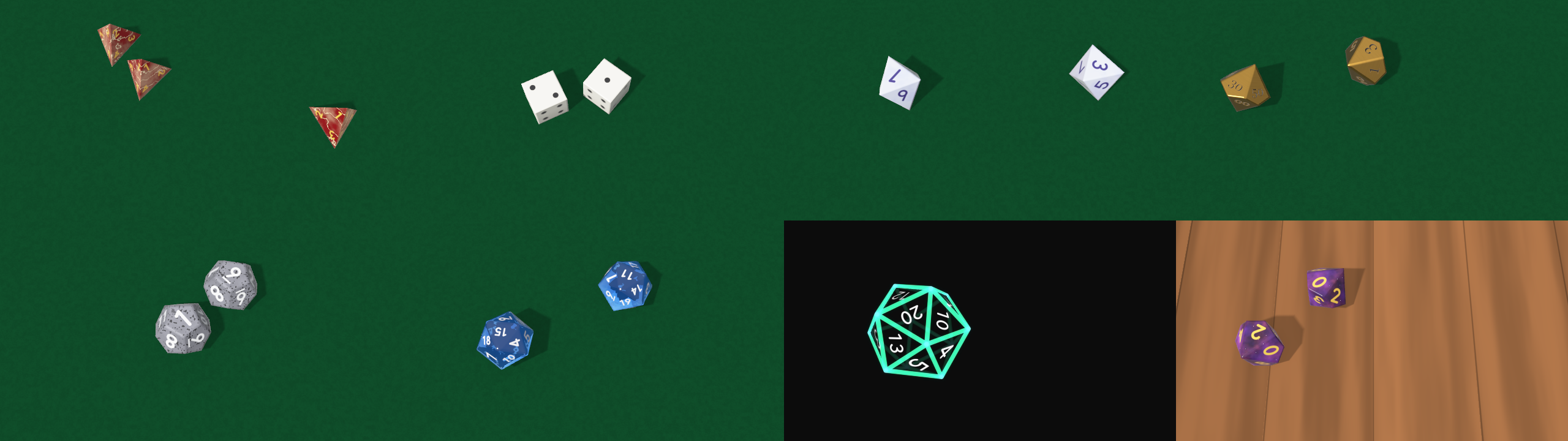
Eight throws, eight textures: marble, engraved pips, pearl, metal in Georgia, stone, gem, wireframe, and galaxy on the wooden table.
- Texture: Plastic, Marble (veins of Second Colour), Pearl (a sheen that shifts with the angle), Metal, Gem (see-through: the light refracts, the colour deepens with thickness, and the numbers on the far faces show through, mirrored), Stone (flecks of Second Colour), Wood (grain in Second Colour), Galaxy (nebulae in Second Colour and stars), Image (the Texture File on every face), Wireframe (glowing edges, front bright and back dim, and the numbers on the faces turned towards you), and on the effect Clip.
- Texture File: a PNG, JPEG, BMP, TGA or GIF (its first frame), up to 4096 pixels on a side, for Image. Each face shows the picture centred on it.
- Colour and Second Colour: the body and the pattern. A gem’s Colour is how much light gets through two inradii of it, so a pale colour makes a pale gem.
- Gloss: dull to polished.
- Edge: how rounded the edges look. (The outline stays sharp; the light rounds them.)
- Line Width: the wireframe’s lines.
The Numbers group
- Font: Built-in (stroked digits, the same on every machine) or any font installed on this one.
- Font File: any
.ttf,.otf,.ttcor.otc, which beats the Font list. - Font Name: a family, typed as text, which wins over the Font list (see below).
- Number Size: how much of each face the number fills.
- Weight: thinner or bolder than the font draws it.
- Ink: the numbers’ colour.
- Number Style: Painted, or Engraved (cut into the face, so the light catches one side of every stroke).
- Mark 6 and 9: None, a Dot after them, or an Underline, on the dice that have both (the d10, d12, d20 and the d100’s units die).
- D6 Faces: Numbers or Pips.
Fonts travel by name, from the next release. The Font list is this machine’s fonts, so a family’s position in it means a different font on another computer. Each family in the list carries a number made from its name instead, and that number is what Arena saves, so the composition finds the same family wherever it’s installed. If the next machine doesn’t have the font, the numbers fall back to the built-in face and the composition keeps the choice for a machine that has it. A name typed into Font Name is saved too, and wins over the list when the composition opens, so once you’ve typed one, change font by typing another.
In v0.1.0 a picked font is saved as its position. Arena never reads back the name Polyhedral writes into Font Name, so a family picked from the list comes back on another computer as whatever sits at that position there. With v0.1.0, type the name into Font Name for a composition that’s going anywhere. A composition saved by v0.1.0 opens in the next release just as it did, the position read the old way, though Arena’s list shows nothing picked for it. Pick the font again and save, and from then on it travels by name.
Every die is numbered as a real set is: opposite faces add up to one more than the number of faces (7 on a d6, 21 on a d20; 9 on the d10’s 0–9); the d6 has 1, 2 and 3 meeting at a corner, counter-clockwise; the d8, d12 and d20 are balanced so that no corner carries all the high numbers; and the d4 prints each number three times, at its corner, so the number at the top of all three visible faces is the roll.
The Scene group
- Size: how big a die is, as a fraction of the frame’s height. With several dice, the view widens as far as it must for all of them to land in shot, so six dice at a close-up Size come out smaller than asked. One die keeps any close-up.
- Camera Angle: 30 degrees (low across the table) to 90 (straight down). Default 70.
- Light Angle: where the light comes from, round the table.
- Shadow: how dark the shadows are; 0 removes them.
- Table: None (transparent: only the dice and their shadows), Felt or Wood.
- Table Colour: the felt or the wood.
The dice stay in the frame: its edges are the walls they bounce off. During a throw a die can still cross an edge for a moment (they come in over it, and a die bouncing high towards the camera looks bigger than the frame), but at rest every die is in shot.
SW Dice Over
Everything above, over the clip. Mix fades between the clip alone (0) and the clip with the dice (1). Where there’s no die and no shadow, the clip comes through untouched, pixel for pixel.
Texture: Clip maps the clip onto every face, each face showing the middle of the picture. It’s the moving clip, so the dice carry it round as they tumble.
Time comes from the host
The dice move on the host’s clock, so a paused composition freezes a throw mid-air. A step backwards in the host’s clock, or a jump forward of more than a quarter of a second (a clip trigger or a scrub), passes no time: the throw carries on from where it was.
For the first few frames after it loads, the plugin runs on its own steady clock while it works out whether the host counts time in seconds or milliseconds. Then it switches to the host’s.
Performance
Measured by the offline harness on an Apple M4 Max, mid-throw on a felt table with shadows, the median frame, on a machine shared with other builds, so the spread is between runs:
| 720p | 1080p | 4K | |
|---|---|---|---|
| one marble d20 | 0.7–1.5 ms | 1.0–1.7 ms | 2.3–2.5 ms |
| six gem d20s | 1.8–2.3 ms | 3.5 ms | 8–10.5 ms |
| six d100 pairs (twelve dice) | 2.5–2.7 ms | 3.5–4.0 ms | 11.3–11.7 ms |
Working out a throw, on its own thread, takes about 0.5 ms for one die, 12 ms for six and 30 ms for twelve, most of it throwing again the times a die comes to rest cocked.
I haven’t timed it inside Resolume, or on Windows.
If it looks wrong
Nothing happens when I press Roll. The roll starts a frame or two after the press, and lands at Roll Time; at 8 seconds it’s a slow throw. A paused composition freezes it.
I see no table. Table is None, the default: only the dice and their shadows are drawn, so the layer goes over whatever is underneath. Choose Felt or Wood.
The dice are smaller than Size says. There are several of them, and the view has widened so they all fit. Lower Count, or live with it.
My font changed on another computer. The font isn’t installed there: the numbers use the built-in face, and the composition still holds your choice for a machine that has it. Install the font, or choose another. In v0.1.0 a font picked from the list is saved as its place in the list, which holds a different font over there: type the family into Font Name and save the composition again.
The Image texture is grey. The Texture File wouldn’t load (wrong format, or larger than 4096 on a side). The log says why.
The dice are thrown slowly. Roll Time is longer than a real throw takes, so the throw plays in slow motion. Lower it towards a second for real speed.
The effect does nothing at all. A shader that won’t compile looks just like that. The actual message is in the log:
macOS    ~/Library/Logs/polyhedral/polyhedral.YYYY-MM-DD.log
Windows  %LOCALAPPDATA%\polyhedral\logs\polyhedral.YYYY-MM-DD.log
It records the GL vendor, renderer and version at load, a shader that failed, the font in use (and a named font that isn’t installed), a Texture File that wouldn’t load, and every roll: its results, how many throws it took, and how much it was slowed.
What is verified, and what is assumed
Measured, on an M4 Max under macOS, by the offline harness driving the real plugin classes: every value of every die shown as asked; Fixed totals over several dice; Random draws shown as drawn and uniform by chi-square; the number on top read out of the rendered pixels, in two fonts; the symmetry moving no pixel of the outline, at two resolutions; the dice at rest flat, still, inside the walls and apart; the last die stopping at Roll Time; free flight on the exact parabola, no contact ever adding energy, and a drop rebounding at the Bounce asked for; the same seed giving the same throw byte for byte; fonts by name, list value, file and missing; the clip untouched by the effect where it must be; and the GL state handed back to the host. Every check also runs against a model that’s wrong on purpose and has to fail it, and a sweep fails if any control does nothing.
Assumed, or not verified:
- Never loaded into Resolume on macOS, and no Resolume has driven the controls on a Mac. How the groups present in the inspector, the clock’s unit, and the order in which a composition restores Font and Font Name are untested there.
- Fonts travelling by name rests on Knockout’s test, not Polyhedral’s. Knockout gives its fonts the same numbers, and Arena 7.28.1 on a Mac saved one and reopened it on a different set of fonts as the same family. Polyhedral’s own build of it hasn’t been in Arena yet.
- The physics is its own, not a physics library’s: corners and edges knocking on the table, the walls and each other. It’s checked for energy, bounce, free flight and the resting state, not against film of real dice. The table’s friction and the felt’s rolling resistance were picked because they looked right.
- A die is laid exactly flat over its last 0.15 seconds if it settles less than a degree off; more than that is a cocked die and a rethrow.
- The rounded edges are shading: the outline is the sharp solid.
- The gem is one refraction through the die and out, rather than a full light simulation.
- The same seed gives the same results everywhere, because they come from the plugin’s own random numbers or from your total. The throw itself may differ between a Mac and a Windows machine: the two compile the arithmetic slightly differently.
- The inspector shows slider positions. Polyhedral doesn’t supply its own display text, so expect the panel to show where each slider is rather than seconds or degrees. This guide gives the ranges.
- Not timed in a host, or on Windows. No OpenFX version.
About
The last group in the source’s panel, About, has the plugin’s name, version, licence and maker, and buttons that open this guide, the project page, the source on GitHub and the support page in your browser. In the effect, Mix follows it.
Links
- Project page: stoatworks-labs.com/software/polyhedral
- Source: github.com/stoatworks-labs/polyhedral
Reporting something
Open an issue at github.com/stoatworks-labs/polyhedral/issues. A screenshot, the Die, Count and Texture, any controls you moved, whether it was the source or the effect, and the composition’s resolution and frame rate are usually enough to go on.