

Drop in a .pptx. Find out which fonts it actually uses, which of those are installed here,
and take away a sidecar .zip that installs the rest on the machine that needs them.
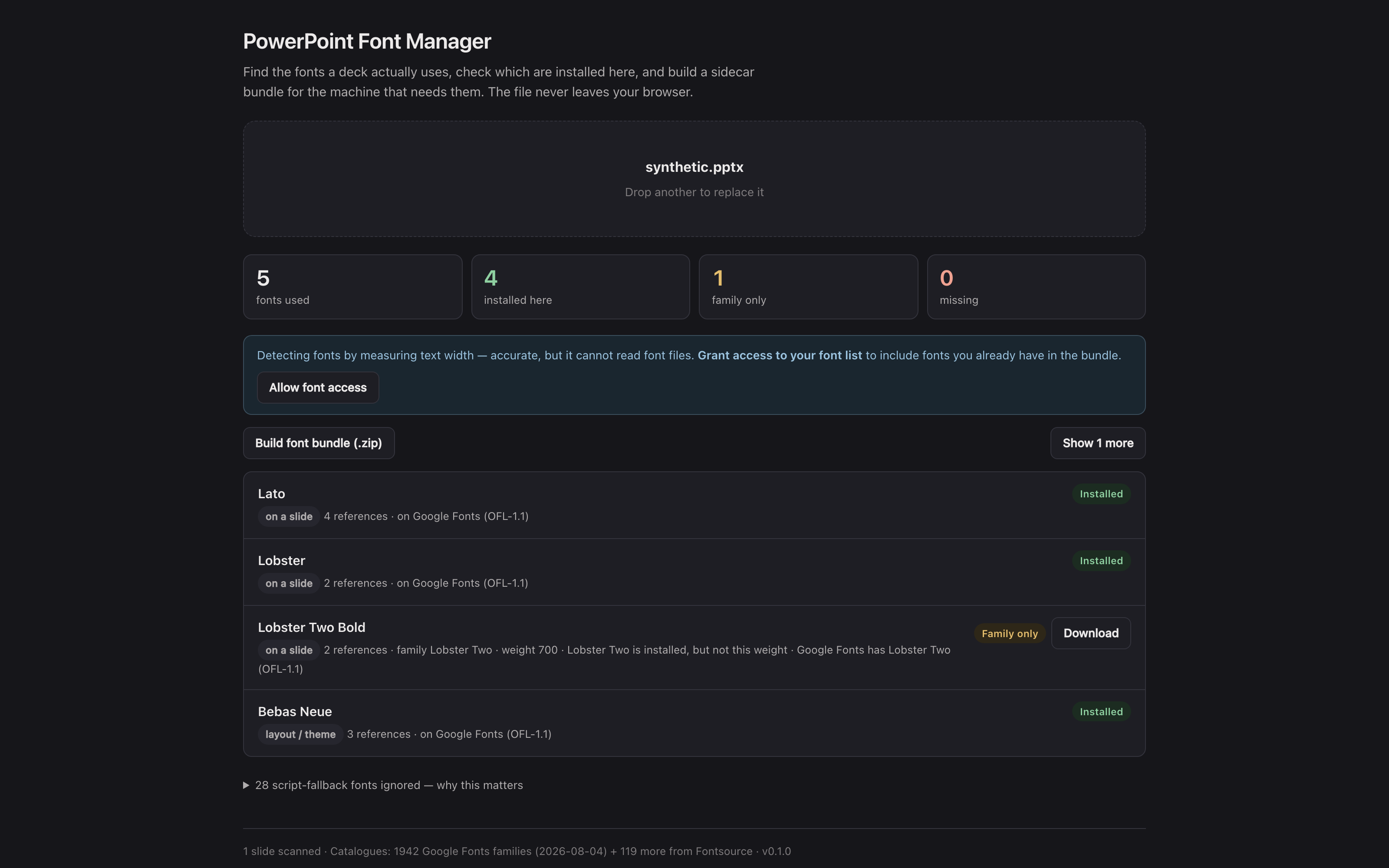
The hosted tool with the repo’s synthetic test deck loaded: five fonts found, four installed on the machine that took the picture, one family present but not at the weight the deck asks for, and the bundle ready to build. The deck never left the browser.
Everything happens in the browser. The deck is never uploaded anywhere.
Before you rely on this: the scanner is verified against three real presentations of different provenance — one from Canva, one from Office with embedded fonts, and one 316 MB deck that names almost no fonts explicitly — and its installed/missing verdicts were checked font by font against the operating system’s own font list on macOS.
The bundle’s Windows installer script has never been run on Windows; the macOS and Linux ones are syntax-checked but have not been run against a real font install. Check the bundle on a spare machine before you rely on it in front of a client.
This codebase was created with AI assistance, directed and reviewed by a human author.
Why not just search the file for font names
Because you get a wrong answer that looks right.
Every PowerPoint theme carries a script fallback table — a list of fonts to reach for if the deck ever contains Japanese, Devanagari, Khmer, Syriac and so on. It is there whether or not a single such character exists in the presentation.
Searching a real deck for font references finds 39 fonts. It uses two. The other 37 are that table, and a tool that lists them will send you off to install Mongolian Baiti for a slide that says “Welcome” in Calibri.
The second half of the problem is that decks name faces, not families:
| The deck asks for | A naive check says | Actually |
|---|---|---|
Helvetica Neue Medium |
missing | you have it |
Poppins Regular |
missing | you have it |
Times Roman |
missing | that’s Times New Roman |
Garamond |
missing | genuinely missing |
Three false alarms out of four. This tool resolves the names first, so “missing” means missing.
What it does
Scans slides, layouts, masters, notes, charts and SmartArt, resolves theme references through the theme the slide actually inherits, and sorts what it finds by how much it matters — used on a slide, inherited from a layout or theme, or only present somewhere incidental.
Checks what is installed, using the browser’s font-access API where it exists and text-width measurement everywhere else.
Finds replacements across two catalogues — 1,942 Google Fonts families plus 119 more that Google does not carry — matched after the name is normalised, with near-matches offered when there is no exact one.
Substitutes, and the distinction that matters
The fonts most often missing are the ones a deck picks up just by being written on Windows or a Mac — Calibri, Cambria, Arial, Times New Roman, Courier New, Georgia. None may be redistributed and none are on Google Fonts.
So the app offers metric-compatible stand-ins instead: Carlito for Calibri, Caladea for Cambria, Arimo for Arial, Tinos for Times New Roman. These have the same advance widths as the original, so line breaks hold and text stays inside its box.
Where only a visually similar face exists — Open Sans for Segoe UI — it says so plainly. That swap will move your line breaks, and being told the deck is fixed when it is not is worse than being told the font is missing.
Adobe Fonts, and the failure that looks fine
Adobe fonts can never be bundled — Adobe’s terms say they are not compatible with workflows that transfer font files to another computer, and there is no API that serves the files in any case. So for a missing one the app names the reason and links to the family page.
The desktop app also catches the version of this that looks fine: a font Creative Cloud syncs onto your machine is installed here and nowhere else, so the deck renders perfectly for you and breaks at the venue.
It is told apart from an ordinary installed font by where its file lives — Adobe keeps synced faces in its own folder — which is why Times New Roman does not get the warning merely for being sold on Adobe Fonts too.
Embedded fonts
PowerPoint’s “embed fonts in the file” does not store a TTF. It stores EOT, and what happens next depends on who wrote the file:
| Written by | Format | Can it be recovered? |
|---|---|---|
| PowerPoint | EOT + MicroType Express | No — the glyph data is compressed |
| Canva, LibreOffice | EOT, uncompressed | Yes — extracted as a valid TTF |
Either way the font travels with the deck, so it will render wherever the .pptx goes. The
distinction only matters for what can go in the bundle.
The bundle, and the two traps it heads off
There is no such thing as a single self-extracting archive that runs on every OS, so the bundle is
a plain .zip with one small script per platform, a manifest saying where each font came from
and under what licence, and a README covering the two ways these normally fail:
- macOS Gatekeeper. Anything extracted from a downloaded zip inherits a quarantine flag, and double-clicking the installer gets “cannot be opened because it is from an unidentified developer”. That is not a broken script. The README gives both ways through, plus the no-script route of dropping the fonts on Font Book.
- Windows Mark-of-the-Web. PowerShell refuses to run a script that came out of a downloaded archive, for the same reason.
The installers write to the per-user font directory, so no administrator password is needed.
If something is wrong
| Symptom | Cause |
|---|---|
| A font is listed as missing and I have it | Should be rare — names are resolved to families first. Check whether it is a Creative Cloud sync. |
| I installed the font while this page was open, and it still says missing (Windows) | Chrome and Edge read the Windows font list only when they start — a reload does not help. Close the browser completely (Edge also runs on in the taskbar tray) and reopen. PowerPoint sees the font straight away. |
| The installer will not run | Gatekeeper or Mark-of-the-Web. The bundle’s README covers both, and Font Book needs no script at all. |
| An embedded font could not be extracted | It is PowerPoint’s compressed EOT. It still travels with the deck. |
| A substitution moved my line breaks | It was a visually similar face, not a metric-compatible one. The app says which. |
| An Adobe font is not offered | It cannot be bundled. Activate it through Creative Cloud on the target machine. |