

Residual is datamosh for Resolume Arena and Avenue, built as a real video codec, as an FFGL effect. It does not paint a glitch over a clip. It runs the clip through a small encoder and decoder of its own — a block-matching motion search, a prediction from the decoder’s own last frame, a quantised 8×8 DCT residual and a GOP — and gives you controls that break one stage of that loop at a time. Every datamosh look is one of those breaks.
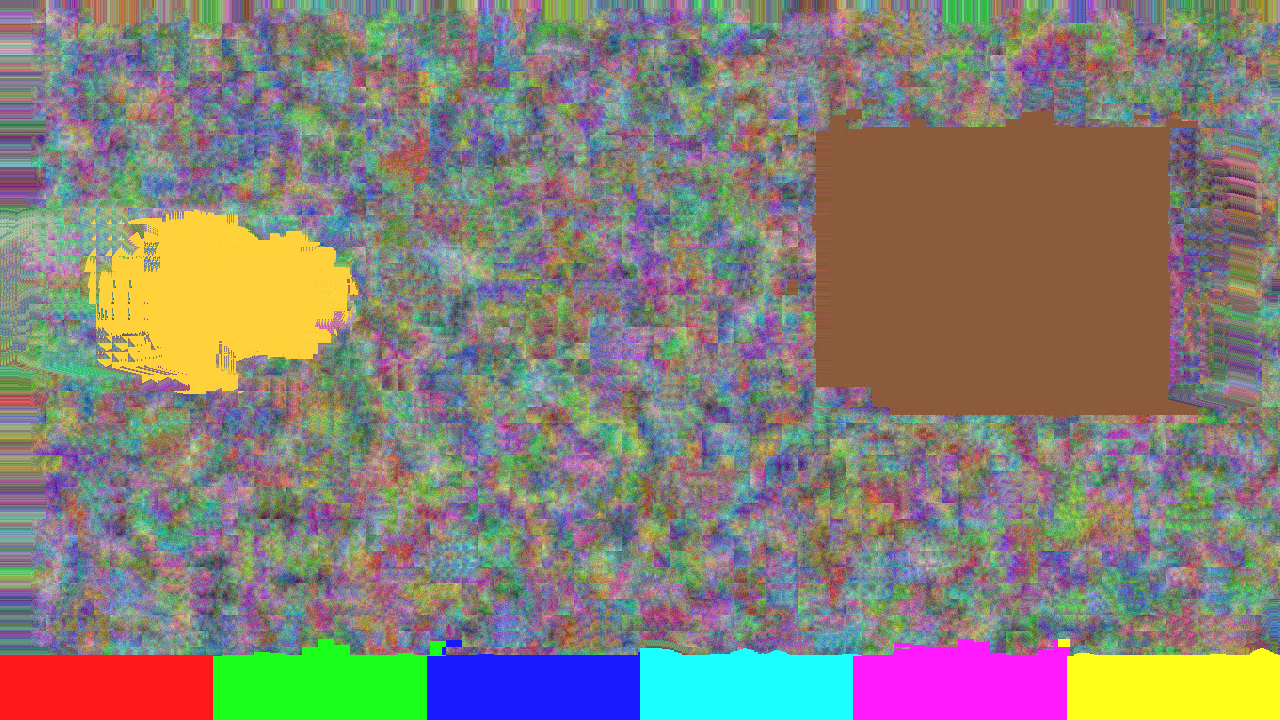
The repo’s demo card through the plugin, rendered by the offline harness rather than captured from Resolume. The card cut to a different scene sixteen frames earlier. With the I-frame dropped and nothing added back, the decoder has been moving the old picture along the new picture’s motion ever since.
Before you rely on this: released at v0.1.0, and honestly early. The codec is measured rather than asserted, by a harness that drives the real plugin class, and most of the claims are bitwise: with the I-frame dropped and the residual at zero, the decoded frame after a hard cut is the previous decoded frame block-copied by the vectors the search found — 0 of 2,592,000 samples differing across six cases at two resolutions; at Q 0 the codec is lossless, 0 of 49,766,400 samples differing; a picture moved by (dx, dy) returns exactly (dx, dy) from every one of 29,961 interior blocks; closed-loop drift grows by exactly one code value a frame for 31 frames; and seven deliberate faults are shown to make those checks fail. All 14 controls that act on the picture are shown to change it. It has never been loaded into Resolume on macOS — the one host it has run in is the fleet’s own test host,
oxbow, for 120 frames. On Windows, a build of v0.1.0 loads, registers and renders in Resolume Arena 7.27.1, with every control matching what the plugin declares — on software rendering, so that says nothing about a GPU. Five controls that need motion or a scene cut to act on (Search Range, Half Pel, Scene Cut, Scene Threshold and Drop I) could not be shown moving there on a still picture. Try it on a spare layer before you put it in a show.This codebase was created with AI assistance, directed and reviewed by a human author.
Installing
Every download carries one effect, SW Residual. Drop it into Resolume’s effects folder and restart Resolume:
macOS    ~/Documents/Resolume Arena/Extra Effects/
Windows  %USERPROFILE%\Documents\Resolume Arena\Extra Effects\
Avenue uses the same layout under its own folder name. The effect then appears in the effects browser as SW Residual.
The macOS download is a universal build (Apple silicon and Intel), as a .dmg or a .zip. It is
Developer ID-signed and notarised, so the bundle simply loads. The
Windows download is an x64 installer or a .zip. It is not code-signed, so the installer trips
SmartScreen once: More info → Run anyway.
A decoder doing its job with the wrong information
A compressed video is mostly not pictures. Every so often there is an I-frame — a whole picture, coded on its own. Every frame in between is a P-frame: a set of motion vectors that say “this block of the picture came from over there in the last frame”, and a residual — the small correction for whatever the vectors got wrong. A decoder rebuilds each P-frame by moving blocks of the last frame it decoded and adding the correction.
Datamosh is what happens when one of those terms is missing. Nothing in the decoder is broken; it does exactly what it always does, with the wrong information:
- No I-frame at a cut. The decoder never gets the new scene’s picture, so it carries on moving blocks of the old picture around — with the new scene’s motion. That is the classic mosh.
- No residual. Nothing ever corrects the prediction, so whatever is on screen just flows wherever the vectors say.
- The same vectors again and again. The pixels keep travelling the way they were going. That is the bloom.
Residual is that decoder, with the encoder in front of it, and the controls are the codec’s own controls with one of them set to a value no encoder would choose. The motion always comes from the clip — the encoder searches your clip’s frames against each other — and it is always applied to the decoder’s picture. That split is the whole effect.
Start here
Put SW Residual on a layer (not on a clip) with something moving in it, and leave every control alone. The defaults are an honest codec at a moderate quantiser: 16-pixel blocks, a ±16 pixel search, an I-frame every 30 frames and at every scene cut, and the residual added back in full. It looks like the clip, very slightly compressed. Nothing moshes until you break something.
Why the layer: an effect on a clip belongs to that clip, so the next clip you trigger arrives with its own copy of the effect and nothing for it to predict from. On the layer, the effect sees the cut.
Then, in this order:
- Drop I → All, Residual Gain → 0. Now trigger a different clip on the layer. The old picture stays on screen and starts moving with the new clip’s motion.
- Refresh. One clean I-frame, right now, whatever Drop I says. The clean-up button. Press it, cut again, and the mosh starts over from the new picture.
- Vector Hold → 30, Vector Scale up. The bloom: one frame’s motion applied again and again, and stretched.
- Put Residual Gain back to 0.5, then raise Q. A working codec again, but a coarse one: blocks, and a picture that slowly loses itself between I-frames.
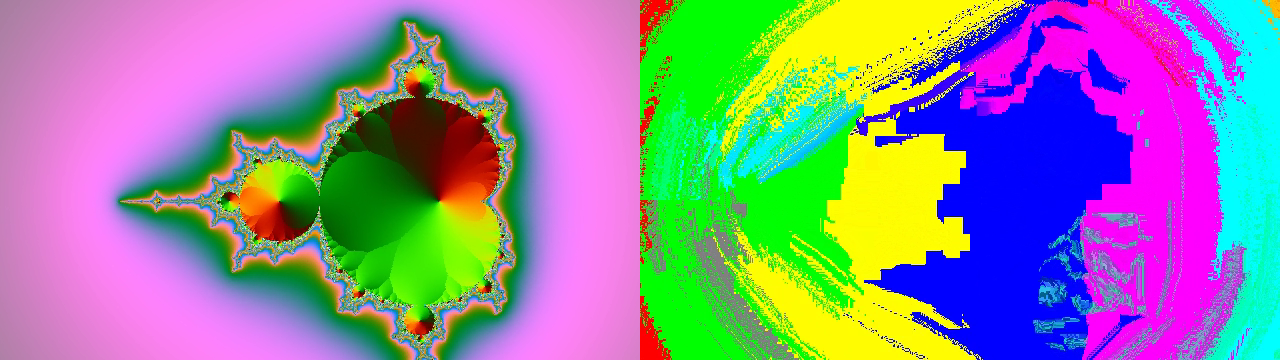
Left, the source fifty frames after a hard cut from colour bars to a zooming fractal. Right, the
same frame through the plugin with Drop I on All and Residual Gain at zero from just before the
cut. The decoder never saw the fractal; it has been moving the colour bars along the fractal’s
zoom ever since. Rendered through the harness’s --pipe mode from ffmpeg’s own test sources, not
captured from Resolume.
Time is counted in frames
A frame here is one rendered frame of your composition. The GOP, Vector Hold and the onset detector all count frames and never read a clock, as a codec does. The consequence is that a GOP of 30 is half a second at 60 fps and a whole second at 30 fps, and a Vector Hold of 30 lasts twice as long at 30 fps as at 60.
The codec keeps state from one frame to the next — the last decoded picture is the next frame’s reference — and every frame Resolume renders moves it on one step. Nothing in FFGL tells a plugin with memory if a host renders the same frame twice.
The Encoder group
The codec as an encoder would build it. These decide what the motion is and when a clean picture arrives.
Block Size — 8, 16 or 32 pixels; 16 by default. The size of the blocks the motion search moves. The residual is always coded in 8×8 blocks whatever this says, as in every codec from MPEG-1 to H.264. Smaller blocks follow motion more finely and cost more: 8-pixel blocks at a wide search are the most expensive thing the plugin can do (see Performance). Larger blocks move the picture in bigger slabs.
Search Range — ±1 to ±32 pixels; 16 by default. The furthest a block can be found to have moved in one frame. The search is hierarchical: it looks across the whole range on a small copy of the picture and refines on each larger copy, so a wide range is cheaper than it sounds. Motion faster than the range is not found; the block takes the best match within it instead, which under a mosh is just a different wrong answer.
Half Pel — off by default. Refines every vector to half a pixel, the way MPEG codecs do. A half-pixel copy is the rounded average of two or four neighbouring pixels, so a mosh carried for many frames under Half Pel softens as it travels.
GOP — 1 to 250 frames; 30 by default. An I-frame every this many frames. GOP 1 makes every frame an I-frame, which is a codec with no prediction in it and nothing to mosh (unless Drop I drops them). A long GOP lets drift build up between clean pictures.
Scene Cut — on by default. Inserts an I-frame where the picture changes more than motion can explain, as encoders do. This is the I-frame the classic mosh drops: with Scene Cut on and Drop I on Off, a cut to a different clip is clean.
Scene Threshold — how different a frame has to be, after the motion has been accounted for, to count as a cut: 2 to 64 code values per pixel of luma, on a logarithmic slider. The default, halfway, is 11.3. Lower it to catch softer cuts; raise it if ordinary fast motion is triggering I-frames. The default was judged on synthetic pictures and real footage may want it lower.
The cut detector only judges frames whose motion was freshly searched. While Vector Hold is reusing old vectors it has nothing current to judge by, so a cut that lands during a hold is not seen.
The Residual group
What is added back to the prediction — the correction.
Q — the quantiser for luma. 0 is a real bypass: the correction is not even rounded and the codec is lossless. Above zero, the quantiser step runs from 2 to 512, doubling every eighth of the slider; the default, 0.3, is a step of about 10.6. Higher Q throws more of each correction away: flat 8×8 blocks, colour banding, and a closed loop that slowly loses the picture between I-frames and snaps back at each one.
Residual Gain — what the correction is multiplied by before it is added back, 0 to 2. Half way is exactly 1.0, the honest setting and the default. At 0 nothing ever corrects the prediction and the picture is pure motion. In between, each P-frame fixes only part of what the prediction got wrong: at 0.25 on the slider (a gain of 0.5) whatever the vectors miss halves every frame, so a mosh heals over a handful of frames instead of snapping clean. Above half way it over-corrects — what was wrong comes out wrong the other way — and at the top the error flips sign every frame and never shrinks, which reads as shimmer on every moving edge.
I-frames always reconstruct at full strength whatever Residual Gain says, so Refresh and an arriving I-frame always give you a picture, even at gain 0.
Chroma Q — the same quantiser for the colour-difference channels (the codec works in Y, Co, Cg, a reversible integer form of luma and two colour differences); 0.4 by default, a step of about 18.4. Raise it on its own for colour that smears and blocks while the detail holds. The colour is coded at full resolution, not the quarter resolution most codecs use, so the chroma-block look of a real H.264 mosh is not here yet.
The Mosh group
The breaks.
Drop I — which I-frames the decoder never receives.
| Drop I | What it does |
|---|---|
| Off | The default. Every I-frame arrives. |
| Next | The next I-frame that would have arrived — from the GOP or a scene cut — is dropped, once. Choosing Next arms it; it is spent when it drops one. Choose it again to re-arm. |
| All | No I-frame from the GOP or a scene cut ever arrives. The classic mosh, held for as long as you like. |
| On Onset | Every audio onset on the Audio input arms the same one-shot latch as Next. A hit just before a cut moshes the cut. |
Three pictures are never dropped: the very first frame, the frame after the composition changes resolution (there is nothing left to predict from), and a Refresh. A dropped I-frame still ends its GOP — the encoder made it, the decoder never saw it — so the next one comes a GOP later, as in the real thing.
For a mosh on a particular cut, All is the dependable choice. Next drops the next I-frame, and if the GOP delivers one before your cut, that is the one it spends.
Vector Hold — 1 to 60 frames; 1 by default. One frame’s motion vectors are reused for this many frames before the next search. At 1 the vectors are fresh every frame. Held higher under Drop I All and Residual Gain 0, the picture keeps flowing in the direction it was going: the bloom. The motion search is skipped on held frames, so a hold is also cheaper.
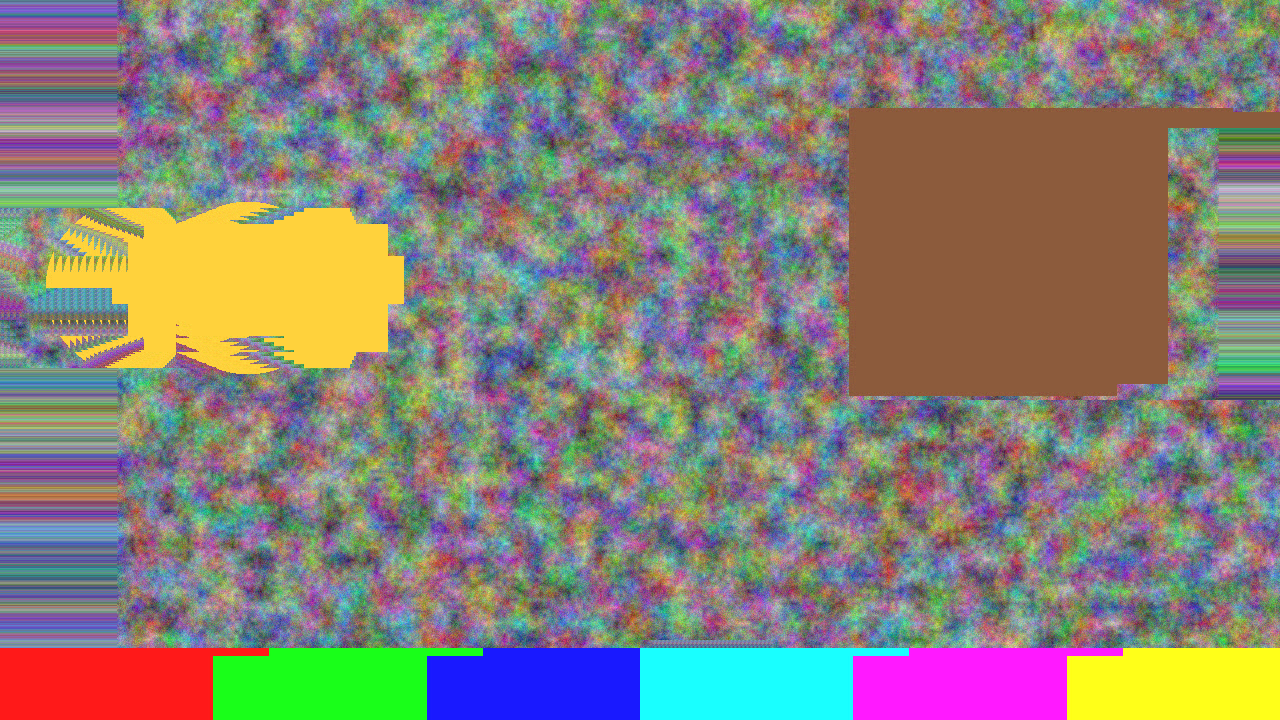
Vector Hold at 30 frames and Vector Scale at 2×, on the demo card, through the harness. The estimator found the disc moving once; the decoder has been applying that motion, doubled, ever since.
Vector Scale — what every vector is multiplied by before the blocks are moved, 0 to 4×. A quarter of the way along is exactly 1.0, the default. Above it everything travels further than it did in the clip; at 0 nothing moves at all and the decoder just holds the old picture where it is. The scaled vector is rounded to the nearest half pixel, so a scaled vector can land between pixels and average them even with Half Pel off. It cannot reverse the motion.
Refresh — a button. The next frame is an I-frame, whatever Drop I says, reconstructed in full even at Residual Gain 0. Use it to clean up a mosh, or to reset the reference just before a cut so the mosh starts from exactly the picture you want.
Audio — Resolume’s audio-source picker, for Drop I = On Onset and nothing else. The plugin reads the spectrum Resolume sends every frame (it asks for 64 bands) and looks for onsets: a sudden rise across the spectrum, judged against a running average of about the last second at 60 fps. A steady loud signal is not an onset; a hit on top of it is. After an onset, another cannot fire until five frames later. The detector is primed with the first spectrum it ever sees, so loading the effect is not a hit, and it never resets, so retriggering a clip is not a hit either. Its thresholds were tuned on a synthetic spectrum and have not been judged against real music in Arena.
The View group
Show Vectors — off by default. Draws the motion over the picture: a white dot at the centre of every block and a green line from it along the block’s vector, drawn at Vector Scale. A vector points to where the block came from, which is the codec convention — so the lines point against the motion you see on screen. Held vectors are drawn as held. The overlay is drawn on the output whatever Mix says.
Mix — the decoded picture against the untouched clip; 1 by default. Zero is the clip as it arrived. The codec keeps running underneath whatever Mix says, so bringing Mix back up shows the mosh as it has been all along, not a fresh start. Alpha is not coded: the output carries the clip’s own alpha at every setting.
How it works
Once a frame:
- Copy the clip’s frame exactly into an 8-bit integer texture and take the codec’s own luma from it, then build a small pyramid of half-size copies.
- Search. Unless Vector Hold is reusing old vectors, find, for every block, where in the clip’s previous frame it came from: across the whole range on the smallest copy, then refining on each larger one, keeping the offset whose sum of absolute differences is lowest. Ties go to the shorter vector, so a flat area moves by exactly nothing. Half Pel refines to half a pixel.
- Decide I or P from the GOP, the scene-cut measure, Refresh and Drop I.
- Predict: the decoder’s own last decoded frame, block-copied by the vectors (scaled by Vector Scale).
- Correct: the clip minus the prediction, in Y/Co/Cg, through an 8×8 DCT, quantised at Q and Chroma Q, back again, multiplied by Residual Gain and added to the prediction. On an I-frame there is no prediction and the whole picture is coded this way. The result is the decoded frame — and the next frame’s reference.
- Composite the decoded frame against the clip at Mix, with the vectors over it if asked.
Everything the decoder keeps is an integer, read back with no filtering, and the colour transform is exactly reversible for every 8-bit colour. That is what lets Q 0 be lossless rather than nearly so, and it is why the harness can say the mosh is a block copy rather than looks like one.
Performance
Measured by the offline harness on an M4 Max at the defaults (16-pixel blocks, ±16 search, Half Pel off), with moving content so the search has work to do:
| ms/frame | % of a 60 fps frame | GPU memory | |
|---|---|---|---|
| 1280×720 | 5.1 | 31% | about 52 MB |
| 1920×1080 | 6.1 | 36% | about 117 MB |
| 3840×2160 | 14.0 | 84% | about 466 MB |
The memory column is worked out from the buffers the plugin allocates, not measured. About 1 ms of each frame is one small read back from the GPU for the scene-cut decision, which makes the CPU wait for the motion search to finish. Half Pel adds about 0.3 ms at 1080p and 1 ms at 4K.
The motion search is the whole cost, and it grows with the search. 8-pixel blocks with a ±32 search run at about 50 ms a frame at every resolution — not a setting for a show. Held frames under Vector Hold skip the search. Nothing was timed inside Resolume, and nothing was timed on Windows.
If it looks wrong
Nothing seems to happen. That is the default: an honest codec looks like the clip. Break something — Drop I on All and Residual Gain at 0 — then cut. Check Mix.
A cut to another clip is clean even with Drop I on All. The effect is on the clip rather than the layer, so the new clip brought its own fresh copy of the effect. Move it to the layer.
The mosh stops moving and just sits there. The motion comes from the clip. On a still clip, or a still moment, every vector is zero and the old picture holds still. Vector Scale at 0 does the same.
The mosh cleans itself up after a moment. An I-frame arrived: Drop I is on Next and has spent itself, or on Off. Or Residual Gain is above 0, and the correction is healing the picture a little every frame — which is also a look.
Drop I is on Next and the cut was clean anyway. Next drops the next I-frame, and the GOP delivered one before your cut. Choose Next again just before the cut, or use All.
The picture snapped clean on its own, once. The composition’s resolution changed. The frame after a resize is always an I-frame: the reference picture no longer exists at the new size.
On Onset never drops anything. Pick a source in Audio. The detector looks for a sudden rise, so a sustained level does not fire. And the onset only arms the latch: a dropped I-frame needs an I-frame to drop, from the GOP or a scene cut.
Blocky, smeary colour when you did not ask for it. Q or Chroma Q is high.
Frame rate drops. Block Size 8 with a wide Search Range. Go to 16-pixel blocks or narrow the search.
The effect does nothing at all. A shader that will not compile looks exactly like that, and the real message is in the log:
macOS    ~/Library/Logs/residual/residual.YYYY-MM-DD.log
Windows  %LOCALAPPDATA%\residual\logs\residual.YYYY-MM-DD.log
It records the GL vendor and version at load, which shader failed if one did, every resize, and at frame 60 the host’s clock, the block grid and the scene-cut measure.
Known limits
- Never loaded into Resolume on macOS, and nothing has driven the controls in a host. How the four groups, the dropdowns, the button and the audio picker present in the inspector is untested.
- Colour is coded at full resolution, not the 4:2:0 real codecs use, so the chroma-block look of an H.264 mosh is not here yet.
- No B-frames, no deblocking filter, no rate control — deliberately; a mosh does not need them.
- The scene-cut threshold’s default and the onset detector’s thresholds were tuned on synthetic material. Real footage and real music may want the threshold lower.
- The cut detector is blind during a Vector Hold.
- Alpha is not coded. The output carries the clip’s alpha.
- 8-pixel blocks with a wide search are expensive — about 50 ms a frame.
- Never run on Intel, although the macOS build contains an Intel slice. Without a GPU it has run only in automated checks and the Windows check above, never for a show.
- No presets and no OpenFX version.
- There is a browser demo at residual-demo.stoatworks-labs.com. It is a port to a web page, not the plugin: the shaders run in WebGL2 and any CPU half is rewritten in JavaScript. The page lists what it does not reproduce.
About
The last group, About, carries the plugin’s name, version, licence and maker, and buttons that open this user guide, the project page, the source on GitHub and the support page in your browser.
Reporting something
github.com/stoatworks-labs/residual/issues. A screenshot, the Drop I, Residual Gain, Block Size and Search Range settings, and the composition’s resolution and frame rate are usually enough. If the effect did nothing, attach the log.