

simpleVIS
See your lighting programming, before the room
What it does
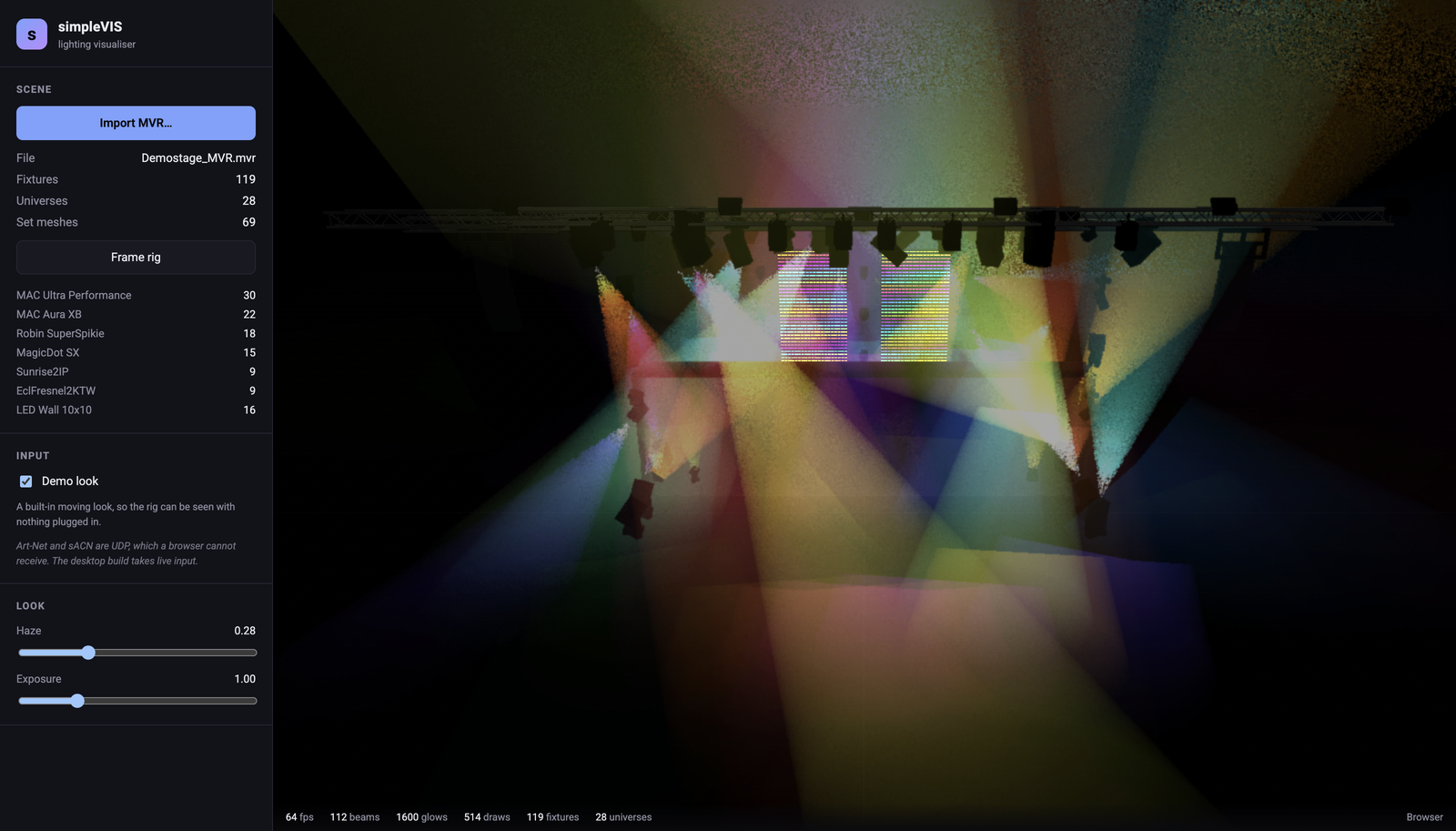
simpleVIS imports an MVR and renders the rig it describes, driven by whatever DMX you point at it. The import is the important bit. An MVR carries fixture placement and patch, and the GDTF files inside carry the geometry tree, the DMX modes and the beam data. Reading both is what lets a fixture it's never seen before move properly without anyone teaching the software what it is: pan turns whatever the file says pans.
Beams are raymarched through a haze volume instead of drawn as cones, so they look like light in air. They stop where they land, they stack where they cross, and a narrow spot looks different from a wash because the beam and field angles come from the fixture's own published photometry.
The desktop build owns the network and serial ports, and the browser demo is the same application without them. That's the only difference between the two. It's a demo and not a hosted edition because nothing can ever drive it: Art-Net and sACN are UDP, a browser can't receive UDP at all, and no browser release is going to change that. So what it flies you round is an MVR you drop in, lit by the built-in look. It also builds for iOS and Android, though neither is published. Those take unicast Art-Net and sACN, but multicast sACN, CITP discovery and USB DMX can't work there and aren't offered.
- MVR import with embedded GDTF: geometry tree, DMX modes, beam angles, colour mixing
- GeometryReference expansion, so pixel-mapped walls address one DMX slot per pixel
- Volumetric haze beams, instanced — the whole rig in one draw call
- sACN with priority arbitration, CID source identity and per-universe multicast joins
- Art-Net 4 with ArtPoll replies, so consoles list simpleVIS as a node
- CITP: peer discovery, levels over SDMX, and fixture patch from the desk over FPTC
- USB DMX input via an Enttec DMX USB Pro
- Two-source HTP/LTP merge with a 4-second timeout; a third source is refused and reported
- Built-in demo look, so the rig can be seen with nothing plugged in
- Video on LED walls — a file or a captured screen, sampled per pixel onto the wall's own pixel-map raster; the fixture's dimmer still gates it
- A Quality panel — wireframe only for a crowded rig or a slow machine, and one Detail slider whose midpoint is exactly the default tuning
Where it stands
Released at v0.4.4, a dependency release (Tauri 2.12, fast-xml-parser 5.11.2), as was v0.4.3 (three.js 0.186.1); v0.4.2 made the macOS build one universal image instead of two per-arch ones. v0.4.1 plays video on the LED walls an MVR already describes (a local file in the desktop app or the browser demo, or a captured screen or window in the browser demo only, because the desktop app's web view can't capture; either way it's sampled per pixel onto the wall's own raster) and adds a Quality panel with a wireframe-only mode and one Detail slider over the things that decide what a frame costs. NDI, Syphon and Spout feeds aren't implemented. It runs the full 119-fixture MA Demostage at 60–70 fps, and the Art-Net, sACN and CITP receive paths are all tested over real sockets. v0.2.0 added CITP (peer discovery over PINF, levels over SDMX, and fixture patch from the desk over FPTC), and it has talked to a real peer, Capture 2026, which parses and connects correctly. But Capture identifies as a visualiser, so it's a DMX consumer like simpleVIS and sends neither levels nor patch, which means SDMX levels and FPTC patch from a real console are still unverified. No lighting console and no DMX interface has ever driven any of this: every packet so far came from a test that wrote it. MSEX and CAEX (thumbnails, and streaming the viewport back to the desk) aren't implemented.
Watch it running
Nothing loads from YouTube until you press play.Watch it there instead