

Slope is a one-bit delta modulator run along the scan line, for Resolume Arena and Avenue, as an FFGL effect. It does not paint smears or noise onto a clip. It runs every scan line of your picture through a CVSD coder — continuously variable slope delta, the codec of military and Bluetooth voice — one bit per sample, and shows you what the decoder at the other end makes of the bits. Hard edges arrive as ramps smeared along the scan, flat areas carry a fine two-sample dither, an adaptive step trades one for the other, and a flipped bit throws the rest of the line. None of it is drawn; it all falls out of the one rule.
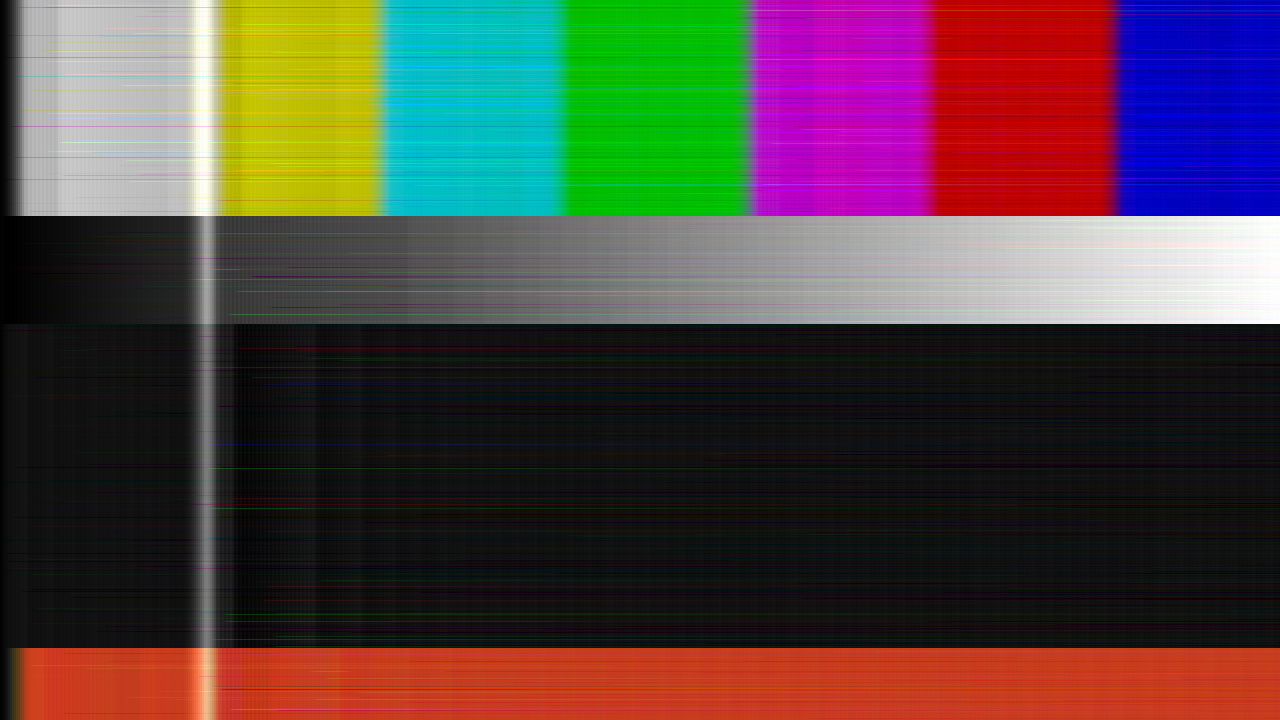
The repo’s test card through the plugin, rendered by the offline harness rather than captured from Resolume: RGB, two pixels a sample, a 1/64 step adapting to 1/8, and one received bit in a thousand flipped. Every streak is one wrong bit, fading on the integrator’s leak.
Before you rely on this: released at v0.1.0, and honestly early. The coder is measured rather than asserted, by a harness that drives the real plugin class and reads each claim back out of the picture it made, at two rasters: a step edge of 8.5, 13.5 and 27.5 steps climbs in exactly 9, 14 and 28 samples from the predicted sample, at whole- and part-sample edge positions; a flat field’s idle pattern has period two and one step peak-to-peak, sample for sample, with zero error over thousands of samples; every step of an 11-bit run follows the stated syllabic law to 0.000 of tolerance; a forced bit error fades on time constants fitted at 64.02 and 256.0 samples against 64 and 256; every pixel of noise matches a serial double-precision run of the same recurrence, with a tolerance of zero in the settings where float arithmetic is exact; a vertical scan is the horizontal one transposed, bit for bit; and nine deliberate faults are shown to make those checks fail. All 12 controls are shown to change the picture. It has never been loaded into Resolume on macOS — the one host it has run in there is the fleet’s own test host,
oxbow, for 120 frames. On Windows, a build of this source loads, registers and renders in Resolume Arena 7.27.1 on software rendering (win-lab, Mesa llvmpipe, no GPU): all 18 host controls match the declaration and all 13 that take a value move the picture, 9 of the fleet gate’s 9 checks. Software rendering says nothing about a GPU or about speed. Try it on a spare layer before you put it in a show.This codebase was created with AI assistance, directed and reviewed by a human author.
Installing
Every download carries one effect, SW Slope. Drop it into Resolume’s effects folder and restart Resolume:
macOS    ~/Documents/Resolume Arena/Extra Effects/
Windows  %USERPROFILE%\Documents\Resolume Arena\Extra Effects\
Avenue uses the same layout under its own folder name. The effect then appears in the effects browser as SW Slope.
The macOS download is a universal build (Apple silicon and Intel), as a .dmg or a .zip. The
Windows download is an x64 installer or a .zip. It is not code-signed, so the installer trips
SmartScreen once: More info → Run anyway.
One bit per sample
A delta modulator is the simplest codec there is. Every sample, the encoder asks one question — is the input above or below my current guess? — and sends the answer as one bit. The decoder at the other end has the same guess, and steps it up for a 1 and down for a 0. That is the whole channel: no levels, no words, one bit a sample.
The guess can only move one step per sample, and everything you see follows from that:
- Slope overload. A hard edge is a jump the guess cannot make in one sample. It climbs one step a sample until it catches up, so a step of height h arrives as a ramp h/Δ samples long, smeared along the scan. Big edges smear further than small ones; a bright object on black grows a ramp on its left edge and falls away on its right.
- Granular noise. On a flat area the guess overshoots, comes back, overshoots: the bits alternate and the guess hunts one step either side of the true level. A fine two-sample dither wherever the picture is smooth.
- Adaptation. CVSD watches the last few bits. A run of identical bits means the guess is falling behind, so the step grows; alternating bits mean it is hunting, so the step shrinks back. A bigger step shortens the ramp and coarsens the hunt after the edge, because the step it grew to takes time to fall back. Adaptation Rate moves the balance, and no setting removes both.
- Bit errors. A received bit that was flipped moves only the decoder’s guess, by two steps. Nothing corrects it: the rest of the line is wrong by that much, fading only as the integrator leaks, so a wrong bit is a streak trailing along the scan.
Slope runs one such coder along every line of the picture (or down every column), one sample per
Pixels/Sample pixels, every frame. Every line starts its coder from the blanking level with the
smallest step, so the left edge of every line is itself an edge, climbing — bright picture
against the left margin ramps in.
Start here
Put SW Slope on a clip or a layer with footage that has hard edges and some flat colour. At the defaults — two pixels a sample, a 1/64 step adapting up to 1/8, a light reconstruction filter, no errors — a 1080p picture comes out coded but recognisable: a soft horizontal texture, softened edges, a little dither in the flat areas. It is meant to be a starting point, not the look.
Then:
- Pixels/Sample → 4 or 6, Adaptation Rate → 0. A fixed small step at a coarse pitch: every edge is now a ramp a good part of the way across the picture, and flat areas hunt. That is slope overload in its pure form.
- Adaptation Rate back up, slowly. The ramps shorten as the step learns to grow; the hunt after each edge widens. Watch the trade happen.
- Bit Errors → 0.5. One received bit in a thousand flipped, fresh every frame: streaks appear, each one fading rightwards. 0.75 is one in a hundred and the picture is full of them.
- Leak → 0 with errors on. No leak: a wrong bit stays wrong to the end of the line. Leak → 1: four samples, and the streaks heal almost at once — but the coder can no longer hold a flat area’s level either.
- Channels → RGB. Three coders, and each primary smears on its own, so edges fringe. Y+C codes the colour difference at half the sample rate and holds it between samples.
- Show Bits on. The received bitstream itself, one primary per coder.
Every slider is declared to the host as 0 to 1 (Pixels/Sample is a real integer). The value each position stands for is given with each control below.
The Coder group
The coder itself. All of it is in samples: one sample is Pixels/Sample pixels along the scan,
whatever your resolution, so the same settings give the same look in samples at 720p and at 4K —
and a different look in pixels.
Step Size — the smallest step, Δmin, as a fraction of the full range: 2^(−8 + 4v), from one 8-bit code (1/256) at 0 to sixteen codes (1/16) at 1. Default 0.5, which is 1/64. This is the step the coder falls back to on a flat area, so it sets the size of the dither, and it is the floor the ramp’s speed cannot go below.
| Slider | step | a full-range edge takes |
|---|---|---|
| 0 | 1/256 | 256 samples |
| 0.25 | 1/128 | 128 samples |
| 0.5 | 1/64 | 64 samples (the default) |
| 0.75 | 1/32 | 32 samples |
| 1 | 1/16 | 16 samples |
Those are the ramp lengths with no adaptation. With adaptation the step grows during the ramp and it is shorter — the harness measures a 0.3 edge at 20 samples fixed and 4 adapting, at the defaults.
Max Step — how far adaptation may grow the step: 2^(−6 + 6v), from 1/64 at 0 to the whole range at 1, and never below Step Size. Default 0.5, which is 1/8. At the default a run can grow the step eightfold; at 1 the coder can cross the whole range in one sample once it has learnt to.
Adaptation Rate — what one run of identical bits adds to the step: v × Max Step / 8. Default 0.5, a sixteenth of Max Step per run. 0 is a fixed step: the coder is a plain delta modulator, and Max Step and Run Length do nothing. Higher is faster adaptation: shorter ramps, a coarser and longer hunt after each edge.
Run Length — the run detector’s window: 3 bits (the default) or 4 bits. The step grows when the last J bits are all the same. Four bits is a stricter detector: it fires later on an edge and less often by accident on texture, so ramps are a little longer and flat areas a little quieter.
Leak — the integrator’s time constant, in samples: exactly no leak at 0, otherwise 4 × 2^(10(1 − v)), from 4,096 samples just above 0 down to 4 at 1. Default 0.4, which is 256 samples. The decoder’s guess leaks toward mid-grey on this time constant, and so does the encoder’s, so the two stay matched; a bit error’s offset dies on it too. The step’s own filter (the syllabic filter) leaks four times faster, so the step falls back within a line while a level holds across many.
| Slider | integrator | syllabic | what it does to a wrong bit |
|---|---|---|---|
| 0 | none | none | stays wrong to the end of the line |
| 0.2 | 1,024 samples | 256 | fades over most of a 1080p line at 2 px/sample |
| 0.4 | 256 samples | 64 | the default: fades over a few hundred pixels |
| 0.7 | 32 samples | 8 | a short streak |
| 1 | 4 samples | 1 | heals in a few samples — and flat areas shimmer |
The leak rests at mid-grey, the bias point of an AC-coupled decoder. A codec built for speech has no DC to hold; a picture is mostly DC, so on a flat area away from mid-grey the coder spends bits fighting the leak, and with a short Leak and a small step it cannot hold black or white at all: the step adapts and the flat area shimmers. The default holds a 1/64 step against full white with a bit to spare. That is the physics of putting DC through CVSD, and Leak is where you decide how much of it to have.
The Sampling group
Pixels/Sample — how many pixels along the scan are box-averaged into one sample, 1 to 16; a real integer. Default 2. This is the coder’s sample rate against your picture: at 1 a 1080p line is 1,920 samples and the ramps are short in pixels; at 16 it is 120 samples and the same ramp in samples stretches across the frame. It is the coarsest control on the look, and the cheapest — fewer samples is fewer draws.
Scan — Horizontal (the default; each row is a line, the scan runs left to right) or Vertical (each column is a line, the scan runs top to bottom). The same coder, so the ramps fall down the picture instead of along it, and the top margin is the edge every line climbs from. The harness checks that a vertical scan is exactly the horizontal one transposed.
Channels —
- Luma (the default): one coder on brightness (Rec. 601 luma); the picture’s own colour difference is carried through uncoded and added back. The picture keeps its colour clean and only its brightness is coded.
- RGB: three coders, one per primary. Each smears and hunts on its own, so edges fringe where one primary’s ramp is longer than another’s, and a bit error is a streak of one colour.
- Y+C: luma at the sample rate, and Cb and Cr at half the sample rate, each coded on the even samples and held on the odd ones, as a real system would. Colour edges are softer than luma edges and a chroma bit error is a coloured streak.
All three modes are the same coder; Channels decides what it codes.
The Channel group
Bit Errors — the fraction of received bits flipped: none at 0, otherwise 10^(−5 + 4v), from one in a hundred thousand just above 0 to one in ten at 1. Default 0. The flips fall where an integer hash of the frame, line, sample and coder says, so they are fresh every frame and the same for the same frame — the harness counts them and finds the stated rate.
| Slider | rate | what it looks like at the defaults |
|---|---|---|
| 0 | none | a clean channel |
| 0.25 | 1 in 10,000 | a streak here and there |
| 0.5 | 1 in 1,000 | a few streaks on every frame |
| 0.75 | 1 in 100 | the picture is full of streaks |
| 1 | 1 in 10 | the picture is mostly wrong |
A flipped bit moves the decoder’s guess by two steps (it went the wrong way instead of the right way) and nothing puts it back but the leak. So the streak’s length is Leak’s, and its brightness is the step’s at the moment it happened: errors on an edge, where the step has grown, are brighter than errors on a flat area.
The Decoder group
Reconstruction — the decoder’s low-pass filter, a one-pole with a time constant of 2^(6(1 − v)) − 1 samples: 63 samples at 0, 1.83 at the default 0.75, and none at 1 — the bare staircase, every step visible. A real decoder has this filter to take the dither out of the reconstructed signal; here it is a control. Heavier smooths the hunt and softens everything along the scan; lighter shows the coder’s steps as they are.
Show Bits — off by default. Instead of the decoded picture, draws the received bitstream: white for a 1, black for a 0, one primary per coder (grey in Luma mode, since there is one coder). Flat areas are an alternating pattern; a ramp is a run of one colour; a flipped bit is one wrong sample in the pattern. It is a way to see what the channel is carrying, and it is a look in its own right: the picture is in there as runs against a fine checker.
The Output group
Mix — the coded picture against the untouched clip, 0 to 1; 1 by default. Zero is the clip as it arrived. The output carries the clip’s own alpha, and Show Bits goes through Mix too.
How it works
Once a frame, three passes on the GPU, nothing on the CPU:
- Sample. The picture is box-averaged into one texel per sample per line: luma, the three primaries, or Y with Cb and Cr averaged over the pair of samples they will be coded on.
- Code. The recurrence runs along every line at once. GLSL has no way for one shader to write a whole line, so each line is cut into chunks of 32 samples and there is one draw per chunk in scan order: every fragment re-runs the coder from its chunk’s first sample — whose state the previous draw wrote — up to its own. The state at every chunk boundary is exactly the serial one, so this is the serial coder, not a windowed approximation of it. Encoder, channel, decoder and reconstruction all run in this pass.
- Display. Each output pixel reads the decoder’s guess (after its own bit) at its sample, or the received bit, and puts it back on the picture.
Nothing carries from one frame to the next except a frame counter that seeds the bit errors, so a change of resolution cannot lose anything and there is no clock.
Why chunks rather than a window that restarts from a fixed state a few hundred samples back: the idle pattern on a flat field is a two-cycle, and which phase of it a given sample is on is a memory of the whole line before it — every edge’s climb sets it, and no leak erases it. A window restarted from a fixed state gets that phase from its own start, so on a flat field every window is identical and the granular noise vanishes entirely. The harness carries that restart as a negative control, and it fails.
Performance
Measured by the offline harness on an M4 Max at the defaults, best of three runs of 60 frames after a warm-up, on a GPU shared with other work:
| ms/frame | % of a 60 fps frame | RGB, 1 pixel/sample | |
|---|---|---|---|
| 1280×720 | 0.60 | 3.6% | 1.41 |
| 1920×1080 | 1.21 | 7.2% | 2.73 |
| 3840×2160 | 2.89 | 17.4% | 7.84 |
The cost is the number of draws: one per 32 samples of the scan — 120 at 4K horizontally at one pixel a sample, 30 at the default two — each cheap. Vertical scan at 4K is 68. A coarser Pixels/Sample is proportionally cheaper; RGB and Y+C run three coders in the same draws. GPU memory is three RGBA32F buffers of samples × lines × coders, about 40 MB at 4K in RGB at one pixel a sample. Nothing was timed inside Resolume, and nothing was timed on Windows.
If it looks wrong
It barely does anything. The defaults are gentle at 1080p. Raise Pixels/Sample, lower Step Size, or turn Adaptation Rate to 0, and the ramps come out. Check Mix.
Everything smears to the right and the picture is mush. A small step at a coarse pitch with no adaptation: that is slope overload doing exactly what it does. Raise Step Size or Adaptation Rate, or lower Pixels/Sample.
Flat areas crawl or shimmer. A short Leak, especially with a small step: the coder cannot hold a level away from mid-grey. Lengthen Leak (lower the slider) or raise Step Size.
The left edge of everything ramps in from black. By design: every line starts its coder at the blanking level. A coarser pitch or a smaller step makes it longer.
Streaks that were not in the clip. Bit Errors is above 0.
The streaks never fade. Leak is at 0.
Colour fringes on edges. Channels is RGB: each primary ramps on its own.
The picture is a grey checker with the clip faintly in it. Show Bits is on.
The colours went strange in Y+C. Chroma is coded at half rate and held, so colour edges lag luma edges by a sample and a chroma bit error is a coloured streak. That is the mode.
SW Slope is not in the effects browser. Check the folder under Installing, and that Resolume was restarted.
The effect does nothing at all. A shader that will not compile looks exactly like that, and the real message is in the log:
macOS    ~/Library/Logs/slope/slope.YYYY-MM-DD.log
Windows  %LOCALAPPDATA%\slope\logs\slope.YYYY-MM-DD.log
It records the build that was loaded, the GL vendor, renderer and version at load, which pass failed to compile if one did, and a buffer that could not be allocated.
Known limits
- Never loaded into Resolume on macOS, and nothing has driven the controls in a host. How the twelve controls read in the inspector is untested there.
- Lines are independent. A real serial system carries its state through the blanking interval; here every line restarts from black with the minimum step. That is what lets the GPU run the lines side by side, and it is why the left (or top) margin is an edge.
- The leak rests at mid-grey, so flat black and white cost the coder bits to hold, and with a short Leak they shimmer. See the Coder group.
- Y+C chroma is held between its samples, not interpolated.
- No audio input, no presets and no OpenFX version.
- Only ever run on an Apple M4 Max, although the macOS build contains an Intel slice. On Windows, see the note at the top of this guide.
- There is a browser demo at slope-demo.stoatworks-labs.com. It runs the plugin’s own shaders in WebGL2 with the draw schedule ported to JavaScript; the page lists what it does not reproduce.
- Checked at up to 1920×1080, and only timed at 4K.
About
The last group, About, carries the plugin’s name, version, licence and maker, and buttons that open this user guide (stoatworks-labs.com/software/slope/guide/), the project page, the source on GitHub and the support page in your browser.
Reporting something
github.com/stoatworks-labs/slope/issues. A screenshot, the Step Size, Adaptation Rate, Leak, Pixels/Sample and Channels settings, and the composition’s resolution are usually enough. If the effect did nothing, attach the log.