

Slowscan is slow-scan television over HF, for Resolume Arena and Avenue, as an FFGL effect. It does not paint scan lines, noise or a slant onto a clip. It sends the clip as a slow-scan television station would, as audio tones a line at a time, down a simulated shortwave path with noise, fading, an echo and interference on it, into a receiver that decodes the tones back into a picture. The picture arriving from the top, the noise, the lean and the stripes are all what that radio chain does. None of them is drawn.
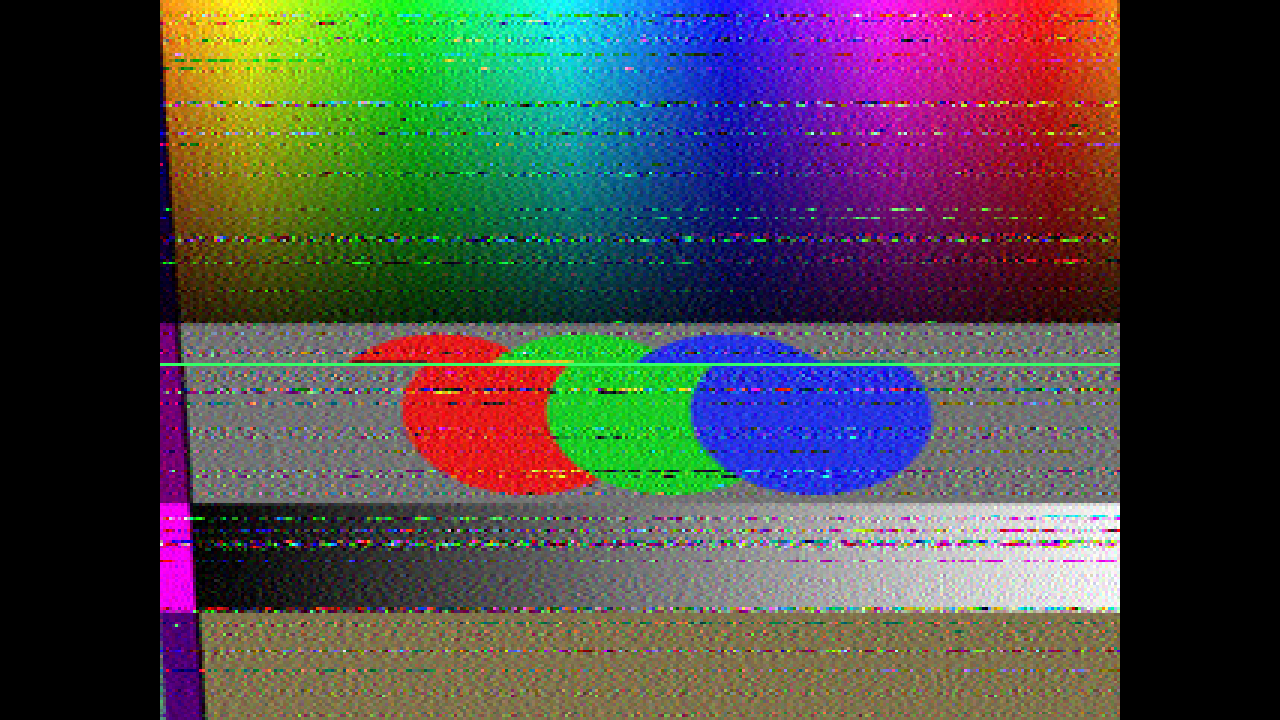
The harness’s test card through the plugin, rendered by the offline harness rather than captured from Resolume. Martin M1 at 40x through a 15 dB channel with deep fading and a receiver clock 60 ppm fast. The card scrolls, so the picture arriving (above the cursor) is not the picture it is overwriting (below it).
Before you rely on this: released at v0.1.0, and honestly early. The radio is measured rather than asserted, by a harness that drives the real plugin class and the signal chain it owns. Every line, segment and pixel boundary of Martin M1, Scottie S1 and Robot 36 lands on its constant to the sample over a whole picture. A receiver clock error leans a vertical edge by the predicted amount to within 5e-5 pixels a line, measured in the decoder’s picture and again in the rendered frame at two rasters. Above the FM threshold the pixel noise is within 2% of the discriminator’s closed form, and the threshold is measured at 3.70 dB SNR against Rice’s 3.11 dB. Line Sync takes a 75-pixel slant down to 0.24 px. Speed changes nothing per sample, bit for bit. Fourteen deliberately broken models all fail the checks, and all 20 controls the harness can sweep change the picture. It has never been loaded into Resolume on macOS. The one host it has run in there is the fleet’s own test host,
oxbow, for 120 frames. On Windows, a build of v0.1.0 loads, registers and renders in Resolume Arena 7.27.1, with every control matching what the plugin declares — on software rendering, so that says nothing about a GPU. The three controls that follow the music, Audio, Audio QRM and Bin Spacing, could not be tried there, because the test machine has no sound device. Try it on a spare layer before you put it in a show.This codebase was created with AI assistance, directed and reviewed by a human author.
Installing
Every download carries one effect, SW Slowscan. Drop it into Resolume’s effects folder and restart Resolume:
macOS    ~/Documents/Resolume Arena/Extra Effects/
Windows  %USERPROFILE%\Documents\Resolume Arena\Extra Effects\
Avenue uses the same layout under its own folder name. The effect then appears in the effects browser as SW Slowscan.
The macOS download is a universal build (Apple silicon and Intel), as a .dmg or a .zip. It is
Developer ID-signed and notarised, so the bundle simply loads. The
Windows download is an x64 installer or a .zip. It is not code-signed, so the installer trips
SmartScreen once: More info → Run anyway.
This is a radio, not a filter
Slow-scan television (SSTV) is how radio amateurs send still pictures over a voice channel. Each pixel is a tone: 1500 Hz for black, 2300 Hz for white, and the frequencies between for the greys between. A picture is sent a line at a time, each line opened by a 1200 Hz sync pulse, and colour is sent as separate scans of the same line. A picture takes about two minutes. At the other end an FM discriminator turns the tones back into brightness, and the decoder paints each line as it arrives, over the picture before.
Slowscan builds that whole chain and runs it on the CPU at 11,025 samples a second:
- The station. The clip is read down to the mode’s own resolution, 320 pixels across and 256 lines (240 in Robot 36), and sent as a phase-continuous tone.
- The HF path. Fading, a second, later path, an interfering carrier, the audio routed into the effect, and noise, all applied to that signal.
- The receiver. A band-pass filter, the discriminator, a lowpass, the header decoder and the line timing, which paint the picture a pixel at a time.
So the controls come in the same order. Mode is what the station sends and how fast. Channel is the path between the station and the receiver. Receiver is the decoder at the far end. Display is how the decoded picture is put on your layer.
What comes out is the receiver’s picture, not your clip with something laid over it.
Start here
Put SW Slowscan on a layer with something moving in it and leave every control alone. The defaults are Martin M1 at about 40 times real time, a picture every three seconds, over a clean-ish 25 dB path with some slow fading, into a receiver whose clock is 30 ppm fast. Each picture arrives from the top over the one before, with a green cursor on the line arriving, and leans very slightly: about seven and a half pixels from top to bottom.
Then, in this order:
- SNR. Bring it down. The picture gets grainy, and below about 3 dB it breaks up into speckle and streaks: the FM threshold.
- Fade Depth. Push it to 1 with SNR back around 10 dB. Bands of lines break up where the path fades.
- Clock Error. Push it well off centre and the picture leans; each colour scan starts to pick up the end of the one before, down one edge. Then set Slant Correct to the same value, or switch Sync to Line Sync, and it stands up again.
- QRM Level. A carrier on frequency. The picture fills with fine stripes, and QRM Freq changes them.
Be honest about the input. With Transmit on Latch, the default, each picture is the frame your clip showed when that picture started. A clip that does not change sends the same picture again and again, and a new picture painting over an identical old one is invisible except for the cursor. Something that moves or cuts shows the arrival best.
Time comes from the host
The signal runs on the host’s clock. Each frame is worth its own duration in signal, times Speed, at 11,025 samples a second. A re-render of the same composition therefore sends the same signal.
Two things keep that clock from misbehaving:
- Each frame’s duration is clamped between 1/240 and 1/24 of a second. A stall, a scrub or a dropped frame never asks the radio for more than 1/24 s of signal at once. And a clock that does not move still advances 1/240 s a frame: if the host keeps drawing while its clock is stopped, the transmission slows to a quarter of its speed at 60 fps, but does not freeze.
- For the first few frames after it loads, the effect runs on its own steady clock while it works out whether the host counts time in seconds or milliseconds. Then it switches to the host’s.
Everything in the channel is defined per second of signal, not of video. So at 40x a 0.3 Hz fade happens forty times as fast on screen. That is correct (the whole signal is sped up) and it is why the fades get busier as Speed goes up.
The Mode group
Mode: Martin M1 (the default), Scottie S1, Robot 36 or Auto VIS. The timings are the real ones:
| Mode | Picture | Line | A picture at 1x | at 40x | at 120x |
|---|---|---|---|---|---|
| Martin M1 | 320 × 256, colour as G, B, R scans | 446.446 ms | 1 min 55 s | 2.9 s | 0.96 s |
| Scottie S1 | 320 × 256, colour as G, B, R scans | 428.22 ms | 1 min 51 s | 2.8 s | 0.92 s |
| Robot 36 | 320 × 240, brightness and one colour difference a line | 150 ms | 37 s | 0.92 s | 0.31 s |
Each picture starts with a VIS header, 0.91 s of tones that carry a code for the mode. The receiver reads it and starts the picture. Auto VIS makes the station cycle through the three modes, Martin, Scottie, Robot, one picture each, and the receiver takes each picture’s mode from its header. A mode change takes effect with the next picture, as a real station’s would. The old picture stays on screen until the new one paints over it, in its own colours.
Robot 36 sends a line’s brightness, then one colour difference: R−Y on even lines and B−Y on odd ones, each shared with its neighbour. So its colour has half the vertical resolution of its brightness.
Speed: how many times real time the signal runs, 1x to 120x. The travel is geometric: 11x in the middle, and the default, 0.77, is 40x. Speed only decides how much signal each video frame is worth. Nothing in the radio reads it, so a picture sent at 120x decodes exactly as the same picture does at 1x, bit for bit, only sooner.
Transmit: Latch or Live.
- Latch (the default): the station grabs the frame your clip shows when a picture starts and sends that frame, as a real station sends a stored image.
- Live: each line is taken from the clip as that line starts. A moving clip is sheared down the picture, each line from a later moment than the one above.
The Channel group
The shortwave path. Everything here happens to the signal between the station and the receiver.
SNR: signal to noise, in a 3 kHz bandwidth, −10 dB to +40 dB, linear in dB. The default, 0.7, is 25 dB; 0.2 is 0 dB. The noise is added to the audio the receiver hears. Above the FM threshold it shows as grain that doubles in power for every 3 dB lost. Below it, around 3 dB here, the discriminator starts slipping whole cycles, and each slip is a streak: the picture goes from grainy to broken up over a few dB. Below the threshold the header usually fails to decode too; see Restart for what the receiver does then.
Fade Depth: how much of the path is fading, 0 to 1, default 0.25. At 0 the path is a wire. At 1 it is pure Rayleigh scatter, the deep fades of a real HF path; between, a steady part and a fading part. FM does not dim in a fade: the discriminator reads frequency, not strength, so a fade does not darken the picture. It takes the SNR down with it, so each fade is a band of noisy lines, deep enough to break up when the SNR is already low. At 10 dB and Fade Depth 1, as in the video, each fade is a distinct band of broken-up lines across a picture that is otherwise clean.
Fade Rate: how fast the path fades, a Doppler spread of 0.02 Hz to 5 Hz. The travel is geometric: 0.32 Hz in the middle, which is the default. Real HF is usually 0.1 to 1 Hz. The faster, the more and narrower the bands. It is per second of signal, so Speed multiplies it on screen: at 40x the default makes busy, narrow bands, and 0.06 Hz, about a fifth of the way, gives about half a dozen a picture.
Multipath: the delay of a second path, 0 to 8 ms, linear. The default is 2 ms. A Martin pixel is 0.4576 ms, so 8 ms is about 17 pixels (18 in Scottie, 29 in Robot 36).
Multipath Level: the second path’s strength against the first, 0 to 1, default 0. So at the defaults there is no second path at all, and Multipath does nothing until this is up. The second path fades on its own, by the same Fade Depth. Every edge gets a coloured echo the delay to its right. The echo of the gap before each scan does the same: the first few pixels of every line are disturbed, and a thin bright line runs down the picture the delay in from its left edge.
QRM Freq: the frequency of an interfering carrier, 300 Hz to 3 kHz. The travel is geometric: 949 Hz in the middle, and the default, 0.8, is 1893 Hz, in the middle of the picture’s tones. The receiver’s filter passes 1000 to 2500 Hz, so a carrier well outside that is mostly filtered out.
QRM Level: the carrier’s strength, 0 to 1, default 0. At 1 it is as strong as the picture. It beats with the picture’s tones and drags the discriminator with it, and the picture fills with fine stripes. Tuning QRM Freq changes the stripes.
Audio: the audio input. Resolume hands an effect its audio as a spectrum of 64 bins, not as a waveform, and fills this in itself; there is nothing to set.
Audio QRM: how much of that audio goes on air, 0 to 1, default 0. It goes on as noise shaped by the spectrum, so the music lands in the picture wherever its spectrum overlaps the picture’s 1500 to 2300 Hz. At 1, a flat full-scale spectrum is interference as strong as the picture. A kick drum is mostly below the picture’s band; hats and vocals are in it.
Bin Spacing: Linear or Log (the default). How Resolume spreads its 64 bins over the audio has never been measured, so this is the assumption, exposed:
- Linear: the bins are 344.5 Hz wide, from 0 to 22.05 kHz. The picture’s band is bins 4 to 6, so the bottom of the spectrum, where a kick lives, lands in the picture.
- Log: the bins run from 20 Hz to 20 kHz, each about 11% wider than the one before. The picture’s band is bins 40 to 43, and a kick is far below it.
Either way the radio’s audio stops at 5.5 kHz, so bins above that drop out: all but the lowest 16 under Linear, and the top dozen under Log. The video on the project page shows a synthetic kick drum landing in the picture as bands of noise under Linear and not under Log. With Resolume’s own spectrum, try both and keep the one that looks like your music.
The Receiver group
Rx Bandwidth: the discriminator’s lowpass, 100 Hz to 3 kHz. The travel is geometric: 548 Hz in the middle, and the default, 0.73, is about 1.2 kHz. Narrow it and edges smear to the right, with a tail that decays over 1/(2π × bandwidth): 0.13 ms at the default, under a third of a Martin pixel, and 1.6 ms, three and a half pixels, at 100 Hz. Narrowing it also averages the noise down. Widen it for sharper edges and more grain.
Sync: Free-run (the default) or Line Sync.
- Free-run: the receiver times every line from its own clock, starting from the header. If that clock is off (Clock Error), every line starts a little early or late, and the picture leans.
- Line Sync: the receiver re-starts every line on the 1200 Hz sync pulse it detects. The lean goes: at 300 ppm, where Free-run drifts 75 pixels over a Martin picture, the harness measures the edge held within 0.24 px. Anything that looks like a sync pulse re-starts the line, so in heavy noise a burst can make a line jump.
Clock Error: how far off the receiver’s sound card clock is, −300 to +300 ppm, 0 in the middle. The default, 0.55, is +30 ppm. Every line lands a fraction of a pixel away from the one above, clock error × line time ÷ pixel time pixels a line, which is about 0.03 px a line per 30 ppm in Martin and Scottie, and a little over half that in Robot 36:
| At | Martin M1 | Scottie S1 | Robot 36 |
|---|---|---|---|
| 30 ppm (the default) | 0.029 px/line, 7.5 px over the picture | 0.030, 7.6 px | 0.016, 3.9 px |
| 300 ppm (the end) | 0.29 px/line, 75 px | 0.30, 76 px | 0.16, 39 px |
Positive values push each line a little further right than the one above. Martin and Scottie send each line’s colour as three scans, green, blue, red, so as the lean pulls a line early the start of each scan picks up the end of the one before it: a coloured fringe down the leading edge, and a coloured wedge down the side of the picture.
Slant Correct: a correction subtracted from Clock Error, −300 to +300 ppm, default 0. It is the slant adjustment in real decoders. Set it equal to Clock Error and the picture stands up straight. What the receiver runs at is Clock Error minus Slant Correct, so turning either one moves the same lean.
The Display group
Cursor: on by default. A green line marks the row below the one arriving, so the pixels arriving stay visible. It is always at least one output pixel tall, at any composition size.
Aspect: Fit (the default) or Fill. Every mode is shown 4:3, as decoders show them (Martin’s and Scottie’s pixels are not square).
- Fit: the largest 4:3 box that fits, centred. The surround is transparent, so on a 16:9 composition the layer below shows either side.
- Fill: the picture stretched to the whole layer.
Mix: 0 to 1, default 1. At 1 you see only the received picture. At 0 you see your clip, untouched. In between the two are blended, and under Fit the letterbox fades from your clip to transparent.
Restart: a new picture now. The station starts a fresh picture from its header, and the receiver drops the picture it was painting and waits for that header. The picture on screen stays until the new one paints over it.
If the header does not decode (too much noise, fading or interference at that moment), the receiver does what an operator does and starts the picture by hand: two lines in, from the station’s own timing. So below the threshold you still get a picture, of streaks, rather than a frozen screen, and it lands exactly where a decoded one would have.
How it works
Each frame, in order:
- The clip is read down to the mode’s 320 × 256 (or 240) through a box filter and read back to the CPU. The readback is double-buffered so it never stalls Resolume, which means the station always sees your clip a frame or two late.
- The radio runs for as many samples as the frame is worth: frame duration × Speed × 11,025. Every sample, the station makes one sample of tone; the channel fades it, adds the echo, the carrier, the audio noise and the white noise; and the receiver filters it, reads its frequency, lowpasses that, and, when a pixel’s time comes, writes the pixel.
- The picture is drawn, 4:3, with the cursor and the Mix.
The line timing is integer arithmetic on microseconds and samples, so nothing drifts however long the effect runs, and the only error in the timing is the Clock Error you ask for.
Performance
Measured by the offline harness on an M4 Max at the default controls, best of three runs of 60 frames, on a GPU and CPU shared with other work:
| Speed | ms/frame | % of a 60 fps frame | |
|---|---|---|---|
| 1280×720 | 40x | 1.04 | 6.2% |
| 1920×1080 | 40x | 1.02 | 6.1% |
| 3840×2160 | 40x | 1.04 | 6.2% |
| 1920×1080 | 1x | 0.29 | 1.7% |
| 1920×1080 | 120x | 2.58 | 15.5% |
The composition size hardly matters. Speed does. The cost is the radio, which is CPU work on Resolume’s render thread and scales with how many samples a frame is worth. With Multipath Level, QRM Level and Audio QRM all up, the radio alone takes about 3.7 ms a frame at 120x. The two GPU passes are small at any size.
Nothing was timed inside Resolume, and nothing was timed on Windows.
If it looks wrong
Nothing seems to happen. Check Mix. If Mix is 1 and the picture looks exactly like your clip, the channel is clean and the clip is still: each new picture is the same as the last. Lower SNR, or put something moving on the layer.
The picture is black at first. Nothing has been received yet. The first picture arrives from the top within a few seconds at the default Speed, and nearly two minutes at 1x.
The new picture looks the same as the old one. Under Latch the station sends the frame your clip showed when the picture started. A still or slow clip sends near enough the same picture every time.
After a Restart, the first picture is the clip from before a cut. The station takes the frame the readback delivered, which is a frame or two behind. Press Restart a moment after the cut.
It leans. Clock Error is off centre; the default is +30 ppm, on purpose. Set Slant Correct to match, or switch Sync to Line Sync.
The pictures flicker with noise bands. Fade Rate at high Speed: the fades are defined per second of signal and Speed multiplies them. Lower Fade Rate, or Fade Depth.
Multipath does nothing. Multipath Level is 0 by default. Raise it.
QRM does nothing. QRM Level is 0 by default, or QRM Freq is far outside 1000 to 2500 Hz.
Audio QRM does nothing. Audio has to be routed to the effect in Resolume for it to receive a spectrum, and your music may have nothing where the current Bin Spacing puts the picture’s band. Try the other Bin Spacing.
A switch of Mode takes a moment. A mode change applies to the next picture, as a station’s would. Press Restart to start it now.
The effect does nothing at all. A shader that will not compile looks exactly like that. The real message is in the log:
macOS    ~/Library/Logs/slowscan/slowscan.YYYY-MM-DD.log
Windows  %LOCALAPPDATA%\slowscan\logs\slowscan.YYYY-MM-DD.log
It records the GL vendor and version at load, which shader failed if one did, whether the buffers could not be allocated, and which unit (seconds or milliseconds) it decided the host’s clock is in.
Known limits
- Never loaded into Resolume on macOS, and nothing has driven the controls in a show. On Windows it loads and renders in Arena, on software rendering, with every control as declared. How 21 controls in four groups read in the inspector on a Mac, how Resolume routes audio into the Audio input, the layout of its 64 bins, and what its clock does over a long session are all untested.
- The audio is noise shaped by the spectrum, not the music itself, because a spectrum is all an effect is given. Bin Spacing is a guess made visible.
- The fading is flat across the band, and the channel is at most two paths. A propagation lab’s multi-tap ionospheric model would do more.
- The receiver is one decoder design: an analytic band-pass, a phase-difference discriminator and a one-pole lowpass. MMSSTV and QSSTV differ in their filters and sync detection.
- A failed header is started by hand, from the station’s timing, as an operator pressing Start at exactly the right moment. A real decoder without a header waits, or searches for the picture’s start; this one does not search.
- Three modes. No Martin M2, Scottie S2/DX, Robot 72 or PD modes.
- Up to 3.7 ms of CPU a frame at 120x with everything on, on Resolume’s render thread. On a busy show machine that may be too much; lower Speed.
- No presets and no OpenFX version.
About
The last group, About, carries the plugin’s name, version, licence and maker, and buttons that open this guide, the project page, the source on GitHub and the support page in your browser.
Reporting something
github.com/stoatworks-labs/slowscan/issues. A screenshot, the Mode, Speed and Channel settings, your Resolume version, and the day’s log are usually enough.