

Teletext is a picture sent as Level 1 teletext mosaic graphics, for Resolume Arena and Avenue, as an FFGL effect. It does not paint a blocky filter over a clip. It encodes each frame the way a teletext page was encoded — 40 columns by 24 rows of character cells, eight colours, 2 × 3 mosaics, and colour set by control codes that each cost a cell — with an encoder that is exactly optimal under that constraint, then transmits the page a few rows a field and decodes it the way a television did. The black columns at every colour boundary, the rationed colour, the tearing as a moving picture arrives row by row and the way bit errors land are all what the standard does, not what somebody drew.
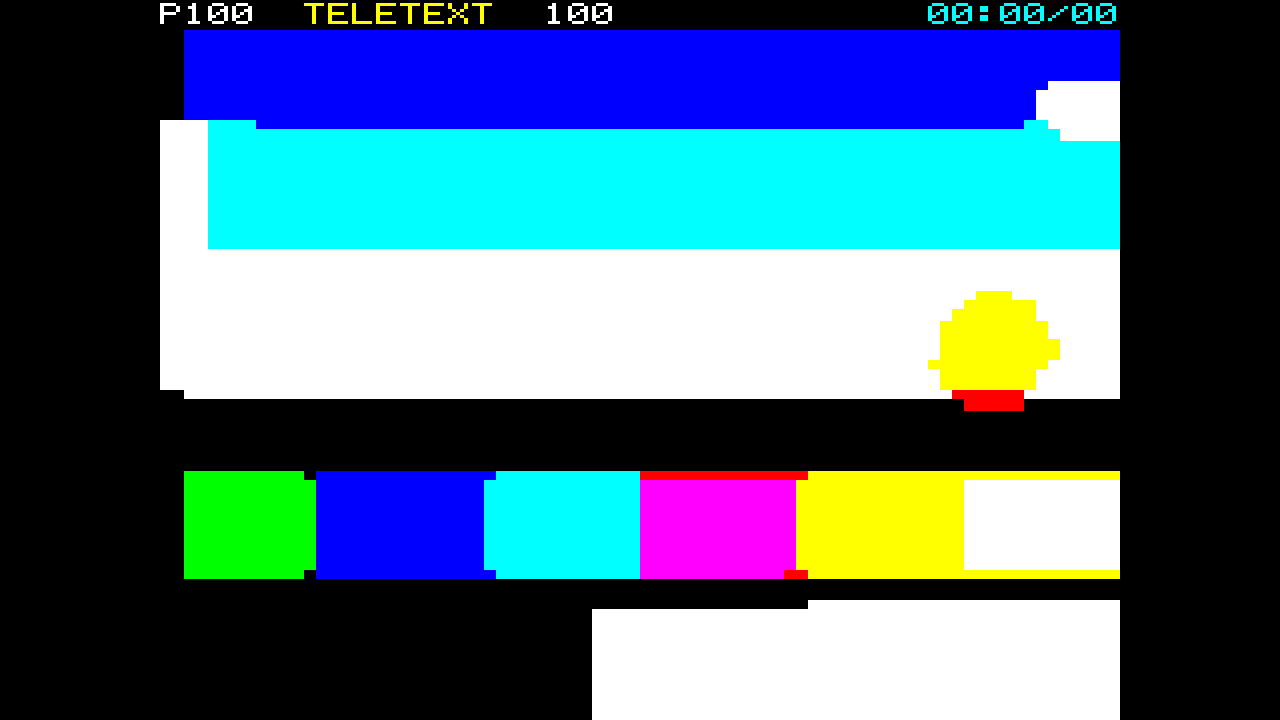
The repo’s test card through the plugin at its defaults, rendered by the offline harness rather than captured from Resolume: the 4:3 safe area centred in a 16:9 frame, the header on page 100, Hold Graphics on, four rows a field. Every colour patch is separated from the next by a column of black, because the code that changes the colour occupies a cell.
Before you rely on this: released at v0.1.0, and honestly early. The teletext is measured rather than asserted, by a harness that drives the real plugin class and reads each claim back out of the picture it made, at two rasters: the row encoder’s realised cost equals an exhaustive search over every control placement, exactly, in integers, on 24 random rows in both error spaces; a red-then-blue row puts its control cells at exactly columns 0 and 20 with the boundary cell black, a background change at exactly 18 and 19, and with backgrounds allowed the boundary costs no black at all; 0 of 921,600 output pixels are off the eight colours and 0 sit in a non-uniform sixel; the separated gutter is right to the pixel on 912 cells; all 24 rows show the frame of the field that carried them, through a resize; a forced single-bit error blanks its cell and a forced double-bit error changes the mosaic, with 0 pixels changed outside the cell; and nine deliberate faults are shown to make those checks fail. All 12 controls are shown to change the picture. It has never been loaded into Resolume on macOS — the one host it has run in is the fleet’s own test host,
oxbow, for 120 frames. On Windows, a build of v0.1.0 loads, registers and renders in Resolume Arena 7.27.1, with every control matching what the plugin declares — on software rendering (win-lab, Mesa llvmpipe, no GPU), so that says nothing about a GPU. Rows per Field and Freeze could not be shown moving there, in two runs, because the gate’s picture is a still: a still page comes round in under a second at any Rows per Field, and a frozen still is the same still. The harness’s--carriagecheck measures the first and its sweep the second. Try it on a spare layer before you put it in a show.This codebase was created with AI assistance, directed and reviewed by a human author.
Installing
Every download carries one effect, SW Teletext. Drop it into Resolume’s effects folder and restart Resolume:
macOS    ~/Documents/Resolume Arena/Extra Effects/
Windows  %USERPROFILE%\Documents\Resolume Arena\Extra Effects\
Avenue uses the same layout under its own folder name. The effect then appears in the effects browser as SW Teletext.
The macOS download is a universal build (Apple silicon and Intel), as a .dmg or a .zip.
It is Developer ID-signed and notarised, so the bundle simply loads. The Windows download is an x64 installer or a .zip. It is not code-signed, so
the installer trips SmartScreen once: More info → Run anyway.
Colour is not stored per cell
A teletext page is 40 columns by 24 rows. Each cell holds one 7-bit code. A code of 0x20 or above is a character: a letter, or in mosaics mode a 2 × 3 block of sixels in the current foreground colour over the current background. A code below 0x20 is a control code, and a control code does two things at once: it changes the state of the row from that cell onwards — the foreground colour, the background, Hold — and it occupies the cell, which shows as background (a space) unless Hold Graphics is on. Every row starts alphanumeric, white on black, and nothing carries over from the row above.
That is the whole effect. Encoding a picture is an optimisation under a hard serial constraint, and the look is what the optimum looks like:
| the constraint | what comes out |
|---|---|
| a colour code costs a cell that shows background | the gap: a black column at every foreground colour boundary; column 0 of every row lost to the code that switches to mosaics |
| a new background costs two codes | colours are rationed; where the background may move, a solid boundary costs three code cells and no black at all, because each code shows the background it is changing to |
| eight colours, 2 × 3 sixels | 80 × 72 sixels and nothing between; a mid-tone is whichever of the eight is nearest |
| Hold Graphics: a code cell shows the last mosaic received | the gaps filled, and the held shape bleeding in whatever colours are in effect at that cell |
| rows arrive a few per field, in order, cycling | a moving picture tears between rows |
| odd parity per byte, Hamming on the row address | a single bit blanks a cell; two bits pass as the wrong mosaic; a row never moves |
The encoder that decides each row is exactly optimal: a Viterbi programme over the 40 cells with the decoder’s own row state — mode, foreground, background, Hold — as the state, and every byte it may send as a transition. The harness checks it against an exhaustive search over every control placement, on random rows, and the costs agree exactly, in integers. Real teletext artists worked this out by hand; the plugin works it out fifty times a second.
Start here
Put SW Teletext on a layer or a clip with bold, coloured footage on a dark ground — the bundled demo clips with dancers, rings and a kaleidoscope tunnel are ideal. Out of the box you get the 4:3 safe area centred in the frame, a header row on page 100 with a running clock, Hold Graphics on, and four rows a field, so the page follows the picture with a small tear.
Then:
- Hold Graphics off. Every colour boundary opens into a column of black: that is the gap, the cost of every colour code laid bare. Turn it back on and the code cells fill with the last mosaic, in the colours in effect at that cell.
- Allow Background off. Now every boundary costs black, even a solid one. Turn it on again and watch the encoder find the artists’ trick on any large area: a solid boundary that costs three code cells and no black.
- Rows per Field → 1. The page takes 24 fields, nearly half a second, to come round, and a moving picture tears between rows. → 24 and the whole page arrives every field.
- Signal Quality → 0.5. Cells blank where a single bit was caught by parity; a broken colour code loses its colour for the rest of the row; a double-bit error passes as the wrong mosaic, or as a stray capital letter. Freeze holds the page, errors and all.
- Show Codes on. Every control cell is tinted, so you can count what each row cost.
Dark clips vanish. Eight colours and nothing between means a mid-tone is whichever of the eight is nearest, and in linear light a lot of mid-tones are nearest black. A clip of thin lines on black comes out as a handful of white and cyan cells. Put a brightness or contrast effect ahead of this one to lift it into the palette; that is what the encoder wants to see.
Every slider is declared to the host as 0 to 1, except the two counts, which are integers. The value each position stands for is given with each control below.
The Encoder group
Error Space — RGB or Luma Weighted; RGB by default. How the encoder measures the distance between a sixel’s colour and each of the eight. In RGB the three channels count equally. Luma Weighted scales each channel’s error by its Rec. 709 luma share (0.2126, 0.7152, 0.0722, times three so a neutral error weighs the same in both), so green is the channel that matters most and blue barely counts: brightness is kept at the expense of hue. Either way the sixel’s colour is its mean in linear light over the source pixels under it, and the error is measured on the sRGB encoding of that mean, which is nearer to how the eye weighs a mid-tone.
Hold Graphics — on by default. Under Hold a control cell shows the last mosaic received on the row instead of a space, so the gaps at colour boundaries fill in — with a shape that belongs to the cell before, drawn in whatever foreground and background are in effect at that cell, which is the bleed teletext art was known for. The encoder runs both programmes, with Hold and without, decodes each for what it actually shows, and keeps the cheaper, so Hold never makes a row worse than the exact optimum without it. Off, every code cell is a space.
Allow Background — on by default. Whether the encoder may use New Background and Black
Background. A new background costs two codes — a colour code to set the foreground and New
Background to copy it — but once the background may move, a solid boundary costs no black at all:
New Background shows the old colour, the colour code shows it too, New Background again shows the
new one. Off, the background stays black and every boundary costs a black cell; the plugin’s
--gap and --separated checks run this way, because it is where the standard’s plain claims are
the truth.
Separated — off by default. Separated mosaics: each of the six blocks in a cell loses its left column and its bottom line, so the page becomes a grid of dots. It costs a cell — the Separated code goes at column 0 of every row, as it did on air. The gutter follows the SAA5050 character generator as jsbeeb’s emulation reads it; see Known limits.
The Transmission group
Rows per Field — 1 to 24, an integer; 4 by default. Teletext rows travelled as packets in the vertical blanking interval, a few per field, so a page was never updated at once. The plugin runs fields at 50 a second on the host’s clock, whatever the composition’s frame rate, and each field carries this many rows, in row order, cycling: the page comes round every ⌈24 / R⌉ fields. At 4 rows a field that is six fields, 0.12 s, and a moving picture follows with a small tear; at 1 it is 24 fields, 0.48 s, and the tear is the look; at 24 the whole page arrives every field and there is none. Each row is encoded from the frame on show when its field goes out, so different rows genuinely show different moments.
Signal Quality — 0 to 1; 1 by default, a clean signal. Below 1, bytes arrive with bit errors at a rate of 0.3 × (1 − q)² of transmitted bytes: at 0.5 about 7.5% of bytes, at 0 about 30%. Of the errored bytes a quarter carry two flipped bits and the rest one, and packets are dropped for an unrepairable row address at a quarter of the byte rate. They land the teletext way, because the decoder is the receiver’s half of the standard:
- a single-bit error fails the byte’s odd parity, and the cell shows a space: a mosaic loses its shape, and a control code loses its effect for the rest of the row — so a broken colour code leaves the row in the old colour;
- a double-bit error passes parity and shows as the wrong character — another mosaic, or in mosaics mode a capital letter, since codes 0x40–0x5F stay alphanumeric;
- the row address is Hamming-protected, so an error never moves a row: a packet whose address cannot be repaired is dropped and the row keeps what it had.
Errors are drawn from an integer hash of (field, row, column), so the same field at the same quality always breaks the same bits, and a row’s errors are redrawn each time it is transmitted: they flicker at the page cycle, as real ones did. The constants are stated, not measured from any transmitter.
Freeze — off by default. Holds the page memory: no field is transmitted while it is on, so the picture — errors included — stays exactly as it was, like the Hold key on a teletext remote. The source keeps playing underneath; turn Freeze off and the rows catch up as their fields come round.
The Display group
Grid Fit — 4:3 or Fill; 4:3 by default. A teletext page is 240 × 240 dots on a 4:3 display, so the default draws it in the largest 4:3 rectangle centred in the frame, black outside it — the teletext safe area. Inside that region the page is scaled by whole pixels wherever the region allows at least a pixel a dot, centred, so every dot edge is a pixel edge: at 1280 × 720 a dot is 4 × 3 pixels in a 960 × 720 area, at 1920 × 1080 it is 6 × 4 in a 1440 × 960 area letterboxed in the 1440 × 1080 region. Only where a dot would be under a pixel (a 320 × 180 frame has 180 lines for 240 dot lines) is the scale a fraction. Fill uses the whole frame, so on 16:9 the dots are wide. Either way the encoder samples the source over exactly the area the page is painted on, so the page sits on the picture it encodes.
Header — on by default. Row 0 is a real header row: the page number, the service name
TELETEXT, the page again and a running clock, in alphanumerics with their own colour codes,
drawn from a 5 × 7 bitmap font of our own. It is transmitted every field, like the real one, and
it covers row 0 of the picture — the picture is always encoded as 24 rows and the header
replaces the top one, so turning it off does not re-fit the grid. The clock is the composition’s
running time, HH:MM/SS, not the wall clock, so two renders of the same frame are the same
picture. No broadcaster’s name appears anywhere.
Page Number — 100 to 899, an integer; 100 by default. The number the header shows, as a magazine page. It changes nothing but the header.
Show Codes — off by default. A diagnostic: every cell that holds a control code is tinted a blue-grey, so you can see what each row cost and where the encoder put its codes. Not teletext — with it on, the picture is no longer eight colours.
Mix — the page against the untouched clip, 0 to 1; 1 by default. Zero is the clip as it arrived. The transmission keeps running underneath whatever Mix says. The page’s own alpha is 1 — a television is opaque — and Mix blends the whole RGBA.
The page arrives in real time
Fields run at 50 a second on the host’s clock, in seconds, whatever the composition’s frame rate. When the composition runs slower than the field rate, several fields pass between two frames and each carries its rows, all encoded from the one frame there is; up to four fields a frame are run, and a longer gap is treated as a jump and runs only the field it lands on. When it runs faster, some frames fall inside a field already transmitted and the page is simply shown again. Rendering the same moment twice does not move the page on.
The page memory is 24 × 40 bytes on the CPU and is never reallocated, so a change of resolution does not clear it: the rows already received stay, and the next fields bring the new frame in row by row.
How it works
Once a frame:
- Cells. The GPU takes the mean of the source pixels whose centres fall in each sixel’s rectangle on the output, in linear light: 80 × 72 means. At 4K a sixel is 48 × 36 pixels; past 48 a side the taps are strided.
- Read-back. Those 92 KB are read back to the CPU. This is the one stall in the plugin, and the price of an encoder that is exact.
- Encode. For each row a field carries, the CPU builds a cost table — for every cell, every sixel and every palette colour, the squared error in the chosen space, quantised to 1/65536 and summed in 64-bit integers — and runs the Viterbi programme over 224 row states (mode, foreground, background, Hold): about 0.05 ms a row for both programmes.
- Transmit. The fields elapsed since the last frame each carry their rows into the page memory, through the channel that flips bits.
- Decode. Every row of the page memory is decoded to what each cell shows — foreground, background, the code, whether it is a mosaic, separated, a control — and uploaded as a 40 × 24 texture.
- Render. The GPU draws the SAA5050’s 6 × 10 dot cell at every output pixel: mosaic blocks of 3 × 3, 3 × 4 and 3 × 3 dots, contiguous or separated, or a glyph from the font; Show Codes tints; Mix blends.
The decoder is the reference for everything: the encoder is judged by what the decoder makes of its bytes, the harness’s exhaustive search drives the decoder step by step, and the render pass draws exactly the cells the decoder produces.
Performance
Measured by the offline harness on an M4 Max at the defaults, best of three runs of 60 frames
after a warm-up, glFinish both sides, on a GPU and CPU shared with other work:
| ms/frame | % of a 60 fps frame | |
|---|---|---|
| 1280 × 720 | 0.67 | 4.0% |
| 1920 × 1080 | 0.86 | 5.2% |
| 2560 × 1440 | 1.42 | 8.5% |
| 3840 × 2160 | 2.98 | 17.9% |
The figure includes the read-back and the encoder for the rows each field carries. With Rows per Field at 24 — the whole page every field — a separate, noisier run gave 1.8–4.9 ms. The 4K cost is the cells pass’s up to 48 × 48 taps a sixel plus the read-back stall. Nothing was timed inside Resolume, and nothing was timed on Windows.
If it looks wrong
Most of the picture is black. The clip is dark: in linear light its mid-tones are nearest black. Put a brightness or contrast effect ahead of this one.
There are black columns through everything. That is teletext: every foreground colour change costs a cell. Hold Graphics fills them with the last mosaic; Allow Background lets solid boundaries cost nothing; fewer colours in the source means fewer gaps.
The picture is torn, or lags the clip. Rows per Field is low. At 1 the page takes half a second to come round; raise it. At 24 there is no tear at all.
Cells are blanking, and there are stray letters. Signal Quality is below 1. That is the channel: single-bit errors blank cells and double-bit errors pass as the wrong character.
Nothing moves. Freeze is on — or Rows per Field is low and the clip is still, in which case nothing should.
The top row of the picture is missing. The Header covers row 0. Turn it off.
There is a black border round the page. Grid Fit is 4:3, the teletext safe area. Fill uses the whole frame.
The colours are wrong for the picture — greens and yellows where I expected white. Try the other Error Space: Luma Weighted keeps brightness at the expense of hue, RGB the reverse.
Some cells are blue-grey. Show Codes is on. It is a diagnostic.
SW Teletext is not in the effects browser. Check the folder under Installing, and that Resolume was restarted.
The effect does nothing at all. A shader that will not compile looks exactly like that, and the real message is in the log:
macOS    ~/Library/Logs/teletext/teletext.YYYY-MM-DD.log
Windows  %LOCALAPPDATA%\teletext\logs\teletext.YYYY-MM-DD.log
It records the GL vendor, renderer and version at load, which shader failed if one did, a buffer that could not be allocated, and at frame 60 the host’s clock and the unit the plugin decided it is in.
Known limits
- Never loaded into Resolume on macOS, and nothing has driven the controls in a host there. How the twelve controls read in the inspector, what Resolume’s clock does to the field counter over a long session, and whether the read-back stall is felt on a busy composition are untested.
- Hold Graphics is approximate, and bounded. Under Hold a code cell shows the last mosaic received, which depends on the path through the row; the programme costs it as the best mosaic of the cell before, under the state’s own colours, which is exact in the common case of a colour change between two runs. Both programmes are run and the cheaper realised result is kept, so the result with Hold on is never worse than the exact optimum without it — but it is not a proof of optimality with Hold.
- Mosaics only, Level 1 only. Alphanumeric characters are used for the header and nowhere else; no double height, no flash, no boxes, no Release Mosaics in the encoder’s alphabet.
- The header covers row 0 rather than the picture being re-fitted into 23 rows.
- The separated gutter is a reading: each block loses its left column and bottom line, following jsbeeb’s SAA5050 emulation and Wikipedia’s description; the chip’s datasheet figure was not consulted. The font is our own 5 × 7, not the SAA5050’s character ROM.
- The error constants are invented — 0.3 (1 − q)² of bytes, a quarter double, a quarter of that rate dropped — stated, not measured from any transmitter.
- The encoder’s choices on a real picture may differ by a sixel here and there between GPUs, because the sixel means are sums of floating-point decodes that round differently; the programme itself is integer and agrees bit for bit given the same means. No check asserts the card’s encoding, only structure on pure-colour sources and invariants on the card.
- Checked at up to 1920 × 1080 in the harness, and only timed at 4K.
- Only ever run on an Apple M4 Max, although the macOS build contains an Intel slice. On Windows, see the note at the top of this guide.
- No presets, no audio input and no OpenFX version.
- There is a browser demo at teletext-demo.stoatworks-labs.com. It is a port to a web page, not the plugin: the shaders run in WebGL2 and the encoder, transmission and decoder are rewritten in JavaScript. The page lists what it does not reproduce.
About
The last group, About, carries the plugin’s name, version, licence and maker, and buttons that open this user guide (stoatworks-labs.com/software/teletext/guide/), the project page, the source on GitHub and the support page in your browser.
Reporting something
github.com/stoatworks-labs/teletext/issues. A screenshot, the Encoder settings, Rows per Field and Signal Quality, and the composition’s resolution and frame rate are usually enough. If the effect did nothing, attach the log.