

Toner is a photocopier, and a copy of a copy of a copy, for Resolume Arena and Avenue, as an FFGL effect. It does not threshold a clip and add grain. It runs each frame through a xerographic engine — optics, an auto-exposure that sets the background to paper white, a photoconductor with a steep discharge curve, development that follows the electric field above the latent image rather than the image itself, a toner supply that runs short, and a drum whose defects come round once a circumference — and then runs the same machine again on its own output, up to eight times a frame. The greys that collapse to paper or toner, the wide solids that go hollow while thin lines print full, the page that runs out part-way down and the drift from copy to copy are all what the machine does, not what somebody drew.
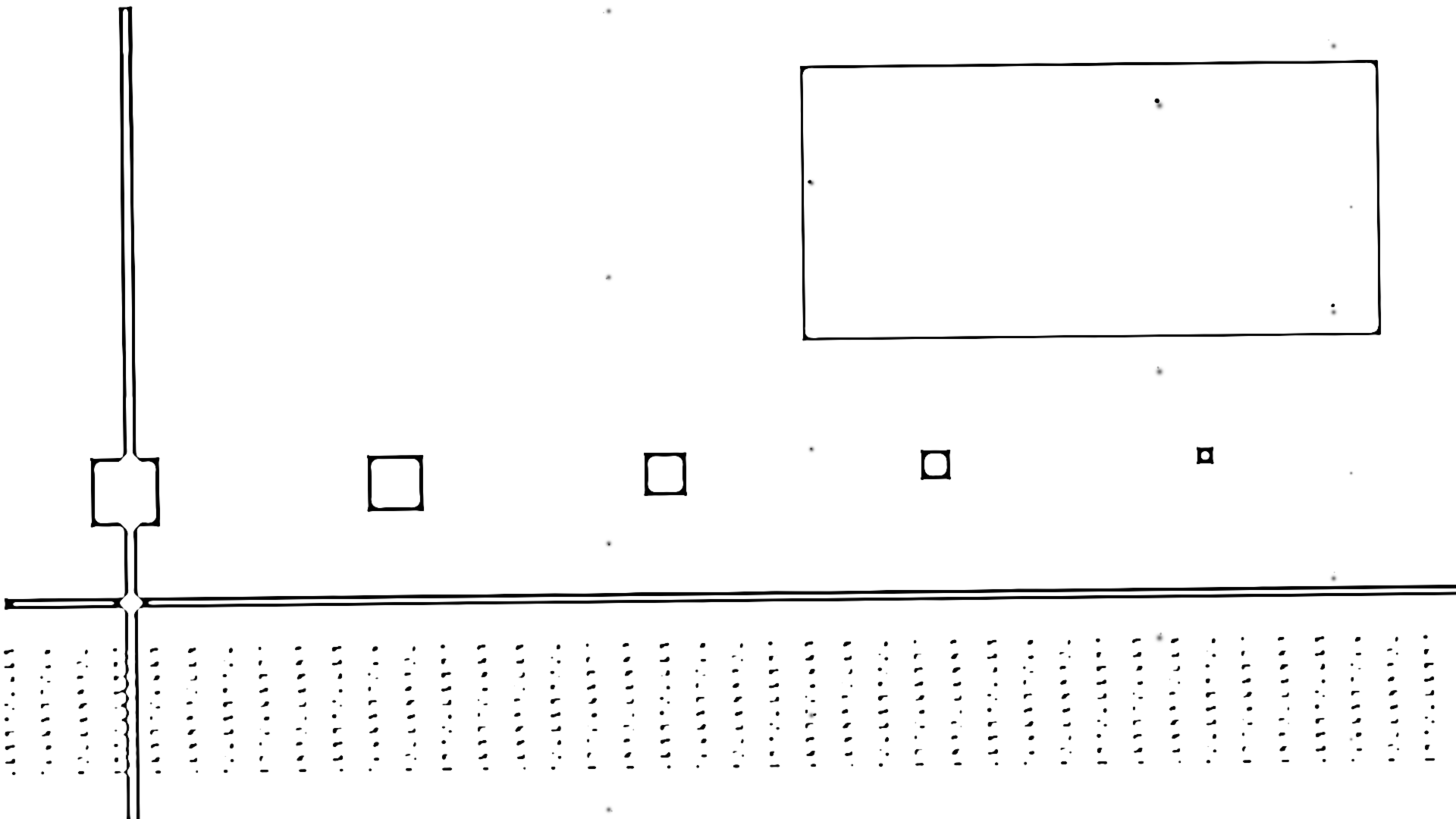
The repo’s test card through the plugin, rendered by the offline harness rather than captured from Resolume: four generations, Solid Fill 0.3, Toner Supply 0.55, Drum Marks 0.6 — off the defaults, because the defaults on a synthetic card show a clean threshold. Nothing here is drawn as an outline: every rim is where the fringe field of a charged area is strong enough to develop, and every hollow is where it is not.
Before you rely on this: released at v0.1.0, and honestly early. The copier is measured rather than asserted, by a harness that drives the real plugin class and reads each claim back out of the picture it made, at two rasters: a grey ramp copied n times matches the stated tone curve composed n times, column for column, with two plateaus and a transition that narrows every copy; a solid square’s density profile follows the strip-field closed form to 5 × 10⁻⁶ and its centre-to-edge ratio falls with its width while a one-pixel line prints full; the drum’s defects repeat one circumference apart to 8 × 10⁻⁶ px at a whole-pixel circumference and 6 × 10⁻⁵ px at a fractional one; density down a page of constant coverage follows the depletion–recovery closed form; a line has turned by the sum of the seeded skews after 2, 5 and 8 generations; grey paper comes out exactly white at full suppression and a grey patch lands where the tone curve says; and six deliberate faults are shown to make those checks fail. All 17 controls are shown to change the picture. It has never been loaded into Resolume on macOS — the one host it has run in is the fleet’s own test host,
oxbow, for 120 frames. On Windows, in Resolume Arena 7.27.1 (win-lab, Mesa llvmpipe, no GPU, 2026-09-24): a build of v0.1.0 loads from Extra Effects, registers asSW Toner/TO01/ effect, all 23 host controls match the declaration, it renders and Arena’s log stays clean: 9 of the fleet gate’s 9 checks, with all 18 controls moving the picture (four under a precondition: Screen and Screen Angle in Photo Mode, Circumference with Drum Marks up, Direction with Toner Supply down). Software rendering says nothing about a GPU or about speed. Try it on a spare layer before you put it in a show.This codebase was created with AI assistance, directed and reviewed by a human author.
Installing
Every download carries one effect, SW Toner. Drop it into Resolume’s effects folder and restart Resolume:
macOS    ~/Documents/Resolume Arena/Extra Effects/
Windows  %USERPROFILE%\Documents\Resolume Arena\Extra Effects\
Avenue uses the same layout under its own folder name. The effect then appears in the effects browser as SW Toner.
The macOS download is a universal build (Apple silicon and Intel), as a .dmg or a .zip.
It is Developer ID-signed and notarised, so the bundle simply loads. The Windows download is
an x64 installer or a .zip. It is not code-signed, so the installer trips SmartScreen once:
More info → Run anyway.
Toner follows the field, not the image
Each generation takes the last generation’s page — the clip’s luma, for the first — through the whole machine, in order:
| stage | what it does | what comes out |
|---|---|---|
| place | Zoom, and this generation’s own seeded skew and offset about the centre; off the page is paper | the copies drift, a little more each generation |
| optics | a Gaussian of Optics pixels |
soft edges before anything else happens |
| auto exposure | the mean of the brightest sixteenth of the page is read as the background, and the page is scaled so that reading is paper white, by Bg Suppression |
grey paper comes out white; a dark clip is read as a dark page |
| screen | Photo Mode only: diamond dots whose area is exactly the tone | a halftone, re-screened every copy |
| photoconductor | the discharge curve q(R), 1 at black and 0 at paper, steep by Contrast |
one generation is an S-curve with stable fixed points at paper and at toner |
| develop | the electric field above the latent image, from the strip-over-a-ground-plane closed form, blended with the plate field by Solid Fill; toner lands where the field is inside the development window |
wide solids hollow to rims, thin lines print full |
| starvation | the developer’s concentration falls with the coverage laid down along the process direction and recovers at Recovery |
a heavy page fades down its length |
| drum | seeded specks and dropouts at positions that repeat every Circumference |
marks in a column down the page |
| fuse | a three-tap spread; toner black on Paper |
the sheet |
Composed, the S-curve drives every grey to paper or toner, the transition narrowing by the
curve’s slope every copy. The field above a wide charged area is zero at its centre — all its
flux goes straight down to the grounded photoconductor — and strongest near its edges, so a big
solid develops as a rim round a pale centre, while a thin line’s field is its whole width. A
developer electrode flattens that field toward the parallel-plate value, which is exactly what
better machines added; Solid Fill is that electrode. And a developer that has laid down a lot
of toner has less to give, so density fades down a heavy page; the next copy’s S-curve pushes the
faded grey to paper, and the fade becomes a cut.
Start here
Put SW Toner on a layer or a clip. Out of the box you get three generations, a page whose background is read as paper, the electrode half in, and a drum with a few marks.
Know what the copier reads as toner. The page is the clip’s luma, and black is full charge: toner. Resolume’s bundled demo clips are bright shapes on black, so at the defaults every one of them comes out as a black page with the shapes cut out in paper, a rim of toner edging the greys. That is the copier doing its job on a dark original. For a white page with black marks, give it a bright original — footage on a light ground, or an invert effect ahead of this one.
Then:
- Generations → 1, then 8. One generation is one pass through the machine: a soft threshold with a fringe. Eight is a copy of a copy of a copy of a copy: every grey gone, the skews added up, the page drifted.
- Solid Fill → 0.25. The electrode goes out and the field falls away from the middle of every wide solid: a page of black hollows to rims and thin lines, and over the generations the rims thin further. → 1 and the field is flat: solids hold full black.
- Toner Supply → 0.65 on a heavy page. The developer runs short with the coverage it has laid down and the page runs out part-way, abruptly, because the copy loop turns the fade into a cut. Direction turns the page round so it runs out from the other end.
- Photo Mode on. A diamond-dot halftone goes in before the drum and is re-screened on every copy, so the screens beat against each other. Screen sets the pitch, Screen Angle the angle.
- Paper → Goldenrod. The stock. Toner is toner whatever the sheet.
Every slider is declared to the host as 0 to 1, except Generations, which is an integer. The value each position stands for is given with each control below.
The Machine group
Generations — 1 to 8, an integer; 3 by default. How many times the whole machine runs on its own output each frame. Each generation has its own seeded skew and offset, so the picture is stable from frame to frame. The cap of 8 is where 1080p is still inside a 60 fps frame; see Performance.
Contrast — the tone curve’s slope at mid-grey, 1.6 to 16, as 1.6 × 10ᵛ; 0.5 by default, a slope of 5. The photoconductor’s discharge curve has an unstable fixed point at mid-grey, and this is how steep it is there. Steeper collapses the greys in fewer copies; at 0 the transition is widest and a soft original keeps some grey through the first generation. The development window is centred on that mid-grey and is as wide as the slope allows, so Contrast and Solid Fill interact: see the next group.
Bg Suppression — 0 to 1; 0.6 by default. The auto-exposure sensor reads the page’s background as the mean of the brightest sixteenth of a 64 × 36 grid of point samples, and the page is scaled so mix(1, background, v) is paper white. At 1 the background is always paper, however grey it was; at 0 the sensor is out and the page is taken as it is. A dark original has a dark “background”, so full suppression lifts it hard; that is the sensor working as designed.
Optics — the lens’s Gaussian, 0 to 4 pixels of sigma, as 4v²; 0.5 by default, one pixel. Applied before the photoconductor, so it softens what the S-curve then sharpens: a wider blur moves where the greys fall rather than leaving them grey. In pixels, so a 4K page is blurred by a smaller fraction of its width than a 1080p one.
Zoom — 96% to 104% per generation, as 1 + 0.08(v − ½); 0.5 by default, exactly 100%. A copier’s 100% is never quite 100%; over eight generations 101% is 8% and the edges of the page go off it (off the page is paper).
Skew — the largest rotation per generation, 0 to 2°, with an offset of up to half a percent of the shorter side; 0.3 by default, 0.6°. Each generation takes its own seeded fraction of that, so eight copies drift by the sum: about 3° at the maximum. Positive Skew is anticlockwise as seen. There is no separate offset control; the offset rides on this one.
The Development group
Solid Fill — the developer electrode, 0 to 1; 0.5 by default. The field the toner follows is a blend: (1 − v) of the fringe field above the latent image and v of the plate field, which is the charge itself. The interior of a wide solid has no fringe field, so it develops at Solid Fill × charge, and whether that is inside the development window decides whether pure black survives the copy loop at all. At the default Contrast the window’s top is 0.375: below it every solid hollows into a rim over the generations, above it pure black holds. So this is not a subtle control. 0.5 holds; 0.3 hollows; 1 flattens the field entirely and only the tone curve is left.
Toner Supply — how fast heavy coverage depletes the developer, 0 to 1; 0.85 by default. The depletion rate per page is 6(1 − v)², so 1 is an unlimited supply and 0 runs out in a fraction of a page. Along the process direction, each row’s mean density lowers the developer’s concentration by that rate times the coverage, and the row is laid at the concentration before its own depletion. One generation lays a gradient; the next generation’s S-curve maps the depleted grey to paper, so through the copy loop the fade becomes a cut: at 0.7 a black page came out as a black bar across the top fifth and nothing else. The default keeps a full page whole (its settled concentration stays above the level a solid needs); pull it down and the page runs out part-way, abruptly. The developer starts every generation fresh.
Recovery — how fast the developer recovers along the page, 0 to 1; 0.5 by default. The recovery rate per page is 6v²: after a heavy band the concentration climbs back toward full at this rate, so a light stretch under a heavy one prints darker again. At 0 there is no recovery and a page only ever runs down.
The Photo group
Photo Mode — off by default. A halftone screen before the drum: diamond dots whose area is exactly the tone (2T² below a half, 1 − 2(1 − T)² above), so a mid-grey is a checkerboard. Each generation screens the last generation’s page again, and the screens beat: the moiré of a photocopied photograph.
Screen — the dot pitch, 4 to 16 pixels a cell, as 4 × 2²ᵛ; 0.4 by default, 7 px. In pixels, so a 4K page has a finer screen relative to its width.
Screen Angle — 0 to 180°; 0.25 by default, 45°. A square dot lattice is the same lattice a quarter turn on, so 0° and 90° are the same screen; the range is wider than it needs to be so the angle can be swept through a full turn of the moiré.
The Page group
Paper — White, Cream, Goldenrod, Pink, Blue, Green, Newsprint; White by default. The stock the toner lands on. Toner is black on every one, and off the page is paper.
Drum Marks — the defects’ strength, 0 to 1; 0.3 by default; 0 is a clean drum. Eight seeded defects per circumference — five specks, which add toner, and three dropouts, which take it away — Gaussians of one to three pixels, applied to the density before the fuse. They repeat at exactly one circumference down the process direction, so a mark stands in a column down the page.
Circumference — the drum’s circumference as a fraction of the page, 0.1 to 1, as 0.1 + 0.9v; 0.25 by default, a quarter of the page, so every mark appears four times down it. A shorter drum repeats more often. A fraction of the page rather than pixels, so the pattern is the same at every raster.
Direction — the process direction, Down, Up, Right, Left; Down by default. Which way the page goes through the machine: the direction starvation runs down and the drum’s marks repeat along. Turn it round and a page that ran out at the bottom runs out at the top.
Mix — the page against the untouched clip, 0 to 1; 1 by default. Zero is the clip as it arrived, alpha and all. The page itself is opaque — a copier outputs a sheet, whatever the alpha of what was on the platen — and Mix fades the whole RGBA back to the source.
How it works
Once a frame, for each generation, eleven passes on the GPU: place, two blur passes, the
auto-exposure reading, the latent image (screen, charge), the field’s horizontal pass for both
kernels, develop, coverage, supply, marks, fuse. Every coefficient — the blur weights, the two
33-tap field kernels, the development window, the placement matrix, the defect table — is
computed on the CPU in double once a frame and handed over as float uniforms, and every read on
the GPU is a texelFetch at an integer coordinate (the placement does its own bilinear from four
fetches), so an identity placement passes the page through exactly. Nothing carries across
frames and there is no clock: each generation’s skew and the drum’s defects are seeded by index,
so a frame is the same picture every time.
The field is the image-charge result for a charged strip over a grounded plane, as Cauchy kernels at the development gap and at the gap plus twice the photoconductor’s thickness, with a gain that makes a one-pixel line’s field equal to a full solid’s plate field. The gap and the thickness are half a pixel and the kernels are truncated at 16 texels and renormalised, so a solid wider than 33 pixels has exactly no field more than 16 pixels from its edge: the hollowing runs from about 13 px to 25 px wide and is complete past that.
Performance
Measured by the offline harness on an M4 Max, best of three runs of 60 frames after a warm-up,
glFinish both sides, on a GPU shared with other work, at Generations 1 / 5 / 8:
| ms/frame | % of a 60 fps frame | |
|---|---|---|
| 1280 × 720 | 0.82 / 3.95 / 6.32 | 5 / 24 / 38 |
| 1920 × 1080 | 1.44 / 6.50 / 10.29 | 9 / 39 / 62 |
| 3840 × 2160 | 4.58 / 21.2 / 33.6 | 28 / 127 / 201 |
The cap of eight generations keeps 1080p real-time. At 4K five generations do not fit a 60 fps frame, and about three do by interpolation (roughly 13 ms; not timed). Each generation is eleven passes, and the two 33-tap field passes are most of the cost, so the price is linear in Generations. Nothing was timed inside Resolume, and nothing was timed on Windows.
If it looks wrong
The page is black with white shapes. The original is dark: the copier reads black as toner. That is the right answer for a dark clip. For a white page, give it a bright original, or an invert effect ahead of this one.
Everything has gone white, or nearly. Solid Fill is below the window’s top, so every solid hollowed away over the generations; raise it above 0.4 at the default Contrast. Or Toner Supply is low and the page has run out: raise it, or lower Generations so the cut has fewer copies to sharpen in.
A hard band across the page, black one side and paper the other. Toner starvation through the copy loop. That is the machine; raise Toner Supply or Recovery to move the cut, or Direction to move it to the other end.
The picture is drifting or rotating. Skew or Zoom is high and Generations is high; the per-generation moves add up. Zoom at exactly 0.5 and Skew at 0 pass the page through untouched.
Grey has vanished. It always does: every generation is an S-curve. Contrast at 0 and Generations at 1 keep the most.
There is a checkerboard or a moiré over everything. Photo Mode is on. That is the halftone re-screened each copy; a coarser Screen shows it plainly, a finer one hides it.
Specks and holes in a column down the page. Drum Marks. 0 is a clean drum.
The page is tinted. Paper is not White.
SW Toner is not in the effects browser. Check the folder under Installing, and that Resolume was restarted.
The effect does nothing at all. A shader that will not compile looks exactly like that, and the real message is in the log:
macOS    ~/Library/Logs/toner/toner.YYYY-MM-DD.log
Windows  %LOCALAPPDATA%\toner\logs\toner.YYYY-MM-DD.log
It records the GL vendor, renderer and version at load, which shader failed if one did, and a buffer that could not be allocated.
Known limits
- Never loaded into Resolume on macOS, and nothing has driven the controls in a host there. Whether eight generations at 1080p leave the composition room for anything else is untested. On Windows, see the note at the top of this guide.
- The field is a separable product of strip closed forms, not the radial field of a point charge. It is exact for infinite strips and at the centre of any rectangle; off-axis near a small mark its shape differs from the radial one, and at a larger gap it once put a ring of toner two pixels outside a small square where the radial field would have cleaned. At half a pixel that artefact is gone from every square the harness checks; it is not proven absent everywhere.
- The gap, the thickness, the kernel radius, Optics and Screen are in pixels, not page fractions, so a 4K page hollows features half the size, relative to the page, that a 1080p page does. Starvation and the drum are in page fractions and do not.
- The kernels are truncated at 16 texels, so the hollowing is complete past 25 px rather than fading as 1/width for ever.
- The developer starts every generation fresh. A real machine carries the last page’s state into this one.
- The AE sensor is a statistic, not a mode: the mean of the brightest sixteenth of the page, floored at 1/32. On paper with text it agrees with the histogram’s upper mode; on a dark clip it reads the brightest shapes as the background.
- Footage has been seen by eye only, through the harness’s
--pipe, on Resolume’s bundled demo clips: none flooded and none blanked at the defaults. Nothing on footage is measured. - Not verified at 4K, only benchmarked there.
- Only ever run on an Apple M4 Max, although the macOS build contains an Intel slice.
- No presets, no audio input and no OpenFX version.
- There is a browser demo at toner-demo.stoatworks-labs.com. It runs the plugin’s own shaders in WebGL2 over a hand port of the per-frame coefficients; it is a port to a web page, not the plugin, and the page lists what it does not reproduce.
About
The last group, About, carries the plugin’s name, version, licence and maker, and buttons that open this user guide (stoatworks-labs.com/software/toner/guide/), the project page, the source on GitHub and the support page in your browser.
Reporting something
github.com/stoatworks-labs/toner/issues. A screenshot, Generations, Contrast, Solid Fill and Toner Supply, and the composition’s resolution are usually enough. If the effect did nothing, attach the log.