

Wetplate is a wet collodion plate, blue-blind and seconds long, for Resolume Arena and Avenue, as an FFGL effect. It does not paint a sepia grade over a clip. It exposes the clip onto a plate that sees only blue and ultraviolet — each pixel’s light weighted by a sensitivity curve digitised from a published measurement of a collodion plate — and that is slow, so the plate integrates the clip over a window of seconds and anything that moved is a ghost as dense as the fraction of the exposure it stayed. Then the exposure goes through a characteristic curve onto a hand-poured coating that drained toward one corner, with a bare pour edge and dust on the silver bath. Reds going black, skies going white, the spiral of ghosts a ring leaves on its orbit, the capped lens of a take and the heavy drain corner are all what the plate does, not what somebody drew.
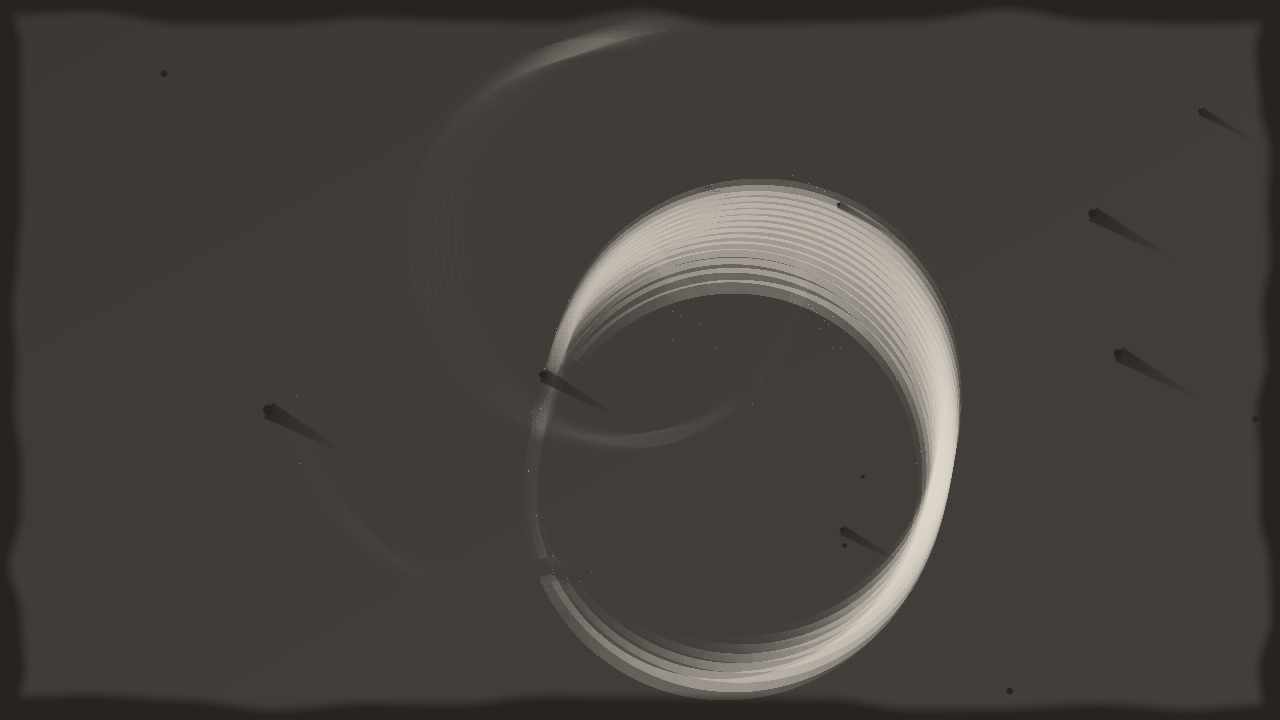
Resolume’s bundled demo clip Trinity through the plugin at its defaults, rendered by the offline harness rather than captured from Resolume: a tintype in daylight, half a second of exposure in eight buckets, poured from the top left. The blue ring is the bright one of the clip’s three, because the plate barely sees the orange ones; each ghost in the spiral is one frame’s worth of the ring’s orbit, at the density of the fraction of the half second it spent there.
Before you rely on this: released at v0.1.0, and honestly early. The plate is measured rather than asserted, by a harness that drives the real plugin class and reads each claim back out of the picture it made, at two rasters: pure red, green and blue expose the plate in the ratio of the computed spectral weights to 3e-6 under each light (in daylight red 0.074, green 0.016, blue 0.980 of white); a square moving two pixels a frame leaves a smear each column of which is exposed for exactly the fraction of the window it was covered; the bucketed window is the exact per-frame box mean to within one bucket’s edge, and reaches that bound; a grey wedge maps through the stated characteristic curve to 6e-7 in density at three gammas; the coating along the drain axis is a + b√s with a and b what the drainage law says; a take stops changing on exactly the frame Exposure seconds after the event; a resize mid-exposure carries the exposure across; and seven deliberate faults are shown to make those checks fail. All 15 controls are shown to change the picture. It has never been loaded into Resolume on macOS — the one host it has run in there is the fleet’s own test host,
oxbow, for 120 frames. On Windows, a build of this source loads, registers and renders in Resolume Arena 7.27.1, with every control matching what the plugin declares — on software rendering (win-lab, Mesa llvmpipe, no GPU), so that says nothing about a GPU; the gate’s picture is a still, so it could not show Exposure acting (a still integrates to the same plate at any window) and it never presses Take. The harness’s--ghost,--bucketand--takechecks measure both from the picture. Try it on a spare layer before you put it in a show.This codebase was created with AI assistance, directed and reviewed by a human author.
Installing
Every download carries one effect, SW Wetplate. Drop it into Resolume’s effects folder and restart Resolume:
macOS    ~/Documents/Resolume Arena/Extra Effects/
Windows  %USERPROFILE%\Documents\Resolume Arena\Extra Effects\
Avenue uses the same layout under its own folder name. The effect then appears in the effects browser as SW Wetplate.
The macOS download is a universal build (Apple silicon and Intel), as a .dmg or a .zip. It is
Developer ID-signed and notarised by the release pipeline after publication, so the bundle simply
loads; if macOS refuses a download, it predates the signing — download it again. The Windows
download is an x64 installer or a .zip. It is not code-signed, so the installer trips SmartScreen
once: More info → Run anyway.
Two facts make the look
A wet collodion plate (the 1850s to the 1880s, and the tintype revival) is silver halide in collodion, exposed while wet. Two physical facts make the look, and both are in the model rather than in a grade:
| the fact | what comes out |
|---|---|
| the plate sees only ultraviolet and blue: its sensitivity ends near 500 nm | the exposure is not the clip’s brightness but its light weighted by the plate’s curve, integrated against a spectrum built from each pixel’s RGB by Smits’ rule; under daylight pure red exposes the plate to 7% of white, pure green to 2%, pure blue to 98% — reds and skin render dark, a blue sky is blown to white |
| the plate is slow: exposures run for seconds | the plate integrates light over a sliding window of Exposure seconds, so anything that moved is a translucent ghost with density exactly the fraction of the window it stayed in one place, and anything that held still is sharp; a ring on an orbit stacks into a spiral |
Then it was hand-poured, so the coating is thicker where it drained (thin-film drainage: thickness grows as the square root of the distance drained past), bare where the pour never reached, and marked where dust kept the silver bath off. And it is looked at as a tintype (silver over black japanned iron), an ambrotype (silver over black glass) or a glass negative on a light box.
The plate sees a spectrum built from three numbers per pixel, so the weighting is Smits’ smooth reconstruction of an RGB, not the scene’s real spectrum, and the ultraviolet the plate also sees is absent — a clip’s pixels say nothing about it. See Known limits for where the numbers came from.
Start here
Put SW Wetplate on a layer or a clip with something moving in it — a shape on an orbit, a dancer, the bundled Trinity or Metalive loops. Out of the box you get a tintype in daylight at the plate’s stated gamma of 1.2, half a second of exposure in eight buckets, poured from the top left with a modest drain, a little bare edge, twelve defects, and a slightly warm silver.
Then:
- Exposure → 2 s. The ghosts stretch to two seconds of motion. → 1/16 s and the plate is sharp: only the spectral weighting is left, which is the plate’s other half.
- Mix → 0 and back. Compare the clip with the plate: orange and red go dark, blue and white go to the silver. Nothing was graded.
- Mode: Take, then press Take. The lens is capped until the button; then the plate integrates for Exposure seconds and holds the developed plate, while the clip goes on underneath. Set Exposure long — 2 to 8 s — for a real take. Back to Continuous to open the lens.
- Plate: Ambrotype, Negative. The same silver over black glass, cooler; then the negative itself on the light box, where the exposed parts are dark.
- Pour: Bottom Right, Coating Var → 1. The drain corner swaps and the drainage gradient deepens: density is heavier toward the drain corner and thin at the pour corner.
- Bare Edge → 1, Defects → 1. The pour never reached the frame’s edge, and forty-eight specks and comets with their tails down the drain.
- Development → 0, then → 1. Gamma 0.6, a soft plate; gamma 2.4, a hard one that drives most of a clip to silver or to plate. Sensitivity → 0.83 (+2 stops) and the plate blows out; → 0.17 (−2) and only the brightest light registers.
- Buckets → 2. The window is exact to one bucket’s width, so with two buckets the tail of a ghost breathes as the window’s edge comes and goes; → 16 and it is steady, at twice the memory.
A fast VJ loop is streaks at a second. Half a second is the default because on Resolume’s bundled loops a full second turned every fast loop into streaks; a slower, stiller subject wants the seconds a real plate took, and the slider goes to 16 s.
Dark clips are a bare plate. A clip of thin lines on black exposes a few lines onto a plate that is otherwise its own grey (the fog of the tintype) with its pour marks showing. That is correct: a plate exposed to nothing is a plate. Red lines on black are barely there at all.
Every slider is declared to the host as 0 to 1. The value each position stands for is given with each control below.
The Plate group
Plate — Tintype, Ambrotype or Negative; Tintype by default. A tintype is the silver image over black japanned iron, warm; an ambrotype the same silver over black glass, a little cooler and darker in the plate; a negative is the glass itself on a light box, so density is dark where the tintype is bright. The silver’s density is the same in all three; only the presentation changes. The output is opaque whatever the clip’s alpha, because a plate is.
Light — Daylight, Tungsten or Flash; Daylight by default. Each is a Planckian radiator at the CIE’s colour temperature (6504 K, the correlated colour temperature of D65; 2856 K, Illuminant A’s definition; 5500 K). White always exposes the plate to exactly 1, so Light changes the balance between colours and never the overall exposure: under tungsten the balance shifts a little toward green (about 4% rather than 2%), because that light has more of the plate’s long end. The differences are small, because the plate sees so little of any of them.
Development — the curve’s gamma, 0.6 to 2.4, geometric; 1.2 by default (0.5), the stated gamma of a high-contrast, short-latitude material. The characteristic curve has a toe at log₁₀ H = −1.1 (white at 0), a straight line 1.2 log₁₀ units long, and a shoulder, with the bends made by a softplus of slope 6 per log₁₀ unit. Density on the straight line is fog + gamma × the distance above the toe. The fog rises with development too: 0.004 at 0, 0.017 at the default, 0.030 at 1, and it is why a bare tintype is a grey rather than black.
Sensitivity — the plate’s speed, −3 to +3 stops; 0 by default (0.5). Each stop doubles the exposure before the curve. Red at 7% of white sits at the toe at the default; +2 stops lifts it onto the straight line, −2 leaves only the brightest light on the plate.
The Exposure group
Exposure — the window, 1/16 to 16 s, geometric; 0.5 s by default (0.375). Every eighth of the slider is a power of two of seconds: 0 is 1/16 s, 0.25 is 1/4 s, 0.375 is 1/2 s, 0.5 is 1 s, 0.625 is 2 s, 0.75 is 4 s, 1 is 16 s — exactly, so a window stated as a multiple of 1/8 lands on the frame it should. The plate’s exposure is the mean over the window, so a still subject reads the same at any exposure and only what moves is diluted; a strobing light reads as its average. Changing Exposure keeps what is already in the ring: the old buckets fall out of the new window by the window’s own rule.
Mode — Continuous or Take; Continuous by default. Continuous is the sliding window: the plate always shows the last Exposure seconds. Take caps the lens: switching to it blanks the plate, and the plate stays blank until Take is pressed. Switching back to Continuous opens the lens again.
Take — a button, active in Take mode. On the press the ring is emptied and the plate starts integrating; exactly Exposure seconds later it stops, and from that frame the developed plate is held bit for bit until the next press. A second press starts a new take. In Continuous mode the button does nothing.
Buckets — 2 to 16; 8 by default. The window is held as a ring of bucket sums, each a frame of memory holding Exposure / Buckets seconds of exposure, so memory is a fixed number of frames whatever the exposure. The price is that the window is exact only to one bucket’s width: it runs from the oldest bucket’s start to now, so it is between Exposure − width and Exposure long and the tail of a ghost breathes by that much. With two buckets at half a second the breathing is a quarter second; with sixteen it is a thirty-second. Sixteen is the cap because the sum pass binds one texture per bucket and sixteen is what OpenGL 4.1 guarantees. Changing Buckets (or Mode) resets the ring, so the plate goes blank for one window.
The Coating group
Pour — Top Left, Top Right, Bottom Left or Bottom Right; Top Left by default. The corner the collodion was poured from; it drained toward the opposite corner, so that is where the coating is thickest and the density heaviest.
Coating Var — the drainage variation V, 0 to 1.2; 0.42 by default (0.35). The coating thickness along the drain axis is h = 1 + V (√s − 2/3), with s the fraction of the way from the pour corner to the drain corner: the mean thickness is 1 whatever V is, so the exposure is not changed overall, only redistributed. At the default the drain corner is 1.14 thick and the pour corner 0.72; at 1.2 they are 1.40 and 0.20. Density scales with thickness.
Bare Edge — 0 to 12% of the frame; 3.6% by default (0.3). A seeded, irregular band round the frame where the pour never reached, so there is no silver and the plate shows through (black on the tintype and ambrotype, clear on the negative). It is the same shape every time, because it is seeded.
Defects — 0 to 48 specks; 12 by default (0.25). Dust that kept the silver bath off: a dark disc, and for most of them a comet tail running toward the drain corner. They are at seeded positions, so two layers of the plugin have the same defects; there is no seed control yet.
The Output group
Tone — the silver’s colour, neutral to warm; 0.45 by default. Neutral is a grey silver on a near-black plate; warm is the brown of an old tintype. On the negative it warms the light box.
Vignette — 0 to 85% of loss at the corners; 30% by default (0.35). A fall-off in the plate’s exposure toward the corners, applied before the curve, so the corners darken the way a slow lens on a big plate did.
Mix — the plate against the untouched clip, 0 to 1; 1 by default. Zero is the clip as it arrived, alpha included; anything above zero is opaque. The ring keeps integrating underneath whatever Mix says.
How it works
Five passes a frame, and a ring of buckets kept on the GPU between frames:
- Expose. The host’s frame, sRGB-decoded to linear, through Smits’ rule: the reflectance of an RGB is a sum of seven basis spectra (white, cyan, magenta, yellow, red, green, blue) chosen by the order of the components. The plate’s exposure to each basis under the chosen light is precomputed, so a pixel’s exposure is a seven-term sum. Times the frame’s seconds, added into the current bucket.
- Sum. H = Σ buckets in the window × (1 / the seconds in the window). Which bucket a frame goes in, what a frame is worth and whether a take is over are all decided on the CPU in double, because Resolume’s clock overflows a float; the shaders see only a per-frame Δt and sixteen weights.
- Coating. h = 1 + V (√s − 2/3) along the drain axis, times the bare-edge mask and the defects. Cached: rendered again only when something it depends on moves.
- Plate. H × 2^Sensitivity × the vignette → log₁₀ → the curve → D = h (fog + γ L c) → the silver’s coverage a = 1 − 10^−D → silver over the plate, or the light through the negative → sRGB → Mix. Alpha 1.
- Resample, only on a resize: the buckets are resampled into the new raster and swapped, never reallocated in place, so the exposure so far survives a resolution change.
A frame’s worth is the host’s clock, clamped to [1/240, 1/4] s, the first frame a nominal 1/60. A paused host clock therefore adds nothing; a real plate would keep exposing, but the fleet’s contract is that time is the host’s.
Performance
Measured by the offline harness on an M4 Max at the defaults, best of three runs of 60 frames
after a warm-up, glFinish both sides, on a GPU shared with other work:
| ms/frame | % of a 60 fps frame | state held (8 buckets) | |
|---|---|---|---|
| 1280 × 720 | 0.12 | 0.7% | 35 MB |
| 1920 × 1080 | 0.29 | 1.8% | 79 MB |
| 3840 × 2160 | 1.14 | 6.8% | 316 MB |
The cost does not depend on what the frame holds: every pass runs every frame, and the coating is cached whatever the picture does. The state is (Buckets + 2) R32F frames, colour textures only; sixteen buckets at 4K is 570 MB. Nothing was timed inside Resolume, and nothing was timed on Windows.
If it looks wrong
Everything is a streak. The clip moves faster than the window. Shorten Exposure; half a second suits fast loops, 1/16 s is sharp.
The plate is blank. Mode is Take and Take has not been pressed, or Buckets or Mode was just changed (that resets the ring for one window). Press Take, or switch to Continuous.
The plate went blank and then came back. A Buckets or Mode change. Exposure changes do not do that.
A red clip is nearly invisible. That is the plate: red exposes it to 7% of white. Raise Sensitivity by two stops to lift red onto the straight line, or accept that a wet plate never saw red.
Everything is white. Sensitivity is high, or the clip is bright blue or white, which the plate sees fully. Lower Sensitivity; a stop is a halving.
The whole plate is a flat grey. The clip is dark, or red. A plate exposed to nothing is its fog and its pour marks; feed it blue, cyan or white light.
One corner is much heavier than the other. That is the pour. Lower Coating Var, or turn Pour round.
The ghost’s tail flickers in length. Few buckets: the window is exact to one bucket’s width. Raise Buckets.
A strobe or a flash reads dull. The plate holds the mean over the window, so a light that is on a tenth of the time reads a tenth as bright. Shorten Exposure to catch a flash, or accept the average — that is what a plate did.
The clip’s transparency is gone. The plate is opaque above Mix 0. Lower Mix to see the clip’s own alpha again.
SW Wetplate is not in the effects browser. Check the folder under Installing, and that Resolume was restarted.
The effect does nothing at all. A shader that will not compile looks exactly like that, and the real message is in the log:
macOS    ~/Library/Logs/wetplate/wetplate.YYYY-MM-DD.log
Windows  %LOCALAPPDATA%\wetplate\logs\wetplate.YYYY-MM-DD.log
It records the GL vendor, renderer and version at load, which pass failed if one did, and at frame 60 the host’s clock and the unit the plugin decided it is in.
Known limits
- Never loaded into Resolume on macOS. Everything numeric was compiled, rendered and measured
offline against the real plugin class in a headless CGL context, plus an
oxbowload. What the host’s clock does to the bucket grid over a long session is untested there. - The sensitivity curve is digitised from a figure, not taken from a table. It is the 40/60 bromide/iodide curve of Hertel, Skladnikiewitz and Schmidt, “The Wet Collodion Process — a Scientific Approach” (IS&T’s 50th Annual Conference, 1997), Figure 4, read off the plot at 10 nm to about ±0.03, tapered to zero past the 500 nm the paper’s text gives. The paper prints no table.
- Smits’ basis could not be re-fetched. The seven basis spectra are a transcription of the table in Smits, “An RGB-to-Spectrum Conversion for Reflectances” (Journal of Graphics Tools 4(4), 1999); a copy of the paper could not be fetched to check them against in the session that wrote this, so the transcription is checked only by the property the paper constructs them with — each secondary plus its complementary primary sums to white in every bin, which they satisfy within 0.08.
- No ultraviolet. The plate’s sensitivity below 380 nm is real and unrepresentable from RGB; it is left out rather than fudged.
- The lights are Planckian, at the CIE’s colour temperatures, rather than the CIE daylight tables — chosen so no table had to be typed from memory.
- The curve is a stated shape, with its numbers chosen inside the published picture of a high-contrast, short-latitude material, not fitted to a measured plate.
- Never seen on camera footage. Skin, foliage and sky — where a blue-blind plate shows most — have only been judged on Resolume’s bundled CG loops.
- No grain, no halation, no intensification, no varnish, no fluid pour: the bare edge and the comets are seeded shapes, judged by eye.
- The window is exact to one bucket’s width, and no better, by design; the harness measures the bound.
- Checked at 320 × 180 and 1280 × 720 in the harness, and only timed at 4K.
- Only ever run on an Apple M4 Max, although the macOS build contains an Intel slice. On Windows, see the note at the top of this guide.
- No presets, no seed control, and no OpenFX version.
- There is a browser demo at wetplate-demo.stoatworks-labs.com. It is a port to a web page, not the plugin: the shaders run in WebGL2 and the ring’s bookkeeping is rewritten in JavaScript. The page lists what it does not reproduce.
About
The last group, About, carries the plugin’s name, version, licence and maker, and buttons that open this user guide (stoatworks-labs.com/software/wetplate/guide/), the project page, the source on GitHub and the support page in your browser.
Reporting something
github.com/stoatworks-labs/wetplate/issues. A screenshot, the Plate and Exposure settings, and the composition’s resolution and frame rate are usually enough. If the effect did nothing, attach the log.