

Wipe is a 1970s vision mixer’s pattern generator, as an FFGL mixer for Resolume Arena and Avenue. It wipes this layer in over the layer below, and it makes every wipe the way the hardware did: not from a stored picture of a shape, but from a few waveforms (a horizontal ramp, a vertical ramp and their parabolas) compared against the fader. Soft edges, borders, the wobble of the modulator and the way a circle’s edge is softer near its middle are all what that comparator does.
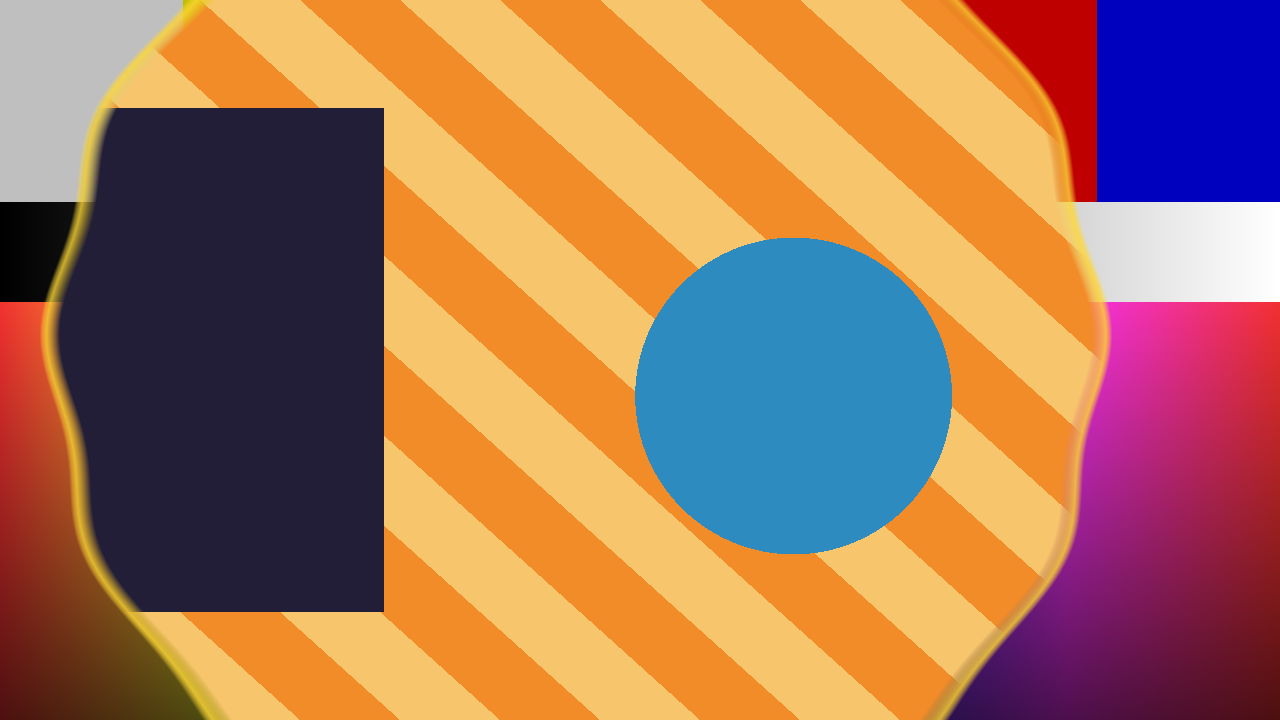
The repo’s two test cards through the plugin: a Circle at Opacity 0.42 with a soft edge, a gold border and the modulator on. This was rendered by the offline harness, not captured from Resolume.
Before you rely on this: released at v0.1.0, and honestly early. The pattern generator is measured, not just asserted. An offline harness drives the real plugin with two inputs at two different sizes. A hard edge lands on its column with 0 pixels wrong. A soft edge’s position integrates to 0.0000 px of where the fader puts it. In Area law every pattern’s revealed area is within 0.33 px of the fader. A circle’s soft edge widens towards its centre exactly as the parabola predicts (41.855 px measured, 41.855 predicted). The modulator’s sine comes back at 16.0000 px of 16. All 21 controls the harness can sweep change the picture. It has never been loaded into Resolume on macOS. On Windows, a build of v0.1.0 loads in Resolume Arena 7.27.1, is offered as a layer’s Blend Mode, is driven by the layer’s opacity fader and hides only Aspect Comp, as designed — on software rendering, and no picture of it inside Resolume has been captured, so a correct render there is not yet shown. The rest of what it assumes about how Resolume treats a mixer was measured on Genlock, the fleet’s first mixer. Try it on a spare layer first, and please report anything that misbehaves.
This codebase was created with AI assistance, directed and reviewed by a human author.
Installing
Download the build for your platform. For macOS there is a universal .dmg or
.zip (Apple silicon and Intel), Developer ID-signed and notarised so the bundle
simply loads, and for Windows an x64 installer or .zip. Every download
carries one mixer, SW Wipe. Put it in Resolume’s FFGL folder, then restart
Resolume:
macOS    ~/Documents/Resolume Arena/Extra Effects/
Windows  %USERPROFILE%\Documents\Resolume Arena\Extra Effects\
Avenue uses the same layout in its own folder. It really is Extra Effects,
even though this is a mixer: Resolume has one FFGL plugin folder, and sources,
effects and mixers all load from it. There is no Extra Mixers.
A mixer does not appear in the effects browser. In Resolume it appears in a layer’s Blend Mode list, beside Resolume’s own blend modes (the same list Resolume uses for transitions). Choose SW Wipe as the blend mode of the upper layer.
The Windows builds are not code-signed. Plugin files are not gated the way .exe
files are, so Resolume loads them as normal; only the installer trips SmartScreen,
once: More info → Run anyway.
It is a mixer, not an effect
An effect gets one picture. A mixer gets two, and Wipe needs both:
| Input | In the code | What it is here |
|---|---|---|
| A | the layer below | What you wipe from. Shown in full at Opacity 0. |
| B | this layer | What you wipe in. Shown in full at Opacity 1. |
To patch it, put one clip on a layer and the clip you want to wipe in on the layer above it. Then set the upper layer’s Blend Mode to SW Wipe. Handed only one picture, the plugin declines to draw.
The two layers do not have to be the same size. Each input is read at its own resolution, and every distance below is in pixels of the output picture.
Start here
The layer’s opacity fader is the wipe. Wipe’s fader is a parameter called Opacity, and Resolume drives a mixer parameter of that name from the layer’s own opacity fader. So once SW Wipe is the upper layer’s blend mode, pull that layer’s opacity down and the layer below is wiped in; push it up and this layer is wiped back in. At 0 you see only the layer below, at 1 only this layer, and in between the wipe.
The defaults are a plain hard Horizontal wipe: at half way this layer fills the left half and the layer below the right half, and as the fader rises the edge travels to the right. Then, in this order:
- Pattern. Try Box and Circle, which open from the centre, and Clock, which sweeps round from twelve.
- Softness. Give the edge 16 pixels or so. On a Circle, notice the edge is softer when the circle is small than when it is large. That is not a bug.
- Border Width, and the border colour. A second edge in a solid colour.
- Mod Amount. The edge starts to wobble, and the wobble travels.
Pattern
Aspect Comp: whether the generator corrects for the picture’s shape. On, the default, a Circle is round and a Box is square on screen. Off, the pattern is drawn in the unit square and stretched to the picture, so on a 16:9 composition a circle is an ellipse and a box is a rectangle, which is what an uncompensated generator actually drew.
In Resolume this control is missing, and that is deliberate. Resolume Arena does not show a mixer’s first parameter at all (measured on Genlock, whose first control vanished from the panel). So Wipe puts Aspect Comp first, because its default is the right setting if it can never be changed: in Resolume, circles are always round and the ellipse cannot be reached. In Arena 7.27.1 on Windows, Wipe’s panel shows every control except Aspect Comp, so this works as intended.
Pattern: the shape of the wipe. The default is Horizontal.
| Pattern | The waveform | What you see as the fader rises |
|---|---|---|
| Horizontal | the horizontal ramp | B comes in from the left edge, and the edge travels right. |
| Vertical | the vertical ramp | B comes in from the bottom, and the edge travels up. |
| Box | the larger of the two ramps (a non-additive mix) | a rectangle of B opens from the centre. |
| Diamond | the two ramps added | a diamond of B opens from the centre. |
| Circle | the two parabolas added | a circle of B opens from the centre. |
| Clock | the angle | B sweeps round clockwise from twelve o’clock. |
| Matrix | a threshold per cell | the picture is cut into a 32 × 18 grid and the cells switch to B one at a time, in a fixed scattered order. |
Whatever the pattern, the fader’s range covers the picture: at 1 the last corner has been reached, and at 0 nothing has started.
Reverse: runs the pattern the other way. It mirrors the waveform rather than swapping the two pictures, so a reversed Box closes: B comes in from the edges and a shrinking rectangle of A is left in the middle. A reversed Horizontal comes in from the right, a reversed Vertical from the top, and a reversed Clock sweeps anticlockwise from twelve.
Flip-Flop: reverses the pattern on alternate transitions. A transition is the fader arriving at one end from the other. With Flip-Flop on, the direction flips each time one completes, so on the way back the wipe does not run backwards: each new picture arrives the same way as the last. Whether that is “from the centre” or “from the edges” depends on which end the fader was resting at first. If it is the wrong one, toggle Reverse. The first arrival at an end after the plugin is created does not count, and turning Flip-Flop off clears it.
Fader
Opacity: the fader. 0 is all A, the layer below; 1 is all B, this layer. The default is 0.5, but in Resolume this is driven by the layer’s opacity fader, and the Opacity slider in the mixer’s own panel is overridden: moving it or automating it does nothing. Use the layer’s fader. (Measured on Genlock and on Wipe in Arena 7.27.1 on Windows. Whether a layer transition or the autopilot also moves it has not been tried.)
At exactly 0 and exactly 1 the output is the untouched picture, bit for bit: no soft edge, border or wobble can leak into an end stop.
Law: how the fader’s position becomes the size of the wipe.
- Edge, the default, is what the hardware did: the comparator’s level moves in a straight line with the fader. On a Horizontal wipe that is the same as the revealed area, but on the shapes that grow from the centre it is not: at half way an edge-law Box has revealed about 44% of a 16:9 picture.
- Area chooses the level so the area of B on screen is exactly the fader, for every pattern, soft edge included. At half way, half the picture is B, whatever the shape. The level is solved on the CPU each time something changes; see Performance.
Edge
All four sizes here are output pixels, measured on the Horizontal wipe, from 0 to 64. On a Horizontal wipe 16 pixels is 16 pixels. Every other pattern converts the same number through its own waveform, and then its edge follows the waveform’s slope. So a Box’s sides match the Horizontal wipe, but a Circle’s edge is softer when the circle is small and sharper when it is large, because the parabola is flatter near its centre. The harness measures that: at Softness 16 the circle’s edge is 41.9 pixels wide at a radius of 82 and 14.3 at a radius of 233.
Because the unit is a pixel, the same setting is half the share of the picture on a 4K composition that it is at 1080p.
Softness: the width of the soft edge between A and B, from 0 to 64 pixels. The default is 0, a hard cut. The edge is a straight ramp, so its 10–90% width is 0.8 of the setting.
Border Width: a band of solid colour at the edge, from 0 to 64 pixels. The default is 0, which is no border at all. It sits on the A side of the edge, the side the wipe is heading into.
Border Softness: the softness of the border’s outer edge, from 0 to 64 pixels. The default is 0. It only does anything once Border Width is above 0.
Border colour: the colour of the border. The host sees it as three parameters, Border Red, Border Green and Border Blue, and can show them as one swatch. The default is white. The border is painted opaque, whatever the alpha of the two pictures.
On the Matrix pattern there is no edge to measure, so Softness and the border act on the order the cells switch in: a soft matrix fades each cell over a short stretch of the fader instead of switching it, and a border paints the next few cells due to switch in the border colour.
Positioner
Centre X and Centre Y: where the pattern is centred, from 0 to 1 across and up the picture. The default is the middle. 0, 0 is the bottom-left corner. It moves Box, Diamond, Circle and Clock. The Horizontal and Vertical wipes and the Matrix ignore it, as the hardware’s did: on a plain ramp a positioner only slides an edge the fader already slides.
Rotation: turns the pattern clockwise, from 0 to 360 degrees. The default is 0. It turns every pattern except the Matrix, so a rotated Horizontal wipe is an angled wipe.
Aspect: the pattern’s own width against its height, from 0.25 to 4 on a geometric scale. The middle of the slider (the default) is 1. Towards the top the pattern gets narrower, so a Box becomes a tall rectangle; towards the bottom it gets wider. It does not affect the Matrix, and on a Horizontal or Vertical wipe it only changes anything once the wipe is rotated.
Modulation
The modulator adds a sine wave to the waveform, which makes the edge wobble. The wobble runs down the picture on every pattern except Vertical, where it runs across.
Mod Amount: how far the wobble pushes the edge, from 0 to 64 pixels, measured the same way as Softness. The default is 0, which is off.
Mod Frequency: how many waves fit in the picture, from 0.5 to 32 on a geometric scale. The default is about 2.6.
Mod Speed: how fast the wobble travels along the edge, from 0 to 4 cycles a second. The default is a quarter of the way along, 1 cycle a second. At 0 it stands still. It runs on Resolume’s clock, which Arena sends to a mixer every frame (measured on Genlock).
Multiple H and Multiple V: run the waveforms 1 to 8 times over, so the pattern repeats in cells. The default is 1 of each. Multiple V counts copies up the picture. Multiple H counts copies across one picture height’s worth of width whenever Aspect Comp is on (the default, and the only setting Resolume can reach), because the horizontal ramp is scaled for the picture’s shape before it wraps: that keeps the cells square, so on a 16:9 picture Multiple H of 4 gives about seven copies across. With Aspect Comp off it is exactly N across, and a circle’s cells are stretched with the picture. A Horizontal wipe uses Multiple H only and a Vertical wipe Multiple V only; a Box, Diamond or Circle is repeated in a grid, each copy opening in its own cell; a Clock with Multiple H of N sweeps N sectors at once; the Matrix multiplies its 32 × 18 grid by both.
How it works: a waveform and a comparator
A vision mixer of the 1970s did not store its wipes. It ran a few analogue waveform generators at line and field rate: a horizontal ramp, a vertical ramp, and the two parabolas. It combined them in a small matrix, adding them or taking the larger, and compared the result against the level set by the fader. Where the waveform was below the level you saw B; above it, A.
Wipe does exactly that for every pixel, and everything else follows from it:
- Softness is the comparator’s gain. A low-gain comparator does not switch cleanly, and the width of its soft edge on screen depends on how steep the waveform is there. That is why a circle’s edge is softer near its middle.
- The border is a second comparator, set a little above the first. The border is where the two disagree, so its width follows the waveform’s slope too.
- The modulator is a sine added to the waveform, which is how the wobble control on a real generator worked.
- A circle is an ellipse unless the generator compensates for the picture’s aspect. Real ones had to, and Aspect Comp is that correction.
The fader’s two ends are special-cased: at 0 and 1 the plugin fetches one picture and does nothing else.
Performance
It is one pass with two texture reads. The worst figures from the offline harness on an Apple M4 Max, on the Matrix pattern with softness, a border and the modulator all on (the most work per pixel), were:
| ms/frame | Share of a 60 fps frame | |
|---|---|---|
| 1280×720 | 0.032 | 0.2% |
| 1920×1080 | 0.038 | 0.2% |
| 2560×1440 | 0.055 | 0.3% |
| 3840×2160 | 0.117 | 0.7% |
At this size the measurement itself costs about as much as the work, so take the ceiling, not the average.
Area law adds a calculation on the CPU, on the frames where the fader or a setting has changed. It is under 0.06 ms for any single pattern, but it grows with the Multiples: about 2.8 ms for a Box at Multiple 8 × 8 and 7.8 ms for a Circle on a quiet machine, and up to 16.9 ms for the Circle on a busy one. If a moving fader stutters with both Multiples high, use Edge law.
No timing has been taken inside Resolume.
If it looks wrong
Only one of the two pictures shows. The fader is at an end. In Resolume the fader is the layer’s opacity, not the Opacity slider in the mixer’s panel.
Moving the Opacity slider does nothing. That is Resolume overriding it with the layer’s opacity fader. Use the layer’s fader.
A control does nothing. Some controls only act on some patterns: the positioner on Box, Diamond, Circle and Clock; Border Softness and the border colour only with a Border Width; Mod Frequency and Mod Speed only with a Mod Amount.
The mixer does nothing at all. A shader that fails to compile looks exactly like that. The plugin writes a small log:
macOS    ~/Library/Logs/wipe/wipe.YYYY-MM-DD.log
Windows  %LOCALAPPDATA%\wipe\logs\wipe.YYYY-MM-DD.log
It records when an instance is created, the host’s name and version and the file it was loaded from, the GL vendor, renderer and version when it is put on a layer, and an error line if the shader failed to compile.
Known limits
- Aspect Comp is hidden in Resolume. Arena does not show a mixer’s first parameter, so Wipe puts Aspect Comp there on purpose. In Resolume it is always on: circles are round and the ellipse cannot be chosen. Checked with Wipe in Arena 7.27.1 on Windows.
- The fader is the layer’s opacity. In Resolume the mixer’s own Opacity slider is overridden by the layer’s opacity fader, so it cannot be set or automated separately. Whether a layer transition or the autopilot moves it has not been tried on any mixer.
- Never loaded into Resolume on macOS. In Resolume on Windows it has run only on software rendering, and its picture there has not been captured. No graphics card but the Mac it was built on has run it.
- Sizes are in pixels, so a 4K edge is half the share of the picture of a 1080p one.
- Area law with the modulator on gives the area of the wipe without the wobble.
- Premultiplied alpha is assumed for both pictures, and the border is opaque.
- No Size control, no presets and no OpenFX version.
- There is a browser demo at wipe-demo.stoatworks-labs.com. It is a port to a web page, not the plugin: the shaders run in WebGL2 and any CPU half is rewritten in JavaScript. The page lists what it does not reproduce.
About
The last group, About, carries a credit line (name, version, licence and maker) and buttons that open this user guide, the project page, the source on GitHub and the support page in your browser.
Reporting something
github.com/stoatworks-labs/wipe/issues. A screenshot, your Resolume version, the pattern and Law, the composition’s resolution, and the day’s log are usually enough.