

Atem Overseer monitors and controls a fleet of Blackmagic ATEM switchers from one screen — one tile per switcher, showing live preview, audio, record and stream state, with transport controls under each.
Before you rely on this: it was developed and verified end to end against the built-in simulated fleet (
--mock), with real test-pattern streams pushed into the RTMP ingest so the picture in the tiles is genuine even though the switcher state is simulated. It has since been tested against real ATEM hardware in a lab, but never on a live show.There is also no authentication, and the server listens on every network interface. Anyone who can reach port 4700 can start and stop recording and streaming on your switchers, with no password. See Security.
This project was written with AI assistance and reviewed by a human. Use at your own risk in live environments.
Three existing documents cover subsystems in depth and are not repeated here: device-management.md (adding devices, discovery, launching external apps), streaming-setup.md (getting live preview working end to end) and restreamer.md (the optional split pipeline for multi-destination egress). This guide is the operator’s overview.
Getting started
npm install
npm run dev:mock          # simulated 3-switcher fleet — dashboard at http://localhost:4700
For real devices, copy the example config, edit the addresses, then build and start:
cp atem-overseer.config.example.json atem-overseer.config.json
npm run build
npm start
There is also a one-click desktop app — see the README’s Desktop app section.
publicHost is the setting that breaks everything if it’s wrong
Set it to the address the ATEMs and the browsers reach this machine at. It is baked into the
generated Streaming.xml and into the http-flv playback URLs.
If it is localhost, or an interface the switchers can’t route to, the switchers will fail to
find the ingest and the browser will fail to find the playback — and nothing will tell you that
is why. Tiles simply stay dark.
A note on --mock
--mock simulates every switcher, so nothing touches hardware. But it only substitutes the
built-in demo fleet if your config file has no devices — with a real config present you will
see your own device names, simulated. Don’t read familiar names on screen as evidence you are
connected to anything.
Reading a tile
Each tile is one switcher.
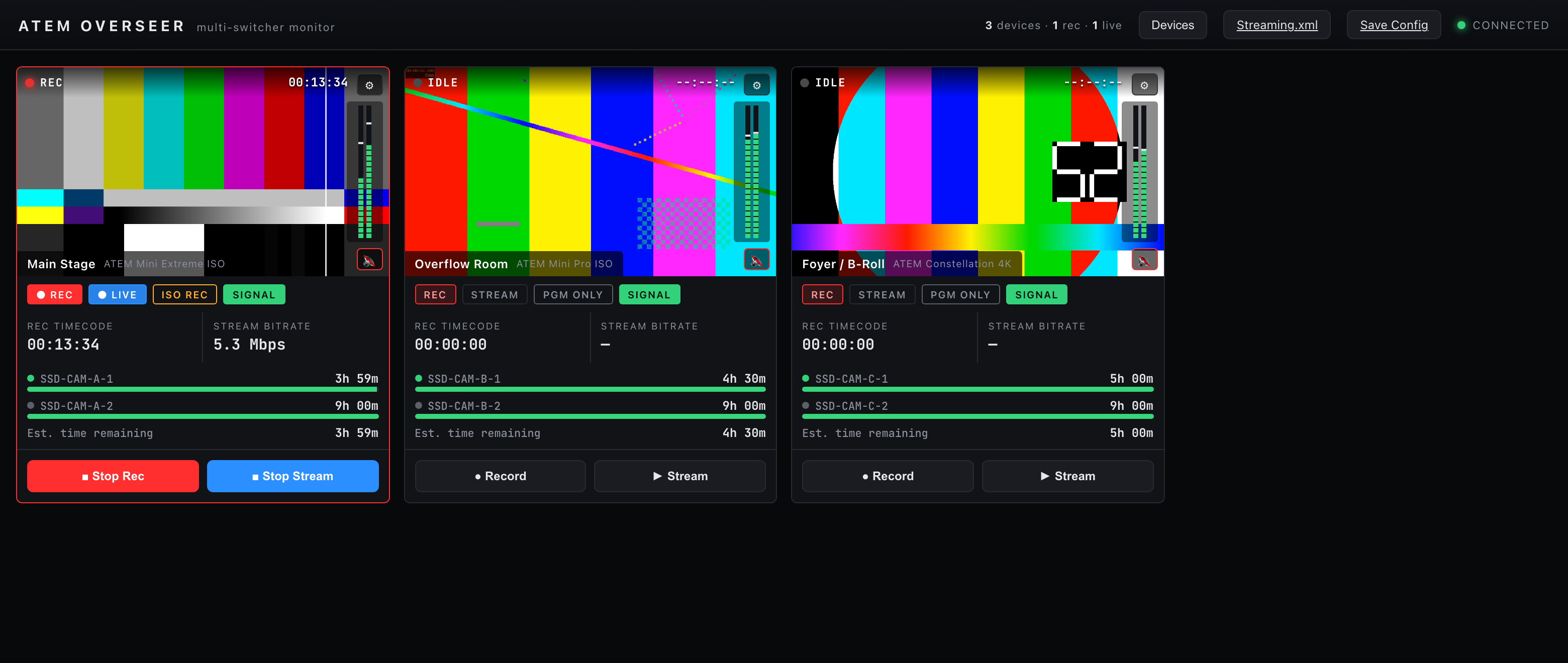
The simulated fleet. The pictures are real test-pattern streams through the RTMP ingest; the
switcher state behind them is --mock.
Most of a tile is self-explanatory. These five are not:
| What you see | What it actually is |
|---|---|
| Drive capacity bar | Recording time remaining, not disk space. The ATEM protocol doesn’t expose capacity at all — only seconds of headroom. The bar uses 4 hours as a nominal “full”, so a fresh 1 TB SSD does not read 100%. |
| Version | The ATEM protocol/API version, not the switcher’s firmware. Firmware isn’t available over the wire. |
| Audio meters | Always live telemetry, regardless of any mute. |
| Stream cache | Fraction of the switcher’s stream buffer in use — a network-health indicator, not progress. A rising cache means the upstream is struggling. |
| Hostname | Reverse-DNS, often blank. Blank means DNS, not a fault. |
Connection state is connecting / connected / disconnected, per device — one switcher
dropping doesn’t affect the rest of the fleet.
The two different mutes
This catches everyone once:
- The per-tile mute button is browser-local. It silences your playback of that tile’s stream. It changes nothing on the switcher, and it does not affect the meters — the meter keeps moving on a muted tile, which is intentional.
- Monitor mute is the ATEM’s own monitor bus, sent to the switcher. It affects what comes out of the switcher’s monitor output, for everyone.
If someone says “I muted it and it’s still loud in the room”, they used the browser one.
Transport controls
Record start/stop, stream start/stop, and record mode (PGM or ISO).
These are real commands to real switchers that may be live on air. There is no confirmation step and no undo. Two consequences:
- Check which tile you are on. The dashboard is designed for a fleet, so the buttons are close together by nature.
- Anyone who can reach the dashboard can press them — see Security.
Recording writes to whatever disk the switcher has in its working set. Check the drive readout before a long record, keeping in mind it is time, not space.
Live preview
Full walkthrough in streaming-setup.md. The short version:
- Tile ⚙ → Download Streaming.xml, and put it in ATEM Software Control’s streaming support folder — or hit Apply local service to switcher to push the RTMP config directly over the protocol.
- Set the switcher’s stream key to its Overseer device id. This is the step people miss. The stream key is how the ingest knows which tile a feed belongs to; get it wrong and the stream arrives and lands nowhere.
- Start streaming. The feed appears in the tile.
“Apply local service to switcher” doesn’t work on every model. If the switcher’s runner
doesn’t support remote streaming config you will get device does not support remote streaming config — a capability limit on the switcher, not a bug. Use the XML route instead.
Managing the fleet
See device-management.md for discovery, adding devices by hand, and the external-app launch buttons. Two things worth repeating here:
- The “launch external app” buttons run the app on the machine running the server, not on the machine whose browser you are using. If you are viewing the dashboard remotely, ATEM Software Control opens at the server, where nobody is looking at it.
- Importing an Overseer config XML saves it but does not apply device changes until restart. The response says so, and the dashboard keeps showing the old fleet until you restart. This XML is Overseer’s own fleet/ingest config — it is not an ATEM state backup, and restoring it will not restore anything about the switchers.
Media pool
Behind the tile’s gear: list the media pool, assign a media player to a slot, and upload a still.
Stills are converted in the browser to the switcher’s resolution before upload. The upload cap is 64 MB.
Transport, streaming and media upload are the paths where a simulator is least likely to match a real switcher, so test an upload against your own model before you need it on a show.
Security
The server has no authentication and listens on every network interface. Anyone who can reach port 4700 can start and stop recording and streaming on your switchers. There is no token, no login and no TLS, and none can be turned on.
This belongs on a private production network — never on a venue guest network, and never port-forwarded.
Troubleshooting
| Symptom | Cause |
|---|---|
| Tiles connect but preview stays dark | publicHost is wrong or unreachable, or the switcher’s stream key isn’t its Overseer device id. |
| A stream arrives but no tile shows it | Stream key ≠ device id. |
| “device does not support remote streaming config” | That model can’t be configured remotely. Use Streaming.xml. |
| Drive bar looks wrong for the disk fitted | It is time remaining scaled against a nominal 4 hours, not capacity. |
| Muted a tile, still audible in the room | That is the browser mute; you want monitor mute. |
| Meters still moving on a muted tile | Intended — metering is telemetry and is always shown. |
| Imported a config, nothing changed | Device changes need a restart. |
| Launched ATEM Software Control, nothing appeared | It opened on the server’s machine. |
| A command “worked” but nothing happened | Successful commands are not acknowledged; only failures produce a toast. Watch the tile state, not the button. |
Sent {"action":"begin"} and it stopped |
Anything that isn’t exactly start means stop. There is no validation — see API.md. |
| Restreamer destinations vanished | A malformed destinations body is treated as an empty array and clears them — see API.md. |
| Phantom type errors when building | build:libs didn’t run first — see DEVELOPING.md. |
| Desktop app’s helpers die silently on macOS | Only on a self-built or pre-notarisation copy — the released .pkg builds are signed and notarised. Approving an unsigned .app does not unquarantine its bundled binaries. See the launcher README. |
See also
- API.md — REST, WebSocket, snapshot fields, config schema
- DEVELOPING.md — the monorepo and the mock-first rule
- device-management.md · streaming-setup.md · restreamer.md