

Photosensitivity note. Bolometer’s automatic gain re-ranges the palette whenever the clip’s brightness changes, so on a dark clip with small flickering lights it can turn that flicker into flashing over a large part of the picture. Flashing light can trigger seizures in people with photosensitive epilepsy, and the guidance for broadcast and the web (Ofcom’s, and WCAG’s) draws the line at three flashes a second over a large part of the picture. At the defaults, over eight of Resolume’s demo clips, the worst second stayed at or under that line; at Frame Rate 60 Hz, or with the Rainbow palette, two of those clips went over it. See Flashing, and keeping it safe before you put it in front of an audience.
Bolometer is your clip through a thermal camera, for Resolume Arena and Avenue: one FFGL effect, SW Bolometer, that shows the clip the way a cheap thermal camera on an uncooled microbolometer core would, with brightness standing in for heat.
Nothing is drawn on top. Every pixel is a tiny thermal mass that warms and cools towards the scene with a 12 ms lag. The picture is read out at the export-limited 9 Hz of most cheap cores, corrected by a calibration that a shutter refreshes every so often, and a histogram decides which colour each temperature gets. What you see follows from those four things: the picture moving in a stutter, freezing for most of a second when the shutter closes, jumping in contrast when something hot comes in, hot edges ringed with dark halos, grain and stripes creeping in between shutters, and a faint dark spot dead centre where the detector sees its own reflection in the lens.
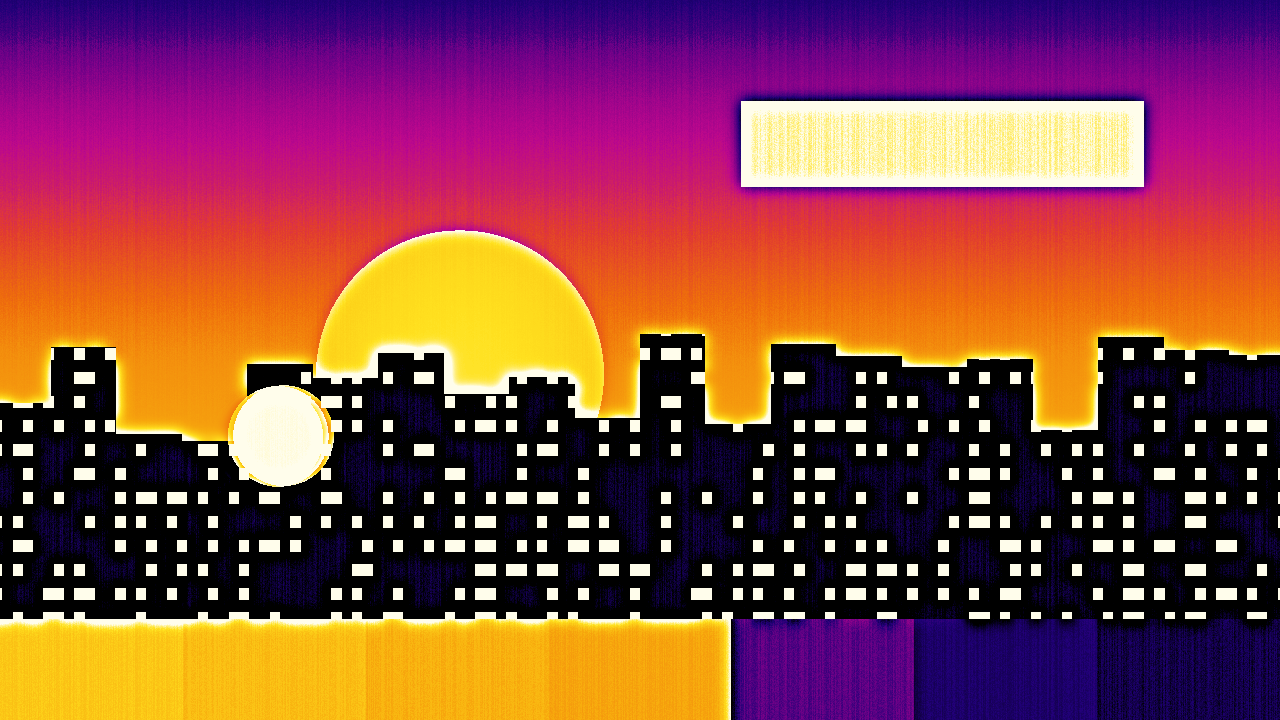
SW Bolometer on its defaults, rendered by the offline harness rather than captured from Resolume: the harness’s test card, 29 seconds in, a second before the first shutter. The fine vertical stripes are 29 seconds of drift; the next shutter wipes them.
Before you rely on this: this is v0.1.0, the first release, and early days. The camera is measured, not just asserted. An offline harness drives the plugin’s own code on an Apple Silicon Mac’s GPU, at two sizes, and again on Apple’s software renderer. Each pixel’s lag follows the textbook equation to 1.5e-12 K, and the lag read back out of the picture is 12.00000 ms at 24, 30, 60 and 144 fps. Over ten minutes at nine host frame rates and three sensor rates, 1,954,476 host frames read out exactly the sensor instants that integer arithmetic gives, with none disagreeing. Thirty-seven deliberately wrong versions of the plugin and twenty-seven one-character sabotages of its code are all caught, and every control changes the picture. In Resolume Arena it has loaded on a Mac (7.29.0) and on Windows (7.27.1, software rendering), with every control as declared, and every control a still picture can show changed Arena’s picture. But that was over a still test card: it hasn’t been through a show, and it has never been compared with a real thermal camera. How brightness becomes temperature, how fast the drift grows and how big the narcissus spot is are chosen, not measured. Try it on a spare layer first, and shout if anything misbehaves.
This codebase was created with AI assistance, directed and reviewed by a human author.
Installing
Download the build for your platform. For macOS there’s a universal .dmg or .zip (Apple
silicon and Intel), Developer ID-signed and notarised so the bundle just loads (the
signing happens on my Mac shortly after each release is published, so a download made in the
first few minutes may need Open from the context menu once), and for Windows an x64
installer or .zip. Put Bolometer.bundle (macOS) or Bolometer.dll (Windows) in
Resolume’s effects folder, then restart Resolume:
macOS    ~/Documents/Resolume Arena/Extra Effects/
Windows  %USERPROFILE%\Documents\Resolume Arena\Extra Effects\
Avenue uses the same layout in its own folder. SW Bolometer appears in the effects browser.
The Windows installer puts the DLL there for you, per user, with no admin rights needed. It
defaults to Arena’s folder (Avenue’s if only Avenue is installed) and lets you change it. The
Windows builds aren’t code-signed. Plugin files aren’t gated the way .exe files are, so
Resolume loads them as normal; only the installer trips SmartScreen, once: More info →
Run anyway. Or skip the installer and copy Bolometer.dll out of the .zip by hand.
Start here
- Put SW Bolometer on a clip with something bright moving over something dark: a dancer, a flame, a figure on a transparent background. The clip’s brightness is read as temperature, so bright is hot and dark is cold.
- Watch it move. At the default 9 Hz the picture changes only nine times a second and holds in between: that’s the stutter of a camera whose output is export-limited.
- Wait half a minute. Fine grain and column stripes creep in, then the picture freezes for most of a second and comes back clean: that was the shutter, a flat-field correction. Press Shutter to make one happen now.
- Bring something bright into the frame and watch the rest of the picture slide darker as the palette makes room for it, then settle. That’s the automatic gain.
- Try Palette, then Frame Rate 60 Hz to see every frame read out.
The defaults: Frame Rate 9 Hz, Shutter Interval 30 s, Drift 0.1 K a minute, Narcissus 0.1 K, Span Auto with a 2% Plateau, Palette Ironbow, Halo 1, Mix 1. In Manual, Level 27.5 °C and Width 25 K span the whole mapped range.
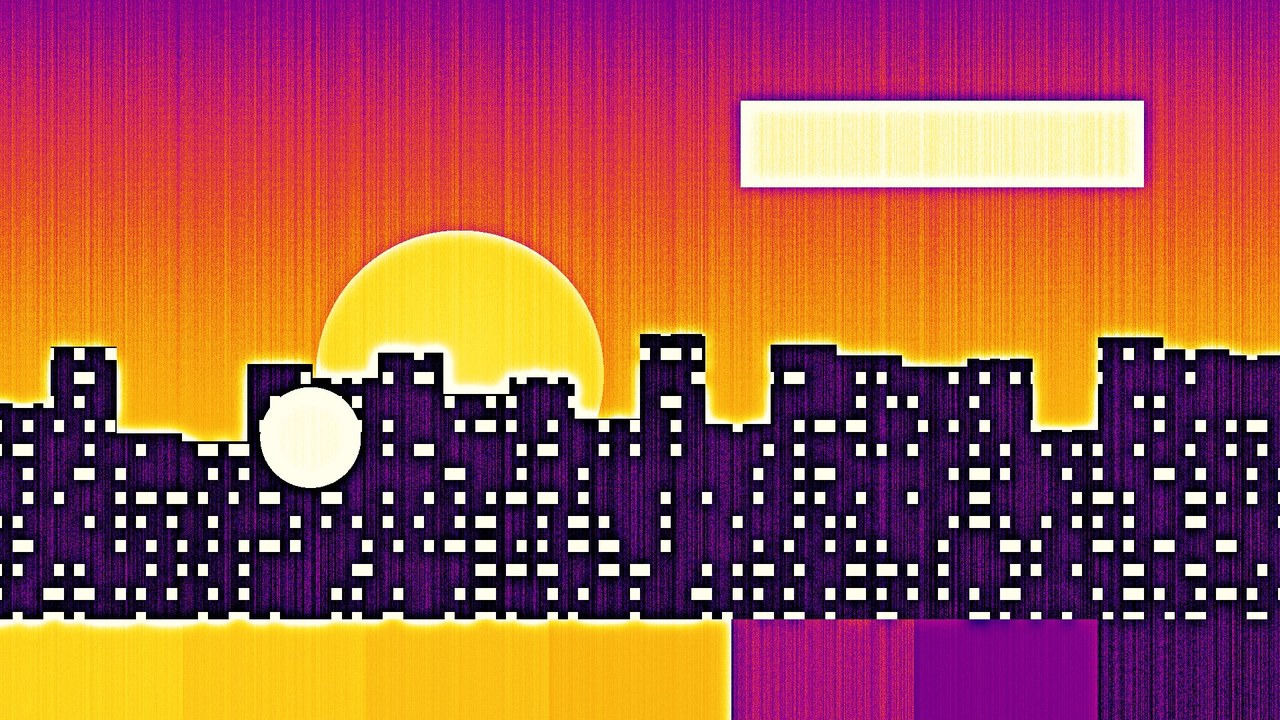
What you should see: SW Bolometer inside Resolume Arena 7.29.0 on a Mac, from Arena’s own composition snapshot, over a still of the harness’s test card. Drift is turned up to 1 K a minute with the shutter off, twelve seconds in, so the stripes are plain; pressing Shutter wiped them. The colour bars along the bottom come out as a few temperatures, because only their brightness counts.
Flashing, and keeping it safe
A real thermal camera’s automatic gain is known to flash: FLIR’s Boson datasheet calls it “an image flash” and damps it. Bolometer does the same, with the datasheet’s default damping. The gain shares the palette out among the temperatures in view, so when a few bright pixels come and go on a dark clip, the whole picture swings between dark and light as the palette re-ranges around them. On most clips that’s a gentle slide. On a dark clip with small flickering lights, it can turn the flicker into flashing over most of the picture.
People with photosensitive epilepsy can have a seizure from flashing light, and the line that broadcast guidance (Ofcom) and web guidance (WCAG 2.x) draw is no more than three flashes in any second over a large area of the picture. A flash here is a rise and a fall in brightness of at least a tenth of white.
Measured from Bolometer’s own output over eight of Resolume’s demo clips, 35 seconds of each, as rises and falls in brightness in the worst second (two make a flash, so the line is six):
| Settings | the whole picture | the worst third of the picture |
|---|---|---|
| Defaults (9 Hz, Ironbow) | 4 | 6, at the line |
| Shutter Interval 5 s | 4 | 6, at the line |
| Frame Rate 60 Hz | 6, at the line | 9, over |
| White Hot at 60 Hz | 7, over | 9, over |
| Rainbow | 5 | 7, over |
| Shutter pressed four times a second | 3 | 3 |
| Span Manual, a narrow window | 3 | 5 |
The clips that went over were the two dark ones with small flickering lights, Cyberspace_09 and NeonRoom2_32. The clips with steady subjects (the dancers, the tank, the figures on transparent backgrounds) stayed at 0 to 4. One more clip, IntoTheGlow_02, flashes on its own (5 in the worst second before the effect touches it), and stays about the same through it.
The shutter is not a flash. It holds the last picture for 0.9 s, which is a freeze, not a change in brightness, and pressing Shutter repeatedly makes the picture flash less, because it keeps holding it.
What keeps it within the guidance:
- Stay at 9 Hz. The gain is damped per sensor frame, so at 9 Hz it takes about 0.7 s to re-range and can’t follow a fast flicker; at 60 Hz it takes 0.1 s and follows it.
- Ironbow, the default, flashed least of the palettes measured. White Hot and Rainbow flashed more.
- Span Manual fixes the window, so the palette stops re-ranging: on clips that don’t flicker on their own it measured 0.
- Look at the clip. A dark clip with small, fast-flickering lights is the case to watch.
None of this is a substitute for warning your audience. The browser demo opens on the defaults, with the same note at the top.
The Sensor group
- Frame Rate: 9, 30 or 60 Hz. How often the camera reads its sensor out. 9 Hz is the export-limited rate of most cheap cores, and it’s the look: the picture changes only at sensor instants, exactly a ninth of a second apart in Resolume’s own time, and holds in between (at 60 fps, a 6-7-7 rhythm of frames). 30 and 60 Hz are what the same cores do unrestricted. Nothing counts frames, so it keeps time at any composition frame rate.
- Shutter Interval: 5 seconds to 300, Off at the top. How often the shutter closes for a flat-field correction. During one the picture holds its last frame for 23/26 s (0.9 s, FLIR Lepton’s default), then comes back with the drift wiped. The default is 30 s so a clip shows one; real cameras do it every few minutes, or when their own temperature changes.
- Shutter: a button. Starts a flat-field correction at the next sensor instant, unless one is already running.
- Drift: 0 to 1 K a minute. How fast the calibration drifts between shutters: fine grain and column stripes that grow from nothing at each shutter and vanish at the next. With the shutter Off it stops growing after ten minutes.
- Narcissus: 0 to 2 K. The dark spot dead centre, the detector seeing its own cold reflection in the lens. The shutter can’t remove it, because the shutter sits behind the lens. On a real uncooled core it’s weak, about the noise; most of this control’s range is an exaggeration, on purpose.
The Span group
- Span: Auto or Manual. How temperatures become colours.
- Auto is plateau equalisation, what thermal cores do: the palette is shared out among the temperatures in view, so the picture always uses the whole palette, and the contrast jumps when something hot comes in. It moves gradually, damped by 85% per sensor frame (Boson’s default).
- Manual maps a fixed window of temperatures onto the palette, set by Level and Width. The picture stops re-ranging.
- Plateau: 0.00001 to 1, as a fraction of the picture. How much of the palette one temperature can take in Auto. Small values give every temperature in view its own slice (flat backgrounds stop swallowing the palette); 1 is plain histogram equalisation. The default, 2%, is lower than Boson’s 7% because Resolume’s clips have perfectly flat backgrounds (see Known limits).
- Level: 15 to 40 °C. The temperature in the middle of the palette, in Manual.
- Width: 0.5 to 30 K. How wide the window is, in Manual. A narrow window makes small differences in brightness into big differences in colour.
Temperature comes from the clip’s brightness and transparency: 15 °C for black (or transparent), 40 °C for white. So the window that spans everything is Level 27.5 °C, Width 25 K.
The Look group
- Palette: White Hot, Black Hot, Ironbow or Rainbow. Ironbow and Rainbow are the tables from Pure Engineering’s LeptonModule, the open-source software for FLIR’s Lepton cores, not FLIR’s own palettes. The picture is quantised to 256 levels first, as a core’s output is.
- Halo: 0 to 3. Detail enhancement: the cores sharpen their picture, and the way they do it rings every hot edge with a dark halo and every cold edge with a light one. 0 turns it off.
- Mix: from the clip (0) to the camera (1). At 1 the camera’s picture is opaque, as a camera’s is, even where the clip was transparent (a transparent pixel reads as cold). At 0 the clip passes through untouched.
Recipes
- The surveillance camera. White Hot, 9 Hz, Shutter Interval at 60 s or more, Halo 1. A steady, grey, slightly stuttering picture that freezes now and then.
- The predator. Rainbow at 30 Hz, Halo 2: everything warm glows in bands of colour. Mind the flashing note on dark clips.
- Freeze on the beat. Map Shutter to a MIDI note or a beat trigger: the picture holds for 0.9 s each time. It can’t flash, since it only ever holds the picture.
- A cold, stable picture. Span Manual, Level and Width set around your subject, Drift 0: no re-ranging, no stripes, only the stutter and the lag.
- An old, tired core. Drift up to 0.5 K a minute and Shutter Interval at 120 s: the stripes build until the shutter wipes them.
- Fade the camera in. Mix from 0 to 1 over a phrase.
How it works
Each pixel of the clip becomes a temperature, T = 15 °C + 25 K × brightness × alpha. Every pixel’s bolometer warms and cools towards that temperature with a 12 ms time constant, integrated exactly whatever the frame rate. At each sensor instant the bolometers are read out, the calibration’s drift and the narcissus spot are added, and the readout is held until the next instant. The automatic gain counts the readout’s temperatures on a fixed grid of 256 × 144 samples (about a real core’s pixel count, so it doesn’t change with your resolution), clips each temperature’s count at the Plateau, and turns the running total into the palette’s position, damped from one sensor frame to the next. Then an unsharp mask adds the halos, the result is quantised to 256 levels and coloured. When the shutter closes, the readout stops and the last frame is held; when it opens, the drift starts again from zero.
Performance
On the Mac it was measured on (Apple Silicon, shared with other work), from the plugin’s call to the GPU finishing, at the defaults: about 0.27 ms a frame at 720p and 0.48 ms at 1080p (2.9% of a 60 fps frame). Most frames only show the held picture (0.08 and 0.23 ms of GPU time); the one in six or seven that reads out a sensor instant runs every pass (1.09 and 1.91 ms). At 60 Hz with Halo 3, every pass every frame: 1.30 ms at 720p and 2.18 ms at 1080p. 4K wasn’t measured, another GPU will differ, and nothing has been timed inside Resolume.
If it looks wrong
- The picture is all one colour. The clip is flat: a uniform background is one temperature, and the gain gives one temperature one colour. Use a clip with something bright on something dark.
- The background is noisy and stripy, or there’s a dark blob in the middle. That’s the drift and the narcissus spot, and on a perfectly flat background they’re all there is to see, so the gain stretches them over the palette. Turn Drift and Narcissus down, or Plateau down, or use Span Manual.
- It stutters. That’s 9 Hz. Use Frame Rate 30 or 60 Hz for smooth motion.
- It froze. That’s the shutter: it holds the picture for 0.9 s every Shutter Interval. Turn Shutter Interval to the top (Off) to stop it.
- The picture keeps changing brightness on its own. That’s the automatic gain re-ranging around whatever’s bright. Use Span Manual for a fixed window. See Flashing, and keeping it safe.
- My transparent clip came out opaque. At Mix 1 the camera’s picture is opaque, and a transparent pixel reads as cold. Lower Mix to bring the clip’s transparency back.
- The colours of my clip don’t matter. Only brightness counts: red and blue of the same brightness are the same temperature.
- Level and Width do nothing. They act in Span Manual only.
Known limits
- Never compared with a real thermal camera. Every figure is checked against the model as written, and the model against the datasheets’ words (FLIR’s Lepton and Boson), not against footage from either.
- Brightness is not temperature. The mapping from the clip’s brightness to 15–40 °C is a choice, made on the clip’s encoded values; whether it should use linear light instead is an open question.
- Chosen, not measured: the 15–40 °C range, how the drift grows and how fast, the narcissus spot’s size, the halo’s width, the form of the gain’s damping, how the shutter’s overhead splits around it, and the shutter’s own temperature.
- Open questions, decided for this release but not settled:
- the default palette is Ironbow; White Hot is the other candidate;
- the default Plateau is 2%, lowered from Boson’s factory 7% so that the perfectly flat backgrounds of Resolume’s demo clips don’t take the whole palette;
- at Mix 1 the picture is opaque, as a camera’s is, rather than keeping the clip’s alpha;
- flat areas show the drift’s stripes and the narcissus spot plainly, which is right for a camera looking at a flat wall but may be more than you want;
- the drift and the narcissus spot are drawn at your clip’s resolution, not on a grid the size of a real sensor.
- Left out: frame-to-frame noise (a camera’s NETD), the optics’ blur, the sensor’s low resolution (the picture keeps your clip’s), dead pixels, the radiance curve, and the rest of a real camera’s gain processing. The shutter’s click is sound and isn’t there.
- Tried in Resolume on a test card only. It loads and renders in Resolume Arena 7.29.0 on a Mac and 7.27.1 on Windows (software rendering, no GPU), but it hasn’t been through a show, with real footage, or timed inside Resolume. Frame Rate and the shutter only show on a moving picture, so the automated check in Arena couldn’t judge them; the offline harness checks both.
- Other GPUs. It has run on one Apple GPU and Apple’s software renderer only.
About
The last group, About, has the plugin’s name, version, licence and maker, and buttons that open this user guide, the project page, the source on GitHub and the support page in your browser.
Links
- Project page: stoatworks-labs.com/software/bolometer
- Source: github.com/stoatworks-labs/bolometer
- User guide: stoatworks-labs.com/software/bolometer/guide
- Browser demo: bolometer-demo.stoatworks-labs.com
Reporting something
Something wrong, odd or missing? Open an issue at github.com/stoatworks-labs/bolometer/issues. The plugin keeps a short log of what the host did (the GL renderer, whether every shader compiled, and the host’s clock as the plugin read it), which helps a lot:
macOS    ~/Library/Logs/bolometer/
Windows  %LOCALAPPDATA%\bolometer\logs\