

Boreal is the aurora borealis and australis for Resolume Arena and Avenue, as two FFGL plugins: SW Boreal, a source that is the night sky, and SW Boreal Over, an effect that adds the aurora to your clip as light. Nothing in it is drawn with a noise function. The arcs are a sheet of electric charge that rolls itself up the way a sheet of spinning fluid does. Where the sheet winds tight, the electrons coming down it are harder and brighter. They lose their energy in a real model atmosphere, each spectral line glows at the height and for the time its own chemistry says, and a camera on the ground looks up through the lot.
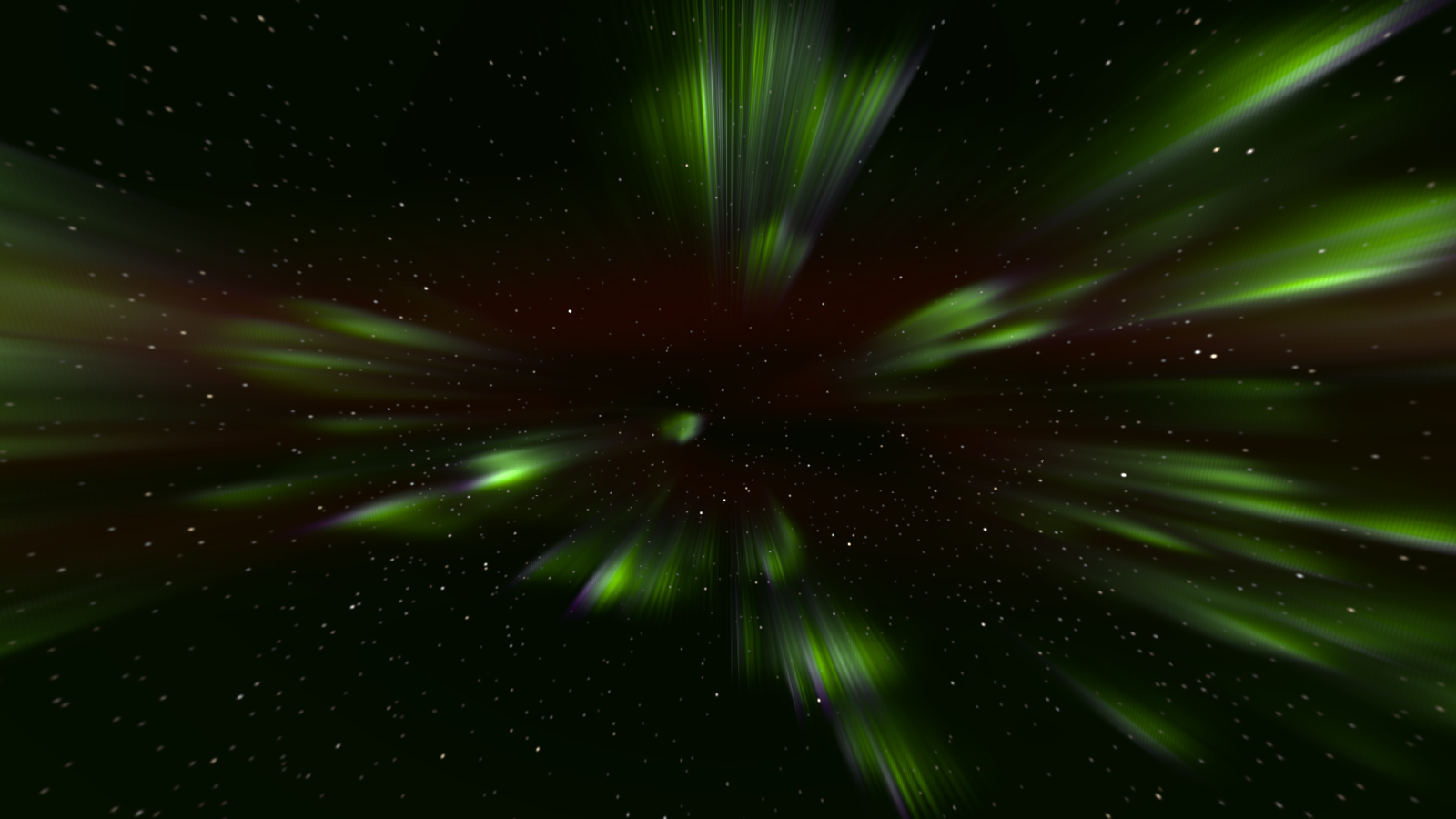
A corona, a few minutes after a substorm: four arcs overhead at moderate solar activity, looking up the field line. Every ray points at the magnetic zenith because it is a field line, seen in perspective. Rendered by the plugin’s offline harness, not captured from Resolume.
Before you rely on this: released at v0.1.0, and honestly early. The physics is measured rather than asserted, by a harness that drives the real plugin classes in a headless GL context. A single wave on the plugin’s own charge sheet grows at the rate derived for its kernel to 2.6×10⁻¹⁰–8.7×10⁻¹⁰ /s. The ionisation peaks land at 118.7 km (1 keV) and 96.7 km (10 keV), against 120 and 97.5 read from Fang et al.’s published figure. The red/green ratio holds to the collisional-quenching formula at all 721 heights to 1.6×10⁻⁷. With the flux off, the green and red lines decay as their lifetimes say to 8×10⁻⁶ and 5×10⁻⁵. The rays meet the magnetic zenith to 0.07–0.32 px at three rasters in both hemispheres. With Mix at 0, or no light, the Over effect returns the clip bit-exact. Fourteen deliberately wrong models are all detected, three one-character mutants of the shipped code are all caught, and all 39 parameters across the two plugins measurably do something. It has never been loaded into Resolume on macOS. The one host it has run in is the fleet’s own test host,
oxbow, for 120 frames through each plugin. On Windows, a build of v0.1.0 loads, registers and renders in Resolume Arena 7.27.1, with every control matching what the plugins declare and 33 of the source’s and 38 of the effect’s controls shown moving the picture — on software rendering, so that says nothing about a GPU. Substorm and Calm are buttons the test never pressed, and the audio controls had no sound device to hear. Try it on a spare layer before you put it in a show.This codebase was created with AI assistance, directed and reviewed by a human author.
Installing
Every download carries both plugins: the source and the effect. On macOS they are
Boreal.bundle and Boreal Over.bundle; on Windows, Boreal.dll and Boreal Over.dll. Put
both into Resolume’s effects folder and restart Resolume:
macOS    ~/Documents/Resolume Arena/Extra Effects/
Windows  %USERPROFILE%\Documents\Resolume Arena\Extra Effects\
Avenue uses the same layout under its own folder name. SW Boreal then appears among the sources and SW Boreal Over among the effects.
The macOS download is a universal build (Apple silicon and Intel), as a .dmg or a .zip. It is
Developer ID-signed and notarised, so the bundles simply load. The Windows download is an x64
installer or a .zip. It is not code-signed, so the installer trips SmartScreen once: More
info → Run anyway.
Two plugins
- SW Boreal (a source) is the whole night sky: the aurora, the airglow, the stars and, if you want it, a snowy horizon lit by the display. Put it on a layer of its own.
- SW Boreal Over (an effect) adds the same aurora to the clip beneath it, as light. It can add it everywhere, only where the clip is dark, or only where the clip is transparent, and it can light the clip with the display’s glow.
The effect declares every one of the source’s controls and adds its own Over group at the end, after About. A look built on one carries across to the other.
An arc is a vortex sheet
An auroral arc is a sheet of electric charge drifting in crossed electric and magnetic fields, and a charge sheet drifting that way obeys the same equations as a thin sheet of spinning fluid. It is unstable in the same way: it rolls itself up. So the curls, the folds and the westward surge of a substorm are one instability at different scales, and Curl Size is a physical length. It sets the wavelength that grows fastest.
Four more models follow from it, in order:
- Precipitation. Where the sheet is wound up tight, the current along the field is high, and so is the electrons’ energy. The brightest curls are the hardest.
- The atmosphere. That energy goes into a real atmosphere at the heights the published parameterisation gives, and excites each spectral line by its own chemistry.
- Lifetime. The green line’s atoms live under a second before they glow; the red line’s live minutes, and at low altitude collisions knock them out first. So the red lives above about 200 km, lags behind a moving curl and lingers after it. Nothing places it there.
- A camera on the ground looks up through all of it on a curved Earth, with the air in between dimming and reddening what is low.
What falls out rather than being arranged: the pink or violet lower border of a hard display (the green needs oxygen, which thins below 100 km, and nitrogen does not); the corona overhead, with every ray converging on the magnetic zenith; arcs on the horizon shrinking to bands; red tops that rise with solar activity; the faint airglow band low in the sky; and snow that goes green under a strong display.
Everything runs in sky time. The Speed control sets how many seconds of sky pass per second of the host’s clock, and at the defaults that is four.
Start here
Put SW Boreal on a layer and leave every control alone. The defaults are two arcs 250 km north of you and 60 km apart, at moderate solar activity, seen through a rectilinear camera looking north, 25° up, with a 90° field of view, over snowy hills, at four times real time. You see green curtains with red above them, the airglow faint along the horizon, a scatter of stars, and the curls beginning to wind as the sheet goes unstable.
Then, in this order:
- Substorm. Press it. The sheet’s strength jumps, the poleward arc brightens and surges west, and a kink seeded on it rolls up into folds. It takes minutes of sky time to settle, which at the default Speed is about a minute of yours.
- Look Elevation and Look Azimuth. Swing the camera up and round to the south until you are looking up the field line (at the default Dip, that is 77° up, facing south). If the arcs are overhead, the rays converge on a point: the corona. The Corona preset sets this up in one gesture.
- Activity and Energy. Push Activity to the top and bring Energy down. The red line rises, spreads and dominates. Push Energy up instead, towards 10 keV and past it, and the curtains’ lower edges go pink.
Be honest about the input to your eye. A real display is faint. The plugin works in kilorayleighs and candelas, and Exposure is the camera’s exposure in stops. If the sky looks dim, that is a faint aurora photographed at 0 stops; open it up.
Presets
Preset is its own group, after Audio. Element 0 is Custom, which is where the plugin starts, and it means the controls are the truth. The others are:
- Boreal — the defaults, named so they stay reachable.
- Quiet Arc — one quiet homogeneous arc low in the north: a soft sheet, few curls.
- Corona — overhead, looking up the field line. Three disturbed arcs converge on the magnetic zenith, 13° south of the zenith at the default dip. The horizon is off.
- Red Storm — solar maximum and soft precipitation: the red line dominates and lingers.
- Rayed Band — a single band of strong rays.
- Australis — the southern lights over hills: the oval to the south, the curls turned the other way, the rays converging north of the zenith.
- Eye — the defaults as the dark-adapted eye sees them: grey-green, and the red nearly gone.
A preset is an override, not a write. Resolume does not take values back from a plugin, so the plugin cannot move your sliders to a preset’s positions. While Preset is on anything but Custom, the preset’s values are laid over the Sky, Arcs, Precipitation, Atmosphere and Camera controls as the plugin reads them, and those sliders do nothing and do not show the truth. Set Preset back to Custom to take control again, and the controls return to wherever you left them.
A preset leaves some things to you: Seed (which sky, not what kind), Detail (your machine’s budget), the Substorm and Calm buttons, the Audio amounts, and the whole Over group. “Corona” is a substorm’s look. Pressing Substorm on top of it is your gesture, not the preset’s.
The Sky group
Hemisphere — Borealis (the default) or Australis. Australis moves the auroral oval to the other side of the sky, turns the curls the other way, and sets the stars turning about the southern pole. A substorm still surges west.
Oval Distance — how far poleward of you the equatorward arc lies, from −600 to +1400 km, linear. The default is 250 km. Large values put the display on the horizon as a low band; zero and below put it overhead or behind you.
Dip — the magnetic field’s inclination, 60° to 85°, linear. The default is 77°. It sets how far the magnetic zenith sits from the true zenith (90° − Dip), and so where the corona’s rays converge and which way the curtains lean.
Declination — the magnetic field’s bearing east of geographic north, −30° to +30°, linear, default 0.
Speed — sky time per second of host time. At the very bottom of the travel the sky is frozen. Above that it runs from 0.25× to 64×, geometrically: 1× (real time) is a quarter of the way up, and the default in the middle is 4×. A real display moves slowly; real time is honest and 4× is easier to watch.
Seed — which sky, 0 to 9999, default 1. It seeds the arcs’ starting perturbation, the forcing that keeps them going, the rays, the stars and the hills. The same seed and controls give the same frames, substorms included.
The Arcs group
Arcs — how many parallel arcs, 1 to 5, default 2. They interact through the same sum, so neighbouring arcs push and wind each other.
Arc Spacing — the distance between neighbouring arcs, 15 to 400 km, geometric, default 60 km.
Sheet Strength — the shear across the sheet, 0.1 to 6 km/s, geometric, default 1 km/s. A stronger sheet rolls up faster and curls harder, and because precipitation follows the sheet’s local strength, a curl is where the light concentrates.
Curl Size — the sheet’s smoothing length, 2 to 60 km, geometric, default 8 km. This is the physical length that sets the fastest-growing wavelength, so it sets the size of the curls. Small values give fine, tightly wound curls; large ones give broad folds.
Disturbance — the size of the seeded perturbation the arcs start with and return to after Calm, 0 to 40 km. The travel is quadratic, so the bottom half is fine control: a quarter of the way up is 2.5 km, halfway 10 km. The default is 3 km.
Drift — a uniform eastward convection of the whole sheet, −2 to +2 km/s, linear, default 0.2 km/s east. Negative drifts it west. It carries the rays with it.
Substorm — a button. The sheet’s circulation jumps by 2.5 times and decays back over 240 seconds of sky time; the poleward arc brightens fourfold (decaying over 150 s), surges west at 1.5 km/s (over 180 s), and has a 400 km kink seeded on it, which the same instability rolls up. Pressing it again while one is running does not stack: it restarts the jump at full strength and seeds another kink.
Calm — a button. Straight arcs again, rebuilt with the seeded perturbation. Use it to reset a sheet that has wound itself into a tangle.
Left alone, the arcs keep going: every 12 seconds of sky time a small wave packet is added to a random arc, and each arc relaxes slowly back towards its base line.
The Precipitation group
Energy — the electrons’ base characteristic energy, 0.2 to 20 keV, geometric, default 3 keV. Harder electrons reach lower, so this sets the height of the display: the ionisation peaks at about 119 km at 1 keV and 97 km at 10 keV. Soft precipitation deposits high, towards the red line; hard precipitation, 10 keV and up, reaches below 100 km, where the green fades and the pink lower border appears.
Flux — the energy flux at the base sheet strength, in erg cm⁻² s⁻¹. At the very bottom it is zero, and the display is dark on the next frame. Above that it runs from 0.05 to 50, geometric; the default is 25. This is brightness at source.
Knight — how strongly a curl’s energy follows its local sheet strength, 0 to 1, linear, default 0.6. At 0 every curl has the base energy. At 1 it follows the Knight current–voltage relation in full: a curl wound twice as tight carries electrons twice as hard, and four times the flux.
Thickness — the curtain’s half-thickness across the arc (one standard deviation), 0.2 to 10 km, geometric, default 2 km. (The name is short because Resolume’s parameter names stop at sixteen characters.) Curtains thinner than the footprint map’s cell, about 0.6 km overhead and 8 km at 1000 km, are widened to it at constant integrated brightness.
Rays — the depth of the ray modulation along each curtain, 0 to 1, linear, default 0.35. At 0 the curtains are smooth; at 1 they break into strong field-aligned rays. The rays are the one stochastic texture in the plugin: a seeded spectrum of filaments that travel with the sheet and move light around without adding any.
The Atmosphere group
Activity — the Sun, from quiet (0) to solar maximum (1), linear, default 0.4. It moves between two model atmospheres, so it changes the upper atmosphere’s density and temperature: at maximum the red line climbs higher (to around 270 km) and grows.
Neutral Wind — the wind at the red line’s height, −300 to +300 m/s eastward, linear, default +80 m/s. The red line’s atoms live for minutes, so the wind drifts the red haze away from the curtains that made it. The green lives under a second and does not drift.
Airglow — the brightness of the green airglow layer at the zenith, 0 to 1000 rayleighs. The travel is quadratic; the default is 100 R. It shows as a faint band low in the sky, brightening towards the horizon because you are looking through more of it.
Extinction — how much the air dims and reddens what is low in the sky, 0 to 3, linear. 1 (the default) is a clean sea-level site; 0 is no atmosphere between you and the display.
The Camera group
Camera — Rectilinear (the default) or Fisheye.
- Rectilinear is an ordinary lens, pointed by Look Azimuth, Look Elevation and Roll, with Field of View as the frame’s height.
- Fisheye is a research all-sky camera: equidistant, the zenith in the middle, the horizon at the edge of a circle, with the Look Azimuth’s direction at the top and east on the left. Look Elevation, Field of View and Roll do nothing in Fisheye. Outside the circle the source is transparent.
Look Azimuth — the direction the camera faces, −180° to +180°, linear, with 0 (the default, in the middle) at geographic north. Either end is south.
Look Elevation — how far above the horizon the camera points, −10° to +90°, linear, default 25°.
Field of View — the frame’s height in degrees, 15° to 150°, linear, default 90°.
Roll — the camera’s roll, −45° to +45°, linear, default 0.
Exposure — in stops, −6 to +10, linear, default 0.
Observer — Camera (the default) keeps the sensor’s colour. Eye is the dark-adapted eye, by CIE 191 mesopic photometry: a faint display goes grey-green and the red nearly vanishes, as it does to a person standing under it. The Eye adapts pixel by pixel, which the standard does not.
Stars — the stars’ brightness, 0 to 1, linear, default 0.4. At 0 there are none.
Star Motion — on by default: the sky turns at the sidereal rate, in sky time, about the pole at the latitude the atmosphere was modelled for. Off, the stars stand still.
Horizon — None, Flat or Hills (the default). Flat and Hills are snow, lit by the whole sky, so it takes the display’s colour. None makes everything below the horizon transparent in the source, so you can composite your own foreground under it. In the Over effect, Horizon does nothing: the clip is the foreground.
Detail — the ray march’s resolution as a fraction of the output: Quarter, Half (the default), Three Quarters or Full. The march is the render’s cost. The result is upsampled with the curtains’ edges kept sharp. Use Quarter at 4K.
The Audio group
Audio — Resolume’s FFT buffer, which Resolume shows as an audio-source picker.
Audio Substorm — 0 to 1, default 0 (off). Above zero, each onset detected in the audio fires a substorm, as if Substorm had been pressed. Higher values lower the bar, so quieter onsets count. A substorm takes minutes of sky time, so on a busy track each onset restarts the one already running.
Audio Flux — 0 to 1, default 0. The audio level brightens the display: at 1, full level multiplies the flux by three. The level is normalised against its own recent peak, so a quiet stem and a mastered track give the same brightening, and a long loud passage reads as full throughout.
What is known and what is assumed. FFGL has no audio path. What Resolume offers is a buffer parameter that the host fills with a spectrum once per frame, so the audio is a modulation source at video rate: a kick lands on the frame after its transient. The plugin assumes 64 bins, which is what the analyser it shares with the fleet’s other plugins was written against. No audio has reached Boreal in a host. The harness feeds it synthetic beats, and it checks that the first hit after a clip trigger still counts.
SW Boreal Over
The effect adds the aurora to the clip as light. It is never a picture pasted over another picture: where the sky is black, the clip is untouched.
Put SW Boreal Over on a clip. Night footage, a landscape, a stage with a dark backdrop, or a title with a transparent background suit it best. Its own controls are the Over group, the last in its panel:
Sky Mask — where the aurora goes.
- Everything (the default) — added over the whole clip. The stars and the airglow are added too; turn Stars to 0 if you do not want stars on your footage.
- Alpha — the clip’s transparent parts become the night sky, and where the clip is opaque it is exactly itself. Use it with a keyed foreground or a title. Mix moves the output’s alpha from the clip’s towards opaque.
- Dark Areas — added only where the clip is darker than Mask Threshold, with a soft edge.
Mask Threshold — the luma below which Dark Areas lets the sky through, 0 to 1, default 0.25. Only Dark Areas uses it.
Illumination — how strongly the display lights the clip, 0 to 20, linear, default 2 (a tenth of the travel). The whole clip is multiplied by one plus this times the sky’s total light, so the scene brightens and tints with each surge, and snow in the footage goes green under a green display. At 0 the clip is not lit.
Mix — the result against the untouched clip, 0 to 1, default 1. At 0 the clip comes back bit-exact.
The Horizon control does nothing in the effect. Everything else, from Hemisphere to the audio, behaves as it does in the source.
Time comes from the host
The sky moves in sky time, which is the host’s clock times Speed, so a paused composition freezes the display. A step backwards in the host’s clock, or a jump forwards of more than a quarter of a second (a clip trigger or a scrub), passes no sky time at all: the display carries on from where it was rather than lurching. The audio analyser starts over at such a jump, primed so that the first hit after it still counts.
For the first few frames after it loads, the plugin runs on its own steady clock while it works out whether the host counts time in seconds or milliseconds. Then it switches to the host’s.
The charge sheet is computed on a worker thread, one frame behind the picture. The render always waits for it, so what you see depends on the frame and the controls, not on how fast the machine is.
Performance
Measured by the offline harness on an M4 Max at the defaults (Detail Half), the median frame, on a machine shared with other builds, so the spread is between runs:
| ms/frame | |
|---|---|
| 1280×720 | 4.4–9 |
| 1920×1080 | 6–12 |
| 3840×2160 | 15–32 |
At 4K, Detail Half can take the whole of a 60 fps frame and more. Use Detail Quarter at 4K.
The charge sheet is computed on the CPU, on up to four threads. An RK4 step costs 0.4 ms at 512 nodes, 3.8–4.1 ms at 2048 and 13–15 ms at the 4096-node cap. The defaults reach the cap after about a minute of sky time. A step is 0.8 s of sky time at the defaults, so at 4× one frame in twelve waits for it. A higher Speed means more steps per frame.
Nothing was timed inside Resolume, and nothing was timed on Windows.
If it looks wrong
The sky is black. Flux may be at the very bottom (zero). Otherwise the display may be faint: raise Exposure. If the camera is Rectilinear, check it is pointed at the arcs: the defaults look north, and an Oval Distance well below zero puts the arcs behind you.
The sliders do nothing. Preset is on something other than Custom, and a preset overrides most controls. Set it back to Custom.
Nothing moves. Speed is at the very bottom, which freezes the sky, or the composition is paused. At 1× a real display moves slowly; the default is 4×.
The curls stopped getting finer. The sheet has reached its 4096-node cap, after about a minute of sky time at the defaults. Past it, the curls are drawn coarser. Press Calm to start the arcs again.
The whole frame is transparent below the horizon. Horizon is on None, which is meant for compositing a foreground under the sky. Choose Flat or Hills.
The corners of the frame are transparent. That is the Fisheye camera: outside the all-sky circle there is no sky.
Stars on my footage. In the Over effect, Everything adds the stars too. Turn Stars to 0, or use Dark Areas or Alpha.
The red is missing. Observer is on Eye, which is correct for a dark-adapted eye, or Energy is high enough that the display sits low, where the red line is quenched. Try the Red Storm preset.
Audio does nothing. Audio Substorm and Audio Flux both start at 0. Raise them, and check the Audio picker is set to a source.
The effect does nothing at all. A shader that will not compile looks exactly like that. The real message is in the log:
macOS    ~/Library/Logs/boreal/boreal.YYYY-MM-DD.log
Windows  %LOCALAPPDATA%\boreal\logs\boreal.YYYY-MM-DD.log
It records the GL vendor, renderer and version at load, and which shader failed if one did.
What is verified, and what is assumed
Measured, on an M4 Max under macOS, by the offline harness driving the real plugin classes: the sheet’s growth rate against the derived one; circulation, impulse and energy over ten minutes of sky time; the Knight relation; the ionisation heights against the published figure; the quenching ratio at every height; the lifetimes; each line’s colour at its CIE chromaticity; the corona’s vanishing point; the airglow’s brightening towards the horizon; the extinction; the Over effect leaving the clip bit-exact where it must; bit-identical frames from the same seed through a substorm; the first audio hit after a trigger; and the GL state handed back to the host. Every check also runs against a deliberately wrong model and must fail it, and a sweep fails if any control does nothing.
Assumed, or not verified:
- Never loaded into Resolume on macOS, and nothing has driven the controls in a host. How the groups present in the inspector, the clock’s unit, the FFT bins, and whether the buttons arrive as a press and a release are untested there.
- Some yields are assumptions. The green line’s is calibrated to the textbook figure; the red line’s and the nitrogen first positive’s are assumed. The heights and the lifetimes are physics; the brightness of red and pink against green is partly a choice.
- One lifetime and one vertical shape per line. Exact in steady state; a real column decays height by height.
- The red haze’s transport by wind and diffusion is not checked.
- Curtains thinner than the footprint map’s cell are widened to it.
- At the 4096-node cap the curls stop being refined.
- Eye adapts per pixel, which CIE 191 does not.
- The rays are a seeded texture standing for filaments the model does not resolve.
- The inspector shows slider positions. Boreal does not supply its own display text, so expect the panel to show where each slider is rather than kilometres or keV. This guide gives the mappings.
- Presets override, so while one is selected most sliders are inert (see Presets).
- Not timed in a host, or on Windows. No OpenFX version. There is a browser demo, but it runs a JavaScript port of the engine that only a reader checks, so it is a preview, not the plugin.
About
The last group in the source’s panel, About, carries the plugin’s name, version, licence and maker, and buttons that open the project page, the source on GitHub and the support page in your browser. In the effect, the Over group follows it.
Links
- Project page: stoatworks-labs.com/software/boreal
- Source: github.com/stoatworks-labs/boreal
Reporting something
github.com/stoatworks-labs/boreal/issues. A screenshot, the Preset and any controls you moved, whether it was the source or the effect, and the composition’s resolution and frame rate are usually enough.