

Eidophone is a Chladni plate with sand on it, sounded by the music, for Resolume Arena and Avenue, as two FFGL plugins in one download: SW Eidophone, a source that is a metal plate seen from above with sand on it, and SW Eido Over, an effect in which your clip is printed on the plate and the sand lies on top.
A Chladni plate is a physics-lab classic: a metal plate held at its centre, strewn with sand and made to ring. The sand is thrown off everywhere the plate moves and comes to rest only on the lines where it keeps still, so every note the plate rings at draws its own figure. Nothing in this plugin is drawn to the music. The music pushes the plate at its centre; the plate answers in its own modes, each a damped resonator; and each of 65,536 grains hops while the plate under it accelerates harder than gravity and sits still when it doesn’t. Every line you see is where the plate is still.
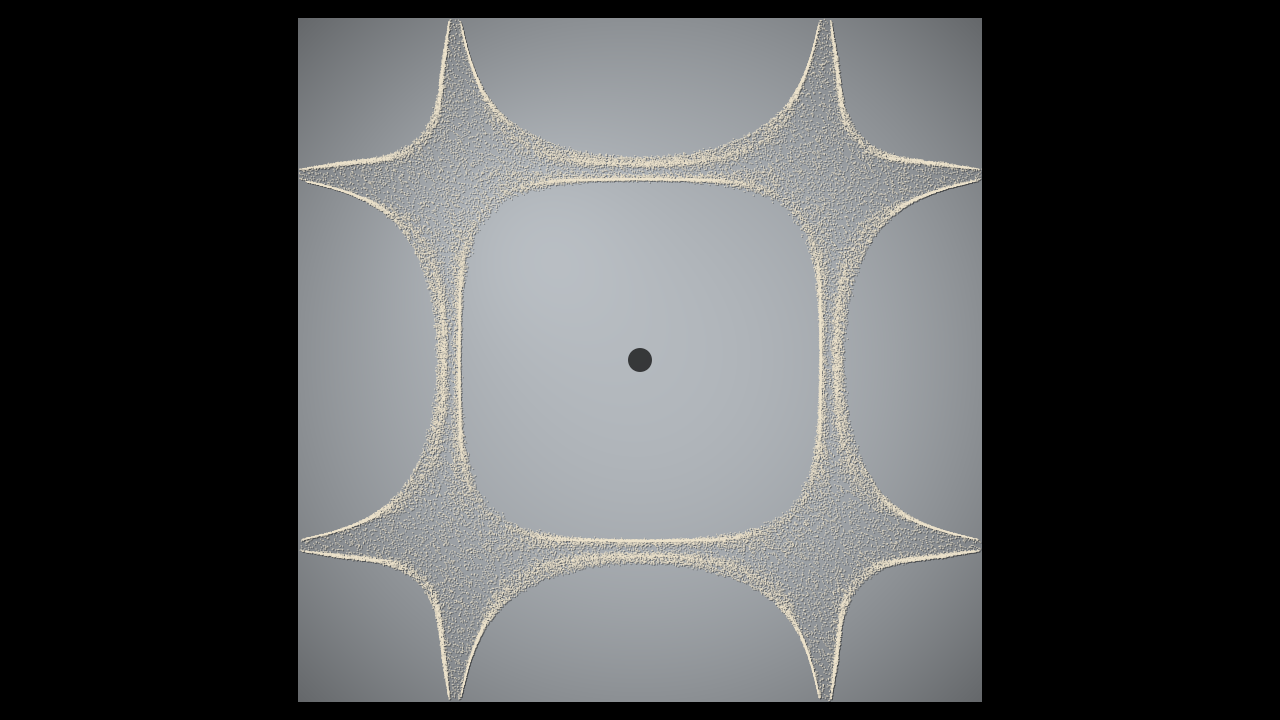
One frame of SW Eidophone on its defaults, from the offline harness, not captured from
Resolume: Resolume’s bundled Beat 001 music, 7.5 s in.
Before you rely on this: it’s at v0.1.1, the second release, and early days. What’s established is established offline, on an Apple Silicon Mac (macOS 26), by a harness that drives the plugins’ own classes in a headless GL context, at two rasters and partly on Apple’s software renderer, and feeds them music through the same path a device would use. The square plate’s modes match Iguchi’s published series solution to 3.4 × 10⁻⁵ and sit inside Leissa’s published bounds; the round plate’s agree with an independent solver to 6.6 × 10⁻¹⁰. Over 757,980 grain-steps where the plate’s acceleration was under g, no grain moved at all; over 4,484,878 above it, every one did. Driven in one mode, all the sand settles on that mode’s nodal lines. Twenty-five models that are wrong on purpose and twenty-nine one-character changes to the shipped code are all caught. On Resolume’s own sound analysis, a tone at the centre of one of its bands now drives the plate at that tone’s pitch, at 48 kHz and at 44.1 kHz (v0.1.0 read every band 1.47 semitones flat in Arena). In Resolume it has run only briefly: in Arena 7.27.1 on Windows on software rendering, where the fleet’s Arena gate passed 15 of 15 (4 skipped: that machine has no sound device, so the controls that need sound weren’t tried), and in Arena 7.29.0 on a Mac, where both plugins showed every control, drew, held perfectly still in silence, and threw their sand to a demo drum loop on Resolume’s own sound analysis (see Where the sound comes from). It has never been in a show and never been driven by a real audio input: every sound it has heard was fed to it from a file. How a grain hops, how powder is carried and how much the plate is damped are assumptions, not measurements. Try it on a spare layer before you put it in a show.
This codebase was created with AI assistance, directed and reviewed by a human author.
Installing
Every download carries both plugins: SW Eidophone, a source (Eidophone.bundle on macOS,
Eidophone.dll on Windows), and SW Eido Over, an effect (Eido Over.bundle,
Eido Over.dll). Drop them into Resolume’s effects folder and restart Resolume:
macOS    ~/Documents/Resolume Arena/Extra Effects/
Windows  %USERPROFILE%\Documents\Resolume Arena\Extra Effects\
Avenue uses the same layout under its own folder name. SW Eidophone appears among the sources and SW Eido Over in the effects browser.
The macOS download is a universal build (Apple silicon and Intel), as a .dmg or a .zip. It’s
Developer ID-signed and notarised, so the bundles just load. The Windows download is an x64
installer or a .zip. The installer offers Arena’s folder above, or Avenue’s on a machine that
only has Avenue; change it on the folder page if you use the other one. It isn’t code-signed, so
it trips SmartScreen once: More info → Run anyway. Or skip the installer and copy the two
.dll files out of the .zip into the folder by hand.
Start here
- Put SW Eidophone in a clip slot and play it. You’ll see a grey plate on black with its sand strewn evenly: nothing has sounded it yet.
- Give it sound. Its Device starts on “Resolume FFT (no pitch)”, Resolume’s own sound
analysis, which has no pitch (see Where the sound comes from):
play some music in the composition and the sand hops (Resolume’s demo
.movclips have no sound: play the matching.wav). For the real thing, pick a capture device in Device: a loopback of the music, an audio interface or a microphone. On macOS, the first time, macOS asks whether Resolume may use the microphone; say yes, or the plate hears silence and its rim pulses red. - Play something with a clear bass line or a held note. Within a few seconds the sand leaves the moving parts of the plate and gathers into lines: corner arcs and a ring round the stem for a low bass note, the four-pointed star a little higher.
- Let the music go quiet. The figure freezes, exactly: below gravity no grain moves at all. The next loud passage picks up where it left off, and a new note half-redraws the old figure.
- Press Pour to strew the sand afresh, and try Shape Circle (it draws rings) or Grain Powder (it draws the negative).
- For your own footage, put SW Eido Over on a clip. The clip is printed on the plate, the plate fills the frame, and the sand lies on top.
The defaults: a 40 cm square plate of 1 mm aluminium, pushed at its centre, Q 40; Device “Resolume FFT (no pitch)”, Gain 12 g, Clarity 0.80, Bin Law Linear, Audio Composition; 65,536 grains of sand, Hop 1, Air 20; View Fit (SW Eidophone) or Fill (SW Eido Over), Grain Size 1.5 px, Mix 100% (SW Eido Over).
What the figures look like
None of these are drawn. They are the plate and the sand doing what they do, rendered by the offline harness from Resolume’s own bundled demo music on the plugin’s defaults unless stated.
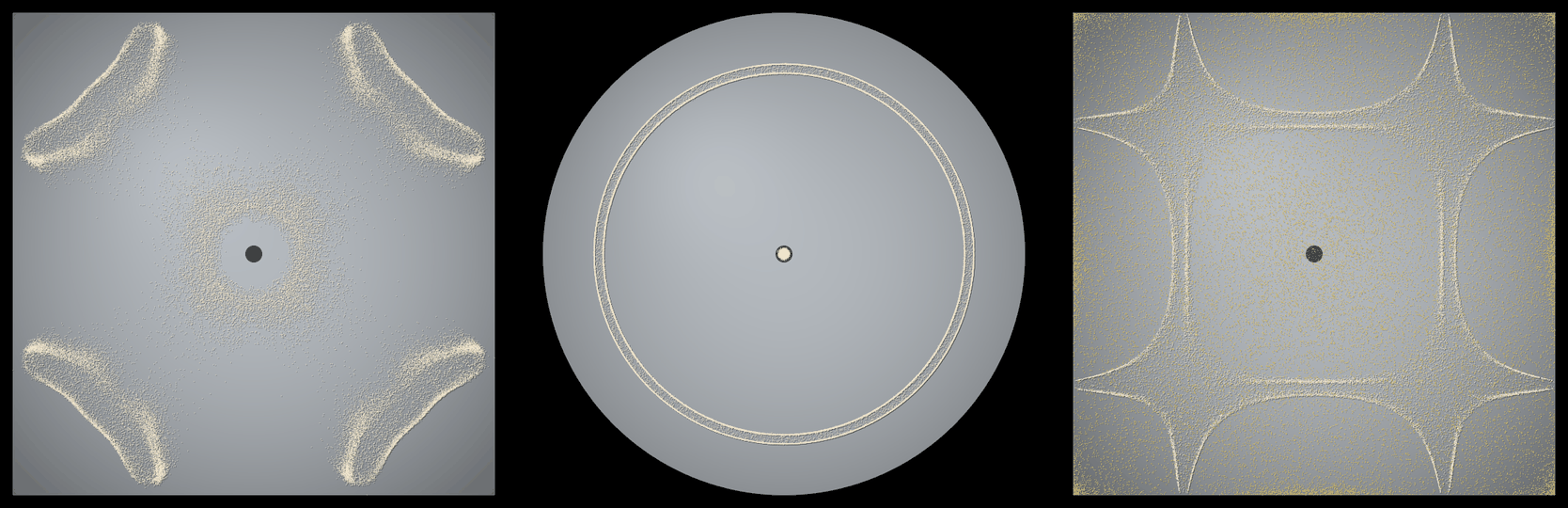
Left to right: a bass note (Bass 001, 7.5 s in): corner arcs and a ring round the stem. The circle (Shape Circle, Beat 001): pushed at its centre, a round plate rings only in rings. Sand and powder (Grain Both, Beat 001): the sand on the star’s lines, the powder drifting the other way, toward where the plate moves most.
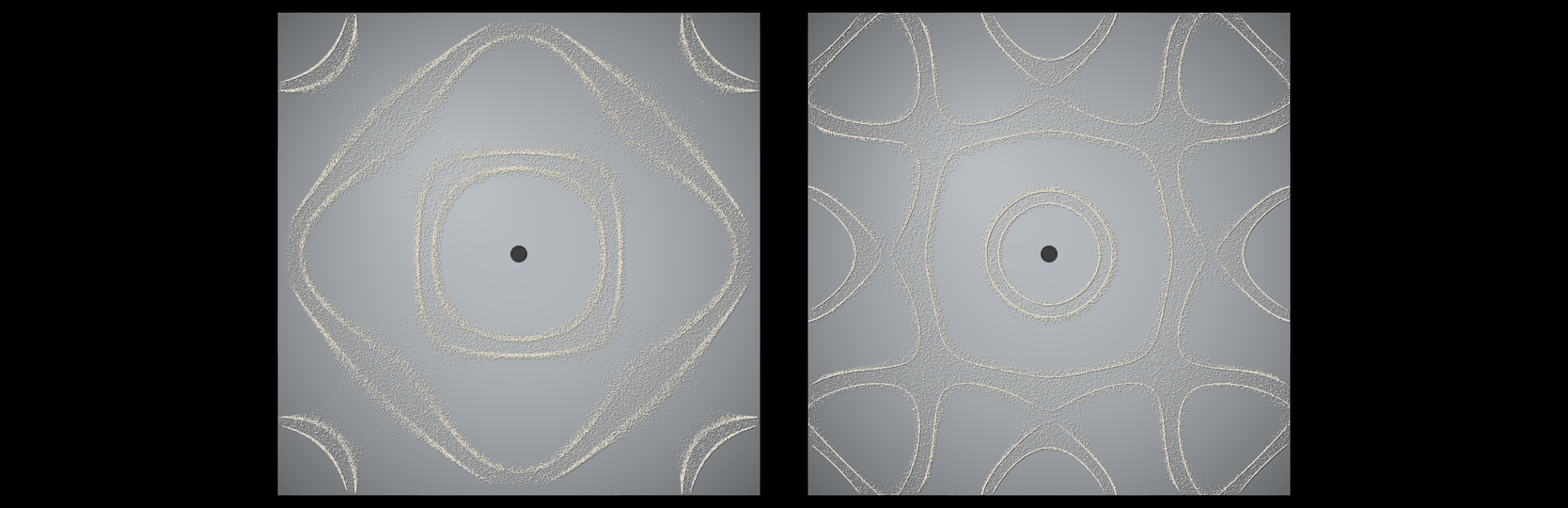
Left: a held synth note (Synth 003, a held 262 Hz): a higher mode, a busier figure. Right: Resolume’s FFT, no device: the harness’s stand-in for Resolume’s sound analysis with one band loud. The note is a guess at that band’s centre, so the plate draws whatever it rings at there: 517 Hz under Linear when this was made, on v0.1.0’s 44.1 kHz reading; in v0.1.1, on Arena’s 48 kHz, that band’s centre is 562.5 Hz, so in Resolume the figure is another.
What falls out of the physics, and what to expect:
- The figure changes with the note. Each mode has its own nodal lines.
- Quiet freezes the figure, exactly. Below g no grain moves, so a quiet passage keeps the last loud one’s figure as long as it lasts.
- Louder draws thinner lines. Sand can rest only where the plate’s acceleration stays under g, a band round each nodal line that narrows as the drive grows.
- A new note half-redraws the old figure. Sand already in the new mode’s still band never moves; the rest is thrown toward the new lines. Until it settles, both figures show.
- A loud wrong note smears everything. Far from every mode the plate moves bodily with the force, everywhere at once, and loud enough no line holds.
- High notes draw slowly. At the same Gain a grain’s hop is shorter as the pitch goes up, as 1/f²: a bass note draws its figure in a few seconds, a note two octaves higher takes sixteen times as long. Turn Hop up to hurry it.
- The circle draws rings. Move Drive At off the centre and the diameters appear.
Where the sound comes from
Device chooses what pushes the plate. Its first entry, “Resolume FFT (no pitch)”, is
Resolume’s own audio analysis, the 64 bands it hands every audio-reactive effect: no device is
opened, but there is no pitch either, so the plugin guesses the note from the loudest band
(other than the lowest) and drives the plate at that band’s centre. In Arena 7.29.0 on a Mac
the bands were measured: 64 of them, each 375 Hz wide, from 0 to 24 kHz (Arena’s audio runs at
48 kHz, even for a 44.1 kHz clip), so their centres are 562.5 Hz, 937.5 Hz, 1312.5 Hz and so on.
The plugin reads the band width from the audio rate Resolume reports to it. Every bass note lands
in the first two bands, so the figures you get on Resolume’s FFT are few and high. Which of Resolume’s audio the bands carry is Resolume’s
Audio setting, which Resolume adds to both plugins as to any audio-reactive effect.
Composition (the default) hears every clip playing in the composition. Local hears only
the clip the plugin is on: the Over on a clip with its own sound track hears that sound, and over
a picture-only clip nothing; the source hears nothing. External hears Resolume’s own audio
input (Resolume’s Preferences, under Audio), which in the Mac test heard nothing. A clip only has
sound if its file has a sound track: Resolume’s demo .mov clips are picture only, and their
sound is in the matching .wav files. In Arena 7.29.0 on a Mac, Arena’s demo drum loop
Beat 001.wav on Composition made the grains hop on its hits at the default Gain, and at 40 g
the source’s sand began to gather into a figure. With a steady test tone at 1312.5 Hz playing
instead, v0.1.1 drove the plate at exactly 1312.5 Hz, whether the tone’s file was at 48 kHz or
44.1 kHz, and an 880 Hz tone at 937.5 Hz, the centre of its band (v0.1.0 drove them at 1206 Hz
and 861 Hz). The plugin’s log names the band and frequency once a note has held for a second
(see If it looks wrong).
The rest of the menu is “System default” and then your capture devices, each remembered by name, so a composition opened on another day or machine finds the same device if it’s there. With a device, earshot, the fleet’s audio library inside the plugin, gives a real pitch and the plate follows the notes. Rescan lists the devices again after you plug one in.
The rim tells you when a device isn’t delivering:
- Amber rim: the device chosen isn’t there (unplugged, renamed, or on another machine). Plug it in and press Rescan, or pick another.
- Red rim, pulsing about once every 2 s: the device is open but silent. On macOS that is usually the microphone permission: a device without it gives silence, not an error. Grant Resolume the microphone in System Settings → Privacy & Security → Microphone, and restart it.
- No rim cue: sound is arriving (or you’re on Resolume’s FFT, which has no error to show).
Using a microphone in the room works, but the plate then hears the room: a loopback of the music, or the console’s feed through an interface, gives cleaner notes.
The Plate group
The inspector shows each control’s slider position, not its value; the ranges and the middle of each slider are given here.
| Control | Range | Default | Middle of the slider |
|---|---|---|---|
| Shape | Square, Circle | Square | |
| Size (side or diameter) | 10–60 cm | 40 cm | 24.5 cm |
| Thickness | 0.3–3 mm | 1 mm | 0.95 mm |
| Material | Aluminium, Brass, Steel | Aluminium | |
| Drive At (from the centre toward the edge) | 0–0.8 | 0 | 0.4 |
| Damping (Q) | 5–500 | 40 | 50 |
Every mode’s frequency goes as the thickness over the size squared: twice as thick doubles every note the plate rings at; twice the size quarters them. Material changes the plate’s colour in SW Eidophone and its notes in both: brass rings at about 0.71 of aluminium’s frequencies, steel at 0.96 (each from its manufacturer’s datasheet). A smaller or thicker plate suits higher music; at the default 40 cm the bass lands on the plate’s second to fourth modes.
Damping is the plate’s Q, one for every mode. High Q rings only very near each mode’s frequency, and longer: clean figures on the right notes, little on the notes between. Low Q rings broadly: more notes move the sand, in mixed figures.
Drive At moves the push off the centre, along the plate’s horizontal axis. At the centre only the modes symmetric about both axes can ring; off it the others join in, and the circle shows its diameters.
The Audio group
| Control | Range | Default | Middle of the slider |
|---|---|---|---|
| Device | Resolume FFT (no pitch), System default, your devices | Resolume FFT (no pitch) | |
| Rescan | a press | ||
| Gain | 0.5–40 g | 12 g | 4.5 g |
| Clarity | 0.50–0.99 | 0.80 | 0.745 |
| Bin Law | Linear, Log | Linear | |
| Audio | Resolume’s FFT input | Composition |
Gain is how hard the plate is shaken, in g, at the loudest passage of the last few seconds: the plugin follows the music’s level against its own recent peak (a running peak that lets go over about 8 s). So a quiet track shakes the plate as hard as a loud one, and at the default 12 g a passage more than about 22 dB under the recent peak leaves the plate under g and the figure frozen. Higher Gain thins the lines and, very high, smears them.
Clarity is how sure the pitch tracker must be before it calls a sound a note. Lower, more of the music counts as notes and the figure changes more often; higher, only clear held notes change it. Between notes the last note is held. Clarity does nothing on Resolume’s FFT.
Bin Law is how Resolume’s 64 bands map to frequency, Linear or Log; it acts only on “Resolume FFT (no pitch)”. Leave it on Linear, the default: that is how Arena lays its bands out (measured in Arena 7.29.0). Log spreads the same 64 bands from 20 Hz to the top, which is not Arena’s: a tone in Arena’s fourth band (1312.5 Hz) would drive the plate at 29.5 Hz under Log.
The Grains group
| Control | Range | Default | Middle of the slider |
|---|---|---|---|
| Grain | Sand, Powder, Both | Sand | |
| Amount | 1,024–262,144 grains | 65,536 | 16,384 |
| Hop | 0.25–4 | 1 | 1 |
| Air | 0–100 | 20 | 50 |
| Pour | a press |
Sand is thrown away from where the plate moves and settles on the nodal lines. Powder does the opposite: fine powder rides the air currents the plate stirs up, toward the places of greatest motion (Faraday saw this in 1831), so it heaps where the sand is thrown from and draws the figure’s negative. Both strews half and half: two colours, two figures.
Amount is the number of grains. More draws solid lines and costs little (see Performance); the Over, spread across the whole frame, reads sparse at the default and looks better with more.
Hop scales how far a thrown grain goes: up, figures form faster; down, slower. Air is how strongly the current carries the powder (it does nothing to sand). Pour strews every grain afresh, evenly, as if you’d tipped a new bag on.
The View group
| Control | Range | Default | Middle of the slider |
|---|---|---|---|
| View | Fit, Fill | Fit (SW Eidophone), Fill (SW Eido Over) | |
| Grain Size | 0.5–4 px at 1080 lines | 1.5 px | 1.4 px |
| Mix (SW Eido Over only) | 0–100% | 100% | 50% |
Fit shows the whole plate in the frame; Fill lets the plate cover the frame, the square cropped top and bottom. Grain Size scales with the output’s height, so a figure looks the same at 720p and 4K.
SW Eido Over: your clip on the plate
SW Eido Over prints your clip on the plate’s surface and lays the sand on top, lit and shadowed. In Fill (its default) the plate covers the frame, so the clip does too; in Fit you see the whole plate with your clip on it, and outside the plate is transparent. The plate’s colour is the clip’s, so Material changes only the plate’s notes, not its look.
Its alpha follows the clip’s: where the clip is transparent, the plate is too, and the sand still shows on it, so sand can lie on a transparent part of a DXV clip. Mix blends back to the bare clip: at 0 it’s the clip exactly. In Arena on a Mac, Mix 0 was identical to the bare clip, and the sand showed over a fully transparent part of the clip as expected.
The Over draws the same plate and grains as the source, and every control above acts on it the same way.
How it works
- The plate is Kirchhoff’s thin plate, free on every edge: a square, whose modes have no closed form and are computed when it loads (a Rayleigh–Ritz solve, 66 modes in about 34 ms), or a circle, whose modes are exact Bessel functions. The modes are checked against published tables (Iguchi’s and Leissa’s for the square, Leissa’s for the circle).
- The drive is a force at Drive At following the music: its frequency the note earshot hears (held between notes), its size from the music’s loudness against its recent peak, scaled so the plate’s peak acceleration at the loudest passage is Gain. Each mode answers as a damped oscillator at Q, solved exactly over each step, so the frame rate doesn’t change the plate.
- The grains each take a step every 1/480 s on the GPU (eight a frame at 60 fps; below 15 fps the excess is dropped and the sand slows). Where the plate under a grain accelerates less than g, it stays exactly where it is. Where it accelerates more, the grain is launched at Newton’s speed, lands a short random hop away, and drifts toward where the plate moves less. Powder is carried along the air current toward the antinodes instead.
- The ear is earshot: on a device, a pitch tracker with a clarity measure and band envelopes for loudness; on Resolume’s FFT, the loudest band.
Flashing
The sand changes slowly, and the plugin is not made to flash. Measured through the plugin’s own code with the broadcast rule (Ofcom’s, which WCAG 2.x follows: more than three flashes a second over the whole frame or a third of it is over the line), on every one of Resolume’s 33 demo clips with music, 7.5 s each:
- SW Eidophone, 14 settings (the defaults; Gain 40 g with the most grains and Both; Fill; Q 5 with Hop 4; Q 500; Powder with Air 100; the thinnest and largest plate; the circle in brass; the lowest Clarity; a loud mastered track; the biggest grains; Pour pressed four times a second): none over the line, at most one flash a second in any part of the picture.
- SW Eido Over, 6 settings on each clip: none over the line. The Over never took a clip over it; the worst seen was the bare clip’s own rate (Beat 002), and the most it raised a clip was from nothing to two flashes a second.
So no photosensitivity warning is needed for the plugin as measured. Two things are still yours to judge: pressing Pour rapidly strews the whole plate again each time (four presses a second stayed within the line, but it’s a full-frame change), and high notes draw fine, regular lines across the plate, which some viewers find uncomfortable at large sizes. Your own clip under the Over flashes as it always did.
Performance
Measured by the offline harness on an Apple Silicon Mac (M4 Max) shared with other work, GPU time per frame, median after a warm-up, every grain thrown:
| 720p | 1080p | 4K | |
|---|---|---|---|
| SW Eidophone, the defaults (65,536 grains) | 0.26 ms | 0.31 ms | 0.61 ms |
| SW Eidophone, 262,144 grains | 0.60 ms | 0.64 ms | |
| SW Eidophone, 16,384 grains | 0.19 ms | 0.23 ms | |
| SW Eidophone, Grain Both | 0.27 ms | 0.35 ms | |
| SW Eido Over, the defaults | 0.28 ms | 0.41 ms | 0.87 ms |
The grain update is most of it below 4K and is the same at any raster. The plate’s oscillators run on the CPU and are tiny. Nothing was timed inside Resolume or on Windows, and a small GPU is another matter.
If it looks wrong
The sand doesn’t move. Nothing is pushing the plate hard enough. Look at the rim: amber means
the device is missing; pulsing red means it’s silent (on macOS, the microphone permission; see
above). No rim cue on “Resolume FFT (no pitch)” means Resolume’s analysis is all there is: check
that music is playing where Resolume’s Audio setting listens (a demo .mov clip has no sound;
play its .wav), or choose a device. Or Gain is
low, or the music has just got quiet against its recent peak: wait a few seconds or turn Gain
up.
It moved, then froze. That’s quiet doing its job: a passage well under the recent peak leaves the plate under g. The next loud note picks it up.
The figure never settles; the sand smears everywhere. The note is far from every mode, or Gain is very high. Turn Gain down, or change Size or Thickness to put the plate’s modes on the music’s notes, or raise Damping’s Q.
High notes take for ever. They do: the hop goes as 1/f². Turn Hop up, or use a bigger or thinner plate so the notes sit lower on it.
The lowest bass note does nothing. The default plate’s lowest mode is near 37.5 Hz, under the 40 Hz floor of earshot’s pitch tracker, so a device can’t ring it; a smaller plate moves its modes up into range.
The Over’s sand is too thin to see. Raise Amount or Grain Size: in Fill the same grains are spread over about three and a half times the screen.
The plugin draws nothing. That’s what a shader that won’t compile looks like. The log has the error:
macOS    ~/Library/Logs/eidophone/eidophone.YYYY-MM-DD.log
Windows  %LOCALAPPDATA%\eidophone\logs\eidophone.YYYY-MM-DD.log
Which note is Resolume’s FFT driving? The same log says. When the plugin loads it records the audio rate Resolume reports, such as “host audio at 48000 Hz: Resolume’s FFT bins are 375.0 Hz each”, and on “Resolume FFT (no pitch)”, once the same band has been the loudest for a second, it records the band and the frequency the plate is being driven at, such as “Resolume FFT note held 1 s: bin 3, 1312.5 Hz”.
Known limits
- Run in Resolume only briefly, in Arena 7.27.1 on Windows (software rendering, no sound device) and Arena 7.29.0 on a Mac. Nothing is known yet about a whole show, how it performs in Resolume, or a real audio input: every sound it has heard was fed to it from a file, never captured.
- Inside Resolume it has moved only to Resolume’s demo stems, on Resolume’s own sound analysis, in Arena 7.29.0 on a Mac: a drum loop made the grains hop at the default Gain. No full mix has been played to it there.
- Resolume’s FFT has no pitch. On “Resolume FFT (no pitch)” the note is a guess from the loudest band, its centre, so the plate rings at a handful of fixed frequencies (562.5 Hz, 937.5 Hz and so on in Arena, under Linear), not at the music’s notes.
- The loudness law is relative. The note is earshot’s pitch, held between notes; the loudness is the RMS of earshot’s band envelopes, whether or not the sound is a note; and Gain is the plate’s peak acceleration at the loudest passage of the last 8 s or so. That is what made Resolume’s demo music draw (the original design, a fixed force for a fixed level on clear notes only, left the plate still), but a quiet track shakes the plate as hard as a loud one, and there’s no absolute-level mode for loud to mean loud.
- High notes draw slowly, as 1/f², at any Gain. Whether the default Hop should rise with pitch is open.
- The default plate’s lowest mode (near 37.5 Hz) is under earshot’s 40 Hz floor, so a device can’t ring it; only Resolume’s FFT or a note’s overtones can.
- The Over’s sand reads sparse in Fill at the default Amount.
- One note at a time. Chords aren’t separated: the pitch tracker gives one note.
- Assumptions, not measurements: how a grain hops (the hop’s length and its drift toward the nodal lines; only the threshold and the launch speed are Newton’s), how powder is carried, the plate’s damping (one Q for every mode; nothing published was found for a sand-loaded plate on a driver), and an ideal driver with no mass of its own.
- Not modelled: sand falling off the edge (the rim holds it), heaps with an angle of repose, grains colliding, thick-plate corrections.
- Two published values are left out of the checks, unexplained: Iguchi’s 65.3680 (SS-A, ν 0.3), which has no counterpart anywhere in the converged spectrum, and Leissa’s Table 4.67 “more precise upper bounds” column (ref 4.76), which lies below converged values.
- The inspector shows slider positions, not centimetres or g. This guide gives the ranges and where the middle of each slider is.
- No presets and no OpenFX version.
About
The last group, About, has the plugin’s name, version, licence and maker, and buttons that open this user guide, the project page, the source on GitHub and the support page in your browser.
Links
- Project page: stoatworks-labs.com/software/eidophone
- Source: github.com/stoatworks-labs/eidophone
- User guide: stoatworks-labs.com/software/eidophone/guide
- Browser demo: eidophone-demo.stoatworks-labs.com
- earshot, the audio front end inside it: github.com/stoatworks-labs/earshot
Reporting something
If something’s wrong, shout at github.com/stoatworks-labs/eidophone/issues. A screenshot, which plugin, the Device, Gain and Shape settings, the rim’s colour, and the log are usually enough.