

Filings is an FFGL effect for Resolume Arena and Avenue that lays a sheet of iron filings over your clip, puts magnets under the sheet, and lets the music tap it.
Nothing in it is animated. Each filing is a tiny soft-iron needle. The magnets magnetise it along its length, so it would turn into their field, slide up towards the poles and stick end to end with its neighbours, but friction pins it to the sheet. Only a tap frees it, and a tap is a kick in the music. Each kick turns the filings part way into the field, so the field lines come up over a few kicks, not at once. Move a magnet and nothing happens until the next kick, which starts turning the filings towards the new field. A quiet passage freezes everything, mid-turn if need be. Far from the magnets the field never beats friction, and the filings stay where they fell.
The clip is the light coming up through the sheet, as on an overhead projector in a physics lesson: the filings are opaque needles in it, and the clip is untouched between them.
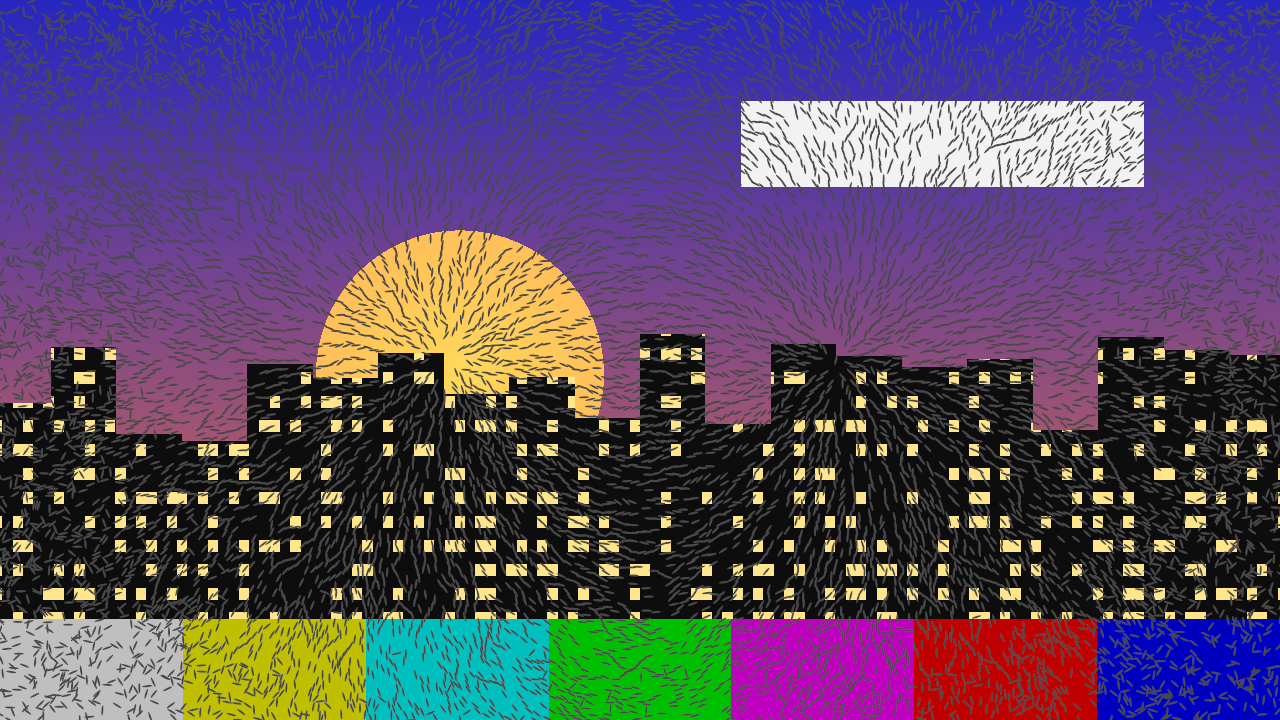
One frame from the offline harness, not captured from Resolume: the defaults over the harness’s card, 10 seconds of its music in (21 taps). The north pole is under the sun, the south pole a third of the frame to its right.
Before you rely on this: it’s at v0.1.0, the first release, and early days. Everything below was compiled, rendered and measured offline on an Apple Silicon Mac (macOS 26), by a harness that drives the plugin’s own class in a headless GL context, at two rasters (1280×720 and 320×180) and again on Apple’s software renderer. The magnets’ field matches the closed form of point poles to 1e-15; a filing’s turn under a tap matches a step-by-step integration of its torque against friction to 1e-13 rad; a whole tap of the sheet, chains and all, matches a second, independent coding of the same law to 1e-13. Over 600 frames of music with no kick in it, while every magnet moves, no filing moves by a single bit. Eighteen models that are wrong on purpose and 21 one-character changes to the shipped code are all caught, and all 25 controls change the picture. In Resolume Arena 7.29.0 on a Mac it loaded with every control, stayed still with tapping off while the magnets moved, and brought the field lines up on Arena’s beat; in Arena 7.27.1 on Windows the fleet’s test gate passed it, with 23 controls changing the picture. It hasn’t yet heard real music in Resolume, so Onset is untested there. How hard a tap shakes the sheet, and the friction, are chosen, not measured. Try it on a spare layer before you put it in a show.
This codebase was created with AI assistance, directed and reviewed by a human author.
Installing
Every download carries one effect, SW Filings (Filings.bundle on macOS, Filings.dll on
Windows). Drop it into Resolume’s effects folder and restart Resolume:
macOS    ~/Documents/Resolume Arena/Extra Effects/
Windows  %USERPROFILE%\Documents\Resolume Arena\Extra Effects\
Avenue uses the same layout under its own folder name. The effect then shows up in the effects browser as SW Filings.
The macOS download is a universal build (Apple silicon and Intel), as a .dmg or a .zip. It’s
Developer ID-signed and notarised, so the bundle just loads. The Windows download is an x64
installer or a .zip. The installer offers Arena’s folder above, or Avenue’s on a machine that
only has Avenue; change it on the folder page if you use the other one. It isn’t code-signed, so
it trips SmartScreen once: More info → Run anyway. Or skip the installer, take
Filings.dll out of the .zip and drop it into the folder by hand.
Start here
- Put SW Filings on a layer or on the composition. You see a scattered sheet of filings over the clip, lying every which way.
- Give it something to tap with. Tap On is Onset by default, which listens to the Audio input: pick one of Resolume’s audio sources there and play music with a kick in it. Or set Tap On to Beat to tap on Resolume’s own tempo, or press Tap by hand.
- Watch the field lines come up over a few taps, strongest near the two poles: a bar magnet, N on the left and S on the right.
- Move Pole 1 X while the music plays. Nothing changes until the next kick; then the filings start to turn towards the new field, and for a few kicks the old pattern and the new overlap.
- Press Scatter for a fresh sheet.
Without music, or with Tap On at Off, the magnet controls change nothing you can see. That is the point: nothing but a tap moves a filing, not the magnets, not Strength, not Friction.
The defaults: two poles, N at the left and S at the right a third of the frame apart, 40 mT straight above each pole, 12% of the frame’s height under the sheet; Tap On Onset at the reference tap; filings a seventieth of the frame long covering 20% of the sheet (12,478 of them), friction 0.2, drawn a dark grey (Tone 0.15), Mix 1.
Recipes
A bar magnet on the kick. The defaults, with Audio set. The lines grow outward from the poles as the music plays, and filings creep in to pile round each pole over many kicks.
Two like poles. Set Pole 2 Sign to N. The fields cancel on the line between the two poles, and the filings there never line up: a bare seam down the middle.
Four poles. Poles at 4. The defaults put N at the left and the top and S at the right and the bottom, so every pole has an opposite neighbour and the loops run round the frame.
On the beat, without audio. Tap On at Beat, 2 Beats or Bar: Resolume’s own tempo taps the sheet. Half Beat taps twice a beat.
Lines that come up slowly. Tap Strength down to a quarter of its slider (0.5×) and Friction up. Each kick turns the filings less, so the pattern builds over a whole section. Turn Tap Strength up (2× at the top) and the field lines snap up in a kick or two.
Magnets that move. Map Pole 1 X and Pole 1 Y to an LFO, or to MIDI or OSC, and leave Tap On on Onset. The filings follow the magnet a kick at a time and leave a trail of the old pattern behind it.
Freeze, then tap by hand. Tap On at Off, then map Tap to a pad or a key in Resolume. Every press is one full tap, whatever the music does.
A fresh sheet at a section change. Map Scatter to a pad. It throws a new scattered sheet straight away, the one thing that moves the filings without a tap.
Light filings on a dark clip. Tone up towards 1: the filings become a lighter grey, as if lit from the room. Tone 0 makes them black silhouettes, which read best over a bright clip.
Over the layer below. Over a transparent part of a clip (a DXV clip with alpha, say) the filings stand on their own as needles over whatever is underneath.
Flashing
Filings doesn’t flash. A tap turns needles a little way; it never lights or blanks the picture. Measured off the harness at 60 fps over a white clip, at the defaults the largest change in mean brightness of any third-of-the-frame patch from one frame to the next is under 1% of white, and at the most extreme settings (black filings, the densest, largest sheet, the hardest tap, least friction, most sensitive) it is under 4%. Neither comes near a flash by the measure broadcast and web guidance use (a change of a tenth of white one way and back), let alone three a second. Pressing Scatter four times a second changes a patch by under 6% a press.
The Magnets group
Poles (1 to 4, default 2) is how many of the four poles are under the sheet.
Strength is the field on the sheet straight above a pole, from 2 to 100 mT (the middle of the slider is about 14 mT; the default is 40 mT). It stops at 100 mT because the torque law below holds only while the filings are well short of saturation, which at their shape is 125 mT. Every pole has the same strength.
Depth is how far under the sheet the magnets are, from 1% to 25% of the frame’s height (the middle is 5%; the default is 12%). Shallow magnets give a strong field in a small patch round each pole; deep ones spread a weaker field across the frame. Straight over a pole the field points down through the sheet and there is nothing to turn a filing; the field along the sheet is strongest in a ring round each pole, about 0.7 of Depth from it.
Pole 1 X, Pole 1 Y and Pole 1 Sign, and the same for poles 2 to 4, place each pole: X from the left edge (0) to the right (1), Y from the bottom (0) to the top (1), and N or S. X runs across the frame’s width, so on a frame of another shape the same X puts the poles a different distance apart (see Known limits). The defaults: pole 1 at (0.35, 0.5) N, pole 2 at (0.65, 0.5) S, pole 3 at (0.5, 0.82) N, pole 4 at (0.5, 0.18) S.
A filing has no north end: it lines up with the field either way round, so swapping every sign at once gives the same picture. What the signs change is the pattern between poles: opposite poles join in loops, like poles leave a bare line between them.
The Tap group
Audio is the sound Onset listens to: one of Resolume’s audio sources.
Tap On decides when the sheet is tapped:
- Onset (the default): a kick in the Audio input. Only the lowest quarter of the spectrum counts, so the hi-hats don’t tap the sheet. A soft kick taps less hard than a loud one: the loudest kick heard lately taps at the full Tap Strength.
- Beat, Half Beat, 2 Beats, Bar: from Resolume’s own clock and tempo, on the frame the beat falls in, each at the full Tap Strength. Half Beat is twice a beat. If the host never moves its beat, Filings keeps its own clock at the host’s tempo.
- Off: only when you press Tap.
Tap is one full tap now, in any Tap On mode, on the press.
Sensitivity (0 to 1, default 0.5) is how far a kick has to stand out for Onset to hear it: higher hears quieter hits, and at 1 even ghost notes tap. Nobody has measured what Resolume’s spectrum carries, so the default is what worked on the harness’s music.
Tap Strength (0 to 2× the reference tap, default 1×, the middle of the slider) is how long a tap frees the sheet. At 1×, one tap turns a filing in a 4 mT field (with no friction) by tan ψ → tan ψ/e, ψ being its angle to the field. The turn goes as the square of the field, so a filing near a pole, in ten times that field, lines up in one tap, and one in half that field takes four times as many.
There’s at most one tap a frame. When a kick, a beat and a press land on the same frame, the hardest of them taps.
The Filings group
Friction is the friction μ between the filings and the sheet, from 0.05 to 1 (the middle is about 0.22; the default is 0.2). It decides where the field is too weak to turn a filing at all: at 0.2 that’s below about 0.8 mT. Higher friction leaves more of the sheet scattered and makes a filing stop short of the field’s direction; lower lets the lines reach further and lie straighter.
Density is how much of the sheet the filings cover, from 5% to 60% (default 20%).
Size is a filing’s length, from 1/200 to 1/30 of the frame’s height (the middle is about 1/77; the default is 1/70). It also sets the physical scale: a filing is taken to be 1 mm long, so at the default Size the frame is 7 cm of sheet.
Density and Size together set how many filings there are, up to 60,000. A change adds or drops filings at the end of a fixed sequence, so no filing already on the sheet moves.
Scatter throws a fresh sheet, scattered at random, at once.
The Look group
Tone (0 to 1, default 0.15) is the filings’ grey, from black silhouettes (0) to a mid grey (1).
Mix (0 to 1, default 1) fades back to the clip. At 0 the output is the clip, alpha included.
How it works
Each filing is a soft-iron needle with a long axis five times its width (a prolate spheroid). The physics runs on the CPU, in double precision; the GPU only draws what it placed.
- The field. Each pole is a magnetic point charge at Depth under the sheet, the pole model of the end of a magnet standing on end, so its field on the sheet is the inverse square, in closed form. Several poles add.
- The turn. A soft-iron needle at an angle ψ to the field feels a torque in proportion to B² sin 2ψ, which lines its long axis up with the field either way round (Huillery et al., arXiv:1903.09699, eq. (1), after Abbott et al., IEEE Trans. Robotics 23, 1247 (2007)). The constants in it are the needle’s demagnetising factors (Osborn, Phys. Rev. 67, 351 (1945), as reproduced in Huillery et al. and in Nahlawi, Ma, Conradi & Saam, arXiv:1904.11562). Against kinetic friction the turn has a closed form, and Filings uses it, so a tap’s turn doesn’t depend on the frame rate.
- The slide and the chains. The needle’s ends become magnetic poles. The magnets pull them up the field towards the poles, and each filing’s poles pull its neighbours’ opposite poles, so filings chain end to end with gaps between the chains. Filings that touch are pushed apart.
- A tap. Between taps no code path moves a filing. A tap frees the sheet for a time set by Tap Strength and how hard the kick was, in two passes, each from a snapshot of the sheet, so the result doesn’t depend on the order the filings are worked through.
- The picture. Each needle is drawn with its exact coverage of every pixel, and the needles multiply into a transmission buffer. In linear light, out = clip × T + ink × (1 − T), T being how much light gets through the filings over the pixel, and the result is turned back into sRGB. The alpha is the clip’s, plus the filings where they cover a transparent part.
The clip never touches the physics, so nothing a clip does can move a filing.
Performance
Measured by the offline harness on a Mac (Apple silicon, M4 Max) at the defaults (12,478 filings) with the harness’s music, medians:
| 720p | 1080p | 4K | |
|---|---|---|---|
| GPU time a frame | 0.05 ms | 0.27 ms | 1.29 ms |
| a whole frame without a tap | 0.28 ms | 0.50 ms | 1.98 ms |
| a frame with a tap | 2.6 ms | 2.8 ms | 4.9 ms |
A tap’s work is CPU time, on the frame of the kick, and it goes as the number of filings: about 8.5 ms at 1080p at 60,000. The 4K GPU time is from one run. Density and Size are the cost controls. Nothing was timed inside Resolume, and nothing was timed on Windows.
If it looks wrong
Nothing moves. Nothing is tapping. On Onset, check that Audio has a source and the music has a kick; try Sensitivity higher. Or set Tap On to Beat, or press Tap.
I moved a magnet and nothing happened. That’s the model: the filings move only on a tap. The next kick starts turning them.
Only the middle of the frame lines up. The field far from the magnets is too weak to beat friction. Lower Friction, raise Strength, or put the magnets deeper (Depth up) to spread the field.
It taps on the hi-hats, or misses kicks. Sensitivity: lower for fewer taps, higher for more. Onset listens to the lowest quarter of Resolume’s spectrum, which is assumed to be where the kick lives.
The filings over a pole look bare. Straight over a pole the field points down through the sheet; the filings lie flat and pile in a ring round it instead.
Frames drop on the kick. The tap’s CPU work lands on one frame. Lower Density, or raise Size.
The effect does nothing at all. That’s what a shader that won’t compile looks like. The log has the error, the GL renderer, and the host clock it settled on:
macOS    ~/Library/Logs/filings/filings.YYYY-MM-DD.log
Windows  %LOCALAPPDATA%\filings\logs\filings.YYYY-MM-DD.log
Known limits
- Pole X runs across the frame’s width, so on a 4:3 frame the default poles sit closer together, in frame heights, than on a 16:9 frame, and the pattern changes with the frame’s shape. Y runs up its height.
- A tap’s CPU work lands on the kick’s frame: 2 to 3 ms at the defaults, about 8.5 ms at 60,000 filings, measured on an M4 Max. In a busy composition that may cost a frame on the kick.
- The first tap at 4K once took 25 ms where the rest took about 5, and that isn’t explained.
- Filings lie flat. They never stand up over a pole, so a pile is a ring round the pole with a bare centre. They never saturate, and the far end of each magnet is left out.
- The friction and how far one tap carries the filings are chosen, not measured on a real sheet. So is the filing’s shape: a 1 mm needle five times as long as it is wide.
- Seen in Resolume, but not with music. Arena 7.29.0 on a Mac loaded it, showed every control at its default, held the sheet still with Tap On Off while two magnets moved, tapped it on the beat and the bar, and took Tap and Scatter. Arena 7.27.1 on Windows, with no GPU, passed the fleet’s gate: every control as declared, 23 of them changing the picture. Onset has not heard real music through Resolume, nothing was timed inside it, and Avenue is untested.
- Resolume’s spectrum is unmeasured. Onset assumes the kick is in the lowest quarter of its 64 bins, and the Sensitivity scale is a guess that worked on the harness’s music.
- The sheet covers frames up to twice as wide as they are tall. A wider frame shows bare sheet at its sides.
- The inspector shows slider positions, not millitesla. This guide gives the ranges and where the middle of each slider is.
- No presets and no OpenFX version.
- The browser demo is a port. It runs the plugin’s shaders unedited and a JavaScript port of its sheet, field and trigger, which only a reader checks. It has no audio, so Onset never taps there (press Tap, or tap on a beat at the page’s tempo), and a tap there costs about 18 ms at the defaults on one thread.
About
The last group, About, has the plugin’s name, version, licence and maker, and buttons that open the project page, this user guide, the source on GitHub and the support page in your browser.
Links
- Project page: stoatworks-labs.com/software/filings
- Source: github.com/stoatworks-labs/filings
- User guide: stoatworks-labs.com/software/filings/guide
- Browser demo: filings-demo.stoatworks-labs.com
Reporting something
If something’s wrong, shout at github.com/stoatworks-labs/filings/issues. A screenshot, the clip, Tap On and the settings you changed, and the log are usually enough.