

Flyback is high-voltage discharges for Resolume Arena and Avenue: a Jacob’s ladder, a Tesla coil, a Van de Graaff generator, a plasma globe and a Lichtenberg figure. It comes as two FFGL plugins, a source (SW Flyback) and an effect that strikes into the clip (SW Flyback Over). No bolt in it is drawn with a noise function. Every discharge is grown, one step at a time, through a field that is solved for as it grows, and each machine’s own circuit decides when the air breaks and how much energy the spark carries.
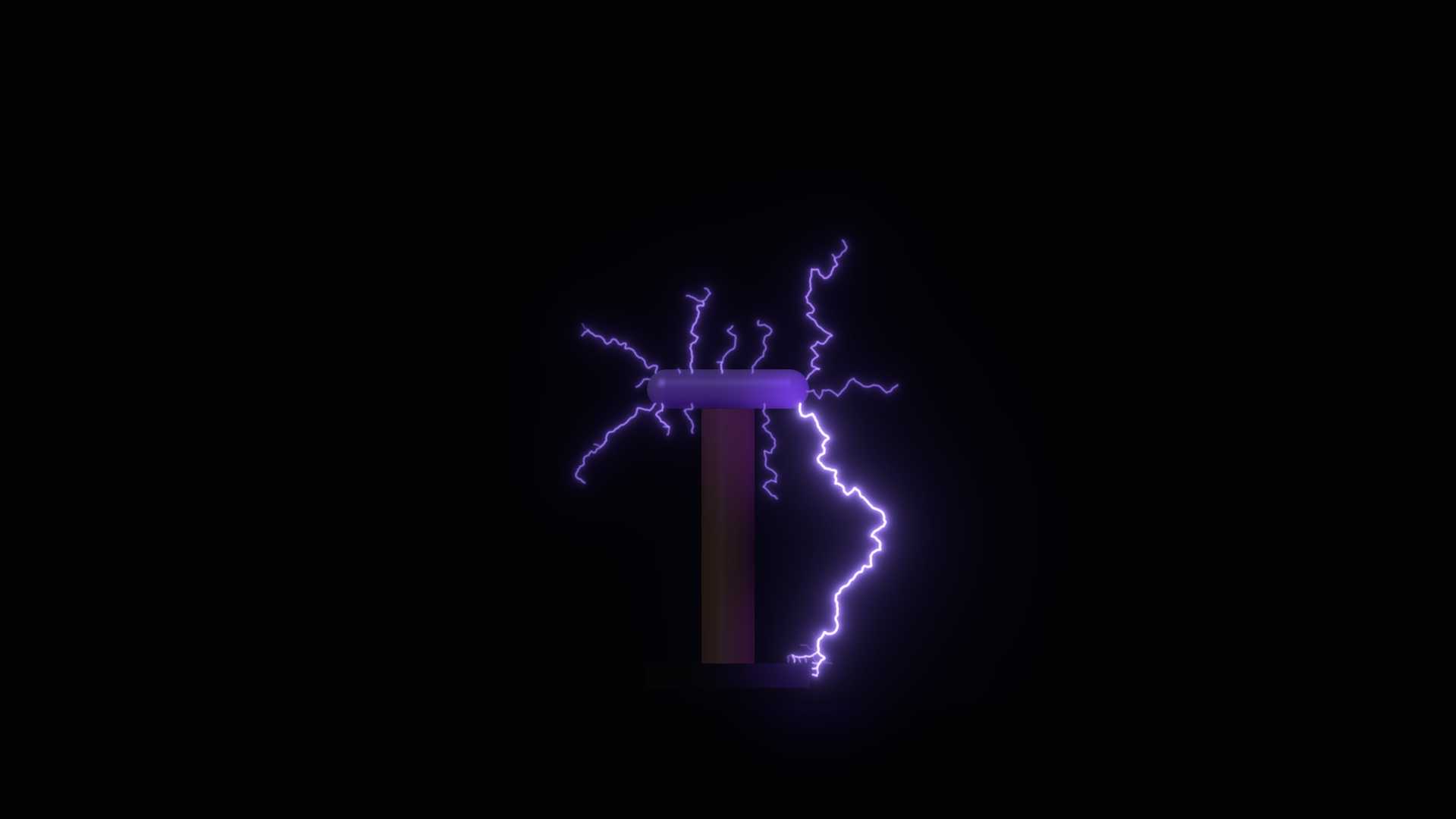
The Tesla coil as the plugin starts: an NST coil at 120 bangs a second, streamers into the air and one striking the grounded base. Rendered by the plugin’s offline harness, not captured from Resolume.
Before you rely on this: released at v0.1.0, and honestly early. The physics is measured rather than asserted, by a harness that drives the real plugin class in a headless GL context, and the engine on its own where a claim needs no GPU. The potential solver holds to the coaxial closed form at every site, worst 0.039 against a bound derived from the lattice step. Clusters grown at the Lichtenberg setting measure a fractal dimension of 1.744, where the same estimator reads true diffusion-limited aggregation as 1.742. Every Jacob’s-ladder arc goes out at Ayrton’s extinction length, L* = 0.1338 m, to one lattice step. The Tesla coil fires 7200 bangs in a minute at 120 BPS. Every Van de Graaff spark comes C·V_b/I = 0.3519 s after the last, to 1.3e-11 s. Each frame’s light equals the event’s energy times the efficiency to 1.9e-5, inside a derived bound of 4.1e-5. Over a clip of a bright disc on black, 600 of 600 strikes go into the disc. Fourteen deliberately wrong models are all detected, nine one-character mutants of the shipped code are all caught, and all 48 parameters swept are live where they apply. It has never been loaded into Resolume on macOS. The one host it has run in is the fleet’s own test host,
oxbow, which reads both plugins and renders through each. On Windows, a build of v0.1.0 loads, registers and renders in Resolume Arena 7.27.1, with every control matching what the plugins declare, and 33 of the source’s and 43 of the effect’s controls shown moving the picture — on software rendering, so that says nothing about a GPU. Eight of the source’s machine controls act through discharges that come and go between the test’s single frames and could not be shown there; the audio controls had no sound device to hear. Try it on a spare layer before you put it in a show.This codebase was created with AI assistance, directed and reviewed by a human author.
Installing
Every download carries both plugins: the source and the effect. On macOS they are
Flyback.bundle and Flyback Over.bundle; on Windows, Flyback.dll and Flyback Over.dll. Put
both into Resolume’s effects folder and restart Resolume:
macOS    ~/Documents/Resolume Arena/Extra Effects/
Windows  %USERPROFILE%\Documents\Resolume Arena\Extra Effects\
Avenue uses the same layout under its own folder name. SW Flyback then appears among the sources and SW Flyback Over among the effects.
The macOS download is a universal build (Apple silicon and Intel), as a .dmg or a .zip. It is
Developer ID-signed and notarised, so the bundles simply load. The Windows download is an x64
installer or a .zip. It is not code-signed, so the installer trips SmartScreen once: More
info → Run anyway.
Two plugins
- SW Flyback (a source) is the machine in a dark room: the apparatus, lit by its own discharge, over a background colour you choose.
- SW Flyback Over (an effect) puts the machine over the clip beneath it, and makes the clip’s bright parts ground. Strikes go into the picture, and the flash lights it.
Both declare exactly the same controls, so a setting moves between them unchanged. The Over group does nothing in the source, and Background does nothing in the effect, where the clip is the background.
Air tears where the field is strongest
Air is an insulator until the field tears it, and where it tears is a Laplace problem. Every discharge in Flyback grows by the dielectric breakdown model. The electrodes, and the channel grown so far, are held at their potentials. The potential in the air is solved on a lattice sized in metres of scene. The channel then extends to a neighbouring site with a probability that goes as the field there to a power, η:
p ∝ |∇φ|^ηOne exponent decides the look. η = 1 is a Lichtenberg figure. η around 2 to 3 is lightning. A large η is a nearly straight arc. Branching, forking towards the nearest ground and a strike taking the short way round are all where the field puts them. The Branching control is η.
Around that model sit the circuits of the five machines. Each decides when the air breaks and how much energy the channel carries. Then one light model serves all five. Current divides through each grown tree by Kirchhoff’s law, so the trunk carries the most, and the channel’s emission follows its current. A frame’s light is exactly the event’s energy times a luminous efficiency, so a bang split into ten branches is not ten times brighter. Colour comes from the gas’s own spectral lines, and a channel moves towards white-hot as its current nears an ampere, so a strike is white and a streamer violet. The glow spreads light around and never adds any.
Start here
Put SW Flyback on a layer and leave every control alone. The defaults are the Tesla coil: a 15 kV neon-sign transformer driving a coil with a 0.15 m toroid at 120 bangs a second, over a grounded floor. Violet streamers branch off the toroid into the air, and now and then one reaches the base or the floor and strikes, white-hot.
Then, in this order:
- Preset. Step through the five machines. Each preset is a machine as a photographer would shoot it. Note that a preset overrides most of the panel while it is selected: see Presets below before you start tuning.
- BPS, on the Tesla coil. Bring it down to about 5 and each bang makes short, fresh sparks. Raise it past 50 and the streamers lengthen, because each bang finds the last one’s channel still hot and re-uses it. The harness measures the mean streamer at 0.254 m at 4 BPS, 0.255 m at 8, then 0.365, 0.820 and 1.072 m at 60, 120 and 240.
- Branching. Pull it down and the discharge goes bushy, towards a Lichtenberg figure. Push it up and it straightens into an arc.
Fire is the machine’s own gesture: a bang, a spark, a restrike, a surge or a new figure. With BPS at off, Fire is how the Tesla coil bangs at all.
Presets
Preset is the first control. Element 0 is Custom, where the plugin starts, and it means the controls are the truth. The others are one per machine:
- Tesla Coil — the defaults: an NST coil at 120 BPS, streamers to the floor.
- Jacob’s Ladder — a neon-sign transformer on 40 cm rods: the arc climbs, bows and snaps.
- Van de Graaff — a desktop generator: a 0.15 m sphere, 10 cm from its discharge ball.
- Plasma Globe — a neon-xenon globe of 0.20 m radius on a small flyback driver.
- Lichtenberg — a figure grown from a point, on a ZVS supply.
A preset is an override, not a write. Resolume does not take values back from a plugin, so the plugin cannot move your sliders to a preset’s positions. While Preset is on anything but Custom, the preset’s values are laid over these controls as the plugin reads them, and those sliders do nothing and do not show the truth: Machine, Supply, Voltage, Source Impedance, Branching, Channel Memory, Reach, every control in the five machine groups except Target X/Y and Finger X/Y, Efficiency, Glow, Gas, Shutter and Persistence.
A preset leaves some things to you: Fire and Seed, Detail (a cost, not a look), Target X/Y and Finger X/Y, the Audio group, Show Apparatus, Background, the Over group and the Layout group.
To tune a machine, go to Custom and choose it by hand. The shared controls are relative to each machine’s own nominal, and sit at that nominal in the middle of their travel, so Machine alone gives each machine looking like itself. Two things Machine does not change are Supply and Gas: the presets put the plasma globe on the Flyback supply with Neon-Xenon gas and the Lichtenberg figure on ZVS, so set those too if you want the preset’s look. The presets also differ slightly in Glow and Persistence.
The Machine group
Preset — see above.
Machine — Jacob’s Ladder, Tesla Coil (the default), Van de Graaff, Plasma Globe or Lichtenberg. Each has its own group of controls below, which do nothing on the others.
Fire — a button. What it does depends on the machine:
- Jacob’s Ladder — the arc snaps and restrikes at the bottom of the rods.
- Tesla Coil — an extra bang, on top of the interrupter’s clock, or the only bang with BPS off.
- Van de Graaff — a spark now, if the sphere has charged past a fifth of its breakdown voltage.
- Plasma Globe — a surge: every filament re-forms at once.
- Lichtenberg — a new figure, grown from nothing.
Seed — which discharge, shown as 1 to 1000, default 1. The same seed and controls grow the same bolt, frame for frame.
The Supply group
Supply — the high-voltage source, as an open-circuit voltage behind a source resistance:
- ZVS — 20 kV behind 0.8 MΩ (25 mA short-circuit).
- NST (the default) — a neon-sign transformer, 15 kV behind 0.5 MΩ (30 mA).
- Flyback — a single-transistor driver, 25 kV behind 4 MΩ (6 mA).
Voltage — a trim on the supply’s open-circuit voltage, from half to double, geometric, nominal in the middle. The panel shows kilovolts: 15.0 kV at the default on NST.
Source Impedance — a trim on the supply’s source resistance, from a quarter to four times, geometric, nominal in the middle. The panel shows megohms: 0.50 MΩ at the default on NST. A lower impedance is a stiffer supply. On the ladder it lets the arc stretch further before it goes out: doubling the resistance takes L* from 0.1338 m to 0.064 m.
The panel’s displayed values are one of the few places Flyback shows its physics directly. Every control that stands for a real quantity reads in its unit.
The Discharge group
Branching — η, the exponent in the growth law, as a trim from half to double each machine’s own, geometric. The panel shows η. The nominal values are 4 for the ladder’s arc, 3.5 for the Van de Graaff’s spark, 2 for the globe’s filaments, 1.6 for the Tesla coil’s streamers and 1 for a Lichtenberg figure. Lower is bushier, higher is straighter.
Detail — lattice sites across the scene’s height, from half to double each machine’s own (between 96 and 176 at nominal), always kept between 32 and 512. The panel shows the count. More sites give finer branching and cost more CPU.
Channel Memory — τ, how long a channel stays hot, from a quarter to four times the nominal 20 ms (80 ms on the globe), geometric. The panel shows milliseconds. A segment carrying a fraction of the trunk’s current cools in that fraction of τ, so tips cool first and the trunk last. On the Tesla coil this is what makes the streamers lengthen once the gap between bangs is shorter than τ.
Reach — how much each event may grow, from a quarter to four times nominal, geometric. On the Tesla coil it is the metres of new channel per bang (2.5 m at nominal, all branches together). On the Lichtenberg figure it is the size of the figure, and on the globe the most a filament may grow.
The Jacob’s Ladder group
The arc obeys Ayrton’s equation on the supply’s load line, so it has an extinction length L*: the longest arc the supply can hold. The hot column rises at a buoyant speed, its roots lag on the rods, and it bows. It stretches as the rods diverge, snaps at L*, and restrikes at the bottom.
Rod Spread — the angle between the rods, 8° to 40°, linear, default 20°. Wider rods reach L* lower down, so the arc snaps sooner.
Rod Length — 0.25 to 0.60 m, linear, default 0.40 m. At the default spread the gap at the top is beyond L*, so the arc snaps before it runs off the top.
Rise Speed — how fast the hot column climbs, 0.2 to 3 m/s, geometric, default 1 m/s. The straight climb to L* takes 0.371 s at the defaults.
Wind — a sideways breeze, −0.5 to +0.5 m/s, linear, default 0. A breeze is a fraction of the column’s own rise; much more and the arc would stretch to L* before it had climbed at all.
The Tesla Coil group
The coil bangs at the interrupter rate, exactly, as a clock. Each bang grows streamers off the toroid towards the nearest ground. The coil’s secondary shapes the field but is not a ground, so streamers do not race down it.
BPS — bangs per second. At the very bottom of the travel it is off; above that it runs from 5 to 1000, geometric, and the default is 120. The panel shows BPS. The harness counts exactly 7200 bangs in a minute at 120, and 2250 at 37.5. Low rates give short, fresh sparks every time; above about 50 BPS (at the default memory) each bang re-uses the last one’s hot channel and the streamers grow long.
Topload Size — the toroid’s radius, 0.06 to 0.35 m, linear, default 0.15 m. Each bang carries the same energy whatever the toroid, but a bigger one holds it at a lower voltage, and no streamer can be longer than the toroid’s voltage divided by the field a streamer needs to keep going (5 kV/cm). So a big toroid throws shorter streamers, and a small one longer.
Target — what the streamers can strike:
- None — only the grounded base and its strike rail.
- Floor (the default) — a grounded floor below the coil as well, within reach of the longest streamers but not most.
- Point — a grounded ball on a rod, at Target X and Target Y.
Target X and Target Y — where the Point target is, in the frame, defaults 0.78 and 0.24. Only Point uses them.
The Van de Graaff group
The belt charges the sphere at a steady current. The gap breaks when the sphere’s surface field reaches Peek’s value, worked out from the two spheres’ image charges, and the spark dumps the stored energy. So sparks come every C·V_b/I: 0.3519 s at the defaults, and twice as often at twice the belt current.
Belt Current — 1 to 50 µA, geometric, default 10 µA. The panel shows microamps. Half the current doubles the interval, to 0.7038 s.
Sphere Size — the sphere’s radius, 0.05 to 0.30 m, linear, default 0.15 m.
Gap — the distance to the discharge ball, 1 to 20 cm, geometric, default 10 cm.
Sphere Finish — the sphere’s surface, as Peek’s surface factor m: polished (m = 1, the default) at the top of the travel, down to m = 0.82 at the bottom, linear. A polished sphere has no corona before it sparks. A rough one goes into corona below its sparking voltage and leaks its charge to the room so fast that the voltage stops climbing: it holds, glows, and never sparks. Only the last hair of the travel, m above about 0.998, both glows and sparks. So in practice Sphere Finish is a choice between sparks (polished) and a glowing sphere (anything below). With a rough sphere, Fire still throws a spark on demand.
Sphere Finish is one of the preset’s controls, and every preset is polished, so it only acts on Custom.
The Plasma Globe group
Filaments grow from the electrode to the glass one at a time. Each frame each filament’s outer part re-forms, so they wander. The number of filaments rises with the supply’s voltage.
Globe Size — the glass’s radius, 0.08 to 0.24 m, linear, default 0.20 m.
Finger — off by default. On, a finger touches the glass at the point nearest Finger X and Finger Y. It is a stronger ground than the glass, and pulls the filaments together.
Finger X and Finger Y — where the finger is, in the frame, defaults 0.72 and 0.66. In the Over effect the finger goes to the clip’s brightest region instead.
The Lichtenberg group
The pure model, η = 1, grown over three seconds until its budget runs out, then held and lit. A real Lichtenberg figure forms in nanoseconds and is a dark fossil afterwards: the growth and the glow are staging.
Origin — Point (the default) grows from a point in the middle, outwards in every direction. Edge grows from the bottom edge upwards, in a uniform field.
The Audio group
Audio — Resolume’s FFT buffer, which Resolume shows as an audio-source picker.
Audio Fires — 0 to 1, default 0 (off). Above zero, each onset detected in the audio presses Fire: a singing Tesla coil, a spark on the beat. Higher values lower the bar, so quieter onsets count. FFGL has no audio output, so the bangs are what you see of the music.
Audio Drive — 0 to 1, default 0. The audio level raises the supply’s voltage: at 1, full level doubles it. The level is normalised against its own recent peak, so a long loud passage reads as full throughout.
What is known and what is assumed. FFGL has no audio path. What Resolume offers is a buffer parameter that the host fills with a spectrum once per frame, so audio is a modulation source at video rate. The plugin assumes 64 bins, which is what the analyser it shares with the fleet’s other plugins was written against. No audio has reached Flyback in a host. The harness feeds it synthetic beats, and checks that the first hit after a fresh instance, and after the clock jumps back, still fires.
The Light group
Efficiency — the luminous efficiency, the fraction of the event’s energy that becomes light: from 0.1% to 10%, geometric, 1% in the middle. The panel shows the percentage. This is the honest brightness control: it scales the light without changing the discharge.
Glow — how much of the light spreads into a halo, 0 to 90%, linear, default 40%. The glow moves light around and never adds any.
Gas — Air (the default), Neon, Argon or Neon-Xenon, each coloured by its own spectral lines. Neon-Xenon is the classic plasma-globe fill; the mix’s line weighting is a look, not a measurement.
Shutter — the camera’s shutter angle, from about 7° to 360°, linear, default 360°. At 360° every spark lands in exactly one frame. At 180° about half of them fall while the shutter is shut and are never seen: the harness counts 48 of 95.
Persistence — the camera’s afterimage, not the air’s. At the very bottom it is off; above that it runs from 5 to 500 ms, geometric, and the default is 19 ms.
Show Apparatus — on by default: the rods, coil, spheres or globe, lit by the discharge. Off, the discharge floats on its own. In the Over effect the Tesla coil’s floor is not drawn, because the clip is the room.
Background — the room’s colour, as a colour swatch (three controls: Background, Background Green and Background Blue), default a very dark blue. The source only.
SW Flyback Over
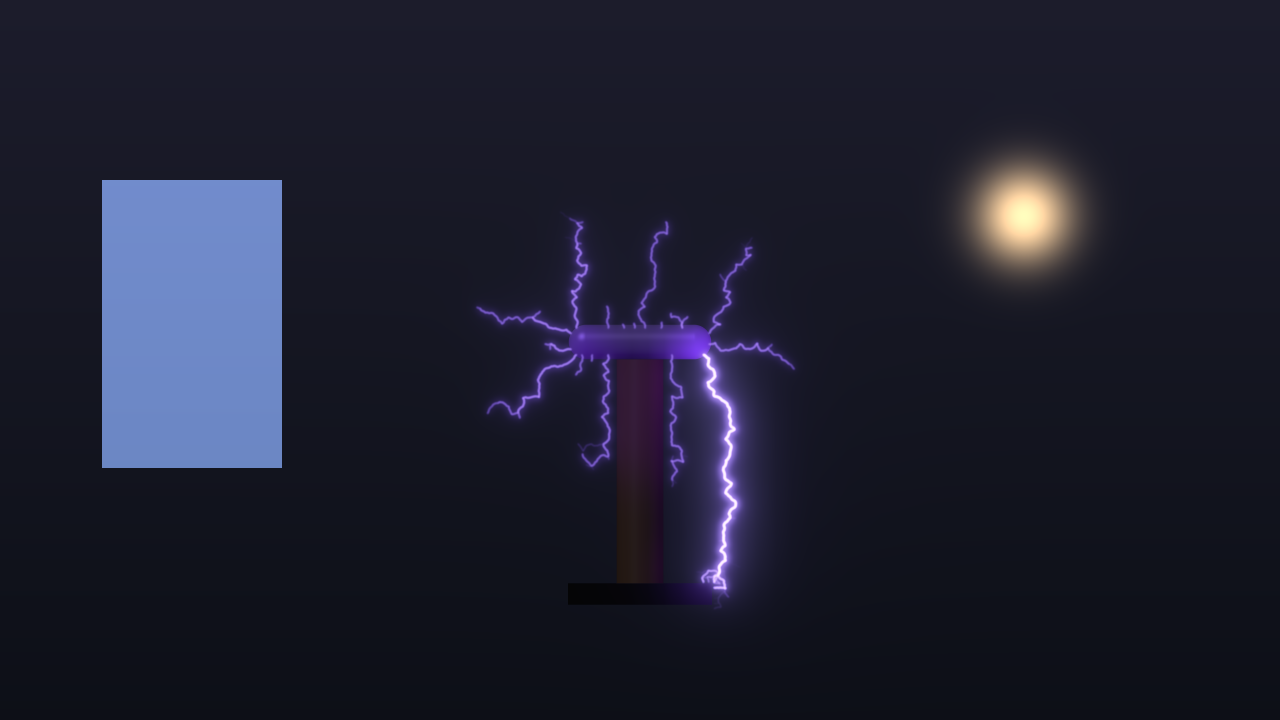
The coil over a test clip through SW Flyback Over, rendered by the offline harness.
In the effect, the clip is ground. Every part of the picture past the threshold becomes a grounded conductor in the machine’s field, whichever machine it is. The Tesla coil’s streamers strike into the picture’s bright parts (this is the case the harness measures), the other machines’ discharges are drawn the same way, and with Finger on, the plasma globe’s finger goes to the brightest region of the clip rather than to Finger X/Y. Over a black clip, every strike goes to the machine’s own grounds instead. The discharge is laid over the clip as light, never pasted over it, and the output keeps the clip’s alpha.
The clip is read into a mask 160 cells wide, a frame late, so the effect never stalls the pipeline waiting for it. Its own controls are the Over group:
Detect On — what counts as ground:
- Luma (the default) — the clip’s brightness.
- Alpha — the clip’s opacity. Use it with a keyed subject or a title.
- Edges — the clip’s edges, by a Sobel filter on the brightness.
Ground Threshold — 0 to 1, default 0.6. Cells past it are ground. Lower it and more of the picture attracts strikes.
Illumination — how much the flash lights the clip, ×0 to ×40, linear, default ×14. The clip is multiplied by one plus this times the glow’s brightness at that point, so the scene flares with each bang.
Mix — the result against the untouched clip, 0 to 1, default 1.
Use the Layout group to put the machine where you want it in the picture, and Show Apparatus to decide whether the machine itself is seen or only its lightning.
The Layout group
Position X and Position Y — where the machine sits in the frame, default the centre.
Scale — from a quarter to four times, geometric, ×1 in the middle.
Rotation — −180° to +180°, linear, 0 in the middle.
Layout places the whole scene, field and all, in the frame. It changes where the machine lands and how big it looks, not its physics: each machine’s scene is sized in metres. In the effect it also changes which part of the clip lies under which part of the field.
Time comes from the host
Everything runs on the host’s clock. The Tesla coil’s interrupter, the ladder’s climb and the Van de Graaff’s charging are all timed against it, so a bang’s timing is exact whatever rate the composition renders at. A step backwards, or a jump forwards of more than half a second, is not replayed: the machines re-anchor and carry on.
For the first few frames after it loads, the plugin runs on its own steady clock while it works out whether the host counts time in seconds or milliseconds. Then it switches to the host’s. The log records which it found.
The discharge engine runs on its own worker thread, one frame behind the picture. The very first frame shows the apparatus with no light on it.
Performance
Measured by hvtest --bench on an M4 Max: GPU time per frame, and the engine’s CPU time per frame,
on a machine shared with other work while it ran.
| machine | GPU 720p | GPU 1080p | GPU 4K | engine mean | engine worst |
|---|---|---|---|---|---|
| Jacob’s Ladder | 0.77 ms | 1.27 ms | 3.21 ms | 1.0 ms | 2.2 ms |
| Tesla Coil | 0.70 | 1.18 | 3.11 | 4.4 | 5.5 |
| Van de Graaff | 0.62 | 1.00 | 3.07 | 1.5 | 6.3 |
| Plasma Globe | 0.76 | 1.04 | 2.88 | 5.0 | 11.0 |
| Lichtenberg | 0.73 | 1.25 | 3.09 | 1.3 | 2.5 |
These come from a run with the load average near 8. The same bench with more running beside it measured GPU 1.6–2.4 ms at 720p, 2.1–2.8 at 1080p and 5.1–5.8 at 4K, and a worst engine frame of 12.3 ms (the globe). Treat the table as a floor and those as a ceiling. Either way a frame costs well under the 16.7 ms of 60 fps at 1080p.
The engine’s time is CPU time, and the plasma globe is the heaviest. Detail is the control that moves it most: more sites is a bigger field to solve.
Nothing was timed inside Resolume, and nothing was timed on Windows.
If it looks wrong
The sliders do nothing. Preset is on something other than Custom, and a preset overrides most controls. Set it back to Custom.
A machine’s controls do nothing. Each machine group acts only on its own machine. The Van de Graaff’s controls do nothing to the Tesla coil.
The Tesla coil has stopped. BPS is at the very bottom, which is off. Press Fire, or raise it.
The Van de Graaff glows and never sparks. Sphere Finish is below polished, and the sphere is sitting in corona. That is the physics. Push it to the top of the travel, or press Fire.
The ladder’s arc never reaches the top. It is not meant to at the defaults: it snaps at L*. A lower Source Impedance or a narrower Rod Spread lets it climb further.
Sparks are missing from some frames. Shutter is below 360°. Sparks that fall while the shutter is shut are not seen, as with a real camera.
The plasma globe looks orange, or blue. It is on Air or on one gas alone. The preset uses Neon-Xenon on the Flyback supply; in Custom, Machine does not change Supply or Gas.
In the effect, strikes ignore the picture. Nothing in the clip passes Ground Threshold under the current Detect On. Lower the threshold, or try Edges.
Background does nothing. In the effect the clip is the background.
Audio does nothing. Audio Fires and Audio Drive both start at 0. Raise them, and check the Audio picker is set to a source.
The effect does nothing at all. A shader that will not compile looks exactly like that. The real message is in the log:
macOS    ~/Library/Logs/flyback/flyback.YYYY-MM-DD.log
Windows  %LOCALAPPDATA%\flyback\logs\flyback.YYYY-MM-DD.log
It records the GL version and renderer at load, which of the seven shaders failed if one did, and the host clock’s unit once it has worked it out.
What is verified, and what is assumed
Measured, on an M4 Max under macOS, by the offline harness: the Laplace solver against the coaxial closed form; the fractal dimension against diffusion-limited aggregation; the ladder’s extinction length, climb and restrike; the Tesla coil’s interrupter as a clock and the streamer lengths against BPS; the Van de Graaff’s spark interval, polished and in corona; current in equals current out at every node of every tree; the light in every frame against the event’s energy, at two rasters; one frame per spark at a full shutter; bit-identical frames from the same seed; strikes going into the picture in the Over effect; the first audio hit firing; and the GL state handed back to the host. Every check also runs against a deliberately wrong model and must fail it, and a sweep fails if any control does nothing.
Assumed, or not verified:
- Never loaded into Resolume on macOS. How 53 parameters in thirteen groups present, whether the X/Y pairs show as position pads, whether Resolume’s clock arrives in seconds or milliseconds, and what its FFT bins really are, are untested in a host.
- Some constants are models, not measurements: the low-current arc constants that set the ladder’s height, the streamer propagation field, the glass’s coupling in the globe, a toroid treated as a sphere, and the line weights behind each gas’s colour.
- The Lichtenberg figure grows over three seconds and stays lit. That is staging.
- No racing sparks down the Tesla coil’s secondary, and no corona on the coil.
- Presets override, so while one is selected most sliders are inert (see Presets).
- Not timed in a host, or on Windows. No OpenFX version. There is a browser demo, but it runs a JavaScript port of the engine that only a reader checks, so it is a preview, not the plugin.
About
The last group, About, carries the plugin’s name, version, licence and maker, and buttons that open the project page, the source on GitHub and the support page in your browser.
Links
- Project page: stoatworks-labs.com/software/flyback
- Source: github.com/stoatworks-labs/flyback
Reporting something
github.com/stoatworks-labs/flyback/issues. A screenshot, the Preset, the Machine and any controls you moved, whether it was the source or the effect, and the composition’s resolution and frame rate are usually enough.