

Fountain is a musical fountain whose water is late by its flight time, for Resolume Arena and Avenue, as two FFGL plugins in one download: SW Fountain, a source that’s a fountain at night lit by its own lamps, and SW Fountain Over, an effect that projects your clip onto the same fountain’s water.
Nothing in it is drawn to the beat. The music opens valves and sets the pumps; the water is a ballistic object; the picture is wherever the water is. So the jets are late by the time the water takes to fly, louder is higher, tall jets break into beads at the top, and the mist screen behind them drifts with the wind and tears where the spray thins.
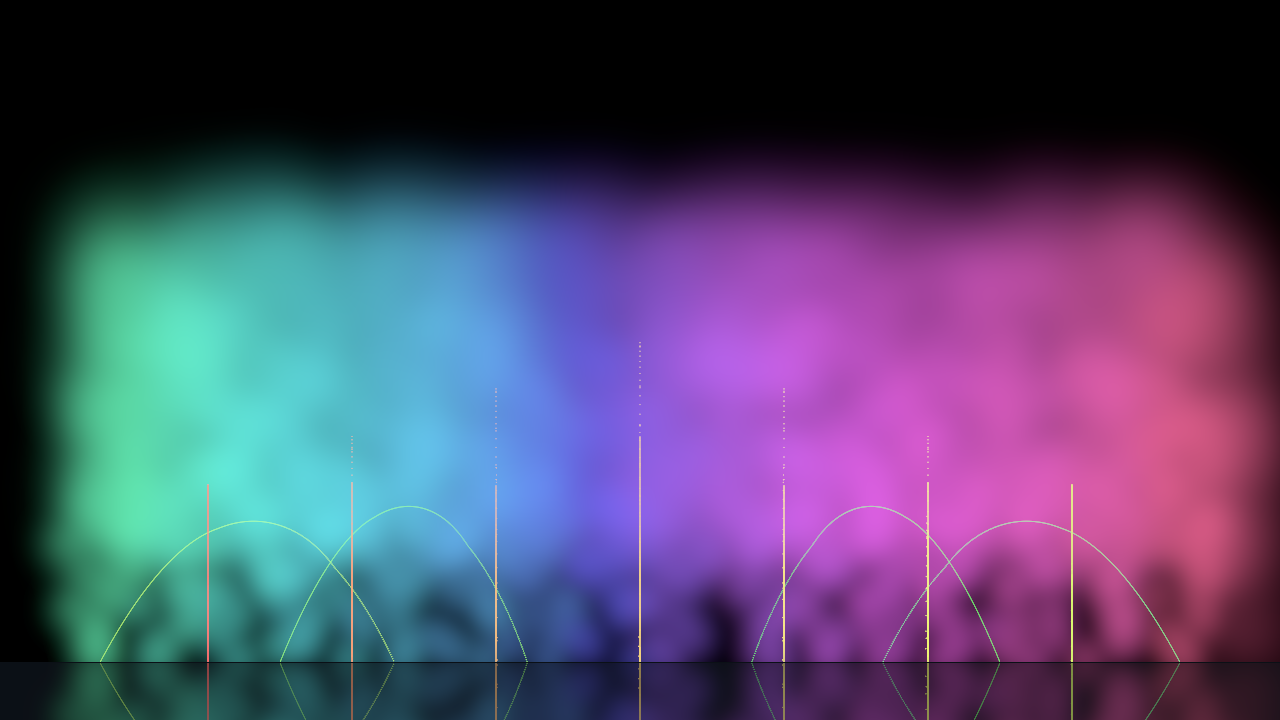
SW Fountain at its defaults, 5.5 s in at 120 BPM with the harness’s test kicks in the Audio buffer, rendered by the offline harness rather than captured from Resolume.
Before you rely on this: it’s released at v0.1.0, and it’s early days. The water is measured rather than asserted, by a harness that drives the real plugin class headlessly, at two rasters and on a software renderer, and reads the water back off the pixels: a steady jet tops out at v²/2g to 0.07 px; an arc falls along the closed-form parabola to 0.2 px; a shot rises as Vt − gt²/2 to 0.08 px; beads stand one Rayleigh wavelength apart to 0.01 px; with Lead the water peaks on the host’s beat to 0.24 frames, and without it an onset’s 15 m shot tops out 105 frames late, its flight time, to 0.2 frames. Eighteen models that are wrong on purpose are each shown to fail their check, and seventeen one-character mutations of the shipped shaders and code are caught. Every control the harness can move changes the picture. The checks verify the stated model, not a real fountain: how hard a nozzle is disturbed, the valve and pump lags and all of the mist are chosen, not measured (see Known limits).
In Resolume: on Windows, in Arena 7.27.1 with no GPU (software rendering) and no sound device, both plugins load with every control as declared and render, and every control that can be tested without sound or a button press changes the picture. Arena 7.29.0 on a Mac loads both and lists SW Fountain among the sources and SW Fountain Over among the effects, but neither has been seen rendering there yet. No real music has reached it in any host.
Try it on a spare layer before you put it in a show.
This codebase was created with AI assistance, directed and reviewed by a human author.
Installing
Every download has both plugins in it: SW Fountain (a source) and SW Fountain Over (an effect). Drop them into Resolume’s effects folder and restart Resolume:
macOS    ~/Documents/Resolume Arena/Extra Effects/
Windows  %USERPROFILE%\Documents\Resolume Arena\Extra Effects\
Avenue uses the same layout under its own folder name. SW Fountain turns up among the sources and SW Fountain Over in the effects browser.
The macOS download is a universal build (Apple silicon and Intel), as a .dmg or a .zip. It’s
Developer ID-signed and notarised by the release pipeline after publication, so the bundles just
load. If macOS refuses a download, it predates the signing, so download it again. The Windows
download is an x64 installer or a .zip. The installer puts both plugins in the folder above
for you. It isn’t code-signed, so it trips SmartScreen once: More info → Run anyway.
The water is late by its flight time
A real musical fountain is plumbing. A show controller opens solenoid valves and drives pumps; the water leaves each nozzle at a speed set by the pressure behind it, and from then on it’s a thrown object. Fountain models exactly that chain, and the look falls out of it.
| the fountain | what comes out |
|---|---|
| a valve takes time to open, and the water takes time to fly | water is late: a jet fired on a kick tops out valve lag + shot + v/g after it. A 15 m jet is 1.75 s late. Nothing delays it on purpose |
| the beat is predictable | Lead puts it back on the beat: the valves open early by the model’s own command-to-peak time, so a beat-fired jet peaks on the beat. An onset can’t be predicted, so onset-fired water is always late |
| the pump’s head follows the music | louder is higher, as v²/2g: the drag-free top of a jet is the pump’s head |
| a column of water is unstable | tall jets break into beads at the top: Rayleigh’s capillary instability grows from the nozzle’s disturbance until the column pinches off, at a fixed age, so a short jet lands glassy and a tall one turns to beads above the height it reached by then |
| the instability has a fastest wavelength | beads are evenly spaced, 9.0144 times the nozzle’s radius apart |
| beads feel the air | beads slow and the wind takes them: quadratic drag with a raindrop’s terminal speed |
| the mist bar sprays fine droplets | a screen that drifts and tears: the wind carries the spray, the gusts tear holes in it, and a thin curtain sends back little light |
The fountain lives in metres and seconds, not pixels: all of the physics runs on the CPU in double precision on the plugin’s own clock, and resizing the output changes nothing but the drawing.
Start here
- Put SW Fountain in a clip slot and trigger it. At its defaults it’s the Show layout: seven shooters in a crown, two pairs of crossing arcs and a mist screen behind them, lit by Rainbow lamps on a black sky. The mist screen comes up over the first second or so as the pumps get going.
- Play some music into Resolume. The shooters fire on the beat, and with Lead at 1 they peak on it rather than leave on it. The arcs flow all the time. The shooters’ height follows the low end of the music and the arcs’ the middle, so louder passages fly higher.
- Press Fire for a shot from every shooter now. Then set Fire On to Onset and watch the water arrive late, after the kick that fired it.
- Turn Pressure up for taller jets, and watch the tops turn to beads. Move Wind to blow the beads and the mist sideways.
- For a projection on water, put SW Fountain Over on a layer with a clip under it. Your clip shows only where there’s water, undistorted, as if a projector sat where the camera is.
The Fountain group
- Layout: which nozzles there are.
- Show: seven shooters in a crown (the middle one tallest), two pairs of arcs crossing at the front and a 16-nozzle mist bar behind. The default.
- Row: eleven shooters of equal height, 1.5 m apart.
- Arcs: eight arcs crossing in the middle. Arcs flow all the time, so with no shooters Fire On and Fire do nothing here: the music moves the arcs through Response.
- Fan: a centre shooter with arcs fanned out either side of it from one point.
- Screen: a 20-nozzle mist bar with a shooter at each end, the layout for SW Fountain Over’s projection.
- Pressure: a shooter’s head at full drive, from 0.5 to 20 m. Pressure is in metres: it’s the height a full shooter reaches, drag-free. Shorter nozzles in a layout take a share of it. Default 6 m.
- Response: how much of the head the music sets. At 0 the pumps run at Pressure whatever the music; at 1 silence stops them. At the default 0.5, silence gives half the head and full scale all of it. The shooters follow the Low band, the arcs the Mid band; the mist bar ignores the music (see Known limits).
- Audio: Resolume’s audio input, which it fills with its spectrum. Nothing to set here; it drives Response, Onset and Sensitivity.
- Fire On: what opens the shooters’ valves. The arcs and the mist bar flow all the time.
- Steady: valves held open, continuous jets.
- Beat, Half Beat, 2 Beats, Bar: a shot every beat, every half beat, every other beat or once a bar, timed from Resolume’s tempo and bar position. The default is Beat.
- Onset: a shot on each hit in the music, picked out of the lowest quarter of Resolume’s spectrum (kicks and snares, not hi-hats).
- Fire: a shot from every shooter now, whatever Fire On says. Map it to a key or a MIDI pad.
- Shot: how long a shooter’s valve stays open for one shot, 40 ms to 1 s. Default 150 ms.
- Lead: how early a beat-fired valve opens, as a multiple of the model’s command-to-peak time (the valve’s opening, the shot, the flight, and the beads’ rise against drag), from 0 to 1.5. At 1 the water peaks on the beat; at 0 it leaves on the beat and peaks late. Lead does nothing for Onset or Fire, because a hit can’t be seen coming.
- Sensitivity: the onset detector. Higher hears softer hits. It only matters with Fire On at Onset.
The Water group
- Nozzle: the nozzle’s radius, 1 to 12 mm. Thicker jets are easier to see and break up later; the beads are bigger and their spacing wider. Default 4 mm.
- Breakup: how hard the nozzle disturbs the water, as ln(a/δ), from 20 (calm: the column stays glassy for a long time) to 2 (rough: it breaks up almost at once). The column pinches off at an age proportional to this number. Default ln 9, which puts the beads near the top of the default shooters.
- Valve: the shooters’ solenoid lag, 0 to 300 ms. A slow valve softens the start and end of a shot. Default 60 ms.
- Pump: how long the pumps take to follow the music, 0.05 to 3 s. Default 0.6 s.
The Air group
- Wind: −10 to +10 m/s, sideways. It carries the beads and the mist; the intact columns are left alone (see Known limits).
- Gust: how turbulent the wind is. Gusts tear the mist screen into holes and ragged edges, even on a still night. Default 0.35.
- Screen: the mist bar’s flow. At 0 there’s no mist; at 1 a thick curtain. Default 0.5.
The View group
- View: the height of the frame in metres, 1 to 40 m. Default 10 m. Zoom out for tall jets, in for the beads.
- Lamps (SW Fountain only): the lamps under the nozzles. White, Warm, Rainbow (hue round the wheel by position, the default) or Duo (cyan and magenta by turns). The lamps are steady: they don’t follow the music.
- Exposure (SW Fountain only): ±2 stops. The water is drawn as light, so thin jets are faint at 0; push Exposure up to bring them out.
- Mix (SW Fountain Over only): see below.
SW Fountain Over: your clip on the water
SW Fountain Over is the same fountain with the same controls, but instead of lamps it puts a projector where the camera is. Your clip lands undistorted on whatever water it hits and shows only where there’s water: bright on the thick mist, faint on thin jets, broken where the gusts tear the screen. The Screen layout, a wide mist bar, is the one made for it.
- Mix: at 1 (the default) the output is the clip on the water and black everywhere else, which is what a camera sees of a projection on a fountain at night. At 0 your clip comes through untouched. To let the layer below show through the dry parts instead of black, use a blend mode such as Add or Screen on the layer.
- The clip’s alpha is the projector’s: a transparent part of the clip projects nothing.
- Below the waterline the Over is black (see Known limits).
Flashing
Nothing in Fountain strobes. The lamps are steady, and a shot is a thin line of water rising and falling over a second or more, not a burst of light. The one large bright area, the mist screen, runs steady whatever the music and changes with the gusts over seconds. Measured over the whole frame and in 25 overlapping windows a third of the frame each way, against WCAG’s three-flashes-a-second rule, the presets in the browser demo and the defaults, with and without test kicks, gave no flashes at all (the largest one-frame change in any window was 0.011 of full brightness). SW Fountain Over can only show what your clip shows, so a clip that flashes still flashes through it.
Known limits
- Rayleigh’s regime only. The columns break up by Rayleigh’s capillary instability in still air. Real jets at fountain speeds break up sooner and messier because of the air; viscosity, satellite drops, splashes and wind on the intact column are left out.
- Is ln 9 a fair default disturbance? Nothing in the literature fixes how hard a fountain nozzle disturbs its jet, so Breakup’s default was chosen to put the beads near the top of the default shooters. Real nozzles, with the air, would break up sooner.
- Chosen, not measured: the valve and pump lags and the valve law (a half-open valve halves the speed), and all of the mist: its drop size, settling speed, the updraft that stands in for the spray dragging air up with it, its spread and evaporation, the gusts, and the lamps.
- The mist doesn’t follow the music. It runs steady at Pressure × 1.6 m of head. It followed the high band at first, and over Resolume’s clips that made SW Fountain Over’s picture pulse with the hi-hats. Whether a slow follower of the overall level, over seconds, would read better is an open question.
- Onsets listen to the lowest quarter of Resolume’s 64 bins, on the assumption that kicks and snares sit there and hi-hats don’t. Where Resolume’s bins sit in frequency hasn’t been measured, so with some music Onset may miss hits or hear too many; Sensitivity is the control to try.
- SW Fountain Over is black below the waterline. A real basin would catch the projection too, but the model has no basin surface to put it on. Whether it should light the basin is an open question. SW Fountain draws a dark basin with a dim mirror of the water.
- The clock’s unit. Hosts send time in seconds or milliseconds; the plugin works out which by comparing the host’s clock with the wall clock, with a fallback for a host that renders faster than real time. Arena 7.27.1 on Windows sent milliseconds (186 534.97 on the 60th frame), and the plugin settled on milliseconds. Which unit Arena sends on a Mac hasn’t been read, and whether the fallback ever fires in a real host hasn’t been checked. If the water ever runs a thousand times too fast or too slow, that’s where to look, and the plugin’s log says which unit it settled on.
- Face-on, with no depth. Every nozzle sits on one line across the frame.
- The defaults were chosen over six of Resolume’s bundled clips, looked at as stills, not in a show.
- No real music has reached it in a host. The audio controls were checked with the harness’s synthetic spectrum only.
- Only ever run on an Apple M4 Max, although the macOS build contains an Intel slice. On Windows, see the note at the top of this guide.
- No presets, no OpenFX version.
- There’s a browser demo at fountain-demo.stoatworks-labs.com. It runs the plugins’ own C++, compiled unmodified to WebAssembly, with their own shaders in WebGL2. The page is the host: its tempo stands in for Resolume’s, a browser has no audio, and the page lists what else it doesn’t reproduce.
About
The last group, About, has the plugins’ name, version, licence and maker, and buttons that open this user guide (stoatworks-labs.com/software/fountain/guide/), the project page, the source on GitHub and the support page in your browser.
Reporting something
github.com/stoatworks-labs/fountain/issues. Shout there if something’s wrong. A screenshot, which plugin, its Layout and Fire On, and the plugin’s log help most. The log is a plain text file:
macOS    ~/Library/Logs/fountain/fountain.YYYY-MM-DD.log
Windows  %LOCALAPPDATA%\fountain\logs\fountain.YYYY-MM-DD.log