

Photosensitivity note. Scrim makes no flash of its own, but at its defaults its lights brighten both pictures about four times, so a clip’s own pulses can come out as large changes of brightness, and stepping Front Light or Back Light quickly flashes the whole picture. Flashing light can trigger seizures in people with photosensitive epilepsy, and the guidance for broadcast and the web (Ofcom’s, and WCAG’s) draws the line at three flashes a second over a large part of the picture. At the defaults, over pairs of Resolume’s demo clips, two pairs went over that line through Scrim, though neither clip did on its own. And with Draw Mesh on, the weave’s moiré is a regular pattern of fine stripes, which can matter too. See Flashing before you put it in front of an audience.
Scrim is a theatre gauze for Resolume Arena and Avenue, as one FFGL mixer, SW Scrim. Set it as the blend mode of the layer that holds what the projector sends, over the layer that holds the scene behind the gauze.
A gauze is the oldest trick in the theatre. Light it from the front with the stage behind it dark and it is a screen: the audience sees the projection and nothing else. Darken the front and light the scene behind and the gauze all but disappears. In between you see both. Scrim does that with light, not with an opacity: what the audience sees at a point of the gauze is the light its threads reflect plus the light that comes through its holes. And the projection’s own light carries on through the holes and lands on the set behind, bigger, dimmer and out of focus.

SW Scrim rendered by the offline harness rather than captured from Resolume, on its two test cards: a ring pattern as the projection, a grid over coloured bands as the scene. Left, Front Light at its default and Back Light 0: the gauze is a screen. Middle, both lights at 3.2: both. Right, Front Light 0 and Back Light at its default: the scene through the gauze.
Before you rely on this: this is v0.1.0, the first release, and early days. The light is measured, not just asserted. An offline harness drives the plugin’s own code with two real inputs, at two sizes, on an Apple Silicon Mac’s GPU and again on Apple’s software renderer. With nothing behind the gauze lit, the projection comes back with 0 of 5,529,600 values different; a dark backstage shows nothing of the scene, at any open area, whatever Back Light says. The spill’s edges sit where similar triangles put them to about a tenth of a pixel, and its blur matches the lens’s circle of confusion. Seventeen deliberately wrong versions of the plugin and thirty-nine one-character sabotages of its code are all caught, and every control changes the picture. In Resolume Arena 7.29.0 on a Mac it registers as a mixer, hides only the parameter Arena always hides, takes its Opacity from the layer’s fader and draws what the harness draws, to about a level in 255; in Arena 7.27.1 on Windows, on a PC with no GPU, it did the same. But that was over test stills, and Arena showed two things to know about: see Known limits. Try it on a spare layer first, and shout if anything misbehaves.
This codebase was created with AI assistance, directed and reviewed by a human author.
Installing
Download the build for your platform. For macOS there’s a universal .dmg or .zip
(Apple silicon and Intel), Developer ID-signed and notarised so the bundle just loads
(the signing happens on my Mac shortly after each release is published, so a download made
in the first few minutes may need Open from the context menu once), and for Windows an
x64 installer or .zip. Put Scrim.bundle (macOS) or Scrim.dll (Windows) in Resolume’s
FFGL folder, then restart Resolume:
macOS    ~/Documents/Resolume Arena/Extra Effects/
Windows  %USERPROFILE%\Documents\Resolume Arena\Extra Effects\
Avenue uses the same layout in its own folder. Yes, it’s Extra Effects for a mixer too:
Resolume has one FFGL plugin folder, and sources, effects and mixers all load from it.
There’s no Extra Mixers.
The Windows installer puts the DLL there for you, per user, with no admin rights needed. It
defaults to Arena’s folder (Avenue’s if only Avenue is installed) and lets you change it.
The Windows builds aren’t code-signed. Plugin files aren’t gated the way .exe files are,
so Resolume loads them as normal; only the installer trips SmartScreen, once: More info
→ Run anyway.
SW Scrim is a mixer, so it isn’t in the effects browser. It’s in a layer’s Blend Mode list, beside Resolume’s own blend modes (and in the layer’s transition list, which isn’t what it’s for).
It is a mixer, not an effect
A gauze needs two pictures: what is projected on it, and what stands behind it. So SW Scrim is a blend mode, and it reads the two layers like this:
| Input | In the code | In Resolume | What it is here |
|---|---|---|---|
| Scene | inputTextures[0] (Dest) |
the layer below (everything under this layer) | The set behind the gauze. It shows only where it is lit, and only through the holes. |
| Projection | inputTextures[1] (Src) |
this layer, the one whose Blend Mode is SW Scrim | What the projector sends: it lands on the threads, and its light that passes through the holes lands on the set. |
Put the scene on one layer and the projection on the layer above it, then set the upper layer’s Blend Mode to SW Scrim. Handed only one picture, the plugin declines to draw. The two layers don’t have to be the same size; each is read at its own resolution and stretched over the whole frame. The output is always opaque.
Start here
- Put the scene on layer 1: anything, but something with a clear shape reads best.
- Put the projection on layer 2.
- Set layer 2’s Blend Mode to SW Scrim.
On the defaults both lights are up, and most clips come out very bright: both lights default to the level at which the middle one of Resolume’s demo clips fills the range on its own, and together they clip. So, first:
- Back Light to 0. The scene vanishes completely: a dark backstage shows nothing through a gauze, whatever is on layer 1. The gauze is now a screen showing the projection. If the projection is too bright, bring Front Light down until it isn’t.
- Now bring Back Light up. The scene appears behind the projection, through the holes.
- Bring Front Light down to 0. The projection is gone and you are looking through the gauze at the scene. That is the reveal.
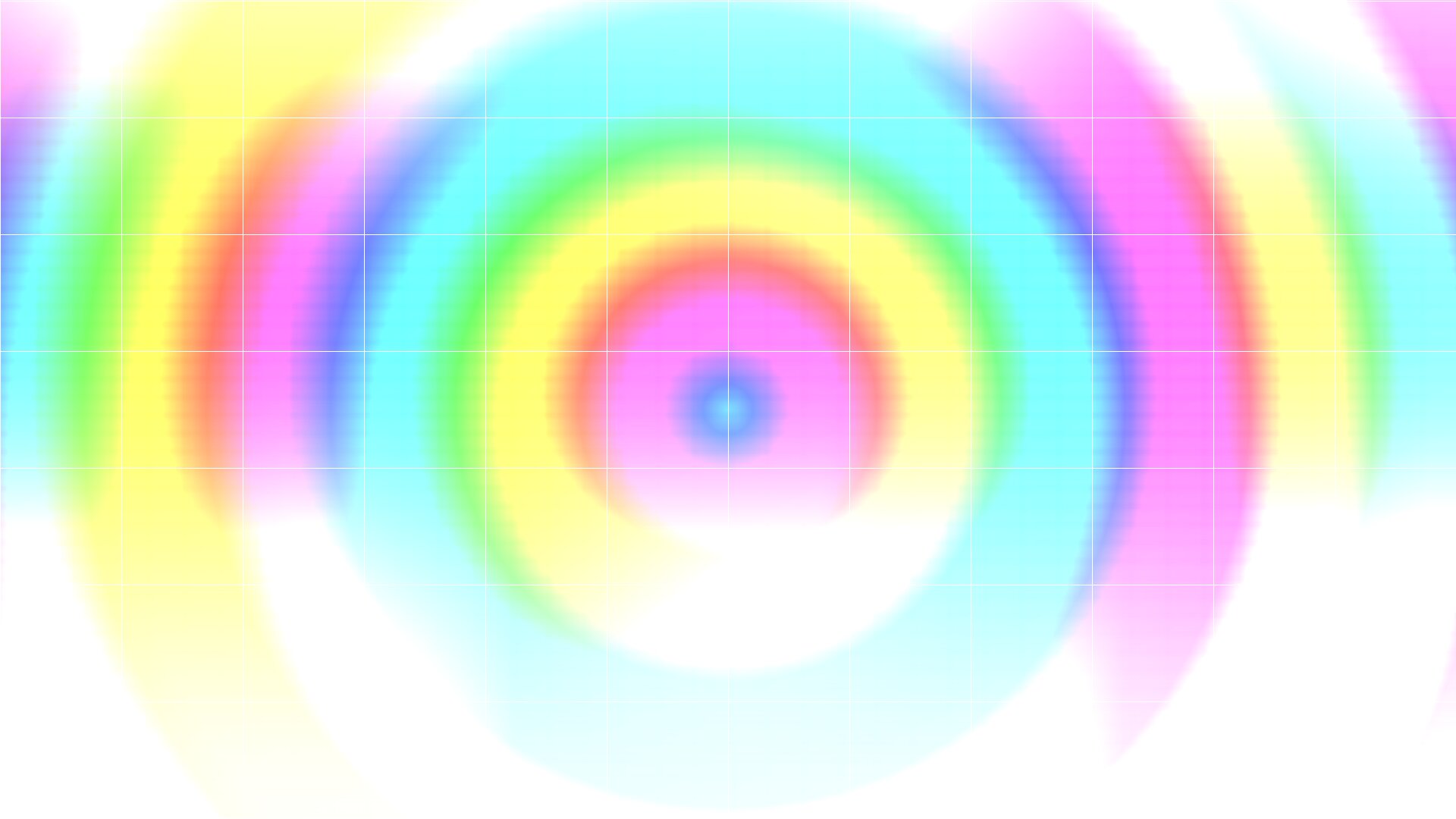
What you should see on the defaults: SW Scrim inside Resolume Arena 7.29.0 on a Mac, from Arena’s own composition snapshot. The harness’s grid card as a still on one layer (the scene), its ring card as a still on the layer above, whose Blend Mode is SW Scrim. Both lights at their defaults clip most of the frame to white; this is the same picture the offline harness draws from those two stills, to about a level in 255.
How it works, in one paragraph
A woven gauze is a fraction φ of holes (its open area) and 1 − φ of threads that reflect a share ρ of the light that falls on them. From the audience, too far away to see the weave, a point of the gauze shows ρ(1 − φ) of the light on the gauze plus φ of the light from behind it. The light on the gauze is the projection (Front Light × the layer fader × the projection layer) plus a Wash. The light from behind is the scene lit by Back Light, plus the projection’s light that went through the holes and landed on the set: spread over a bigger area, so dimmer, seen magnified, and blurred by the projector lens’s circle of confusion. Every term is light, added in linear light; nothing is an opacity, so with no light behind, the scene contributes exactly nothing. With Draw Mesh on, each output pixel is taken as one of the projector’s pixels, a small mirror, and the share of holes it falls on varies across the picture: the weave beats against the pixels in a moiré, as a real gauze does on camera.
The Light group
Linear Light (on). The light adds in linear light, as light really adds. Off does the same arithmetic on the gamma-encoded values, which looks harsher and less like light. Resolume hides this control: Arena never shows a mixer’s first parameter, so it sits there on purpose, on, and stays on.
The Projector group
Opacity (default 1). The projector’s level. Resolume puts the layer’s opacity fader on a mixer parameter named Opacity, so in Arena this is the fader on the projection’s layer, not a control in the blend mode’s panel. It scales the projection’s light, on the threads and through the holes, and nothing else. At exactly 0, Resolume shows the layer below as it is (see Known limits): stop at 1% instead.
Front Light (0 to 16, default 12.27). How bright the projector is at full, in units of what a white diffuser would show: at 1, a white screen would show the projection as it comes. A gauze reflects much less than a screen (about 0.35 of it at the defaults, ShowTex white’s figure), so it takes about 2.9 for the gauze to show the projection at its own brightness; the default is about four times that, so a dark clip fills the range and a bright one clips. The slider is squared, so the low levels get most of its travel.
Pixel Fill (0.5 to 1, default 0.92). How much of each projector pixel is lit: a DLP mirror covers about 92% of its pixel, with dark gaps between. Only matters with Draw Mesh on, where those gaps are what beats against the weave.
The Stage group
Back Light (0 to 16, default 8.03). The light on the scene behind. At 0 the scene is gone entirely, whatever layer 1 holds: the dark backstage that makes a gauze read as solid. The scene shows only through the holes, so it takes about 1.9 (1 ÷ the open area) for the scene to show at its own brightness; the default is about four times that. Squared, like Front Light.
Wash (0 to 16, default 0). A steep light on the gauze from above or the side, as a lighting designer uses to make a gauze read as a surface: it lights the threads, in the thread colour, and never the set behind. Squared.
Spill Distance (0 to 3, default 0.5). How far behind the gauze the set stands, in throws: one throw is the distance from the projector to the gauze. The projection’s light that passes through the holes keeps going and lands on the set. At 0 the set is right behind the gauze and the spill lands exactly under the picture on the gauze; further back it lands spread over (1 + Spill Distance)² the area, so it is dimmer, bigger and more out of focus. It lights the scene, so you see it only where the scene has something to reflect it.
Audience (0.25 to 16, default 4). How far in front of the gauze the audience sits, in throws, on the projector’s axis. The further back they sit, the bigger the spill looks behind the picture on the gauze (up to 1 + Spill Distance times). Logarithmic.
The Gauze group
Open Area (0 to 1, default 0.535). The holes’ share of the gauze: ShowTex GobelinTulle, the default cloth, is 52 to 55% open. 0 is a solid cloth, a screen that hides the scene completely; 1 is no gauze at all, and the projection only lands on the set.
Thread (a colour, default a light grey: white thread of reflectance 0.753). The threads’ colour and how much they reflect. White is the usual front-projection gauze; a black thread (black sharkstooth, a black scrim) barely shows the projection and shows the scene clearly, which is why black gauzes are used for reveals.
Mesh (0.5 to 10 mm, default 2.5). The width of one cell of the weave; its height is half that, as in a tulle. Only matters with Draw Mesh on. Logarithmic.
Draw Mesh (on). On, the weave is drawn per pixel and beats against the projector’s pixels in a moiré. Off, every pixel sees the average: the same open area everywhere, no moiré.
Gauze Width (2 to 20 m, default 9.5). How wide the gauze in the picture is in the room: 9.5 m is the width ShowTex sells. It sets how many weave cells fall on a pixel (at the defaults, at 1920 wide, a pixel is about 5 mm of gauze, two cells across and four down, so the moiré is faint) and how big the lens’s blur is in pixels. A narrow gauze, 2 to 4 m, shows the weave and its moiré clearly. Logarithmic.
Recipes
- The reveal. Start with Back Light 0 and Front Light where the projection looks right: the gauze is a screen. Map Front Light and Back Light to one MIDI fader in opposite directions and push: the projection fades and the scene appears behind it. Leave the layer fader up, or stop it at 1%: at exactly 0 Resolume skips the plugin’s picture.
- A ghost. Both lights low, about 3: the scene is seen through the projection, both faint, as a gauze ghost effect is staged.
- The projection lands on the set. A bright projection, Back Light low, Spill Distance 0.1 to 0.3: the light through the holes lands on the scene behind as a soft second copy of the picture, offset and bigger.
- A black scrim. Thread to black: the projection all but vanishes and the scene reads clearly through the gauze, even with the front lit.
- A glowing cloth. Wash up, Back Light 0: the gauze glows in its thread colour, a solid surface with nothing behind it.
- The weave on camera. Draw Mesh on, Gauze Width 2 to 3 m, then move Mesh or Pixel Fill: the moiré that a camera sees on a real gauze.
Flashing
Scrim keeps nothing between frames and makes no flash of its own: two still clips give a still picture. But at the defaults each light multiplies its picture about four times, so a small pulse in a dark clip becomes a large change in brightness, and a step in Front Light or Back Light changes the brightness of most of the frame at once. That can turn a clip’s flicker into flashing, and stepping the lights fast flashes.
People with photosensitive epilepsy can have a seizure from flashing light, and the line that broadcast guidance (Ofcom) and web guidance (WCAG 2.x) draw is no more than three flashes in any second over a large area of the picture. A flash here is a rise and a fall in brightness of at least a tenth of white.
Measured from Scrim’s own output over 33 pairs of Resolume’s demo clips (each clip once as the projection and once as the scene, 8 seconds of each pair), as rises and falls in brightness in the worst second (two make a flash, so the line is six):
| Settings | the whole picture | the worst third of the picture | pairs over |
|---|---|---|---|
| The clips on their own | 5 | 6, at the line | none |
| Scrim at its defaults | 5 | 8, over | 2 of 33 |
| Front Light and Back Light swapped twice a second | 5 | 6, at the line | none |
| … swapped about four times a second | 6 | 8, over | 6 of 33 |
| … swapped about eight times a second | 9 | 12, over | 27 of 33 |
| Front Light stepped on and off twice a second (Back Light 0) | 3 | 6, at the line | none |
| … about four times a second | 5 | 7, over | 1 of 33 |
| … about eight times a second | 9 | 11, over | 16 of 33 |
The pairs that went over at the defaults were Beat 002 projected in front of BattleWeapon_Tank_09 (6 on its own, 8 through Scrim) and Synth 006 in front of NeonRoom2_32, a dark room with small flickering neon (4 on its own, 8 through Scrim). IntoTheGlow_02 flashes by itself (5 over the whole picture) and is the same through the plugin. Other settings have not been surveyed.
What to do:
- Look at the clips. A dark clip with small, fast-flickering lights is the case to watch, on either layer.
- Don’t step the lights faster than once a second in front of an audience: twice a second reached the line in the survey, and four times a second went over. Ramp them instead.
- Watch it through the plugin before a show, at the settings you will use.
Striped patterns. With Draw Mesh on, the weave beats against the projector’s pixels in a moiré: a regular pattern of fine stripes, and regular stripes can trigger seizures in some people with photosensitive epilepsy, as flashes can. On a plain white projection (Front Light 2, the set dark) the stripes measured 21 to 39 cd/m² apart between light and dark, taking white as 200 cd/m², with the dark ones near 120. Broadcast guidance for regular patterns (ITU-R BT.1702, Ofcom) counts that as a potentially harmful pattern, allowed on no more than 40% of the screen if it stays still, or a quarter if it moves or changes. Over a busy clip it is much fainter. Turn Draw Mesh off when a large, plain, bright area would show it to an audience: that averages the weave away.
None of this is a substitute for warning your audience. The browser demo carries the same note at the top.
Performance
On the Mac it was measured on (an Apple M4 Max, shared with other work), each frame timed alone on the GPU’s own clock after a warm-up: about 0.2 ms a frame at 1080p on the defaults, and 2.3 ms with the biggest out-of-focus spill the controls allow (a 2 m gauze, Spill Distance 3, Audience 16). Another GPU will differ, and nothing has been timed inside Resolume.
If it looks wrong
- Nothing happens when I pick SW Scrim. It needs both layers: something on this layer and something on the layer below. Handed one picture, it declines to draw.
- Everything is white. Both lights at their defaults clip any but a dark clip. Bring Front Light and Back Light down.
- The scene has disappeared. Back Light is at 0, or the scene is dark. That’s the gauze working: a dark backstage shows nothing. Raise Back Light.
- When the fader reaches 0 the picture jumps. Resolume shows the layer below as it is when a layer’s opacity is exactly 0, without the gauze, the Back Light or the Wash. Stop at 1%, or use Front Light for the projector and leave the fader up.
- The soft edges of a keyed clip look dark. Resolume hands a mixer its pictures with the transparency already multiplied in, and Scrim multiplies it in again. See Known limits.
- There are stripes or a shimmer. That’s the moiré: the weave beating against the projector’s pixels, as a camera sees on a real gauze. It changes with Mesh, Pixel Fill, Gauze Width and the composition’s size. Turn Draw Mesh off to average it away.
- The fader doesn’t do anything. Opacity is the layer’s opacity fader in Resolume, not a control in the blend mode’s panel.
- There’s no Linear Light control. Resolume hides a mixer’s first parameter. It’s on, as it should be.
- As a transition, it looks odd. SW Scrim is in the layer’s transition list too, but it’s meant as a blend mode, and it hasn’t been tried as a transition.
Known limits
- Tried in Resolume on test stills only. It loads and draws in Resolume Arena 7.29.0 on a Mac and in Arena 7.27.1 on Windows, but nobody has yet run it with real clips through a show, or timed it inside Resolume.
- Pixels that are partly transparent come out too dark. Resolume hands a mixer its pictures premultiplied (the colour already multiplied by the transparency), and Scrim reads them as straight colour, so it multiplies by the transparency again. Opaque pixels are exact, and fully transparent ones give no light either way, but a white pixel at half transparency gives about a fifth of the light it should (83 instead of 170 on an 8-bit scale, measured in Arena). Use opaque clips on both layers, or flatten a clip with alpha onto black first.
- At opacity 0 Resolume shows the layer below as it is. At a layer opacity of exactly 0 it shows the layers below untouched instead of Scrim’s picture: no Back Light, no Wash, no gauze. (On a Mac, Arena 7.29.0 kept running Scrim at 0; on Windows, 7.27.1 never handed it an Opacity of 0. The picture was the same.) At 1% the picture is Scrim’s again. So the reveal’s last step (the projector off, the scene lit through the gauze) is at 1%, not 0.
- The defaults are bright. Front Light and Back Light default to the light at which the middle one of Resolume’s 33 demo clips fills the range, each alone, and most of those clips are dark. So a bright clip clips at the defaults, and with both lights up most of the frame goes white.
- The output is clamped to the range, then encoded: light above white clips flat, losing its colour. Resolume composites in 8 bits, so nothing above white would survive anyway.
- The threads pass no light, though ShowTex’s white passes some, diffusely. The thread reflectance comes from ShowTex’s luminance factor at 0°, assuming it was measured over a dark ground, which the sheet doesn’t say.
- The set is one flat plane at one distance, no light comes back from the set onto the gauze, the threads cast no shadow on the set, and the audience sits on the projector’s axis.
- Not modelled: the lens’s blur of the projector’s pixel grid, two gauzes’ moiré against each other, and hexagonal bobbinet.
- Other GPUs. It has run on one Apple GPU, Apple’s software renderer, and Mesa’s software renderer on Windows (inside Arena, on test stills) only.
About
The last group, About, has the plugin’s name, version, licence and maker, and buttons that open this user guide, the project page, the source on GitHub and the support page in your browser.
Links
- Project page: stoatworks-labs.com/software/scrim
- Source: github.com/stoatworks-labs/scrim
- User guide: stoatworks-labs.com/software/scrim/guide
- Browser demo: scrim-demo.stoatworks-labs.com
Reporting something
Something wrong, odd or missing? Open an issue at github.com/stoatworks-labs/scrim/issues. The plugin keeps a short log of what the host did (the first frame’s input sizes, any guard that refused a frame, the spill’s blur reaching its cap, and the first few hundred changes of Opacity), which helps a lot:
macOS    ~/Library/Logs/scrim/
Windows  %LOCALAPPDATA%\scrim\logs\