

Snowglobe is an FFGL effect for Resolume Arena and Avenue that stands your clip inside a glass snow globe and lets the music shake it.
Your clip is the scene: a card standing at the centre of a globe of water and glycerine, seen through the curved surface of the water. White snow lies on the glass at the bottom. A kick in the music shakes the globe: the snow on the floor jumps up, the fill starts to turn, and the flakes drift down again through the swirl, slowly, the way they do in a real globe, because the fill is thick and the flakes are tiny. Big flakes fall faster than small ones, and a thicker fill slows them all. Once the snow has landed it lies exactly where it is until the next shake. The glass magnifies the middle of your clip, about 1.4 times, and squeezes its edge.
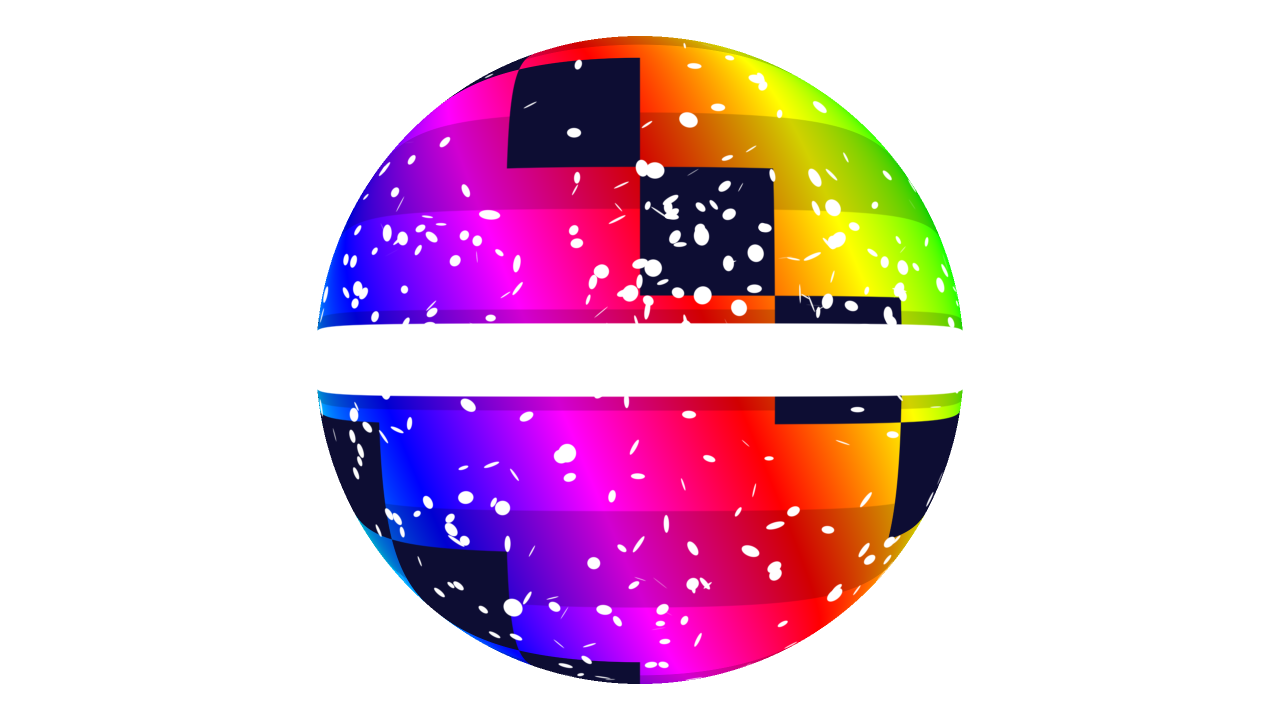
One frame from the offline harness, not captured from Resolume: the defaults over the harness’s colour card, 3.5 seconds after one press of Shake Now. Outside the globe the frame is transparent.
Before you rely on this: it’s at v0.1.1, the second release, and early days. Everything below was compiled, rendered and measured offline on an Apple Silicon Mac (macOS 26), by a harness that drives the plugin’s own class in a headless GL context at two rasters (1280×720 and 320×180) and on Apple’s software renderer, feeding it music through the same path an audio device would use. Single flakes fall at the speed the published glycerine tables and the drag of a disc (or Stokes’s law for a bead) give them, to within 2.3 %; the swirl a shake leaves dies away at the rate the sphere’s slowest viscous mode gives, to within 2.7 %; the clip seen through the glass lands where an independent ray trace puts it, to a ten-thousandth of a pixel; and once the snow has landed, 300 frames of music with no kick are identical to the bit. Thirty models that are wrong on purpose and forty-six one-character changes to the shipped code are all caught. In Resolume it has run only briefly, on one layer over a still, in Arena 7.29.0 on a Mac and 7.27.1 on Windows (software rendering, no sound device): it registers, shows its controls with the declared defaults and renders, every control that acts on a still globe changes the picture, and Beat and the Shake Now button shake it. Kick, the default trigger, now fires on Resolume’s own spectrum (in v0.1.0 it never did): in Arena on the Mac, over Resolume’s demo drum loop, it shook the globe through all 69 of 69 snapshot pairs. Resolume’s lowest band covers everything below 375 Hz, so a bass line shakes it too (see Where the audio comes from). No live audio input has ever been opened, and it has never been in a show. The globe’s size, how hard a shake is and how high it throws the snow are chosen, not measured (see Known limits). Try it on a spare layer before you put it in a show.
This codebase was created with AI assistance, directed and reviewed by a human author.
Photosensitivity. At the defaults Snowglobe didn’t put any of Resolume’s 33 demo clips over three flashes a second. With Shake and Count both at full, the snow can fill the globe and blank and reveal the clip behind it on every kick or beat: on one of the 33 clips, a dark one, that crossed three flashes a second over a third of the picture (7 to 8 rises and falls in its worst second). See Flashing, and check your settings before you put this in front of an audience.
Installing
Every download carries one effect, SW Snowglobe (Snowglobe.bundle on macOS, Snowglobe.dll
on Windows). Drop it into Resolume’s effects folder and restart Resolume:
macOS    ~/Documents/Resolume Arena/Extra Effects/
Windows  %USERPROFILE%\Documents\Resolume Arena\Extra Effects\
Avenue uses the same layout under its own folder name. The effect then shows up in the effects browser as SW Snowglobe.
The macOS download is a universal build (Apple silicon and Intel), as a .dmg or a .zip. It’s
Developer ID-signed and notarised by the release pipeline after publication, so the bundle just
loads. If macOS refuses a download, it’s from before the signing, so download it again. The Windows download is an x64
installer or a .zip. The installer offers Arena’s folder above, or Avenue’s on a machine that
only has Avenue; change it on the folder page if you use the other one. It isn’t code-signed, so
it trips SmartScreen once: More info → Run anyway. Or skip the installer, take
Snowglobe.dll out of the .zip and drop it into the folder by hand.
Start here
- Put SW Snowglobe on a clip. You see a globe in the middle of the frame, a little under the frame’s height across, with your clip inside it, magnified in the middle, and white snow lying on the glass at the bottom.
- Put something behind it. Outside the globe the output is transparent, so the globe stands over whatever is on the layers below. With nothing below, Resolume shows black there.
- Shake it by hand first. Set Trigger On to Button and press Shake Now: the snow jumps, the fill swirls, and the flakes drift down again over the next tens of seconds.
- Play some music. Trigger On at Kick, the default, listens for kick drums: with Audio Input at Resolume FFT, the default, and Resolume’s Audio at Composition, each kick in the composition’s sound shakes the globe at Shake’s strength. On Resolume’s spectrum a bass line can shake it too (see Where the audio comes from). With an audio input picked by name in Audio Input, Snowglobe hears the kick drum itself, but that hasn’t been tried in Resolume.
- Shake it on the beat. Trigger On at Beat shakes it on every beat of Resolume’s clock, music or not.
The defaults: Shake 0.3, Trigger On Kick, Audio Input Resolume FFT; a fill of 60 % glycerol; PET flakes from 0.5 to 1.0 mm in radius, 600 of them; the globe 0.9 of the frame’s height across; Mix 1.
Recipes
A slow, heavy snowfall. Fill up toward 1 (80 % glycerol): the fill is more than five times as thick, so the same flakes fall about seven times slower, and the swirl dies away faster. A shake leaves the snow hanging for a long time.
Fine fast glitter. Size up and Range toward 1: every flake as big as the largest, and the big ones fall fastest. Flakes are thin discs, so they glide sideways as they fall and show edge-on as slivers.
Beads. Snow at Beads: small PET spheres instead of flat flakes. A bead falls as the square of its size, so the range of sizes spreads out more as they fall, and none of them glide.
On the beat, gently. Trigger On at Beat and Shake down to 0.1 or 0.2: a small puff of snow on every beat that never quite settles.
A blizzard. Count up and Shake up. With both at full the snow can fill the globe and blank the clip on every kick: see Flashing before you use it.
A bigger globe. Globe at 1: the globe fills the frame’s height.
The globe over the original clip. Put the clip on the layer below as well, so the globe stands over its own scene.
Flashing
People with photosensitive epilepsy can have a seizure from flashing light, and the line that broadcast guidance (Ofcom) and web guidance (WCAG 2.x) draw is no more than three flashes in any second over a large area of the picture. A flash here is a rise and a fall in brightness of at least a tenth of white; two make a flash, so the line is six rises and falls in a second.
Measured from the plugin’s own output over Resolume’s 33 demo clips, 20 seconds of each at 60 fps, over the whole picture and over every third-of-the-picture patch, with music fed through the plugin’s own audio path: each clip’s own stem for the 18 that come with one, and a mix of Resolume’s Beat, Bass and Synth stems for the 15 that don’t. The worst second, in rises and falls:
| settings | trigger | clips over the line | worst second, whole picture | worst second, a third of it |
|---|---|---|---|---|
| no effect (the clips alone) | 0 of 33 | 3 | 6, the clip’s own | |
| the defaults (Shake 0.3, Count 600) | Kick | 0 of 33 | 2 | 5 |
| Shake 1, Count 3000 | Kick | 1 of 33 | 3 | 7 |
| Shake 1, Count 3000 | Beat, 128 BPM | 1 of 33 | 3 | 8 |
| Shake 1, Count 3000, Size 1, Globe 1 | Beat, 128 BPM | 1 of 33 | 3 | 7 |
The clip over the line was the same one each time, Cyberspace 09, a dark clip, which on its own doesn’t flash at all. Three more mixes at the same full settings gave 7, 8 and 8; at the defaults the same clip gave 1 or 2. With 3000 large flakes and a full shake, the snow covers most of the globe while it’s in the air, so a third of the picture goes from the dark clip to white and back on each shake. At the defaults the snow covers about a twentieth of the globe and adds no flash.
The snow is random white discs, not a regular pattern of stripes or checks.
So: keep Count and Shake below full on a dark clip in front of an audience, or check your own settings. None of this is a substitute for warning your audience.
Triggers
Trigger On picks what shakes the globe.
- Kick (the default): kick drums in the music. Snowglobe uses earshot, the fleet’s shared audio front end, and takes an onset in its lowest band (40–160 Hz) as a kick only while that band is at least a quarter as loud as the loudest band, so hi-hats and cymbals don’t shake it. Kicks closer than 50 ms are one shake.
- Beat: every beat of Resolume’s clock (each quarter of the bar), placed inside the frame. If the clock stands still, Snowglobe keeps the last tempo on its own clock.
- Button: nothing but Shake Now.
Shake Now is one full shake (as if Shake were 1), and it works under every Trigger On, so you can map it to a key or a MIDI pad.
Shake is how hard a kick or a beat shakes the globe: how high it throws the snow lying on the floor (by up to the globe’s diameter at 1, kept inside the glass) and how fast it sets the fill turning (up to 2 radians a second at 1). A shake only lifts snow that has landed; snow still falling is only carried by the swirl. So under steady kicks the snow stays in the lower part of the globe, and a Shake Now straight after a run of kicks lifts less than it would on a settled globe.
Where the audio comes from
Audio Input chooses it, under Trigger On = Kick only. Under Beat or Button, Snowglobe never touches the audio system at all, whatever Audio Input says.
- Resolume FFT (the default): Resolume’s own spectrum of the composition’s audio, which every
effect gets. Resolume sends it as 64 bands, each 375 Hz wide, from 0 to 24 kHz (measured in
Arena 7.29.0 on a Mac, whose audio runs at 48 kHz). The lowest band, 0–375 Hz, holds the kick
drum, the bass and the low toms together, and Snowglobe takes its kick band (40–160 Hz) as a
share of it. So on Resolume’s spectrum Kick follows the low end: a kick shakes the globe,
and so can a bass note. In Arena on a Mac, with Resolume’s demo drum loop
Beat 001.wavplaying on the layer below, Kick kept the globe moving in all 69 of 69 snapshot pairs at the default Shake, and with the demo bass lineBass 001.wav, no drums, it moved in 40 of 40. (In v0.1.0 Kick never fired on Resolume’s spectrum: it read the bands as spread to 22 kHz, and its kick band fell between them.) Resolume’s Audio control (Composition, every clip in the composition; Local, only the clip Snowglobe is on; External, Resolume’s own audio input) chooses which audio that spectrum is of. It is a coarse feed: a new spectrum about every 43 ms, so a kick lands up to two of those, plus a frame, late. - System default, or an input by name: Snowglobe listens to that input itself, and a kick is placed by the input’s own clock inside the frame, within one analysis window (about 27 ms). The menu remembers the input by name, so a composition reopened on another day finds the same device, and a device that has gone is shown as missing rather than quietly becoming another one. On macOS the first input opened inside Resolume asks for Resolume’s microphone permission; refuse it and the input is silent.
No live input has ever been opened by Snowglobe, on any machine. Every test fed it audio from files and from the harness’s own music, through the same path.
The Shake group
| Control | What it does |
|---|---|
| Shake | how hard a kick or beat shakes the globe, 0–1 (0.3) |
| Trigger On | Kick (default), Beat, Button |
| Audio Input | Resolume FFT (default), System default, an input by name |
| Shake Now | one full shake, under every Trigger On |
| Audio | which audio Resolume’s spectrum is taken from (Resolume’s own control) |
The Flakes group
| Control | What it does |
|---|---|
| Snow | Flakes (PET discs, 48 µm thick, the kind of polyester glitter globes hold) or Beads (PET spheres) |
| Size | the largest flake’s radius: 0.3–1.25 mm for flakes (1.0 mm), 0.08–0.3 mm for beads |
| Range | the smallest flake as a fraction of the largest, 0.25–1 (0.5) |
| Count | 50–3000 flakes (600) |
Size and Range change the snow lying on the floor where it lies: a flake that grows while at rest can poke past the glass at the bottom until the next shake settles it.
The Globe group
| Control | What it does |
|---|---|
| Fill | the fill’s glycerol, 60–80 % by mass (60 %): thicker fill, slower snow, a slightly stronger magnification |
| Globe | the globe’s diameter as a fraction of the frame’s height, 0.25–1 (0.9) |
| Mix | the globe over your clip (1); at 0 the clip comes through untouched |
Fill is a real water–glycerol mixture: from 60 % to 80 % glycerol the viscosity goes from 10.9 to 60.9 mPa·s and the refractive index from 1.413 to 1.443, from the published tables.
How it works
- The flakes. The flakes are tiny and the fill is thick, so none of them has any inertia worth the name: each one moves with the fluid plus its own terminal speed. A flat flake falls at its weight over the drag of a disc at low Reynolds number (16μa broadside), so flakes cut from one film fall in proportion to their radius; a bead falls by Stokes’s law, as its radius squared. Each flake has its own fixed tilt, so it glides sideways as it falls, a fifth of its fall at 45°, and shows edge-on as a sliver.
- The swirl. A shake sets the fill turning in the sphere’s slowest mode, a Bessel-function swirl that dies away at the rate the fill’s viscosity gives (its time constant is about 8 seconds at 60 %). Faster modes die faster and are left out.
- The fill. Viscosity from Cheng’s formula, density from Volk and Kähler’s model, refractive index from Hoyt’s fits, all for the glycerol fraction Fill sets, at 20 °C. The harness measures the flakes’ speeds and the settling time against the Glycerine Producers’ Association’s tables themselves, not the formulas.
- The glass. Your clip stands at the centre, inside the water, so it is seen through one curved surface, the water’s against the air: an object at the centre of a fish bowl appears at the centre, magnified by the water’s refractive index. Every pixel is ray-traced through that surface, and every flake is drawn where the same trace puts it, in front of the card or behind it.
- Time. The snow and the swirl live on the CPU in double precision, stepped every 8 ms, and every shake lands at its own microsecond. So the same music at 24, 60 and 144 fps gives the same flurry, bit for bit, and snow at rest never moves.
- Alpha. Your clip’s transparency is kept: where the clip is transparent you see through the globe (and the snow behind the card), and outside the globe the output is transparent.
Performance
Measured by the offline harness on an Apple Silicon Mac busy with other builds, each frame timed alone, medians of 120 frames:
| 720p | 1080p | |
|---|---|---|
| GPU time a frame, the defaults (600 flakes) | 0.34–0.36 ms | 0.68 ms |
| GPU time a frame, 3000 flakes, the largest, the globe full height, a shake a second | 1.27 ms | 1.28–2.17 ms |
| CPU time a frame, the defaults | 1.2–1.7 ms | 1.2–1.7 ms |
| CPU time a frame, 3000 flakes | 2.2–2.9 ms | 2.2–3.5 ms |
The CPU side is the snow, the swirl and the audio analysis, and it doesn’t depend on the raster. 4K wasn’t measured. Nothing was timed inside Resolume, and nothing was timed on Windows.
If it looks wrong
Nothing moves. That’s the snow at rest, waiting for a shake. Under Kick on Resolume FFT, check Resolume’s Audio control: on Local, Snowglobe hears only the clip it’s on, which usually plays no sound; Composition hears everything. Press Shake Now to check the rest works. Under Button, only Shake Now shakes it.
It shakes on the bass, not just the kick. That’s Resolume’s spectrum: its lowest band runs from 0 to 375 Hz, so a bass note is in the same band as the kick. Lower Shake, use Beat, or pick an audio input in Audio Input, where Snowglobe hears the kick drum’s own band.
The snow stays low. That’s the shake lifting only snow that has landed. Steady kicks keep throwing the same snow up a little way; let it settle, or press Shake Now on a settled globe for the full flurry.
It takes ages to settle. It does: tens of seconds at the default fill, as real globes do. Fill at its lowest is already the fastest; a thinner fill would need a different physics.
Black around the globe. That’s the transparency outside the globe with nothing on the layer below. Put a layer behind it.
A flake sticks out of the bottom of the glass. You grew the snow (Size or Range) while it was lying on the floor. The next shake settles it.
The effect does nothing at all. That’s what a shader that won’t compile looks like. The log has the error, the GL renderer, the audio input it chose and the host clock it settled on:
macOS    ~/Library/Logs/snowglobe/snowglobe.YYYY-MM-DD.log
Windows  %LOCALAPPDATA%\snowglobe\logs\snowglobe.YYYY-MM-DD.log
Known limits
- Run in Resolume only briefly, on one layer over a still, in Arena 7.29.0 on a Mac and 7.27.1 on Windows (software rendering, no sound device): it loads, registers and shows its controls as declared, renders, holds still at rest, the controls that act on a still globe change the picture, and Beat and Shake Now shake it. Nothing is known about a whole show, or how it performs inside Resolume.
- On Resolume FFT, Kick is the low end. Resolume’s lowest band is 0–375 Hz, so bass notes shake the globe too. Kick on Resolume FFT was seen working in Arena 7.29.0 on a Mac only; on Windows (no sound device on the test machine) and in Avenue it hasn’t been tried. Kick on an audio input hasn’t been tried in Resolume.
- No live audio input has been opened, by Snowglobe or by the audio library inside it, on any machine. Kicks are proved on audio fed through the same path in the harness. Try your input before a show.
- Resolume FFT is a coarse feed. It gives a new spectrum about every 43 ms, so a kick is placed to that and to the frame, and the quarter-of-the-loudest-band gate that keeps hats from shaking the globe was set on the harness’s music, not on Resolume’s spectrum of a real mix.
- A shake lifts only snow that has landed. Under steady kicks the snow stays in the lower part of the globe. A shake that also threw the falling snow about would read more like a hand; it’s a choice, not in any source.
- Settling takes tens of seconds (about 25 s after a shake at the defaults, 33 s for the biggest flake to fall the whole globe), as real globes do. There’s no faster fill: below 60 % glycerol the biggest flakes would leave the slow-flow physics this is built on.
- Outside the globe is transparent. Put a layer behind it. There’s no option to keep the clip or a backdrop around the globe.
- Chosen, not measured: the kick gate (a quarter of the loudest band), how fast a full shake turns the fill (2 radians a second), how high it throws the snow (up to the globe’s diameter at Shake 1), the globe’s size (80 mm) and the viewing distance. No source models a hand’s shake.
- A flake that grows while lying on the floor pokes past the glass until the next shake.
- Left out: the glass wall, reflections, a meniscus or bubble, a base and a figurine; the outer tenth of your clip is never seen, and the rim of the globe holds a squeezed ring with no reflection. Where your clip is transparent, rays leave unbent.
- The physics is the slow-flow limit. The largest flakes in the thinnest fill reach a Reynolds number of 0.63, where the true drag is perhaps 10 % higher. No tumbling, no sliding down the glass, no flakes bumping, and only the swirl’s slowest mode.
- The defaults were chosen on Resolume’s 33 demo clips as stills, not in a show.
- Full Shake and Count can flash on a dark clip: see Flashing.
- No presets and no OpenFX version.
- The browser demo runs the plugin’s own code, compiled to WebAssembly, but with no audio device: it feeds the harness’s music, silence, or a file of yours decoded in the page, and plays nothing aloud. Resolume’s FFT isn’t in it.
About
The last group, About, has the plugin’s name, version, licence and maker, and buttons that open this user guide, the project page, the source on GitHub and the support page in your browser.
Links
- Project page: stoatworks-labs.com/software/snowglobe
- Source: github.com/stoatworks-labs/snowglobe
- User guide: stoatworks-labs.com/software/snowglobe/guide
- Browser demo: snowglobe-demo.stoatworks-labs.com
- The audio front end inside it: earshot
Reporting something
If something’s wrong, shout at github.com/stoatworks-labs/snowglobe/issues. A screenshot, the clip, the Trigger On and Audio Input you used, the settings you changed, and the log are usually enough.