

srt-router is a broadcast video router for SRT streams. If you’ve used an SDI or HDMI router, you already know the model: a grid of sources down one side and destinations along the other, where each destination is fed by exactly one source, switchable live.
Before you rely on this: the relay engine and web UI have been exercised locally, including integration tests relaying real SRT and NDI traffic end-to-end and a live crosspoint switch from the UI. But it has never been run against real third-party encoders or decoders, or over a real (non-loopback) network path. Review it before putting it in a live chain.
The mental model
- A source is a stream coming in (a camera encoder, a remote feed, a still image).
- An output is a stream going out (to a decoder, a streaming platform, a monitor).
- The crosspoint connects them: each output takes exactly one source; one source can feed any number of outputs.
Switching an output from one source to another is the whole point, and it happens live.
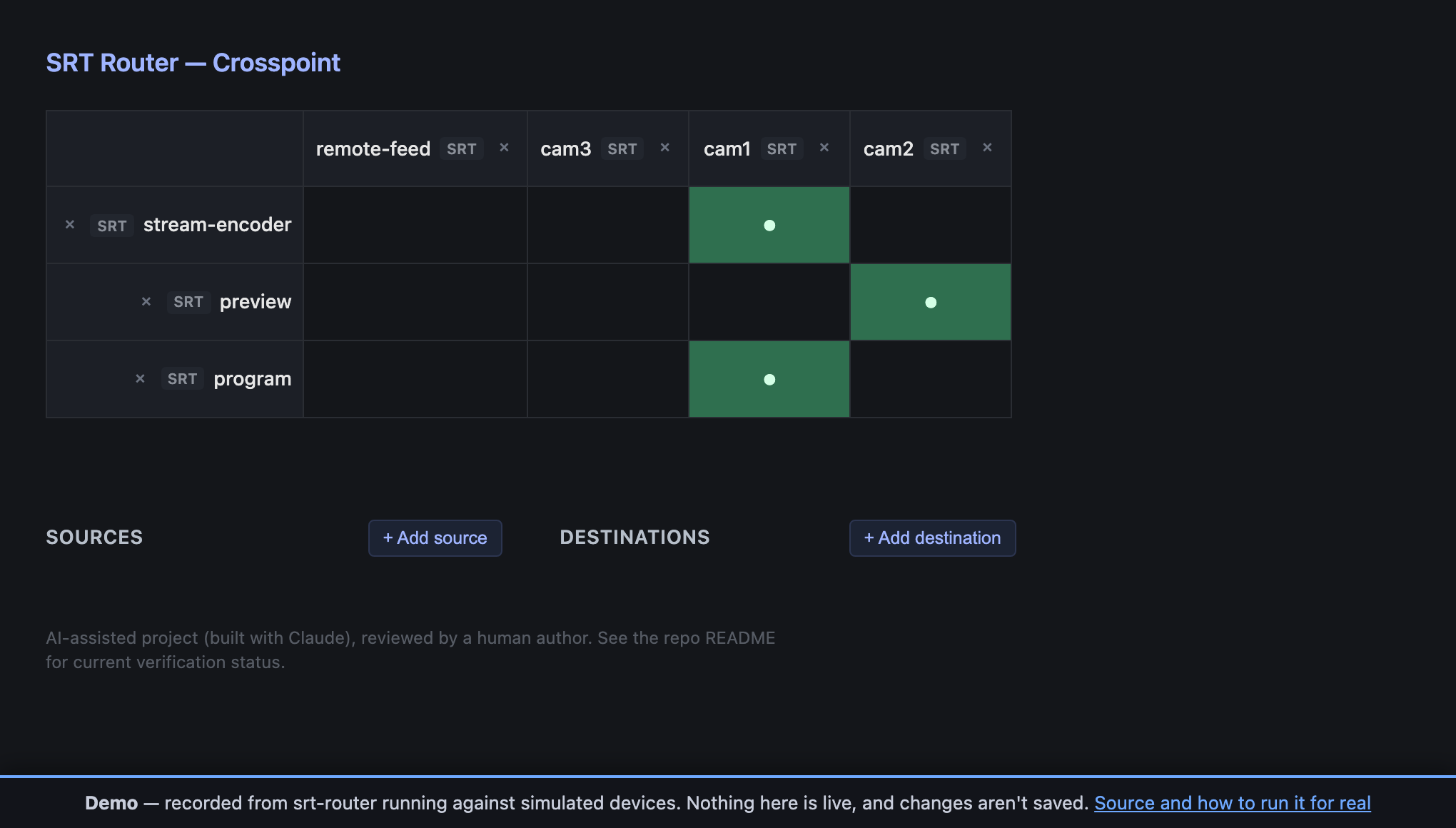
One marked cell per row, because an output takes exactly one source. A column with several marks is one source feeding several outputs, which is allowed and normal.
Running it
srtrouter --config /path/to/config.tomlThen open the web UI at whatever [web] bind says — http://localhost:8080 with the
example config. You’ll get the crosspoint grid, and it updates live: if someone else
switches an output, your screen follows immediately.
Setting it up
Configuration is a single TOML file. A minimal working router:
[web]
bind = "0.0.0.0:8080"

[[inputs]]
id = "cam1"
transport = "srt"
mode = "listener"      # we wait; the encoder connects to us
bind = "0.0.0.0:5001"

[[inputs]]
id = "cam2"
transport = "srt"
mode = "listener"
bind = "0.0.0.0:5002"

[[outputs]]
id = "program"
transport = "srt"
mode = "listener"      # the decoder connects to us
bind = "0.0.0.0:6001"
default_source = "cam1"
listener or caller?
This trips people up more than anything else.
listener— srt-router waits, and the other end connects to it.caller— srt-router dials out to an address you give it.
Every SRT link needs exactly one of each. If both ends are listeners, nothing ever connects and both sides sit waiting; if both are callers, the same. The usual arrangement is encoders calling in to the router’s input ports, and the router calling out to decoders — but any combination works as long as each link has one of each.
Do you want routing to survive a restart?
[state]
path = "state/routes.json"- With
[state]— switches you make in the UI are saved and restored on restart, overriding everydefault_source. - Without it — the router returns to the
default_sourcevalues every time it starts.
Both are legitimate. Persisting is what you want for an installation; resetting is what you want for a truck that should come up in a known state every show day.
Beyond SRT
Sources and outputs don’t have to be the same transport. An NDI camera can feed an SRT output; a still image can feed an NDI monitor.
| Transport | Use | Availability |
|---|---|---|
| SRT | The main event | Always |
| NDI | Local-network video | Only if your build has it |
| OMT | Open Media Transport | Only if your build has it |
| media | Stills, file playback, rescaling | Always (needs ffmpeg installed) |
Check what your build supports — visit /api/manage/transports or look at the UI’s add
menu. NDI and OMT need the router to have been compiled with those features and the
relevant SDK present. media needs only ffmpeg on your PATH.
Useful media tricks
[[inputs]]                     # a slate to cut to when a feed dies
id = "slate"
transport = "media"
mode = "stills"
image_path = "/opt/srtrouter/slate.png"

[[inputs]]                     # a downscaled version of an existing source
id = "cam1-720p"
transport = "media"
mode = "scaler"
source = "cam1"
width = 1280
height = 720
Media publishes plain MPEG-TS — the same format SRT relays — so a slate feeds an SRT output with no transcoding step.
Note media is input-only. There’s no such thing as a media output.
Adding and removing things while running
You don’t have to restart to add a source or output; the UI can do it live, and anything added this way behaves identically to something declared in the config file. Removing an output genuinely frees its port.
The one asymmetry to know: things added at runtime are not written back into your config
file. If you want them next time, add them to the TOML too (or use [state], which
persists routing but not the set of sources and outputs).
Troubleshooting
A source never connects. Almost always a listener/caller mismatch — check both ends. Then check the port isn’t firewalled, and that any SRT stream ID or passphrase matches.
“can’t route a X source to a Y output without transcoding”.
The two payload kinds are incompatible, and the router is refusing to emit something the far
end couldn’t decode. Route through a media scaler input to convert.
NDI or OMT isn’t in the menu.
Your build doesn’t have it. Check /api/manage/transports. NDI/OMT need both a compile-time
feature and their SDK.
Routing resets every time I restart.
You have no [state] section — add one.
Adding something says it’s a conflict.
That id is already in use. Ids must be unique across sources, and across outputs.
I want more detail in the logs.
RUST_LOG=debug srtrouter --config config.tomlSecurity
There is no authentication on the web UI or API. Anyone who can reach the port can re-route your program output or delete a source. Put it on a management network, bind it to a specific interface, or firewall it — don’t expose it to the internet.