

stagewash lets you model a stage and a lighting rig, focus the fixtures, and see the light levels and coverage on the deck before you get to the venue.
It’s a browser app. There’s nothing to install and nothing gets uploaded: the whole calculation runs in the tab.
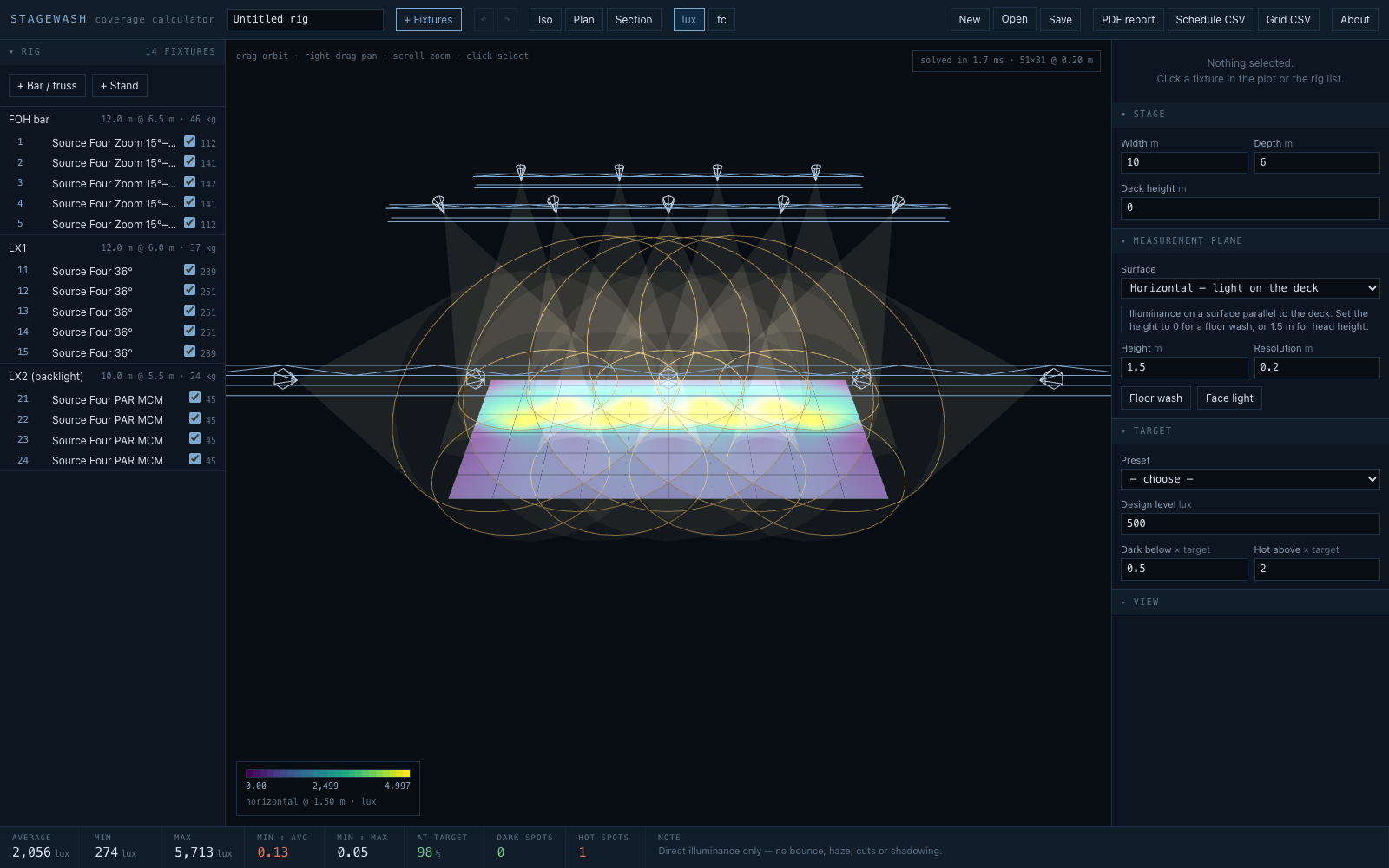
Before you rely on this: the illuminance model is calibrated rather than assumed. Eight published photometric rows from real datasheets are held as tests, and the estimator lands within about 10% given a manufacturer’s own field lumens, or about 25% from bare lamp lumens alone. The importers are checked against real files: an entire published fixture bundle, 132 photometric files, parses with no failures or warnings, and candela tables integrate back over the sphere to the lamp flux the file declares within 0.1%.
This is a direct illuminance calculation only (no inter-reflection, haze, shutter cuts, gobos or shadowing), and nothing here has ever been checked against a light meter on a real stage.
This codebase was created with AI assistance, directed and reviewed by a human author.
The two planes, which is the point
Most of the value in this tool is in a single toggle.
- Horizontal: illuminance on a surface parallel to the deck. The classic floor wash.
- Vertical: illuminance on a surface facing the audience, at head height. What a face receives.
A rig can look perfectly even on the floor and be flat and shadowless on faces, because overhead light arrives nearly edge-on to a vertical surface and contributes almost nothing to it.
Flip between the two and the ranking of your fixtures inverts: on the default rig the backlight contributes nothing at all to the face plane, and the front-of-house units more than double.
That’s the calculation catching the most common mistake in a stage rig. If you read nothing else here, flip that toggle before you sign off a plot.
Building a rig
Truss, scaff, bars and wind-up stands. Hang fixtures along a bar at a spacing, or place them individually.
Focus by aiming a fixture at a point on the stage (it works out the pan and tilt for you), or set pan and tilt directly. Zoom fixtures have a zoom; moving heads are checked against their pan and tilt range, so an impossible focus is reported rather than drawn.
See the levels as a heatmap on the stage, updated as you drag, with beam cones and footprints in a rotatable wireframe plot.
Find the problems: uniformity, coverage against a design level, and contiguous hot and dark spots listed by area with their centres, which is something you can actually act on, rather than one number for the whole stage.
Bringing a rig in from MVR, and sending one out
MVR (My Virtual Rig) is the scene format Vectorworks, Capture, grandMA3, Depence and most other lighting software use to pass a rig between them. stagewash reads and writes it.
Import MVR
An MVR file places fixtures, but it carries no photometry. Each fixture names a type (a GDTF file), and a GDTF at best gives a beam angle, a field angle and a flux. So the import dialog lists every fixture type in the file and asks what each one is:
- A fixture from the library, or one you imported from an IES file. This is the right answer when the answer has to be right.
- Estimate from its GDTF beam, offered only when the file has real figures. The result is badged estimated, because a GDTF beam is a description of a device, not a measurement.
- Leave out. Those fixtures don’t come in, and you’re told how many were left out.
Some files will offer no estimate. Capture writes GDTFs with no beam at all, and many files carry the GDTF format’s own placeholder beam (25° beam, 25° field, 10,000 lm). stagewash says so rather than using those numbers. It never matches a fixture type by guessing from its name.
Fixtures keep their positions and, when the file has focus points, their aims. stagewash hangs every fixture on a structure, so each hanging position (or truss, or group) becomes one or more straight bars through its fixtures.
A drawing’s origin is often not the downstage edge centre. The dialog shows where the rig sits against the stage and warns you if it misses. One button centres the focus points (or the rig) on the stage, or you can move it by hand.
Importing replaces the current rig. Undo brings it back.
Export MVR
This writes the rig as an MVR scene:
- each bar or truss as a hanging position;
- each fixture at its position with its channel as the fixture ID;
- a focus point wherever a fixture is aimed.
No GDTF files go with it. The other application asks you to match each type to a fixture in its own library, which is what you’d do anyway.
Everything MVR has no place for (the fixture models, zoom, levels, gels, your own imported photometry, the stage and the measurement plane) travels inside the file as stagewash data. Import that file back and the dialog offers to restore all of it exactly. Other software may drop that data when it saves. If it does, the positions and focus still come back, and you choose the fixture types again.
How much to trust a fixture’s numbers
Every fixture carries a badge saying where its numbers came from, because a lux figure computed from a guess is worth nothing and you have to be able to tell which is which.
| Badge | What it means |
|---|---|
| measured | Read from a manufacturer photometric file (.ies / .ldt) that you imported. As good as this gets — do this when the answer has to be right. |
| published | Beam angle, field angle and centre-beam candela transcribed from a named datasheet; only the roll-off between those anchors is modelled. |
| estimated | A generic archetype synthesised from lamp output and beam angle. Useful for blocking out a rig, not for promising a level. Always named Generic. |
Building a custom fixture: if you have its centre-beam candela, or its lux at a stated distance, use that, since it assumes nothing. Bare lamp lumens is the weakest option, because it has to assume an optical efficiency, and real fixtures of the same class run anywhere from 42% to 65%.
The real floor on accuracy
Worth knowing before you argue with a number: for four of eight fixtures checked, the manufacturer’s own photometric file and the manufacturer’s own datasheet agree to within 1%, and for the other four they differ by 5–15%, because the files and the sheets are different revisions.
±15% between two first-party sources for the same fixture is the real floor on accuracy in this business. It’s bigger than anything the maths in here contributes.
What is not modelled
Inverse square, the cosine law, and each fixture’s intensity distribution. That’s all.
It does not model inter-reflection from the deck, walls or a cyc; atmospheric haze; shutter cuts, gobos or barn doors; or shadowing by people and scenery.
On a dark stage that’s the right model. In a white studio, inter-reflection can add a third again to these figures.
Reporting
A PDF with the levels, the problem areas, a full fixture schedule with focus and heights, and the structural loading.
It carries three plots drawn from the same model: the heatmap in plan with a colour key, an isometric of the rig and its beams, and a wireframe layout by channel that shares the plan’s frame, so a pool on the map sits over the fixture that made it. Plus CSV of the schedule and of the raw grid.
If a number looks wrong
| Symptom | Cause |
|---|---|
| Faces are dark and the floor is even | The vertical plane. That is the toggle, and the point of the tool. |
| A level is 15% off a manufacturer’s figure | That is within the gap between the manufacturer’s own file and its own datasheet. |
| A studio reads darker than it looks | Inter-reflection is not modelled, and can add a third again in a white room. |
A fixture is badged estimated |
Its numbers are synthesised. Import a photometric file when the answer has to be right. |
| A focus is refused | The moving head cannot reach it within its pan/tilt range. |
| An imported rig lights nothing | The drawing uses a different origin. Centre it in the import dialog, or move it by hand. |
| An MVR type offers no GDTF estimate | Its GDTF has no beam, or only the format’s placeholder figures. Choose a fixture for it instead. |