

Zoetrope is an FFGL effect for Resolume Arena and Avenue that prints your clip’s frames onto the cards of a spinning disc and only lets you see the disc in the light of a strobe that fires on the music.
Nothing in it is animated. A print head prints the clip onto each card as the card goes past, the disc turns, and the camera sees whatever the flashes and a little room light happen to show it. It’s the oldest trick in moving pictures, run backwards: a zoetrope turns a strip of drawings into motion, and this turns the motion back into a strip and then shows you the strip the way a zoetrope would. Turn the disc one card per flash and every figure stands still and plays the clip, each a flash behind the one before it round the ring. Turn it a touch slower and the figures crawl backwards, like the stagecoach wheels in every western.
The Victorians managed without a strobe. William Horner’s drum of 1834, sold in the 1860s as the zoetrope, used slits in its wall as the shutter, and that’s in here too, as the Drum view.
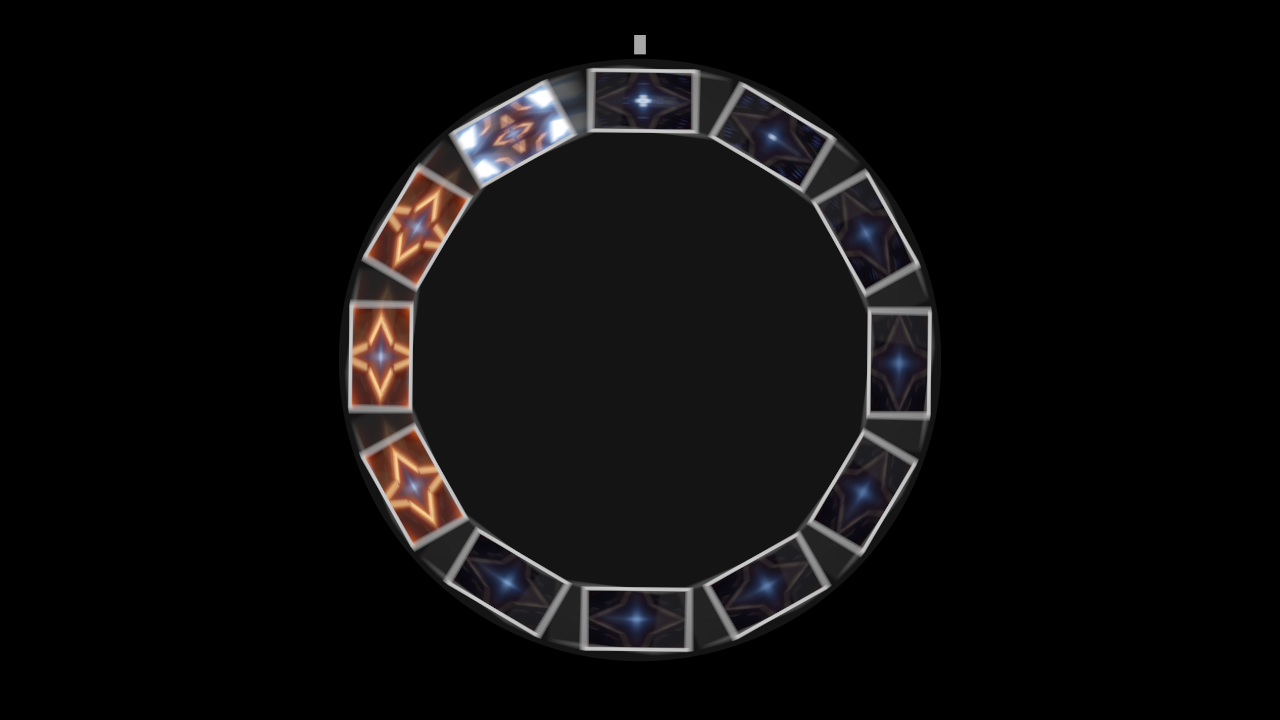
Resolume’s bundled IntoTheGlow_02 through the plugin, rendered by the offline harness rather than captured from Resolume: a flash on every eighth of a beat at 120 BPM with the disc locked to it, 20% room light and a 3 ms flash. The cards stand still in the flash, smeared a little by its length, with the room light’s blur of the disc’s turn over the same exposure behind them. Going clockwise from the print head, each card is a sixteenth of a second older than the last.
Before you rely on this: it’s at v0.1.0, the first release, and very early days. On macOS it has never been loaded into Resolume. In Resolume Arena 7.27.1 on Windows (software rendering, no GPU, no sound) it loads, registers and renders, and passed all 9 of the fleet’s Arena checks twice; 18 and then 19 controls measurably changed the picture there, with Push and Print At too close to call (they act on a moving disc and a small marker). What’s here was compiled, rendered and measured offline on an Apple Silicon Mac (macOS 26), by a harness that drives the plugin’s own class in a headless GL context, at two rasters (1280×720 and 320×180) and again on Apple’s software renderer. A disc locked to the beat stands still to a ten-thousandth of a pixel over a hundred flashes. A crawl advances by the wrapped turn per flash to 3e-8 rad. A smear is ω τ R long to a few hundredths of a percent, and a flash keeps its light whatever its length. All 88 cards read over 11 flashes show the frame of the clip they were printed with. A hand-spun disc follows an independent RK4 solution of its bearing to a ten-millionth of a radian and stops when the closed form says, and flashes land on the beat and its subdivisions to 2e-15 s. In the drum the figures stand within 0.02 px of where the ray geometry puts them, squeezed to two thirds of their width. Seventeen negative controls (models that are wrong on purpose) and thirteen one-character changes to the shipped code are all caught, and all 22 controls the sweep can move measurably change the picture (the 23rd, Audio, is the input Threshold is swept through). The only host it’s run in is the fleet’s own test host,
oxbow, which loads it asSW Zoetrope(ZT01, an effect) and renders 120 frames through it. How the 23 controls read in Arena’s inspector, how Trigger follows Arena’s transport and what Resolume’s FFT does to the onset detector are all unseen: nobody has measured what Resolume’s spectrum carries, so Threshold’s scale is a guess that worked on the harness’s music. Try it on a spare layer before you put it in a show.This codebase was created with AI assistance, directed and reviewed by a human author.
Installing
Every download carries one effect, SW Zoetrope. Drop it into Resolume’s effects folder and restart Resolume:
macOS    ~/Documents/Resolume Arena/Extra Effects/
Windows  %USERPROFILE%\Documents\Resolume Arena\Extra Effects\
Avenue uses the same layout under its own folder name. The effect then shows up in the effects browser as SW Zoetrope.
The macOS download is a universal build (Apple silicon and Intel), as a .dmg or a .zip. It’s
Developer ID-signed and notarised, so the bundle just loads. The Windows build had never been
compiled when this was written (see the box above). If there’s a Windows download beside the macOS
one, it’s an x64 installer or a .zip, it isn’t code-signed, and the installer trips SmartScreen
once: More info → Run anyway.
A disc, a strobe and a camera
The plugin is the whole apparatus:
- The print head is a grey block just off the rim, at twelve o’clock unless you move it. As each card’s centre passes it, the card is printed with the frame of the clip that’s playing, and the print stays until the card comes round again.
- The disc carries the cards round its rim, twelve to start with, facing outwards. It turns clockwise at whatever speed its drive gives it: a motor locked to Resolume’s tempo, a motor at so many RPM, or a hand that pushes it on the beat and a bearing that slows it down between pushes.
- The strobe fires on the beat or a subdivision of it, on the bar, on onsets in the audio, at a free-running rate, or when you press Fire. Each flash is a short rectangle of light with the same energy however long it is.
- The camera sees whatever lands inside its exposure each frame: the flashes, and a little steady room light, added up over the shutter.
None of what follows is drawn. Each is the disc and the light doing what they do:
| what you see | what causes it | group |
|---|---|---|
| figures that stand still and play the clip | the disc turns one card per flash, so every flash finds a card at every station | Disc |
| each figure a flash behind its neighbour round the ring | a print is older the further it has turned from the head | Disc |
| figures crawling backwards or forwards | the disc turns a little less or a little more than a card per flash, and you only see where it ends up | Disc |
| figures jumping about | flashes on onsets land at uneven moments, so the disc has turned however far it happened to | Strobe |
| cards smeared into arcs | a long flash catches the disc moving: the smear is the disc’s speed times the flash’s length | Strobe |
| a dim spinning blur between flashes | the room light shows the disc as it is, turning through the whole exposure | Camera |
| frames that catch two flashes, or none | a strobe faster than the frame rate beats against the shutter | Camera |
| white cards filling in | a fresh disc is bare card stock until each card passes the head | Disc |
Cards face outwards. A card’s up is along its radius, so the figure at six o’clock is upside down. A rigid disc can’t keep them all upright; that would be a carousel, which is another plugin.
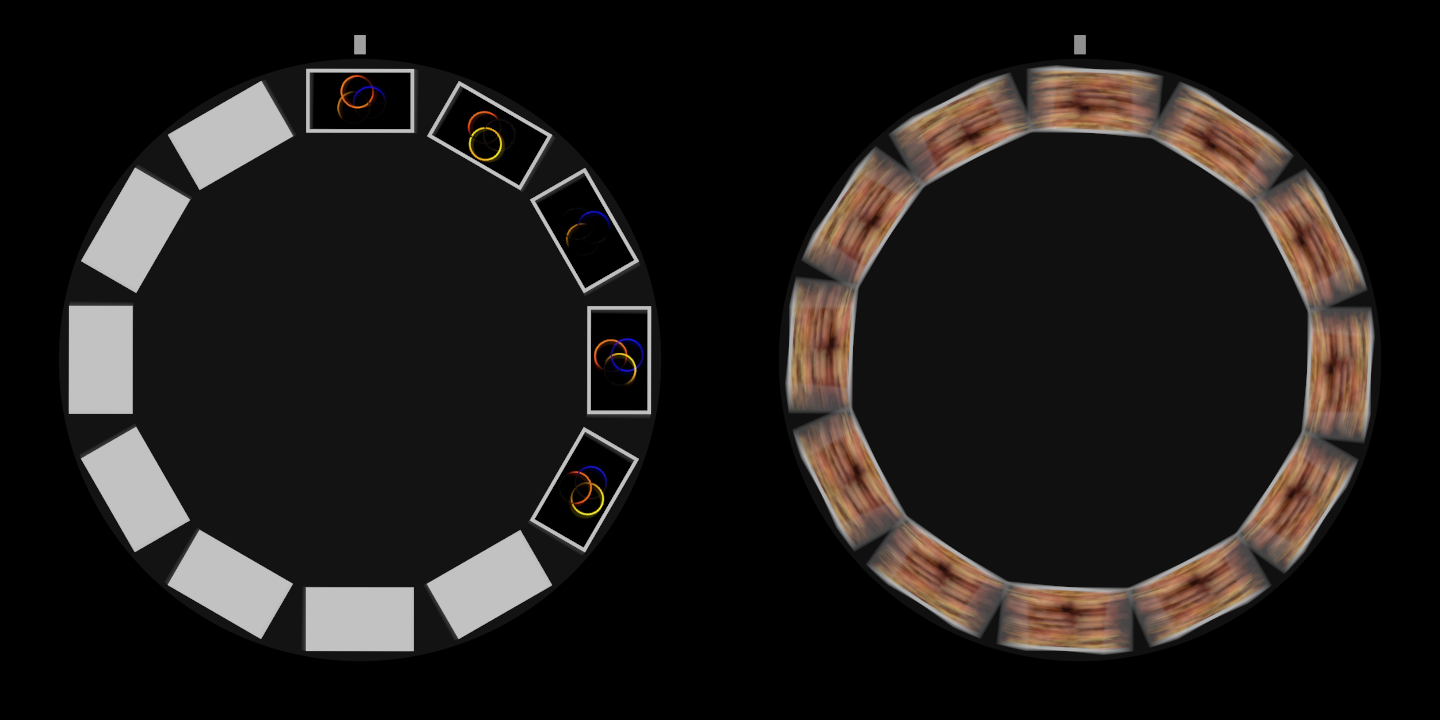
Left: Resolume’s Trinity_09 through the plugin on its defaults at 120 BPM, two and a half seconds after it loaded, on the frame that caught the fifth beat’s flash. Five cards have passed the print head and been printed, the newest at the head and each one clockwise from it a beat older; the other seven are still bare card. Right: NoHopeJustFear_44 with Sync off, RPM 60, a 20 ms Flash and Room Light 0.03, on the frame that caught the same beat’s flash. Each card is smeared along the ring by the disc’s turn during the flash, and as the flash is longer than a frame, this frame caught its first 17 ms and the next one the rest. Both rendered by the offline harness and cropped to the disc.
Start here
Put SW Zoetrope on a layer with a clip in it and leave every control where it is. The defaults are twelve cards locked to the beat: a millisecond’s flash on every beat of Resolume’s tempo, the disc turning one card per flash (10 RPM at 120 BPM), a 360° shutter, so no flash falls between two exposures, and 8% room light.
The disc starts as a ring of bare white cards and fills in a card a beat, clockwise from the print head at twelve o’clock. Between beats it turns slowly in the dim room light, and on each beat it lights up with every card back where the last one was. Each figure plays the clip a beat later than the one before it round the ring, which at 120 BPM is half a second a card and six seconds all the way round.
Then, in this order:
- Trigger to Eighth Beat. Sync speeds the disc up to keep one card per flash (80 RPM at 120 BPM), each figure now plays the clip at 16 frames a second, and the ring holds three quarters of a second of it. The camera sees a lit frame roughly one frame in four, and the room light in between.
- Flash to the top (20 ms). Each card smears along the ring by how far it turns during the flash, about a third of a station at 80 RPM. The light per flash doesn’t change, so the smear is dimmer, not brighter. Bring it back down to the default (0.606 on the slider) or below.
- Persistence to about 0.6 (120 ms). Your eye would smooth those flashes over, and now the picture does. It averages the light, so it’s dimmer: Strobe up towards the top to bring it back.
- Slip a hair below the middle (0.49 on the slider, which is Slip 0.98). The figures crawl backwards round the ring, about a card every three seconds, still playing. A hair above the middle (0.51) and they crawl forwards.
- Room Light up, with Persistence back at 0, to see the disc as it is between flashes: a blur as long as its turn over the exposure.
- View to Drum, with Trigger on Eighth Beat and Persistence at about 0.6: the same cards inside a Victorian drum, seen through slits.
- View back to Disc, Drive to Hand, Trigger to Onset, and point Audio at the music. Every hit fires a flash and gives the disc a shove.
The strobe is the frame rate. Each figure gets a new card once a flash, so the flashes per second are its frame rate, and the ring holds Stations flashes’ worth of the clip. With Sync on, the disc’s speed follows: RPM = Slip × BPM ÷ (Stations × the beats between flashes). At 120 BPM, with twelve cards and Slip 1:
| Trigger | flashes a second | the disc | the ring holds |
|---|---|---|---|
| Bar | 0.5 | 2.5 RPM | 24 s |
| Beat | 2 | 10 RPM | 6 s |
| Half Beat | 4 | 20 RPM | 3 s |
| Quarter Beat | 8 | 40 RPM | 1.5 s |
| Eighth Beat | 16 | 80 RPM | 0.75 s |
More Stations hold more of the past, in smaller cards.
A word about flashing. With Persistence at 0 the output does flash, once for every flash the camera catches. Broadcast guidance on photosensitive epilepsy (Ofcom’s, for one) draws its line at three flashes a second, which Half Beat at 120 BPM is already past. Check before it goes to a broadcast feed or a big screen in front of an audience.
Recipes
Locked to the beat. The defaults, with a faster Trigger if you want the figures to play smoothly rather than step: Quarter Beat or Eighth Beat. Sync works the disc’s speed out from Resolume’s tempo every frame, so it stays one card per flash whatever the tempo does. Slip at the top of its slider (Slip 2) looks locked too, just skipping a card each flash, and the ring then holds half as much time.
Crawling forwards and backwards. Slip a little either side of the middle of its slider, with Sync on. Each flash the figures move by however far Slip is from the nearest whole number of cards: 0.98 crawls backwards by a fiftieth of a card a flash, which on Eighth Beat at 120 BPM is a card every three seconds or so, and 1.02 crawls forwards as fast. Map Slip to a fader over a narrow range round the middle and you can drive the ring back and forth by hand while it plays. Further out it speeds up, until around Slip 0.5 and 1.5 half a card per flash looks the same either way and the ring stops looking like it’s going anywhere in particular. Slip 0 stops the disc, and as nothing then passes the print head, nothing is printed: the ring freezes on its last twelve prints, which makes a decent freeze button.
Hand-spun on the kicks. Drive on Hand, Trigger on Onset and Audio pointed at the music. Each onset fires a flash and pushes the disc on by Push, and between hits the bearing slows it down, so the figures jump by however far the disc turned since the last hit, and the disc picks up speed through the busy parts and loses it in the gaps. Friction down and it spins on through a breakdown; up and it stops dead between hits. At the defaults one push takes the disc to 30 RPM and it coasts to a stop in about six and a half seconds. With Trigger on Beat instead, it winds up over ten seconds or so at 120 BPM to between about 130 and 165 RPM, where a push a beat balances what the bearing takes. Roughly, it settles at Push ÷ (Friction × the seconds between pushes). To spin it yourself, Trigger on Fire Only and Fire on a pad or a key: each press is a flash and a shove.
The Drum view. View on Drum, Trigger on Eighth Beat, so Sync turns it at 80 RPM at 120 BPM, and Persistence at about 0.6 (120 ms). Radius above about 0.77 on its slider makes the drum wider than the frame, so its sides go and the frame fills with figures. See The drum below for what’s different in there.
Persistence for a room-like look. Standing in front of a strobe-lit zoetrope, your eye blends the flashes together; a camera at 60 fps sees one lit frame and a few dark ones. Persistence is the eye. Between 0.5 and 1 on its slider (100 to 200 ms) with a fast Trigger, the flicker goes, the figures play smoothly and a crawl looks like a crawl rather than a slideshow. It averages the light, so bring Strobe up to between 1.5 and 2 (0.75 to 1 on the slider). It also smooths over the camera aliasing below, if you’d rather not have it.
The strobe against the camera. Trigger on Rate and Persistence at 0. Two ways in:
- Rate near the frame rate, through a short shutter. Rate at 61.7 Hz (about 0.824 on its slider) and Shutter at 90° (0.25). At 60 fps the flashes drift through the camera’s exposure, so the picture comes and goes 1.7 times a second, the difference between the two rates.
- Rate well above it. 157 Hz (about 0.964) through a 200° shutter (0.556). Some frames catch one flash and some catch two, so the picture flickers in brightness, and with Slip off the middle a frame that catches two flashes shows every card twice.
Anyone who’s pointed a camera at an LED wall will recognise it. It’s worked out from the host’s own frame times, so in Resolume it’ll be as steady as Resolume’s frame rate is, which I haven’t seen yet.
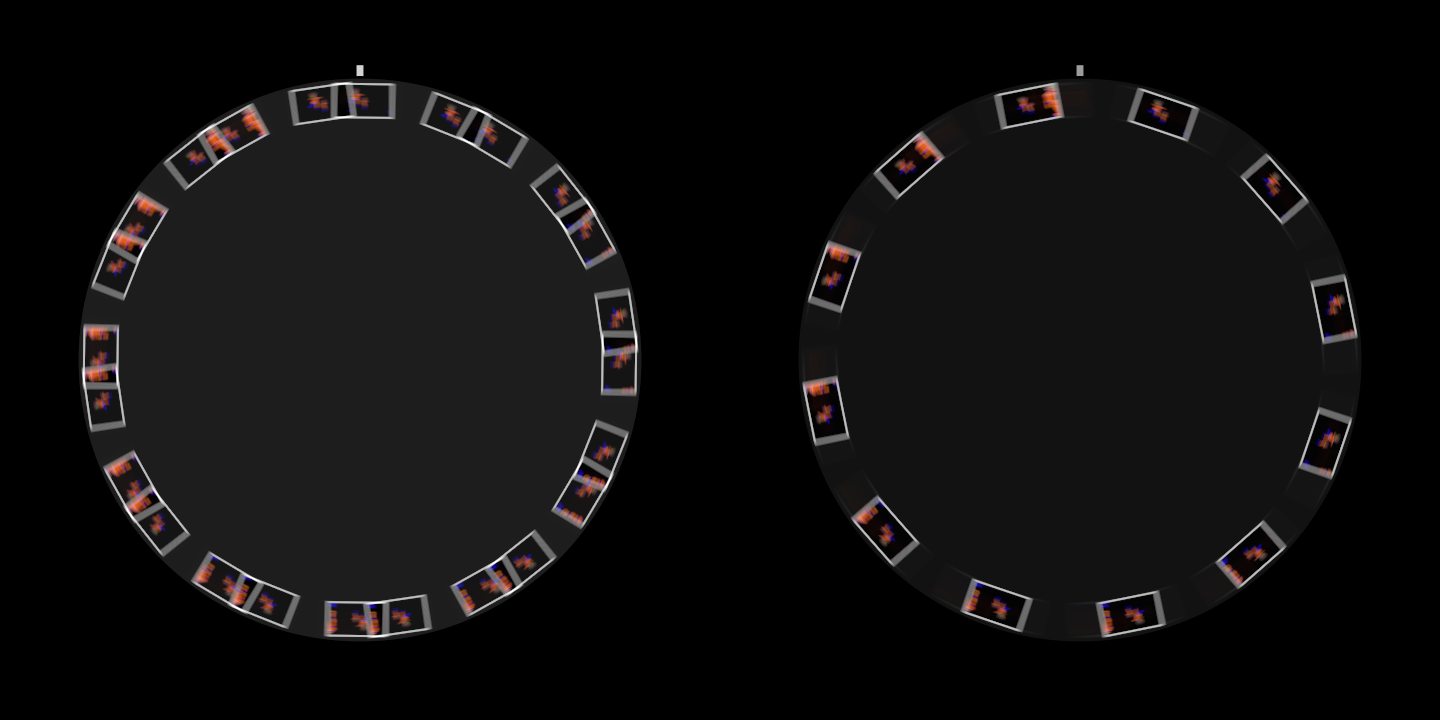
Resolume’s Galactucity_21 with Trigger on Rate at 157 Hz, Slip 0.3 (so the disc turns 0.3 of a station between flashes), a 200° Shutter and Card Size 0.5, at 60 fps. Left: a frame whose exposure caught two whole flashes, so every card is in it twice, 0.3 of a station apart. Right: the next frame, which caught one. Rendered by the offline harness and cropped to the disc.
The disc over the clip. Background on Clip puts the clip behind the disc at its own brightness, rather than in the strobe’s light, so the disc floats over the clip it’s printing. Outside the disc the clip’s alpha comes through. Radius and Card Size make room round it.
The Strobe group
Every slider in the inspector runs from 0 to 1, except Stations (a whole number) and Sync (on or off). The ranges below are what those positions mean, and for the sliders that aren’t linear, where the middle is.
- Trigger: what fires the strobe. Beat (the default), Half Beat, Quarter Beat and Eighth Beat follow Resolume’s tempo: every beat, or every half, quarter or eighth of one. Eighth Beat is an eighth of a beat (a demisemiquaver), not an eighth note; that’s Half Beat. Bar fires on the first beat of each four-beat bar. Onset fires on each hit found in Audio. Rate runs free at Rate. Fire Only fires only when you press Fire.
- Rate: the free-running strobe, 0.25 to 200 Hz (default 12 Hz; the middle of the slider is about 7 Hz, and 60 Hz is at about 0.82). Trigger Rate only. Changing it changes how fast the strobe runs from then on, and never jumps it.
- Fire: a flash now, whatever Trigger is set to, one per press. With Drive on Hand it’s a push as well. A press carries no moment of its own, so its flash is placed to end on the frame that saw it, and never to start before that frame did.
- Audio: Resolume’s audio input, which the host fills with a 64-bin spectrum once a frame. In the other Stoatworks plugins with this input, Resolume draws it as an audio-source picker; I haven’t seen this one’s panel in Resolume yet. Only Onset reads it. As the spectrum arrives once a frame, an onset’s flash lands on the first frame whose spectrum has the hit in it. With nothing routed, Onset never fires.
- Threshold: how hard a hit has to be to count as an onset, 0 to 1 (default 0.4). An onset is a sudden rise across the spectrum, and Threshold sets how far it has to clear the music’s recent average: 1.15 times it at 0, 3.5 times at 1. Onsets are at least 80 ms apart. The detector is primed on the plugin’s first frame, so music that’s already playing when it loads isn’t taken for a hit. Trigger Onset only.
- Flash: how long each flash lasts, 10 µs to 20 ms (default 1 ms; the middle of the slider is 0.45 ms, and 3 ms is three-quarters of the way up). A xenon tube’s flash is tens of microseconds; 20 ms is a lamp switched on and off. Every flash carries the same light whatever its length, so a longer flash smears the cards further without making them brighter. A flash longer than a frame runs on into the next one, and the two frames between them get all of it.
- Strobe: how much light one flash gives, 0 to 2 (default 1, the middle of the slider). At 1, a flash caught whole shows a card at its print’s own brightness. In the Drum view it’s the lamp’s level.
The Disc group
Motor turns the disc at a steady speed, Sync’s or RPM’s. Hand turns it in shoves.
- Stations: how many cards, 4 to 48 (default 12). A change of Stations is a new disc: every card goes back to bare stock and fills in again as it passes the head, and a hand-spun disc stops.
- Drive:
- Motor (the default): a steady speed. With Sync on, Slip cards per flash at Resolume’s tempo; with Sync off, RPM.
- Hand: a push of Push on every flash of a beat-type Trigger (Beat to Bar), on every onset and on every press of Fire, and on Resolume’s beat with Trigger on Rate (a 200 Hz strobe pushing the disc 200 times a second would only be a motor). Between pushes the bearing slows it. Sync, Slip and RPM do nothing on Hand.
- Sync: on (the default) or off. On, the motor turns Slip cards per flash. The time between flashes is Trigger’s share of Resolume’s beat, one over Rate on Rate, and one beat on Onset and Fire Only, which have no rhythm of their own. A host that sends no tempo counts as 120 BPM.
- Slip: cards per flash with Sync on, 0 to 2 in a straight line (default 1, the middle of the slider). 1 is locked. Each flash the figures move by Slip’s distance from the nearest whole number, so 0.98 crawls backwards, 1.02 forwards, and 2 looks locked again, skipping a card. 0 stops the disc.
- RPM: the motor’s speed with Sync off, 0 to 600 RPM in a straight line (default 30, which is 0.05 on the slider).
- Push: how much one push adds to the disc’s speed, 1 to 120 RPM (default 30; the middle of the slider is about 11). Hand only.
- Friction: the bearing, 0.05 to 4 per second (default 0.4; the middle of the slider is about 0.45). One over Friction is roughly how long the disc takes to lose two thirds of its speed: 2.5 s at the default. There’s dry friction in with it, which takes over below about 2.4 RPM, so the disc comes to a stop rather than slowing for ever. One 30 RPM push coasts to a stop in about 6.5 s at the default, 52 s at the bottom of the slider and two thirds of a second at the top. Hand only.
- Print At: where the print head is, 0 to 360° clockwise from twelve o’clock (default 0). The ring’s delay starts there: the newest print is at the head and, with Slip at 1, each station clockwise from it is a flash older.
- Radius: the ring of card centres, 0.15 to 1 of half the frame’s shorter side, in a straight line (default 0.72). The cards grow with it, and at the top of the slider the cards at twelve and six o’clock run off a 16:9 frame. In the Drum view it sets how wide the drum looks instead.
- Card Size: how wide the cards are, 0.2 to 1 of the widest card that can’t touch its neighbours (default 0.9). A card is the clip’s shape with a white margin of 6% of the print’s height all round. More Stations make every card smaller. In the Drum view it’s the share of a station’s arc a card fills.
The Camera group
- Shutter: how much of each frame the exposure takes, 0 to 360° in a straight line (default 360°, the top of the slider). The exposure is the end of the frame, so at 180° it’s the second half. 360° catches every flash; anything less can miss them (see If it looks wrong). A shorter shutter also dims the room light and shortens its blur, as a real one would. At 0 the camera sees nothing.
- Room Light: a dim steady light on the disc, 0 to 1 (default 0.08). At 1 with a 360° shutter it gives the disc as much light every frame as one whole flash at Strobe 1, which is about where the strobe stops mattering.
- Persistence: the eye’s afterimage, 0 to 200 ms in a straight line (default 0, which is off; the middle of the slider is 100 ms). Each frame keeps exp(−T ÷ Persistence) of the last, T being the frame’s length, in linear light: at 100 ms and 60 fps that’s 85%. A flash’s light is all kept, spread over the frames after it, so a single flash looks dimmer and softer and a fast strobe looks steady. At 0 you get the camera as it is.
- Background: Black (the default) or Clip: the clip behind the disc, at its own brightness rather than in the strobe’s light. On Black the output is opaque; on Clip the clip’s alpha comes through outside the disc.
- Mix: the result over the clip, 0 to 1 (default 1). At 0 the clip goes through untouched.
Persistence is one exponential, the simplest eye there is. Yours is more complicated and less well documented.
The View group
- View: Disc (the default), the cards face on under the strobe, or Drum.
The drum
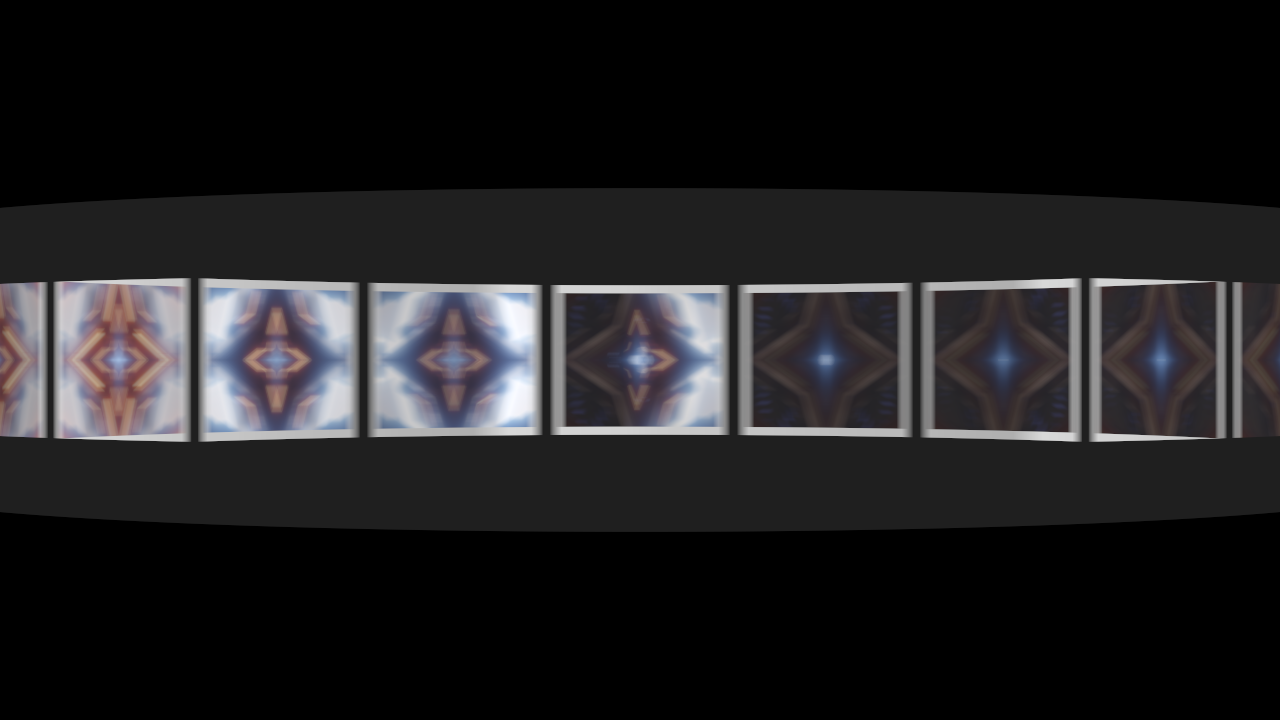
The drum on IntoTheGlow_02, rendered by the offline harness: Trigger on Eighth Beat at 120 BPM with Sync on, 120 ms of Persistence, and Radius turned up so the drum is wider than the frame. Without Persistence you get what a 60 fps camera sees of a zoetrope, which is the slits sweeping across the figures a few at a time. With the eye’s afterimage it reads as it does in the room.
View Drum is the original zoetrope: the same cards on the inside of a drum, seen through slits in its near wall, under steady light. The slits are the shutter. As each slit passes your eye you see a sliver of the card on the far side, and because the near wall and the far wall move in opposite directions the figures come out narrower than they’re printed, by (d + a) / 2d at the middle of the view for an eye d from the axis of a drum of radius a. Here the eye is three radii out, so the figures are two thirds of their printed width.
- The light is steady: the Strobe level as a lamp, plus the room light. Flash does nothing in here, and Trigger only sets Sync’s speed and, on Hand, the pushes.
- There’s a slit for every card, each a sixteenth of a station wide, and the camera is opened up by the slits’ duty cycle (sixteen times), much as your eye adapts to one.
- Radius sets how wide the drum looks: above 0.81 (0.77 on the slider) it’s wider than the frame. Card Size is how much of a station each card fills. Shutter still sets the exposure.
- The print head is behind the drum and isn’t drawn. It still prints.
- It wants a fast disc. On Beat at 120 BPM it turns at 10 RPM and a slit passes any one spot twice a second, so you see a sliver now and then. Put Trigger on Eighth Beat (or Slip up) and Persistence at 100 to 150 ms.
Time comes from the host
The disc turns so many radians a second and the strobe fires on Resolume’s beat, so the plugin takes its time from the host’s clock. When the host’s clock stops, the disc stops turning and the strobe stops firing. A stall or a jump forward moves things on by a quarter of a second at most, and a step backwards passes no time. For the first few frames after it loads, while it works out whether the host counts in seconds or milliseconds, the plugin runs on a steady clock of its own.
The beat comes from Resolume’s bar phase, which goes once round per bar of four beats. When a beat, or a subdivision of one, falls between two frames, its flash starts at the moment inside the frame where it fell rather than at the frame’s start, so it lands where the music put it. Onsets and presses of Fire carry no such moment, so their flash ends on the frame that saw them. A host that sends no beat gets a clock of the plugin’s own, at the host’s tempo if it gives one and 120 BPM if not, so the beat triggers are never dead.
The exposure is the end of each host frame: all of it with a 360° shutter, the second half at 180°. What lands in it is worked out from the host’s frame times, so it’s as even as the host’s frames are.
Prints are made a host frame at a time. A card that crosses the print head during a frame gets that frame of the clip, so a print can be up to a frame later than the moment it stands for. Changing the composition’s resolution keeps the prints, and starts Persistence again from what’s on screen.
How it works
Every frame:
- The light, on the CPU. Whatever’s due fires: beats where they fell, Rate’s flashes on its own clock, onsets and presses at the end of the frame. The camera’s exposure becomes a list of light segments: the room light over the whole window, and each flash’s overlap with it, weighted so that a flash caught whole is Strobe’s worth of light whatever its length. All of it is solved in closed form; nothing about where a flash falls is sampled.
- The disc, on the CPU. The motor’s steady speed, or the hand’s pushes and the bearing’s closed form, dω/dt = −kω − c, solved rather than stepped. The cards that crossed the print head during the frame are found, and the moment each one crossed is solved from the same closed form.
- The prints. Each card that crossed is printed with this frame of the clip, in linear light, into its own layer of a texture array.
- The picture, on the GPU. Each pixel’s angle round the disc, then for each light segment a set of moments across it, one for every pixel the disc turns past at that radius, up to 64, each the card under the pixel at the disc’s angle then. Their average, times the segment’s light, summed over the segments. Past 64 pixels of turn the moments are offset per pixel, so a long smear goes grainy rather than stepped. The drum instead follows a ray from each pixel to the near wall and the far wall, and works out which slits pass in front of it during the exposure.
- The eye, if Persistence is on: this picture mixed with the last, in linear light.
Light adds, so every average here (a print, a smear, the blur, the afterimage) is taken in linear light. With Mix at 0 the clip comes through untouched.
Performance
Measured by the offline harness on a Mac (Apple silicon), GPU time per frame, median of 120 frames after a warm-up, on a GPU shared with other work, so the small numbers wobble from run to run:
| 720p | 1080p | 4K | |
|---|---|---|---|
| the defaults | 0.08 ms | 0.12 ms | 0.60 ms |
| the worst case I could think of: a 150 Hz strobe of 20 ms flashes on a disc at 600 RPM in room light, with Persistence | 1.9 ms | 3.6 ms | 8.9 ms |
| the drum at 600 RPM, with Persistence | 1.2 ms | 1.2 ms | 3.8 ms |
The worst case at 4K is over half a 60 fps frame. Wall time at the defaults was 0.28, 0.33 and 1.05 ms. Nothing was timed inside Resolume, and nothing was timed on Windows.
If it looks wrong
The disc never lights up, it’s just a dim ring turning. Shutter is below 360° and the flashes are falling between exposures. At 120 BPM and 60 fps every beat lands on a frame boundary, and a 180° shutter misses every one of them. Real cameras do this to you too, which is why Shutter is there and why it isn’t the default. Otherwise: Strobe is at 0, Trigger is on Onset with no audio arriving, or Trigger is on Fire Only.
All the cards are white. That’s a fresh disc, card stock nobody has printed on yet. Each card is printed as it passes the head, so it fills in as it turns. A change of Stations starts a new disc.
The ring has frozen. Nothing is passing the print head, so nothing is printed: Slip at 0, RPM at 0 with Sync off, or Drive on Hand with nothing pushing it.
It flickers. That’s the camera: a lit frame for each flash it catches, and the room light in between. Persistence smooths it over.
The figures drift when they should stand still. Slip isn’t quite at the middle of its slider, or Sync is off, or Drive is on Hand. On Onset they jump on purpose: the disc turns steadily and the hits don’t.
Half the figures are upside down. They face outwards round the rim, so the one at six o’clock is on its head.
Every card is there twice, or the picture pulses. The strobe is near or above the frame rate and beating against the shutter (see The strobe against the camera). Persistence smooths it over.
Slip or RPM does nothing. Slip needs Sync on and RPM needs it off, and neither does anything with Drive on Hand.
Push or Friction does nothing. Drive is on Motor.
Rate or Threshold does nothing. Rate only matters with Trigger on Rate, and Threshold only on Onset, with audio arriving at the Audio input.
Flash does nothing. In the Drum view the light is steady. On the disc, a slow disc hardly moves in a short flash: at the defaults a 1 ms flash smears a card by a fraction of a pixel. Speed the disc up and it shows.
No print head in the drum. It’s behind the drum, where it still prints.
The effect does nothing at all. That’s what a shader that won’t compile looks like. The actual error is in the log:
macOS    ~/Library/Logs/zoetrope/zoetrope.YYYY-MM-DD.log
Windows  %LOCALAPPDATA%\zoetrope\logs\zoetrope.YYYY-MM-DD.log
It records the build, the GL vendor, renderer and version at load, which shader failed if one did, whether the cards or the afterimage couldn’t be allocated, and what unit the host’s clock arrives in.
Known limits
- Never loaded into Resolume, on macOS or on Windows, and the Windows build has never been compiled. How the 23 controls in four groups read in the inspector is unseen, and no host has played it any music.
- The inspector shows slider positions, not hertz, milliseconds or RPM. This guide gives the ranges, and where the middle of each slider is.
- Resolume’s spectrum is unmeasured. Nobody has measured what Resolume’s bins carry, so Threshold’s scale is a guess that worked on the harness’s music.
- Prints are made a frame at a time. A card is printed with the frame the host hands over on the frame its centre passes the head, up to a frame later than the moment it stands for.
- At most eight flashes are caught in one exposure, and any more are dropped. 200 Hz at 30 fps through a 360° shutter is seven.
- The look is a model, and a dim one. The disc’s motion, the flashes and the exposure are worked out properly; what a real disc looks like (its card stock, its shadows, the print head) isn’t.
- The drum’s geometry is fixed: the eye three radii from the axis, so the squeeze is always two thirds, and the slits a sixteenth of a station. Its camera gain is a choice of exposure, not physics. On Hand, when each slit opens is worked out from a 16-piece table across the exposure, which is close (about 1e-5 rad) but not the closed form.
- Cards face outwards. There’s no carousel mode to keep the figures upright.
- Every flash is the same. A soft hit and a hard one give the same light; there’s no Accent.
- No presets and no OpenFX version.
- There is a browser demo at zoetrope-demo.stoatworks-labs.com. It runs the plugin itself, compiled to WebAssembly and drawing with its own shaders in WebGL2, not a port of it. The page is the host: its tempo is a BPM clock it keeps itself, there’s no audio (so Onset never fires), its clock is the browser’s, and four GL calls are translated for WebGL2. The page lists everything it doesn’t reproduce.
About
The last group, About, has the plugin’s name, version, licence and maker, and buttons that open the project page, this user guide, the source on GitHub and the support page in your browser.
Links
- Project page: stoatworks-labs.com/software/zoetrope
- Source: github.com/stoatworks-labs/zoetrope
- User guide: stoatworks-labs.com/software/zoetrope/guide
- Browser demo: zoetrope-demo.stoatworks-labs.com
Reporting something
If something’s wrong, shout at github.com/stoatworks-labs/zoetrope/issues. A screenshot, the Trigger, Drive and View, any controls you moved, whether audio was routed, and the composition’s resolution and frame rate are usually enough.