

Photosensitivity warning. SW Nipkow flickers, as a Baird televisor did: every point of the picture is lit once a picture, 12½ times a second. At its defaults the picture flickers in saturated red over most of the field on bright clips, past the line WCAG 2.x draws for red flashes, and some settings make it flash harder or over the whole frame (Frame Fill, a higher Lamp, a Picture Rate near 5 or 8, a shorter Persistence, Sync Free). Flicker like this can trigger seizures in people with photosensitive epilepsy. Turning Persistence up calms it: at 1 s nothing measured crosses the line except a Picture Rate of 4 to 7. See Flashing, and keeping it safe before you put it in front of an audience.
Nipkow is Baird’s 30-line mechanical television looking at your clip, for Resolume Arena and Avenue: one FFGL effect, SW Nipkow.
The picture is drawn by a spinning disc, one hole at a time, in front of a neon lamp whose brightness follows the signal. A mirror drum at the transmitter explores your clip in 30 straight vertical strips, 12½ pictures a second, as the BBC’s did in 1932–35. The signal goes through a narrow amplifier into a flat-plate neon lamp. A disc with 30 holes on a spiral turns in front of the lamp, each hole tracing one arc of the picture, and a toothed wheel on the motor’s shaft, its coils in series with the lamp, holds the disc in step with the transmitter, and hunts.
Nothing in the picture is drawn on. What you see follows from the scan, the lamp and the wheel:
- the lines are arcs, because the holes travel in circles;
- the picture is taller and dimmer on its outer side: a straight line from the drum becomes an arc as long as its radius, and an outer hole dwells less on each point;
- edges smear upwards along the lines, the same angle on every line;
- a lamp starved of current glows over only part of its plate;
- a dark picture holds the wheel weakly, so it swings and slips, and a free-running disc lets the picture drift vertically;
- every point flickers at 12½ Hz, because it is lit once a picture.
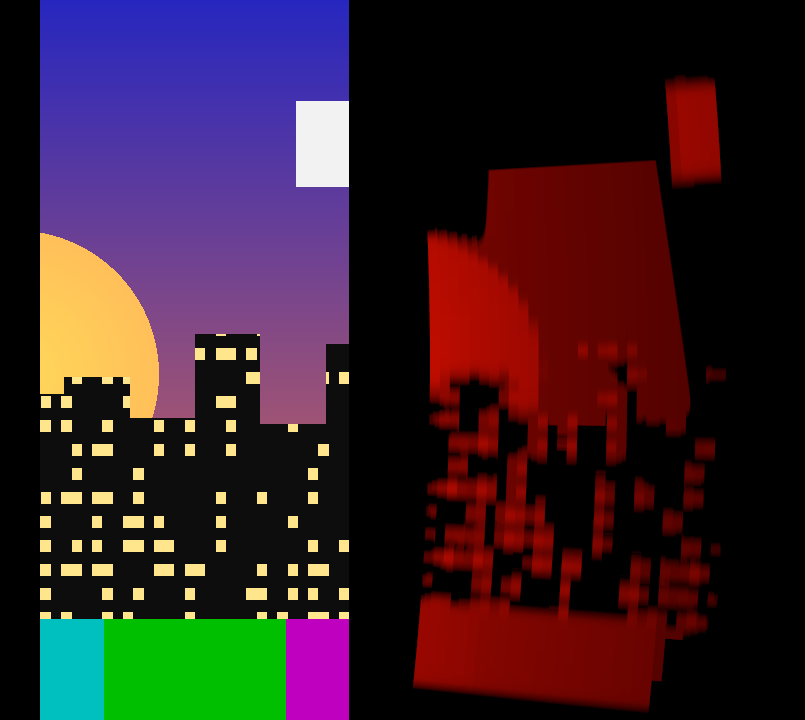
Left: the strip of the harness’s test card the transmitter explores, the middle 3:7 of the frame. Right: SW Nipkow on its defaults, eight seconds in, cropped to the field. Rendered by the offline harness rather than captured from Resolume.
Before you rely on this: this is v0.1.0, the first release, and early days. The televisor is measured, not just asserted. An offline harness drives the plugin’s own code on an Apple Silicon Mac’s GPU, at two sizes, and again on Apple’s software renderer. Read off the picture, each scanned line sits at the spiral’s radius to within 0.008 px, every line’s brightness falls as 1/r to 2e-7, and a free-running receiver’s picture drifts N × speed error × picture rate lines a second to 1e-6 of a line. The phonic wheel hunts at the linearised swing equation’s frequency to 1.2e-4 and locks where the equation says to 4e-4. Twenty-four deliberately wrong models and fifty-one one-character sabotages of its code are all caught, and every control changes the picture.
In Resolume Arena 7.29.0 on a Mac it loaded with every control as declared, and every control changed Arena’s picture over a still test card. On Windows, in Arena 7.27.1 on software rendering with no GPU, it loaded and registered with every control as declared, and nine of its eleven controls changed Arena’s picture; the automated check couldn’t judge the other two (Speed and Persistence), and both changed the picture on the Mac. But it hasn’t been through a show, and it has never been compared with a real Televisor. The amplifier’s single pole, the lamp’s source resistance, the wheel’s 1.5 Hz and 1 s, and where on the plate a starved glow sits are chosen, not measured. Try it on a spare layer first, and shout if anything misbehaves.
This codebase was created with AI assistance, directed and reviewed by a human author.
Installing
Download the build for your platform. For macOS there’s a universal .dmg or .zip (Apple
silicon and Intel), Developer ID-signed and notarised so the bundle just loads (the
signing happens on my Mac shortly after each release is published, so a download made in the
first few minutes may need Open from the context menu once), and for Windows an x64
installer or .zip. Put Nipkow.bundle (macOS) or Nipkow.dll (Windows) in Resolume’s
effects folder, then restart Resolume:
macOS    ~/Documents/Resolume Arena/Extra Effects/
Windows  %USERPROFILE%\Documents\Resolume Arena\Extra Effects\
Avenue uses the same layout in its own folder. SW Nipkow appears in the effects browser.
The Windows installer puts the DLL there for you, per user, with no admin rights needed. It
defaults to Arena’s folder (Avenue’s if only Avenue is installed) and lets you change it. The
Windows builds aren’t code-signed. Plugin files aren’t gated the way .exe files are, so
Resolume loads them as normal; only the installer trips SmartScreen, once: More info →
Run anyway. Or skip the installer and copy Nipkow.dll out of the .zip by hand.
Start here
- Put SW Nipkow on a clip with something bright on something dark. You get a tall, narrow red field in the middle of the frame: that’s the Baird frame, the 7:3 picture of the 30-line standard, fitted to the height. The transmitter explores the middle 3:7 strip of your clip, so put your subject in the middle.
- Watch it settle. At the default Sync Hunting the phonic wheel pulls the disc into step, so the picture swings up and down for a few seconds and comes to rest. A bright, busy picture pulls harder and can keep it swinging (see Known limits).
- Turn Persistence up to 1 s. The flicker calms and the picture holds still; at the default 0.1 s every point is relit 12½ times a second and dims in between.
- Try Lines at 60 and 120, then back to 30: more holes, finer lines, a flatter arc.
- Turn Lamp down below 10 mA. Black now drives the lamp below zero, so it goes out on every dark part of the picture and strikes again a moment after; below about 5 mA a black picture leaves only a glow over part of the plate.
- Set Sync to Free: the wheel’s coils are disconnected, and the picture drifts vertically at a rate set by Speed, the motor’s own speed error.
The defaults are the 30-line standard (30 lines, 12½ pictures a second, the mirror drum, a 9 kHz channel), Lamp 10.1 mA, Sync Hunting with the motor 0.5% fast, Framing 0, Persistence 0.1 s (it flickers: see Flashing), the Baird frame and Mix 1.
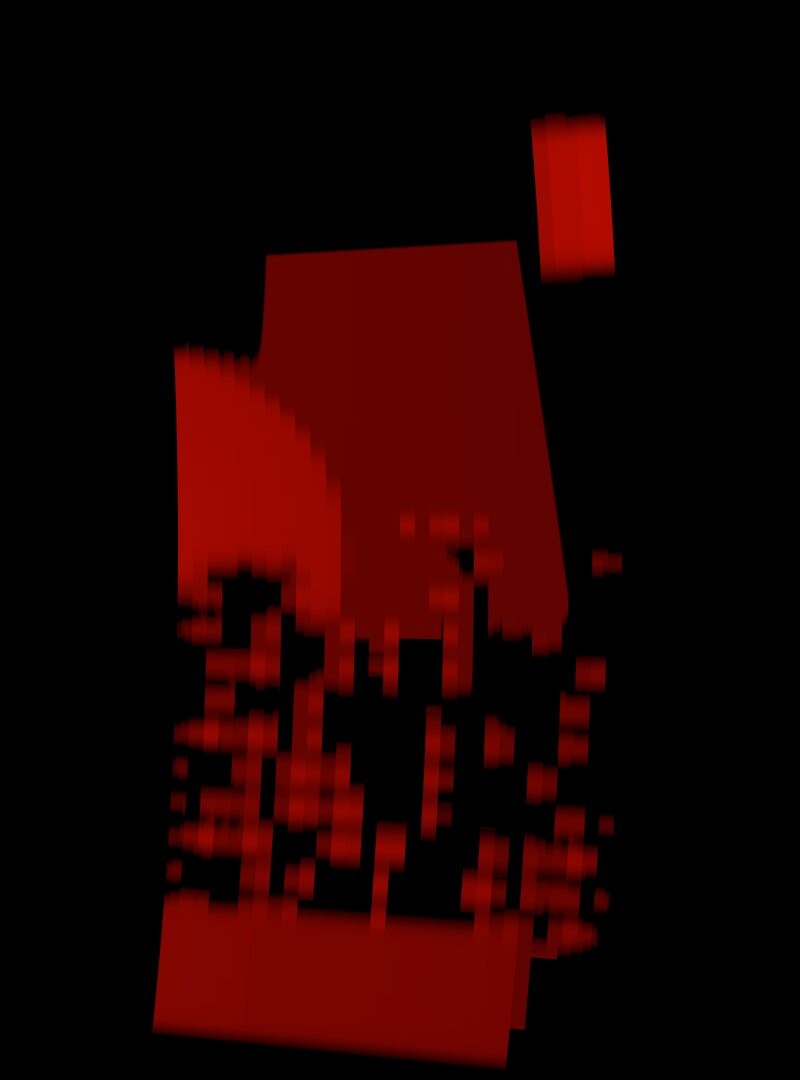
What you should see: SW Nipkow inside Resolume Arena 7.29.0 on a Mac, from Arena’s own composition snapshot, over a still of the harness’s test card, cropped to the field. Sync is Locked and Persistence 1 s, so the picture holds still; the rest is at the defaults.
Flashing, and keeping it safe
A televisor lights its picture one point at a time, each point once a picture, and Baird’s flickered for exactly that reason. Here the screen holds its light for Persistence, so every lit point swings by about (1 − e^(−T/Persistence)) of its light once a picture of T seconds: about half of it at the defaults (0.1 s, 12½ pictures a second). The plugin keeps the flicker, because it is what a Baird televisor did. The mean brightness doesn’t change with Persistence, only how deep the flicker is.
People with photosensitive epilepsy can have a seizure from flashing light. The guidance for broadcast (Ofcom) and the web (WCAG 2.x) draws the line at three flashes a second over a large part of the picture (a quarter of a ten-degree window, taken here as a third of the frame each way). WCAG treats saturated red separately and more strictly than other colours, and the neon’s light is saturated red, so on WCAG’s red scale at the defaults every lit point of the field flashes red 12½ times a second.
Measured from the plugin’s own output, two ways (everything else at the defaults):
- per pixel: the share of the worst window whose pixels flash more than three times a second (the line is 25%);
- window mean: red flashes a second in the mean colour of the frame and of each window, the fleet’s video check. The scan lights neighbouring lines at different moments, so the window mean averages most of the flicker out: it is what a video is cut to, and it understates what an eye sees across the field.
| Setting | Per pixel | Window mean (a second) |
|---|---|---|
| The defaults, on white | 70% | 3.0 |
| The defaults, on Resolume’s brightest demo clips (NoHopeJustFear_44, Metalive 01) | 64%, 62% | 1.0 |
| The defaults, on the harness’s card; on IntoTheGlow_02 | 50%; 39% | 0.5; 2.0 |
| The defaults, on a flat 25% grey | 33% | 0 |
| The defaults, on dark clips (Galactucity_21, Cyberspace_09) | 10%, 5% | 0 |
| Frame Fill, on white; on the brightest clip | 100% | 13.0; 5.0 |
| Lamp 15, 20, 30 mA, on white | 70% | 13.0, 12.5, 6.5 |
| Picture Rate 5, 8, on white (luminance flashes too) | 70% | 5.5, 8.5 |
| Persistence 0.05 s or less, on white (luminance flashes too) | 70% | 13.0 |
| Sync Free, on white | 70% | 3.5 |
| Persistence 0.2 s, on the brightest clip | 5% | 0.5 |
| Persistence 0.6 s, on white | 0% | 0.5 |
| Persistence 1 s, on every source above, at any Lamp | 0% (Lamp 30 mA on white: 15%) | 0.5 |
| Persistence 1 s, Picture Rate 4 to 7, on white | 47–70% | 0.5 |
The general (brightness) threshold is crossed only where the table says so: at the defaults the light swings by less than a tenth of white.
What keeps it within the guidance:
- Turn Persistence up. 0.2 s or more kept Resolume’s brightest demo clip under the line, 0.6 s or more kept white under, and at 1 s nothing measured crossed it except a Picture Rate of 4 to 7.
- Stay in the Baird frame. Fill stretches the field over the whole frame, so whatever flickers flickers everywhere.
- Keep the Lamp near its default and the Picture Rate away from 4 to 8.
- Use dark clips if you keep the default Persistence: they stayed well under.
None of this is a substitute for warning your audience. The browser demo opens behind the same warning and draws nothing until you press Start.
The Transmitter group
- Lines: 8 to 120, a whole number. How many holes the disc has, and so how many lines the picture has. 30 is the standard the BBC broadcast from 1932 to 1935. The disc’s radius grows with the square of the line count, so more lines mean finer, flatter arcs; the field keeps its 7:3 shape.
- Picture Rate: 2 to 30 pictures a second. 12½ is the standard. It sets how often each point is relit, so it sets the flicker’s rate, and the speed of the disc and of the transmitter’s scan. Mind the flashing note near 5 and 8.
- Scanner: Drum or Disc.
- Drum, the default, is the BBC’s mirror drum: it explores the clip in straight vertical strips, which the receiver’s disc draws as arcs. That mismatch is what makes the picture taller and dimmer on its outer side.
- Disc scans the clip with the same arcs the receiver draws, so the geometry cancels and only the arcs’ curvature is left. On a still picture the difference is small (under two line pitches).
The Amplifier group
- Bandwidth: 0.5 to 40 kHz. How fast the signal can change. 9 kHz is the BBC’s channel. A narrow amplifier smears every edge along the line in the direction of the scan, upwards, by the same angle on every line; at 40 kHz edges are sharp, at 0.5 kHz the picture is streaks.
The Receiver group
- Lamp: 0 to 30 mA. The neon’s standing current; the signal swings it 10 mA either side, and the light follows the current. At the default 10.1 mA, black drives the lamp at 0.1 mA, just lit, and white at 20.1 mA. Turn it down and black puts the lamp out; it strikes again a moment after the current comes back over 3 mA (the formative lag, tens to hundreds of microseconds, longer the closer the drive is to striking). Below 5 mA the glow covers only part of the plate, a centred patch of the field’s shape whose area follows the current. Higher Lamp values make the picture brighter and the wheel pull harder; mind the flashing note above 15 mA.
- Sync: Locked, Hunting or Free.
- Locked is an ideal synchroniser: the disc is exactly in step, and the picture stands still where Framing puts it.
- Hunting, the default, is the phonic wheel: a toothed wheel on the motor’s shaft, its coils carrying the lamp’s current, pulled into step once a line by the picture’s own signal. It overshoots and swings before it settles. The pull grows with the square of the lamp’s current, so a dark picture holds the wheel weakly and it can slip a line.
- Free disconnects the coils: the disc runs at the motor’s own speed, and the picture drifts vertically, through the black sync band, at a rate set by Speed.
- Speed: −5% to +5%. The motor’s own speed error. The default +0.5% is a motor set close by hand. Under Free the picture drifts by Lines × speed error × Picture Rate lines a second (0.5% at the defaults: about 1.9 lines a second); under Hunting it sets how hard the wheel has to pull, and past its pull-out the wheel slips; under Locked it does nothing.
- Framing: −½ to +½ a line. Where in the picture the wheel locks, as the Televisor’s framing adjustment did. Under Locked it moves the picture up or down; under Free it only sets where the drift starts.
The Look group
- Persistence: 20 ms to 1 s. How long the screen holds its light. Your eye did this job for a real Televisor; here it’s a control. Short values flicker hard; long ones calm the picture and smear anything that moves. The mean brightness stays the same at every setting. The default 0.1 s is about one picture, chosen for the look, and it flickers (see Flashing).
- Frame: Baird or Fill. Baird fits the whole field, a sector of a disc a little taller than 7:3, to the frame’s height, with black either side. Fill stretches it to the whole frame, which no Televisor did.
- Mix: from the clip (0) to the televisor (1). At 1 the output is opaque: the receiver paints the whole frame, and a transparent part of the clip is black to the transmitter.
Recipes
- A calm Televisor. Sync Locked, Persistence 0.6 s or more: the arcs, the taper and the red glow without the flicker or the swinging.
- The real thing, with care. The defaults on a dark clip. Mind the flicker, and the flashing note, before an audience.
- A wheel that won’t settle. Sync Hunting with Speed at +2% or so on a dark clip: the wheel barely holds, swings and slips a line now and then.
- A rolling picture. Sync Free with Speed small (+0.2%): the picture drifts slowly through the black sync band. Keep Persistence up on bright clips.
- A starved lamp. Lamp at 3 to 5 mA on a dark clip: black leaves a small glowing patch in the middle of the plate, and the bright parts strike the lamp.
- A finer standard. Lines 60 or 120 for a finer picture with the same taper and glow.
- Fade the televisor in. Mix from 0 to 1 over a phrase.
How it works
The transmitter is a GPU pass. For every one of the picture’s lines it samples the clip’s linear brightness (times its alpha) through a square aperture one hole across, along the drum’s straight line or the disc’s arc, four samples to a picture element, with the last element of each line black for the sync. The samples are read back to the CPU, which runs the signal chain sample by sample in double precision: the amplifier as one pole, the lamp (light in proportion to current, out at zero, struck again after the formative lag, a starved glow below 5 mA) and the wheel (the swing equation, its pull each line the lit lamp’s current squared over the picture less that over the sync). The screen is a second GPU pass that adds up, in closed form, how much light every hole’s sweep put on each pixel during the frame, decayed by Persistence: nothing is sampled at a point in time, so the picture doesn’t depend on your frame rate. The receiver’s disc is drawn with its holes on the spiral at their exact radii, which is where the arcs, the taper and the dimming of the outer side come from.
The clock is Resolume’s own, read in microseconds and counted in whole transmitter samples, so how the host cuts time into frames can’t change the picture, and a show that has been running for days gives the same pictures as one just started. Nothing is random.
Performance
On the Mac it was measured on (Apple Silicon, shared with other builds), at the defaults over the harness’s card: GPU time about 0.43 ms a frame at 720p, 0.87 ms at 1080p and 3.17 ms at 4K; the CPU’s time in the plugin (the signal chain, and the read-back, which waits for the GPU) 0.45 ms, 0.76 ms and 2.65 ms. Other runs on the same machine read 0.72 to 0.87 ms GPU at 1080p. Another GPU will differ, and nothing has been timed inside Resolume.
If it looks wrong
- I only get a narrow red column. That’s the Baird frame, the 7:3 picture fitted to the height. Frame Fill stretches it over the whole frame (mind the flashing note).
- It only shows the middle of my clip. The transmitter explores the middle 3:7 strip, as the drum explored a tall picture. Move your subject to the middle.
- It’s black, or nearly. The strip the transmitter sees is dark (eight of Resolume’s 33 demo clips are black in that strip), or the Lamp is turned down far enough to put the lamp out. Turn Lamp up a little.
- Black parts of the picture blink, or have dark fringes. The Lamp is just under 10 mA, so black puts the lamp out and it strikes again a moment later. Turn Lamp up to 10.1 or more.
- The picture swings up and down, or keeps slipping. That’s the phonic wheel hunting. Wait for it to settle, lower Speed, or set Sync Locked. A bright, busy picture pulls the wheel harder and can keep it swinging (see Known limits).
- The picture rolls and won’t stop. Sync is Free: set it to Hunting or Locked, or Speed to 0 for a picture that holds.
- It flickers. It’s meant to, at 12½ Hz. Turn Persistence up.
- Moving things smear. Persistence is long. Turn it down (and mind the flicker).
- It’s red. That’s the neon lamp’s colour, as a Televisor’s was. Only the clip’s brightness reaches the lamp.
- My transparent clip came out opaque. At Mix 1 the receiver paints the whole frame, and a transparent part of the clip is black to the transmitter. Lower Mix to bring the clip’s transparency back.
Known limits
- Never compared with a real Televisor. Every figure is checked against the model as written, and the model against the period books and papers it cites, not against a working machine.
- Open questions, decided for this release but not settled:
- The wheel’s pull grows with the lamp’s current squared, with no limit. A real wheel’s iron would saturate; nothing here does. The reference pull was set from Resolume’s mostly dark demo clips, and a bright, varied picture pulls 20 to 40 times as hard. On the harness’s card at Lamp 9 mA and Speed +1% the wheel’s own frequency comes near half the picture rate, the picture’s pull pattern excites it, and it never settles. At the defaults on the same card it locks. This follows from the model; whether a Televisor did it is not known.
- The default Lamp leaves black only just lit. At 10.1 mA, black drives the lamp 0.1 mA above the point where it goes out, so black is a faint glow over part of the plate. A Lamp a notch lower puts black out, and the lamp then strikes again a formative lag after every return from black. The default was measured from the demo clips; whether it’s the right one for a show is open.
- Whether the Fill frame is wanted at all. It stretches the 7:3 field to the whole frame, which no Televisor did, and anything that flickers then flickers everywhere.
- Persistence’s 0.1 s is chosen for the look, about one picture, and it flickers past WCAG’s red-flash line (see Flashing).
- Chosen, not measured: the amplifier as one pole (no period response curve was found); the output stage’s 10 kΩ (so the lamp strikes above 3 mA); the wheel’s hunting frequency (1.5 Hz at the reference pull) and the motor’s 1 s time constant; where on the plate a starved glow sits (centred); the neon’s colour (a spectral lamp’s chromaticity, brought into sRGB at constant luminance); four samples a picture element.
- The formative lag is an indicator lamp’s (GE, Signalite), not a television lamp’s.
- Left out: the eye, the amplifier’s low-frequency cut and peaking, the statistical striking lag, the wheel’s impulse shape and the motor’s torque ripple, the graduated end holes, the radio path, and sound.
- Resolume’s alpha. The plugin treats a clip’s colour as straight alpha, which is what Arena’s DXV demo clips decode to; whether Resolume hands an effect premultiplied colour has not been checked.
- Tried in Resolume on a still test card only. It loads and renders in Resolume Arena 7.29.0 on a Mac and 7.27.1 on Windows (software rendering, no GPU). It hasn’t been through a show, with real footage, or timed inside Resolume.
- Other GPUs. It has run on one Apple GPU and Apple’s software renderer only.
About
The last group, About, has the plugin’s name, version, licence and maker, and buttons that open this user guide, the project page, the source on GitHub and the support page in your browser.
Links
- Project page: stoatworks-labs.com/software/nipkow
- Source: github.com/stoatworks-labs/nipkow
- User guide: stoatworks-labs.com/software/nipkow/guide
- Browser demo: nipkow-demo.stoatworks-labs.com
Reporting something
Something wrong, odd or missing? Open an issue at github.com/stoatworks-labs/nipkow/issues. The plugin keeps a short log of what the host did (the GL renderer, whether every shader compiled, and the host’s clock as the plugin read it), which helps a lot:
macOS    ~/Library/Logs/nipkow/
Windows  %LOCALAPPDATA%\nipkow\logs\