

Photosensitivity warning. The flames jump with the music, and at the defaults the kicks make them flare. With loud music that can be more than three flashes a second in part of the picture, the line broadcast guidance (Ofcom) and web guidance (WCAG 2.x) draw. Measured through the plugin’s own code: on Resolume’s raw demo stems the defaults stay within it, but with the same music mastered to an ordinary release level (about −11 dBFS RMS) 24 of 33 demo clips went over through SW Rubens Over, up to 11 rises and falls in a second in a third of the picture, and with a louder master (about −9.5 dBFS RMS) all 33 did. Gas 30 Pa or Volume 130 dB brought every one of them back within it. Flashing light can trigger seizures in people with photosensitive epilepsy. See Flashing, and keeping it safe before you put it in front of an audience.
Rubens is Rubens’ flame tube, played by music, for Resolume Arena and Avenue, as two FFGL plugins in one download: SW Rubens, a source that is the tube burning in front of a dark backdrop, and SW Rubens Over, an effect in which the same tube burns in front of your clip and your clip is seen through the hot air above its flames.
A Rubens’ tube is a classroom demonstration: a pipe of propane with a row of small holes along its top, each lit, and a loudspeaker at one end. Play a note on one of the pipe’s resonances and the gas inside it carries a standing wave, and the flames draw it. Nothing in this plugin is animated to the music. The music moves the loudspeaker; the propane in the pipe resonates; each hole’s flow goes as the square root of the pressure across it, outward only, into its flame; and the hot gas above the flames bends the light from whatever is behind them. Every flame you see is its own hole’s fuel flow, sample by sample.
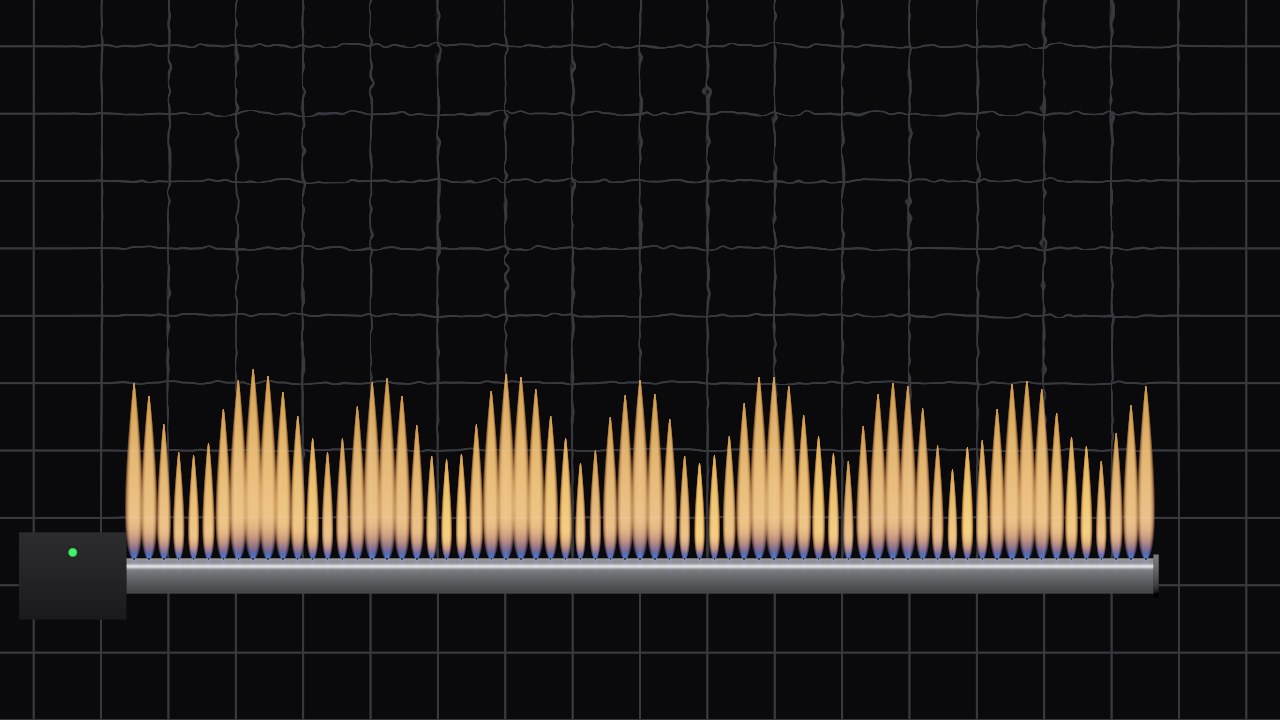
One frame of SW Rubens on its defaults, from the offline harness, not captured from Resolume: the harness’s own music, 5.5 s in.
Before you rely on this: it’s at v0.1.1, and early days. What’s established is established offline, on an Apple Silicon Mac (macOS 26), by a harness that drives the plugins’ own classes in a headless GL context, at two rasters and partly on Apple’s software renderer, and feeds them audio through the same path a device would use. The pipe’s response matches its own continuous model to 1.4 × 10⁻⁶; with the losses taken out its resonances sit on the closed form to 4.4 × 10⁻¹⁶, and against Gardner, Gee & Dix’s measured tubes to 4.4%. The flames’ spacing, read off the rendered picture, matches the theory with propane’s sound speed to 0.15%. Fed a slow tone, the flames dip to 0.838 of their quiet height and cross it again at a swing 4.43 times the gas pressure, where the model says 4.33. The same audio at 24, 30, 60 and 240 fps gives bit-identical flames. Fifteen models that are wrong on purpose and twenty-five one-character changes to the shipped code are all caught. In Resolume it has run only briefly: in Arena 7.27.1 on Windows on software rendering, where the fleet’s Arena gate passed 15 of 15 (4 skipped: that machine has no sound device, so the controls that need sound weren’t tried), and in Arena 7.29.0 on a Mac, where both showed every control, kept a half-transparent clip’s alpha right, and moved to a demo drum loop on Resolume’s own sound analysis (see Where the sound comes from). It has never been in a show and never been driven by a real audio input: every sound it has heard was fed to it. What the flames and the hot air look like is chosen, not measured, and no source gives a working tube’s gas pressure or sound level (see Known limits). Try it on a spare layer before you put it in a show.
This codebase was created with AI assistance, directed and reviewed by a human author.
Installing
Every download carries both plugins: SW Rubens, a source (Rubens.bundle on macOS,
Rubens.dll on Windows), and SW Rubens Over, an effect (Rubens Over.bundle,
Rubens Over.dll). Drop them into Resolume’s effects folder and restart Resolume:
macOS    ~/Documents/Resolume Arena/Extra Effects/
Windows  %USERPROFILE%\Documents\Resolume Arena\Extra Effects\
Avenue uses the same layout under its own folder name. SW Rubens appears among the sources and SW Rubens Over in the effects browser.
The macOS download is a universal build (Apple silicon and Intel), as a .dmg or a .zip. It’s
Developer ID-signed and notarised, so the bundles just load. The Windows download is an x64
installer or a .zip. The installer offers Arena’s folder above, or Avenue’s on a machine that
only has Avenue; change it on the folder page if you use the other one. It isn’t code-signed, so
it trips SmartScreen once: More info → Run anyway. Or skip the installer and copy the two
.dll files out of the .zip into the folder by hand.
Start here
- Put SW Rubens in a clip slot and play it. With no audio input chosen it listens to
Resolume’s own sound analysis (see Where the sound comes from),
so play some music in the composition and the flames move. (Resolume’s demo
.movclips have no sound: play the matching.wav. Resolume’s Audio setting picks what Rubens hears; see Where the sound comes from.) - For the real thing, pick your input in Audio Input: an audio interface, a loopback, the system default. The lamp on the speaker housing goes green when sound is arriving. On macOS the first time, macOS asks whether Resolume may use the microphone; say yes, or the tube hears silence.
- Watch the flames: they rise and fall in humps along the tube, the standing waves of whatever notes the music lands on the pipe’s resonances.
- Turn Gas up from 3 Pa toward 30 Pa and the pattern changes character: see the next section. Turn Shimmer up and the heat haze above the flames gets rougher; turn Distance up and it bends the backdrop further.
- For your own footage, put SW Rubens Over on a clip. The tube burns in front of it and your clip is the backdrop, seen through the hot air.
The defaults: Audio Input None (host FFT), Channel L+R, FFT Law Linear Mag, Volume 145 dB, Length 1.524 m, Hole Pitch 2.2 cm, Hole Size 0.92 mm, Gas 3 Pa, Flame 20 cm, Shimmer 0.5, Distance 6 m, Field Width 1.9 m, Tube Height 0.2, Exposure 0, Backdrop Grid (SW Rubens) or Mix 100% (SW Rubens Over). The tube is the large-holed one Gardner, Gee & Dix measured in 2009.
Which way up: dips, gulps and flares
At the defaults, the pattern is upside down against the textbook’s. The textbook Rubens’ tube has its flames lowest where the pressure in the pipe swings most (the antinodes) and tallest in between. Rubens does that too, with quiet sound. But every hole’s flow goes as the square root of the pressure across it, and only outward: as the swing grows past the gas pressure, the holes at the antinodes start to gulp, briefly drawing air in on each low; and past a swing of about 4.3 times the gas pressure, those same holes push out more fuel on average than a quiet hole does, and burn tallest. Ficken & Stephenson reported this reversal in 1979 (as Gee and Gardner, Gee & Dix relate it; both call it not fully explained). The 4.3 is this model’s own number, not a measured one.
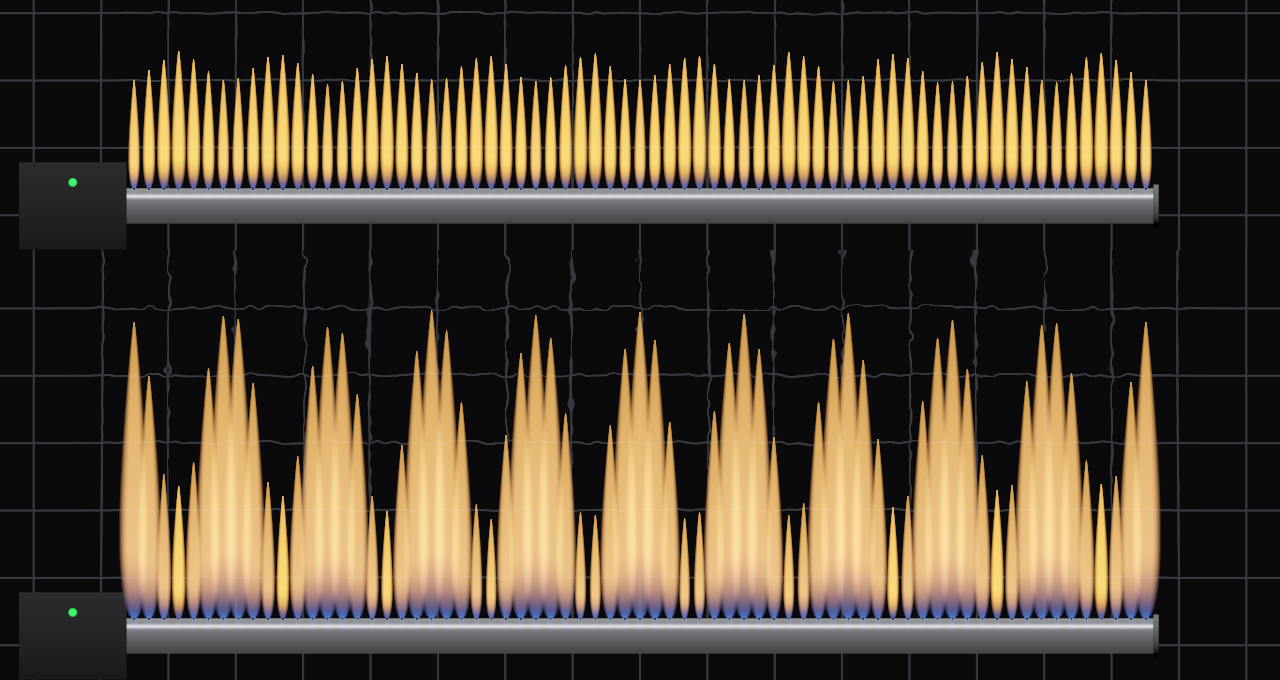
One note on the tube’s tenth resonance, 818.75 Hz. Above, at Volume 110 dB: the textbook picture, the flames dipping at the antinodes (the ends are antinodes). Below, at 128 dB: the same places flaring. Rendered by the offline harness.
Which way round you get depends on Gas against Volume. At the defaults (3 Pa, 145 dB), almost any beat in a mix swings the holes far past the reversal, so the kicks flare the flames, by 70–85% on Resolume’s demo stems. That was chosen because it moves; nobody knows what a working tube’s gas pressure or sound level is (see Known limits). For the textbook picture with music, turn Gas up to the tens of pascals or Volume down: at Gas 30 Pa the jets push harder than the music swings them, and the loud places dip instead.
Recipes
The tube, upside down. The defaults, with music. The kicks flare the flames at the antinodes.
The tube, the right way up. Gas 30 Pa. Now the loudest places dip, and the low modes blur (a hole’s jet resists harder at a higher gas pressure, which damps the lowest resonances most), while the high ones stay sharp. This is also one of the two settings that kept every demo clip within the flash guidance with loud music.
Quieter flames for a loud room. Volume 130 dB. The music swings the gas less, so the flames move less; with mastered music it keeps the flares within the flash guidance.
A longer tube, more modes. Length up toward 3 m: the resonances crowd closer together, so more of the music lands on one, and the humps get longer.
Close up. Field Width down toward 0.6 m: a few dozen flames fill the frame. They flash more readily this close (see the next section).
Your clip through a heat haze. SW Rubens Over, Distance 20–30 m, Shimmer 0.8: the clip behind the flames wobbles and bends as if seen across a hot road.
A tone, to see the physics. Feed it a steady sine on one of the tube’s resonances and the standing wave stands still. For the default tube those are at √(125.86² + (80.90 n)²) Hz: 149.6, 205.0, 273.4 … 818.75 Hz for n = 10, and so on. Halfway between two of them the flames barely move.
Flashing, and keeping it safe
The flames flash when the music is loud against the gas. Each kick that swings the holes past the reversal makes the flames flare and fall back, and a flare of the whole row brightens the band of the picture they’re in. People with photosensitive epilepsy can have a seizure from flashing light, and the line that broadcast guidance (Ofcom) and web guidance (WCAG 2.x) draw is no more than three flashes in any second over a large area of the picture. A flash here is a rise and a fall in brightness of at least a tenth of white; two make a flash, so the line is six rises and falls.
Measured from the plugins’ own output, with xenon’s rule (the whole picture and every third of the picture, in linear light), 60 fps, 7.5 s of each: the worst second in the worst third of the picture. The music is Resolume’s own demo stems as they come (each about −20 dBFS RMS when layered), the same three stems layered and mastered to about −11 dBFS RMS (an ordinary release level), and limited harder to about −9.5 dBFS RMS (a loud one).
| Plugin and setting | raw stems | mastered (−11) | loud (−9.5) |
|---|---|---|---|
| SW Rubens, the defaults | 0 of 18 stems over (worst 6); 1 of 6 mixes (7) | 4 of 6 over (up to 11) | 6 of 6 over (up to 12) |
| SW Rubens Over, the defaults, 33 demo clips | 2 of 33 over (7, 8) | 24 of 33 over (up to 11) | 33 of 33 over (up to 12) |
| SW Rubens Over, Gas 30 Pa | — | 0 of 33 (worst 6) | 0 of 33 (worst 6) |
| SW Rubens Over, Volume 130 dB | — | 0 of 33 (worst 6) | 0 of 33 (worst 6) |
| SW Rubens Over, Volume 135 dB | — | 2 of 33 over (up to 8) | 1 of 33 over (9) |
The whole picture never went over the line at the defaults: only a third of it, the band the
flames burn in. The worst 6 in the Gas 30 Pa and Volume 130 dB rows is one demo clip
(Beat 002) whose own picture measures 6 without the plugin.
Turning things up makes it worse, on Resolume’s raw stems through SW Rubens Over (33 clips): Volume 150 dB, 8 over (up to 10); Gas 1 Pa, 18 over (up to 10); Flame 30 cm, 8 over (up to 10); Exposure +4 stops, 13 over (up to 11); Field Width 0.5 m, 12 over (up to 10). Shimmer at 1 changes nothing. With the loud master, Gas 1 Pa, Flame 30 cm or Field Width 0.5 m took the whole picture over the line too (7).
On SW Rubens with the mastered and loud mixes (12 files), one change at a time: Volume 135 dB, worst 6; Volume 130 dB, 2; Gas 10 Pa, 7; Gas 30 Pa, 2; Gas 100 Pa, 0; Flame 10 cm, 8; Flame 5 cm, 2; Field Width 6 m, 5; Exposure −2 stops, still 8; the Black backdrop, no better than Grid.
What keeps it within the guidance, in everything measured:
- Gas at 30 Pa or more, or Volume at 130 dB or less. Either one kept all 33 demo clips within it with mastered and loud music.
- Not Exposure. Two stops down still went over.
- Watch the level. The louder the music reaching Rubens, the more it flashes: a quiet stem is fine at the defaults; a finished track at release level usually isn’t. Volume is the sound level a full-scale sine would make in the pipe, so it is a gain on whatever arrives.
Regular patterns. The row of flames is a row of evenly spaced bright stripes, 69 of them at the defaults across a quarter of the picture, and the Grid backdrop is a fine grid over the whole frame (dim, about 4% of white). Broadcast guidance (ITU-R BT.1702, Ofcom) also counts strong regular patterns, especially ones that move, as a risk. With the flames tall or close up (Flame up, Field Width down, a loud tone on a resonance) the stripes fill more of the frame.
None of this is a substitute for warning your audience. The browser demo opens on the defaults with the harness’s own music, which measures over the line in part of the picture (8); its Gas 30 Pa and Volume 130 dB presets measure 0.
Where the sound comes from
From an audio input. Pick it in Audio Input. The tube hears every sample, the loudspeaker’s motion at 16 kHz: it picks its own resonances out of whatever is played, chords and noise included. Pitch isn’t used; the pipe does that itself.
The input is remembered by name, so a composition reopened another day finds the same device, and a device that has gone shows as missing rather than quietly becoming another one. Rescan Inputs lists what is plugged in now. The device is opened off the render thread.
On macOS the microphone permission belongs to Resolume, not to this plugin. The first time any plugin inside Resolume opens an input, macOS asks whether Resolume may use the microphone. If that was refused, macOS hands Resolume silence rather than an error: after 3 s of exact zeros the lamp goes steady red and the flames burn at their quiet height. The fix is System Settings → Privacy & Security → Microphone → Resolume Arena. An unpatched Dante receiver or an empty loopback looks the same.
With no input chosen (“None (host FFT)”), Rubens listens to Resolume’s own sound analysis, and
that is much less. Resolume gives a plugin a coarse spectrum a frame and no waveform, so Rubens
sums it into four bands (40–160, 160–640, 640–2560 and 2560–8000 Hz) and drives the
loudspeaker with noise in each, whose level follows the band. The tube still picks its resonances out of the noise, and the loud
bands still dip or flare the flames; but the melody is gone (which notes, so which modes),
so are the transients inside a frame, the level is not calibrated, and it steps once a
frame, so unlike an audio input it depends on the frame rate. It also drives while a chosen input is
opening, missing or failed. This is the normal state with no input chosen, and the lamp shows
amber for it. In Arena 7.29.0 on a Mac, with Arena’s demo drum loop Beat 001.wav playing on the
layer below at the defaults, the Over’s flames dropped from their quiet 115 px to a median of
about 102 px, as low as 60 px; at Volume 150 dB further, to a median between 60 and 82 px from
one run to the next.
What Resolume sends was measured, in Arena 7.29.0 on a Mac: 64 bins, linear, 375 Hz each from 0 to 24 kHz (half Arena’s 48 kHz audio engine rate, whatever the clip’s own), magnitudes, mono, a new spectrum about every 43 ms. That is FFT Law’s default, Linear Mag: keep it. Rubens takes the engine’s rate from Resolume and shares each bin among the bands it overlaps, so the 40–160 Hz band gets a third of the lowest bin (0–375 Hz) and the 160–640 Hz band the rest of it: a kick and a bass line drive those two alike. Before v0.1.1 the 40–160 Hz band got nothing from Resolume and the kicks drove 160–640 Hz alone. The flames dip as far either way (v0.1.0 gave 101 px, as low as 61 px): what changed is which noise bands the kick plays into the tube.
Resolume’s Audio setting. Resolume adds its own Audio control to both plugins, as to
anything that reads its sound analysis, with three choices. Composition (the default) hears
every clip playing in the composition. Local hears only the clip Rubens is on: the Over on a
clip with its own sound track hears that sound, and over a picture-only clip nothing; the source
hears nothing. External hears Resolume’s own audio input (Resolume’s Preferences, under
Audio), which in the Mac test heard nothing. A clip only has sound if its file has a sound track:
Resolume’s demo .mov clips are picture only, and their sound is in the matching .wav files,
so play the .wav on a layer of its own.
The status lamp
A small LED on the speaker housing (slid in from the frame’s edge when the housing is off the frame):
| Lamp | Means |
|---|---|
| green | an input is delivering sound |
| amber | Resolume’s own sound analysis (the usual state with no input chosen) |
| blinking amber | an input is opening |
| blinking red | the chosen input is missing or failed; Resolume’s analysis drives meanwhile |
| steady red | the input is open but silent (3 s of exact zeros) |
The Audio group
| Control | Range | Default | What it does |
|---|---|---|---|
| Audio Input | None (host FFT), System default, each input by name | None (host FFT) | Where the sound comes from (above). Spare slots read “(none)”. |
| Rescan Inputs | a button | Lists the inputs plugged in now. | |
| Channel | L+R, Left, Right | L+R | Which channel of the input drives the loudspeaker. |
| FFT Law | Linear Mag, Linear Power, Log Mag, Log Power | Linear Mag | How Resolume’s sound analysis is read, with no input chosen. Linear Mag is what Arena 7.29.0 sends (measured): keep it. The Log settings read Arena’s bands wrongly; the other settings are for hosts nobody has measured. |
| Volume | 80–150 dB | 145 dB | The sound level a full-scale sine would make in the pipe (dB re 20 µPa, RMS). A gain on whatever arrives. The slider is linear; its middle is 115 dB. |
The Tube group
| Control | Range | Default | What it does |
|---|---|---|---|
| Length | 0.5–3 m | 1.524 m | The pipe’s length. Longer puts the resonances closer together. The slider is linear; its middle is 1.75 m. |
| Hole Pitch | 1–5 cm | 2.2 cm | The spacing of the holes along the top, at most 160 holes. The slider is linear; its middle is 3 cm. |
| Hole Size | 0.3–2 mm | 0.92 mm | Each hole’s radius. Bigger holes are lighter acoustic masses, which shifts the resonances and lets high notes through. The slider is geometric; its middle is 0.77 mm. |
| Gas | 1–1000 Pa | 3 Pa | The gas pressure above the room’s. Sets which way up the pattern is (above), and higher damps the lowest modes. The slider is geometric; its middle is 32 Pa. |
The pipe’s bore (2.6 cm radius) and wall (4 mm) are Gardner, Gee & Dix’s and fixed, and the gas is propane at 20 °C.
The Flames group
| Control | Range | Default | What it does |
|---|---|---|---|
| Flame | 1–30 cm | 20 cm | The quiet flame’s height, at whatever the Gas is. A flame’s length follows its fuel flow, so this is the length with no sound. The slider is geometric; its middle is 5.5 cm. |
| Shimmer | 0–1 | 0.5 | The hot plumes’ turbulence. At 0 they stand still. |
| Distance | 0–30 m | 6 m | How far behind the plumes the backdrop (or your clip) is. The further back, the more the heat bends it. The slider is linear; its middle is 15 m. |
Flame doesn’t follow Gas. In a real tube the quiet flames grow with the gas pressure. Here Flame is the quiet height at any Gas, so turning Gas moves the dip-to-flare balance without relighting the stage. Whether it should follow Gas is open.
The View group
| Control | Range | Default | What it does |
|---|---|---|---|
| Field Width | 0.5–6 m | 1.9 m | How much of the scene the frame is wide. Narrower is closer. The slider is geometric; its middle is 1.7 m. |
| Tube Height | 0–0.6 | 0.2 | The tube’s height up from the bottom of the frame, as a fraction of it. |
| Exposure | ±4 stops | 0 | Brightness of the flames’ light. |
| Backdrop (SW Rubens) | Black, Grid, Dots | Grid | What is behind the tube. The Grid and Dots show the heat bending the light; Black shows none. |
| Mix (SW Rubens Over) | 0–100% | 100% | Blends the result with the untouched clip. 0 returns your clip exactly. |
SW Rubens Over: your clip through the heat
The Over puts your clip behind the tube, as the backdrop. The plumes above the flames bend it, the flames add their light, and the tube is solid in front. Everything in the source acts the same way, except that Backdrop gives way to your clip and Mix appears.
Alpha. The Over treats your clip as premultiplied, which is what Arena hands an effect, and its output is premultiplied too: the result is transparent wherever your clip was, except for the tube and the flames. So a clip with transparency (several of Resolume’s DXV demo clips carry it) stays transparent around the tube and flames. Mix at 0 returns your clip exactly.
How it works
The pipe. The tube is a one-dimensional duct closed at both ends: a rigid cap, and the loudspeaker as a moving wall. Its sound is the sum of its resonant modes, up to 64 of them below the pipe’s first cross-mode (35 for the default tube, the last at 2.75 kHz), each a small linear system solved exactly at 16 kHz, plus a closed-form remainder for the modes left out. The holes weigh on it as a row of acoustic masses (each its wall’s thickness plus Rayleigh’s end correction at each end), which pushes the resonances up, most at the lowest modes; that is why the lowest humps are further apart than a half wavelength in propane, as Gardner, Gee & Dix measured. The walls lose energy as Kirchhoff worked out.
The holes. Each hole is a slug of gas pushed out by the pressure across it: its flow goes as the square root of that pressure, outward only, integrated twice every audio sample.
The flames. A flame’s length follows its outward fuel flow, as a laminar jet flame’s does (Sunderland et al.), smoothed over 50 ms. When a hole gulps, its flame turns bluer.
The heat. Above each flame is a column of hot gas. Its effect on light, summed along your line of sight, is worked out in closed form, and the backdrop is seen displaced by how fast that changes across the picture, times Distance, as background-oriented schlieren sees it.
The harness checks the pipe against its own model solved a different way, against the closed form and against Gardner, Gee & Dix’s measured resonances; the holes against their impedance and the square-root average; the dip and the reversal end to end through the audio path; the flames’ spacing off the rendered picture; and the displacement off a ramp. The README lists the numbers.
Performance
Measured by the offline harness on an Apple Silicon Mac shared with other builds, GPU time per frame, median of 240 frames after a warm-up:
| 720p | 1080p | 4K | |
|---|---|---|---|
| SW Rubens, the defaults (69 holes) | 0.55 ms | 0.57 ms | 2.28 ms |
| SW Rubens, 160 holes (3 m at 1.9 cm) | 0.27 ms | 0.61 ms | |
| SW Rubens Over, the defaults | 0.54 ms | 0.59 ms | 2.38 ms |
The pipe and its holes run on the CPU: 7.6 ms per second of audio for the default tube, about 0.13 ms a frame at 60 fps. 720p measuring near 1080p is the shared GPU’s clock, not the shaders. Nothing was timed inside Resolume or on Windows.
If it looks wrong
The flames don’t move. No sound is reaching the tube. Check the lamp: steady red means the
input is silent (on macOS, the microphone permission; see above); amber means Rubens is on
Resolume’s own sound analysis, which needs music playing in the composition: on Composition it
hears every clip, on Local only the clip Rubens is on, on External only Resolume’s audio
input, and a Resolume demo .mov clip has no sound (play its .wav). Or Volume is low, or the
clip is quiet.
The flames all flare at once, filling the frame. The music is loud against the gas. Turn Volume down or Gas up.
The pattern is upside down. At the defaults it is, by design: see Which way up. Gas 30 Pa turns it the right way up.
Only the bass moves it. High notes dip the flames less: a hole’s mass resists a fast swing. And quiet, high material (a synth pad) barely moves a real tube either.
The lamp is amber and I chose an input. Amber with a blink means it’s still opening; blinking red means the input is missing or failed. Rescan Inputs, or pick it again.
The input I used yesterday shows as missing. It’s remembered by name: plug the same device in, or pick another.
The plugin draws nothing. That’s what a shader that won’t compile looks like. The log has the error:
macOS    ~/Library/Logs/rubens/rubens.YYYY-MM-DD.log
Windows  %LOCALAPPDATA%\rubens\logs\rubens.YYYY-MM-DD.log
Known limits
- Run in Resolume only briefly, in Arena 7.27.1 on Windows (software rendering, no sound device) and Arena 7.29.0 on a Mac. Nothing is known yet about a whole show, how it performs in Resolume, or a real audio input: every sound it has heard was fed to it, never captured.
- Which way up the defaults are is a choice. At Gas 3 Pa and Volume 145 dB loud music is in the reversal and the antinodes flare: the pattern is upside down against the textbook’s. The textbook picture needs Gas in the tens of pascals or a quieter Volume. It was set on Resolume’s demo clips because it moves; neither is “right”.
- Gas and Volume are anchored to no source. No paper read gives a working tube’s gas pressure, flow rate or sound level, so both are calibrated against nothing, and the default 3 Pa is low.
- Flame doesn’t follow Gas. A real tube’s quiet flames grow with the gas pressure; here they don’t, so Gas only moves the balance. Whether it should is open.
- The reversal is known second-hand. Ficken & Stephenson’s 1979 paper is paywalled and wasn’t read: everything about the reversal comes through Gee and through Gardner, Gee & Dix, who both call it not fully explained. The crossover at 4.3 times the gas pressure is this model’s own.
- The modes stop at 2.78 kHz, the pipe’s first cross-mode for the default tube. A loudspeaker driving the pipe evenly can’t excite that one, and the plane-wave modes could run on to the first one it can (5.8 kHz); stopping early is conservative and may change.
- No pitch-driven plunger. Some tubes are tuned by an adjustable end. That would be a second mechanism, not this one, and isn’t here.
- Resolume’s sound analysis was measured only in Arena 7.29.0 on a Mac, not on Windows, in Avenue or in another version. Its lowest band runs from 0 to 375 Hz, so a kick and a bass line drive the tube’s two lowest bands alike. The level isn’t calibrated, and the bands can read above full scale; Rubens clips them. In Arena 7.29.0 on a Mac one of Resolume’s demo drum loops, at its own level, moved the flames at the defaults; nothing louder, and no full mix, has been played to it there.
- Looks, not measurements: the flames’ shape and colour, the plumes’ growth and the shimmer. The flames’ 50 ms response to their fuel is an assumption.
- Not modelled: the jets feeding back into the pipe’s sound, temperature along the tube, the loudspeaker’s own behaviour, holes over only part of the pipe, air drawn in changing the gas, and flames going out.
- It can flash with loud music at the defaults (see above).
- The inspector shows slider positions, not decibels or metres. This guide gives the ranges and where the middle of each slider is.
- No presets and no OpenFX version.
About
The last group, About, has the plugin’s name, version, licence and maker, and buttons that open this user guide, the project page, the source on GitHub and the support page in your browser.
Links
- Project page: stoatworks-labs.com/software/rubens
- Source: github.com/stoatworks-labs/rubens
- User guide: stoatworks-labs.com/software/rubens/guide
- Browser demo: rubens-demo.stoatworks-labs.com
- earshot, the audio front end inside it: github.com/stoatworks-labs/earshot
Reporting something
If something’s wrong, shout at github.com/stoatworks-labs/rubens/issues. A screenshot, which plugin, the Audio Input, Volume and Gas settings, the lamp’s colour, and the log are usually enough.