

openRCS
Modern control for Analog Way switchers
What it does
openrcs is a modern control surface for Analog Way Midra and LiveCore series video processors, replacing control software that depends on runtimes today's browsers no longer support. It also drives the current range — an early LivePremier (Aquilon) mode, and since v0.6.0 a Midra 4K / Alta 4K mode — built on Analog Way's own published AWJ protocol rather than on reverse engineering.
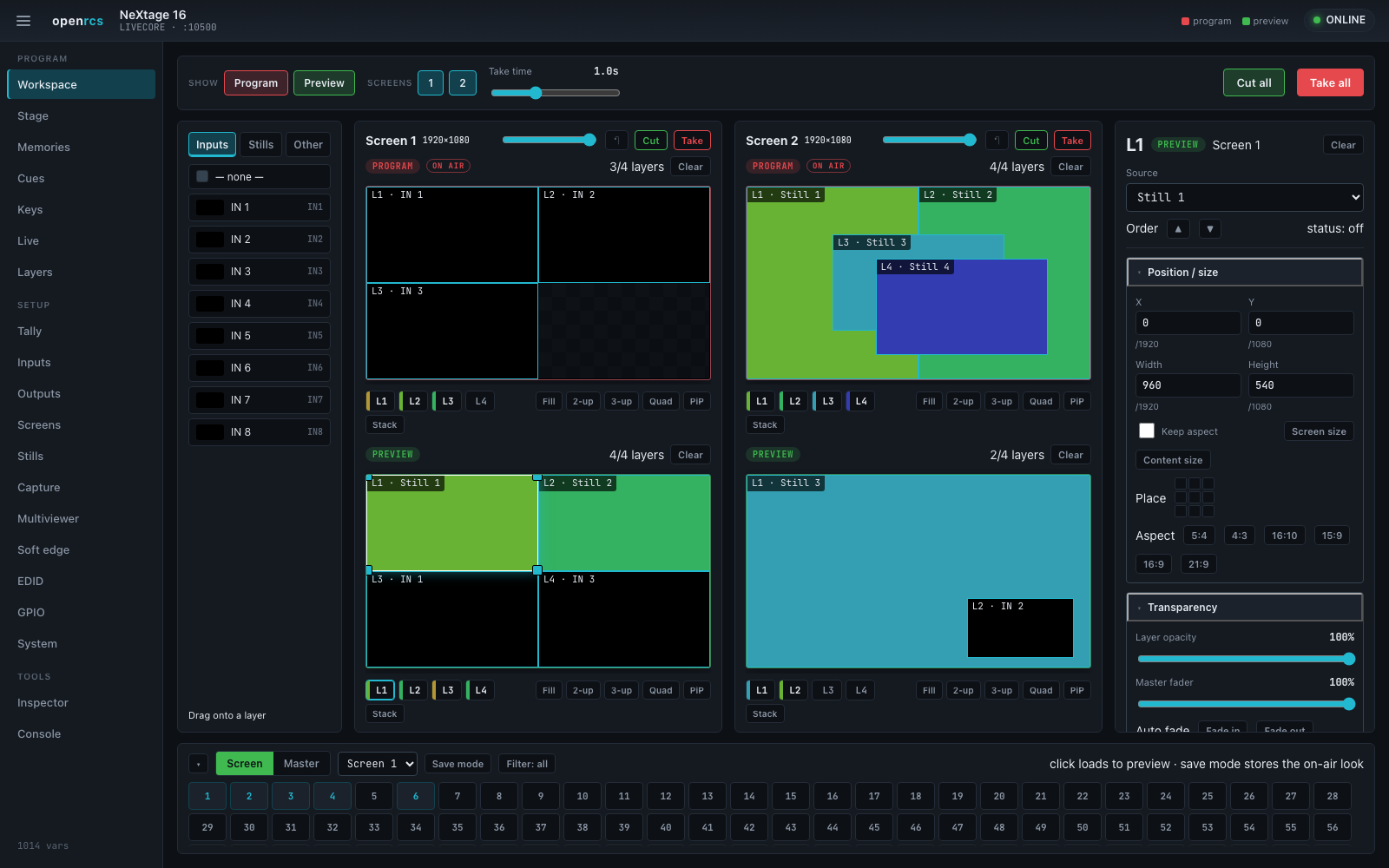
At its centre is the Workspace: a single working page with the source palette (inputs and stills) on the left, every active screen editable side by side in the middle, and the device's memories along the bottom. Show program, preview or both at once, arrange layers with drag/resize or one-click presets, and take — with the previews growing to fill the window so nothing is a scroll away.
A small bridge server holds one connection to the processor and serves a web UI to any number of browsers: recall and store screen and master memories, arrange layers on a graphical canvas, run preview-to-program takes, and reach every device parameter through an inspector.
For operators who never want to touch a command line, a menu-bar tray launcher (macOS, Windows and Linux) bundles the server: enter the switcher's IP, pick the model, click Start, and Open the control surface — nothing else to install.
There is also a browser demo of the control surface. It is the real UI, unmodified, running against a device that exists only in the page — seeded from a recording of a real LiveCore session, so the variable table and the state it starts in are genuine. It cannot reach hardware and does not pretend to: a browser has no raw TCP socket, so the demo replaces the transport and keeps the app. Takes and memory save and recall are modelled; everything else echoes, and the footer says exactly what it cannot show.
- Workspace working page — sources, every screen editable side by side, and memories on one window-filling page
- No-CLI tray launcher (macOS, Windows, Linux) — enter the switcher's IP and go
- Show program, preview or both at once; per-screen visibility and one-click layout presets (Fill / 2-up / Quad / PiP)
- Inputs and Stills tabs — place a frame-store still just like a live input (LiveCore)
- Graphical layer editor — drag and resize sources on the screen
- Master and screen memory grids — recall, load-and-take and save
- Working area — keep layers inside the part of a screen that is actually seen, on hardware that cannot crop an output
- Video out (Midra) — the frame's second output on its own view, with a draggable area of interest so it carries a crop of a screen
- Layer memories — capture one layer's whole property set and drop it onto any screen, preset or layer, with every recall verified by reading the layer back
- Preview-to-program take with a transition time
- Destinations — take, cut and T-bar whole screen groups as one destination
- Wall — place each screen at its real output position; a big-target Show mode for front-of-house
- Shows — capture the device's whole state to a portable file and restore it; instant Confidence undo
- Plan mode — build a look offline with no device attached, then push it on connect
- Cues that chain — per-cue autofollow with a hold, plus one-tap macro Keys
- Multiviewer / confidence-output and soft-edge designers, EDID writer, input/output/screen/stills setup
- Inspector over every device variable, plus a raw-protocol console
- Midra 4K / Alta 4K (v0.6.0, v0.7.0) — a Show page with every destination side by side, screens with grouped takes and the quick preset, a layer canvas with the unit's own pictures, preset banks with save filters and autoscale, multiviewer, audio routing, input plugs with keyer, LUTs and EDID, outputs with area of interest and custom formats, stills, the device configuration, backups and streaming, over AWJ
- Cues and Plan for the AWJ families (v0.7.0) — a cue list over the memory banks with autofollow, and a plan mode that stages a look with no processor attached
- A Bitfocus Companion module drives the same protocol from a control surface
- Dependency-light: a Rust bridge server and a no-build web UI
- An optional Tailnet view for a dedicated panel — join, leave and rename the host from the touchscreen; off unless the server is started with --tailnet, and gated at the server rather than by a hidden button
Where it stands
Validated against real hardware — a NeXtage 16 (LiveCore) and a Pulse2 (Midra): device identity, framing, live layer control and takes, memories, EDID and the per-platform quirks are all confirmed on the wire. The LiveCore per-output area of interest is the one exception: the values stage and the apply is accepted, but the device's own readback never moved off a fixed size. LivePremier is in field testing. Reading has been exercised against two different Aquilon C frames on firmware 6.2.73, most recently on 9 September 2026, and the AWJ operations underneath the controls that write — take, cut, preset recall and the subscription list behind Live updates — are now confirmed on real hardware: a take measured at 1.07 s against a configured 1.0 s fade, a preset saved and recalled onto preview, an empty slot recalled silently, and a second socket receiving the push for a write made on the first. Those hardware writes were sent by a separate test harness rather than by this code, so what is proven is the protocol; openrcs's own write path has run end to end only against the LivePremier simulator. Latest server release: v0.7.0 of 15 September 2026 (prebuilt for macOS, Linux and Windows; the macOS builds signed and notarised, and since v0.5.1 a Windows installer that guards its write to the system PATH, which the v0.5.0 installer could overwrite), plus a tray launcher for a no-command-line install and a Companion module for control surfaces. New in v0.6.0 and v0.7.0: a Midra 4K / Alta 4K mode — screens and auxiliaries with take, cut, T-bar, freeze, take all and the device's quick preset; a layer editor that drags and resizes a screen's live layers on its canvas with the unit's own pictures on them, plus the preset's background and top frame, and sets every property the device declares; preset banks that save, label and erase as well as recall, with a master save that refuses to overwrite the bank slots the device would otherwise write silently; an inputs page with thumbnails, plugs, signals and the device's tally lists; a multiviewer designer that lays the widgets out on the MTVW canvas with the unit's own pictures and keeps its twenty layout memories, alongside the three timers; an audio page that routes every screen, output, line out and Dante group and programs the audio layer each preset carries; a setup page that stages the device's configuration (outputs to screens, layers to screens) and applies it behind a second tap, with each screen's canvas and test pattern; input plugs set up in full, keyer and EDID included; outputs with area of interest, HDR, the plug's HDCP and encoding, and custom formats; the on-device configuration slots and RTMP streaming; what a preset save records; grouped takes; a stills page over the capture library and the frame slots; a system page; and a raw AWJ inspector over every path the device reports — built on paths read off a real Pulse 4K, but driven end to end only against the vendor's simulators, which never complete a still capture, start a timer or a stream, or erase a custom format, so those are written and read back rather than proven. v0.7.0 added the Show page with every screen and auxiliary side by side, a cue list and a plan mode for both AWJ families, autoscale on load, the LUT libraries and soft edge — simulator-driven the same way.
How it compares
Where openrcs stands against the software Analog Way ships for each processor family — the RCS² for the Midra series, the Web RCS for LiveCore, LivePremier and Midra 4K, and the original RCS for the Pulse PLS300. Every row is a feature; the stock column is the vendor's inventory and the openrcs column is the verdict against it.
| Feature | Midra Pulse², Eikos², Saphyr, SmartMatriX², QuickMatriX, QuickVu | LiveCore Ascender, NeXtage, SmartMatriX Ultra | LivePremier Aquilon C / RS | Midra 4K Pulse 4K, Eikos 4K, QuickMatrix 4K, QuickVu 4K | PLS300 Pulse PLS300 | |||||
|---|---|---|---|---|---|---|---|---|---|---|
| RCS² | openrcs | Web RCS | openrcs | Web RCS | openrcs | Web RCS | openrcs | RCS | openrcs | |
| Access & deployment | ||||||||||
| Control path | RCS² desktop app (Adobe AIR) on TCP 10500 | openrcs-server + browser; 562-variable table, proven on a Pulse2 | Web RCS served by the unit, in AW Browser | 1014-variable table, proven on a NeXtage 16 | Web RCS served by the unit over HTTP/HTTPS | AWJ on TCP 10606 from the published guide; reads proven on two Aquilon C frames, openrcs's own write path simulator-only | Web RCS served by the unit | AWJ on TCP 10606 in the Midra 4K / Alta 4K object model, every path read off a Pulse 4K on 3.3.10; openrcs's own surface driven only against the vendor simulators | RCS desktop app (Windows only) over LAN or RS-232; LAN is off until enabled on the front panel | openrcs-server + browser; the 222-variable table from the published Programmer's Guide, driven only against a table-derived fixture — no PLS300 has answered yet |
| Works without a discontinued runtime | needs Adobe AIR | one binary or the tray app, any current browser | needs AW Browser for the Flash-era Web RCS | same | HTML5, nothing to install | parity — nothing to replace | HTML5, nothing to install | parity — nothing to replace | a Windows-only RCS from the 2009–12 support site, gone from the current one | one binary or the tray app, any current browser |
| Login, HTTPS, session lock | none | none; loopback listen is the default | none | none | password, HTTP/HTTPS, custom certificate, session lock | none | password protection, HTTPS | none | none | none; loopback listen is the default |
| Offline planning / simulator | presets 9–64 live on the RCS² computer; no simulator | Plan mode stages a look with no device and pushes it on connect; browser demo against a simulated device | AW Simulator runs the Web RCS with no unit | Plan mode + demo | LivePremier Simulator | plan mode: every value set on Screens or Presets is staged in the browser with no processor attached and pushed on connect; triggers are never staged; not the vendor’s simulator | Midra 4K Simulator | plan mode: every value set on any page is staged in the browser with no processor attached, previewed in place and pushed on connect; triggers are never staged; not the vendor’s simulator, which stays the way to rehearse a whole show | none in the RCS; the Axion2 controller had an offline mode | Plan mode stages a look with no device and pushes it on connect; browser demo against a fixture derived from the table |
| Touch / front-of-house surface | none | Show mode: big CUT ALL / TAKE ALL, a take tile per destination, master-memory tiles | none | same | mobile Web RCS; RC400T console | mobile Web RCS; RC400T console | Show mode: every destination in one big column with large take and cut buttons, drawn for a touch screen or a front-of-house table; no phone layout, no console | none | Live’s TAKE, preset tiles and freeze buttons; no big-button Show page for this family | |
| Appliance use (no keyboard, no shell) | type the IP in a desktop app | Connection view (keypad or network scan, remembered) and an opt-in Tailnet view gated at the server | type the IP in the browser | same | type the IP in the browser | Connection + Tailnet views are family-independent | Connection + Tailnet views are family-independent | type the IP in a desktop app | Connection view (keypad or network scan, remembered) and an opt-in Tailnet view; a scan tells a PLS300 from a Midra by its DEV code | |
| Live operation | ||||||||||
| Take and Cut, per screen and all | TAKE with screen selection, T-bar | Take / Cut per screen, Take all / Cut all, one take time | TAKE with screen selection, T-bar, FADE TO BLACK, STEP BACK | as Midra; on hardware openrcs sweeps the T-bar itself because the device's take verbs stall a group mid-transition | Take, Take Cut, T-bar, Fade In/Out, Step Back, screen transition filter, global take time | Take and Cut per screen with take-up/down times shown; no take-all | Take, Take Cut, T-bar, Step Back, TAKE ALL | Take / Cut per screen and per auxiliary, the take time typed in seconds, and Take all (one take per destination, as the vendor's own Web RCS does it) | TAKE and Stepback buttons, virtual T-bar | TAKE on the one screen; the unit has no cut verb — each layer runs its own opening and closing effect |
| T-bar | GCtba per screen | per screen and per destination group | per destination, on the take node's own control; the device reports the ends | virtual T-bar in the RCS | NT, the unit’s 0.01 % T-bar, with its enable switch | |||||
| Step back | per screen and per group | the device's own xStepBack — an edit undo (the last change to layer settings), which is what the vendor manual means by it here; not a return to the previous look | Stepback button | the previous look copied to next and taken | ||||||
| Preset toggle, auto-take, dynamic fit | Misc: preset toggle, autotake, dynamic fit, freeze mode | settings reachable only through the Inspector | Screens: preset toggle, auto take; Misc: dynamic fit, preview aspect | ON AIR follows the real program bank; the settings themselves are Inspector-only | Preset Toggle per screen | the preset toggle (swap) per destination; no auto-take or dynamic fit | Control menu: auto-take, preset toggle | auto-take and preset toggle on Live; the unit has no dynamic fit | ||
| Fade to black / master fade | Quick Frame: an emergency still in front of every layer | output Black per output (Outputs, Keys); no quick frame | FADE TO BLACK, latching, on all layers | Master fade (to black / up) in Live and as a Key action; output Black | Fade Out / Fade In on the selected screens | Quick Preset → Fade to Black | the device's own quick preset from the Screens view: fade to black, a library image or a master memory on every covered destination, on and off from one switch | [BLACK] clears a layer; output black in the Output menu | output black for main and preview on Live; a layer goes black by clearing its source | |
| Freeze | input, layer and screen freeze; freeze mode all-or-one | input freeze (Inputs, Keys), layer freeze, screen freeze and freeze all | input freeze, ribbon shortcut | input freeze in Inputs, Workspace flags, Keys | freeze the layer selection on PGM/PRW, freeze an input from its thumbnail | layer, screen and input freeze | destination freeze, per-layer freeze (holds through a take), input freeze | Freeze button; freeze mode by input or all inputs | per-input freeze and the all-inputs mode, on Live and Inputs | |
| Screen groups / destinations | screen selection on TAKE only | the Pulse2 advertises no group model (GCsta) | screen selection on TAKE only; no named groups | Destinations: take / cut / T-bar / step-back a screen group, TAKE ALL GROUPS, grouping editor (Plngr, GCupd) | screen transition filter | TAKE ALL / selection | tick any set of screens and auxiliaries and take, cut or T-bar them as one group, or Take all; each keeps its own take time | one screen | ||
| Sequencer / cue list | Sequence: 16 scenes of master memories with durations; play, pause, stop, loop | Cues: any length, GO NEXT, per-cue autofollow wait, HOLD, notes; kept in the browser | Sequencer v2: variable-length cue stack, non-memory cue actions (inputs, frame slots…), keypad mode, loop/rewind/step | Cues cover memory recalls; the device's own SEQ_TAKE sequences and non-memory actions are not driven | none in the Web RCS — webrcs-timeline and livepremier-plus fill this in the fleet | a cue list over the screen bank: a memory per cue on one screen, Go (to preview, then take), Cut and Arm, per-cue autofollow with a wait, Hold; kept in the browser — the device has no sequencer | none | a cue list over the memory banks: a master, screen or auxiliary memory per cue, Go (to preview, then take), Cut and Arm, per-cue autofollow with a wait, Hold; kept in the browser — the device has no sequencer | none in the RCS; the Axion2 controller had a sequence mode | Cues is built on the Midra/LiveCore memory verbs, not yet on the preset copy |
| User keys / macros / quick presets | none in RCS² | Keys: one-tap macros — recall + take, take, freeze, black, master fade | Emergency presets A–D (four master memories); sequencer keypad mode | Keys; the emergency-preset slots themselves are not exposed | RC400T user keys (hardware); none in the Web RCS | Quick Preset on the front panel: fade to black, a library image or a master memory | the device's quick preset — fade to black, a library image or a master memory, on and off from one switch, with the destinations it covers and what it does to audio; the Midra 4K has no user keys or macros beyond it | the six quadravision layouts on the front panel | the six quick layouts and one-tap preset recalls on Live; no macro keys | |
| Timers (clock, countdown, stopwatch) | timers as image-slot and multiviewer content | three timers in the multiviewer | the three timers: type, label, countdown duration, start/pause/stop — the transport verbs are written but the simulator never leaves idle | |||||||
| Input backup / failover | unusable sources are flagged amber with an offer to clear; no automatic switch | same | Quick Backup set: Backup 1/2 per input, manual or automatic on failure | Frame Alert: a backup input shown when a source drops | the backup input (FRAME_ALERT) and the signal-less-input lock, on Inputs | |||||
| Undo | STEP BACK | Confidence: a cache-based undo ring, auto-snapshot before every take, one-click revert | STEP BACK | same | Step Back; quick overwrite or revert on a memory | Step Back; quick overwrite or revert | Step Back (the device's own edit undo, one step) from the Screens view; no revert of a memory | Stepback | Confidence in Shows: a cache-based undo ring, auto-snapshot before every take, revert through the show-restore path | |
| Composition | ||||||||||
| Graphical layer editor | drag sources onto layers, drag/resize, wireframe or thumbnail mode | Layers and Workspace: drag/resize, snap presets, arm-then-tap for touch, drop onto bare canvas | same, with live thumbnails in the layers | same | Screens layout editor with box / layer mode | a table, no layer editing | every screen’s live layers on a canvas at the applied size with the unit’s own pictures — one screen at a time on Layers with the full panel, all of them on Show — drag to move (snapping), corners to resize, twelve layouts, arrow-key nudge, copy and paste; an auxiliary is one background source | Image tab: a preview window with layer buttons, PIP size, position, zoom, border and transparency by value | Layers: drag and resize on a to-scale canvas of the main output, for any of the seven presets | |
| All screens editable at once | Edit shows one screen's program and preview | Workspace: every active screen, program stacked over preview, each canvas editing its own bank; Stage overview | Edit displays and edits only one screen at a time | same | all screens and auxes side by side, resizable, with view memories | the Show page: every screen and auxiliary in service side by side, each screen’s program or preview editable on its own canvas, taken alone or all together | one screen | |||
| Layer properties | pos/size, keep aspect, transparency, crop, edge/shadow borders, opening and closing transitions, timing, force transition, smooth move, per-group reset | every per-layer variable the unit advertises (27 leaves), including opening/closing durations and layer freeze | pos/size (+Z on PL), transparency, crop + aspect override, five border styles, transitions, timing bars, speed, Bézier flying curve, flip, B&W / negative / sepia / solarise, strobe, copy-paste per group | all 40 leaves: nine-point pad, aspect presets, borders, transitions with direction / timing / speed, flying curve, force transition, smooth move, flip, effects, strobe | source, pos/size + anchor, keying, Cut & Fill, opacity, aspect/crop, mask, border, smooth border, shadow, colour filter, flip, strobe, transition effect / timing / speed | opacity, crop/aspect, mask, border, smooth border, shadow, colour filter, flip, transition effect / timing / speed | source, centre/size, opacity, crop, mask, effects, border, shadow, transitions (type/way), flying curve type, speed type, freeze, fader with fade in/out, plus the background set/colour and the top frame; not the timing bars, flying curve points, speed points or a COLOR layer's colour | size, position, zoom, crop, border, transparency, opening and closing effects | every PE_* leaf the guide lists: geometry, opacity, crop, border, both transitions with direction and duration, smooth move | |
| Layout presets | 1–2 PIP layouts, clear or fade the others; Pos. and size shortcuts | Fill / 2-up / 3-up / Quad / PiP / Stack, plus the unit's own Layout picker | 1–6 PIP layouts; perspective layouts on PL | Fill / 2-up / 3-up / Quad / PiP / Stack, dividing the working area | align set, ratio presets, box mode | live-layer layouts | twelve layouts over the fitted layers in slot order — Fill, 2-up, 3-up, Quad, PiP, PiP ×2, 1 + 2, 1 + 3, 3×2, 4×2, Columns, Rows — on Layers and on every Show card | six quadravision layouts | the six quick layouts plus Full and quarter snaps | |
| Snap, align, multi-select | align two or more layers, keep aspect, trap layers on screen | snap presets and nine-point pad; no multi-select or align | snap to grid, snap to layer, alignment guides, multi-select, align, copy layer, raise/lower | snap presets, raise/lower; no grid magnet, multi-select or align | snap to borders and grid, align set, box vs layer mode | drags snap to the canvas edges and centre lines and to the other layers’ edges and centres (Alt to drag free), arrow-key nudge (Shift ×10); no multi-select or align commands | snap presets; no multi-select or align | |||
| Native background / background sets | Background Frame layer and background colour | background frame or colour | native background sets (input, frame or colour) with position, transparency, cut or fade | background set or colour per screen | background sets per screen | background sets | the preset's background set (or colour) and opacity, and its top frame with position, on the Layers canvas | background frame layer; background colour per output | the frame layer, and the output background colour | |
| Input keying | colour killer, luma killer, grabber, DSK titling | no keying panel — Inspector only; captured in Show files | colour, luma and CremaTTe, assistant with masks, invert, DSK | same | chroma, luma, CremaTTe 3D LUT | chroma, luma | keyer mode (off / chroma / luma / cut and fill), the chroma and luma parameters, mask display and the sampling assistant, offered only where the device says the input has a keyer — no simulator input does, so written and read back but never seen keying | luma and chroma key with DSK, colour grabber | keying type, levels, tolerance, invert, DSK background and the grabber, per input | |
| Cut & Fill | a layer keyed by the next layer's content | the mnemonics beyond PRmcv are unknown | on inputs and layers | on odd inputs | cut-and-fill mode on the inputs the device says can be a fill (the odd ones), with the cut input, sync status and phase it reports; set on the simulator | |||||
| Perspective / 3D layers | Ascender 32/48-4K-PL: X/Y/Z, RotX/Y/Z, anchor point, Z mixing, perspective layouts | Depth and Rotate X/Y/Z appear when a screen enables perspective; no anchor point or perspective layouts | ||||||||
| Working-area constraint | a per-screen region that layouts divide and no drag, typed value or recall can escape; the unit never knows | same; Fit existing layers across every bank | the output AOI serves the need instead | the output AOI serves the need instead | the working area is a Midra/LiveCore surface feature; not on this family | |||||
| Live thumbnails | input thumbnails are stored stills, not live | none — the unit serves no HTTP | live pictures in layers and the source ribbon | inputs only, refreshed a few times a minute — the unit serves capture_in_N and 404s everything else | source, layer and output thumbnails | the unit’s own pictures of inputs, outputs and the multiviewer, and each screen’s program and preview composed from them on the Show and Layers canvases; the device has no program or preview render of its own | none | none — the unit serves no HTTP | ||
| Memories | ||||||||||
| Screen memories | 8 in the unit plus 56 on the RCS² computer (64 slots), labels | the unit's eight presets: recall, load + take, save, erase, inspect thumbnail; the computer-side slots have no equivalent | 144 per screen bank: save mode, labels, overview, load filters, saved filters, autoscale | 144: recall / load + take / save / erase, device labels, inspect thumbnail, preview-or-program target | 1000, labels, slot colours, reorder, record mask, autoscale, quick overwrite/revert | recall only, paged 50 slots at a time with validity and label; no save, label or erase | 200 screen + 200 aux | recall, save (from program or preview), label and erase on the 200-slot screen and aux banks, paged 50 at a time, with a red/green mark on the slot each buffer holds | four user presets, saved from main or preview, loaded to preview | the four presets and the previous look: recall, recall + take, save from current or next, inspect |
| Master memories | master memories in Live, dragged onto screens | on this family the eight unit presets are the master bank | 144, built from screen memories or from PGM/PRW, carrying confidence memories | 144: recall / load + take / save / erase, labels, category filter; Show mode tiles | 500, load at startup, edit | 50, self-contained or from screen memories | recall, save, label and erase on the 50-slot master bank; a save from a buffer writes the bank slots the device would otherwise put in slot 1, and refuses when they are in use; or record the memories the buffers already hold | one screen | ||
| Layer memories | browser-side layer bank: one layer's 27 properties, applied under the category chips, verified by reading the layer back, carried in a show file | same, 40 properties | 50 layer memories on the device | not exposed | copy a layer’s whole property set — source, geometry and every property the panel holds — and paste it onto any layer of any screen or buffer (held in the page, not stored on the device) | the browser layer bank is built on the Midra/LiveCore leaves | ||||
| Recall filters (categories) | whole presets only | category chips on layer-bank recalls, applied client-side | load filters and filters saved into the memory | the device's twelve-category PMcat on every recall, all three banks | record mask per memory | what a save records, as the device models it: the thirteen categories, which live layers, background and top for a screen; four categories for an auxiliary; which destinations and what of each for a master memory — a slot reports the filter it was saved with | whole presets only | |||
| Labels, colours, inspect | Shift-click detail window, preset label | device label per slot, inspect thumbnail of the stored layout | hover overview, Shift-click label, filter icon | device labels (LBPMe / LBPSe), inspect thumbnail | labels, slot colours, reorder, hide | labels are read, nothing is written | labels read and written; no colours, no inspect thumbnail | numbered slots | inspect what a slot holds, drawn to scale; the unit stores no labels | |
| Autoscale on recall | not exposed | the device’s own autoscale-on-load flag per screen, and the multiviewer’s, switched from the Presets and Multiviewer pages | ||||||||
| Confidence screens and memories | program outputs as confidence monitors, 14 layouts, 16 confidence memories, in master memories | CM* / CO* are not exposed | aux screens play this role | |||||||
| Aux screens and aux memories | aux screens with aux layers, memories in the screen bank | screens only | aux screens, 200 aux memories | auxiliaries are destinations — take, cut, T-bar, freeze, memory bookkeeping, background source — and the aux bank recalls, saves, labels and erases | ||||||
| Setup | ||||||||||
| Preconfig: outputs → screens, canvas | Mode (mixer / matrix), Screens status, setup assistant | Screens shows layer capacity and sets a working area; the operating mode is Inspector-only | assistant: internal rate, link, output resources / dual-link / 4K, rotation, grid and custom-canvas screens, templates, ID pattern, native inputs | Wall places each screen at its real output position (OSpoh / OSpov, OSupd); screen composition, resource moves and rotation are not surfaced | system rate, output groups, screens and auxes, grid / free canvas with covering and bezel, rotation, AOI, pitch, input groups, images, backgrounds, AVoIP | system, screens / aux, canvas, background, audio, quick preset | template, layer resources (off / seamless / split and their screen), every output’s role and destination, screens and auxiliaries in service, background layer type — from the device’s validity lists — computed and shown against the applied state, applied behind a second tap; each screen’s canvas as a grid of outputs or free placement; background sets, audio and the quick preset on their own pages | mixer or matrix mode from the front panel | the mode has no variable in the guide’s table; the surface draws the mixer layout and says so | |
| Output setup | framelock / internal, format, rate, sync type, force DVI, ten patterns, flicker, gamma, HDCP | format / rate, HDCP, black, processing where the unit advertises it; patterns only on the Video out | rate, format, timing, type / colour, 4K mode, thirteen patterns, flicker, gamma, brightness, contrast, RGB gain, HDCP, optical plug | format / rate, HDCP, black, brightness / contrast / gamma / RGB gain; no timing, type or patterns | format, signal, manual and LUT correction, pattern | role, format from the device’s allowed list applied through its update trigger, plug state, test pattern, picture and gains, area of interest and pitch, HDR and colorimetry, the plug’s HDCP policy, pixel encoding, embedded audio and SDI level, the connected display’s EDID | analog / DVI type, format, rate, test patterns | format, rate, analog and digital types, sync polarity, patterns, background colour, overscan, HDCP, frame lock | ||
| Midra video out (the second output) | format, status, pattern, flicker, gamma, overscan, sharpness | plug mode (Recording, mirror out 1, mirror out 2), screen source, a draggable area of interest, format, pattern — verified on a Pulse2, SDI plug watched moving | ||||||||
| Area of interest (output crop) | only the SD video out crops | the working area stands in | Setup AOI per output | staged and applied (OSaup); a NeXtage 16's readback never moved, so the panel draws the readback and warns | per output, with pitch compensation | the whole format or a custom area in thousandths with overscan, applied with the device’s trigger and read back from its canvas status; pitch compensation beside it | ||||
| Custom output formats | CVT or full, check, save / load | Inspector only | memories with label, load-from, validity check | Inspector only | sixteen slots named and erased, an editor that takes a size and rate (CVT) or every porch and sync (full), checks it on the device and saves it into a slot; the erase is written but the simulator keeps the slot | eight custom computer formats | selectable as Custom 1–8; their timings are not in the guide’s table | |||
| Input setup | autoset all, plugs, EDID, HDCP, level / contrast / colour / hue / RGB, blanking, aspect / crop / overscan, user format, keying | availability, active plug, signal status and size, freeze, black, pattern, brightness / contrast / colour / hue / RGB gain, crop; no autoset, keying or user format | plug select, signal type, SD options, enable, label, dual-link / dual-head / 4K, identifier, pattern, black, freeze, HDCP, image, clock / phase, sharpness, deinterlacer, aspect / crop, user format, keying | as Midra | signal, aspect / crop, keying, correction, LUT, pattern, NDI source, backup | plug, LUT allocation, signal, correction, aspect, keying | active plug, label, signal type and HDCP from the device’s lists, HDR mode and nits, picture, sharpness and pulldown, aspect (signal / shown as / in a layer), predefined or typed crop applied with the device’s trigger, crop finder, keyer, EDID; no LUT allocation | enable, type, autoset, picture, geometry, aspect | enable, type, autoset, picture, geometry, phase, aspect, overscan, pulldown, crop, SD standard | |
| EDID | EDID choice per plug | preferred format per input, the connected display's EDID, and a custom-EDID writer for any resolution and rate | EDID manager: output EDIDs, 32-slot library (10 locked), drag to inputs, file upload, factory reset | per-input preferred format + store / factory, display readout, custom-EDID writer; no library or file import / export | EDID bank, save from I/O, template and custom formats, import / export, AW EDID Editor | same | the EDID each input plug presents, decoded (make, name, preferred timing, extensions), replaced from the device’s library of 21 factory and 64 saved EDIDs; a connected display’s EDID saved into that library from the Outputs page; no byte editor | EDID format and rate per plug | preferred format and rate on the four plugs, written to the input | |
| Stills / image library | capture logos and frames from main or preview, key before saving; frame and logo slots | Stills shows the frame store; Capture grabs a source frame, full or a region | 100-slot library, upload BMP / JPEG / TIFF / GIF / PNG / ICO, 4 frame + 4 logo slots, 4K and dual frames, live captures, link sync | Stills grid of the library, Capture into it; no upload from the computer, no slot assignment | library up / download, capture, image slots, timers, downscale to capacity | library, background and foreground image slots | the 50-slot library with names and sizes, erase, a capture of any input/output/multiviewer into it (written, unproven on the simulator), and each screen's frame slots with pictures; no upload from the computer | six frames and six logos, recorded from an output | Pictures: the twelve slots with their sizes; capture with region and keying; delete | |
| Multiviewer / monitoring | a preview output, no multiviewer | 12 widgets (8 on NeXtage), templates, no-overlap editor, 8 layout memories, fit screen, load a layout in Live | drag / resize designer: up to 12 widgets with source and OSD label, grid presets, fullscreen, apply (MLupd), 8 layout memories (MON_MEM) | up to six multiviewers, widgets, timers, preview mode, 50 memories, load at startup | one multiviewer, audio monitoring, 20 memories | drag/resize designer over the usable widgets on the MTVW output, sources from the device's own list, OSD, grid presets, twenty layout memories with recall/save/erase/label; no audio monitoring | a preview output, no multiviewer | |||
| Soft edge blending | Saphyr only | the Midra scalar soft-edge model (SE*) is not modelled | covering with a centering pattern, black levels and curve per edge | per-edge editor: click an edge to feather it into its neighbour, set the black level | covering in grid and free canvas | Eikos 4K blend mode | the blend on each gap of a grid canvas — enable, gamma or Bézier curve, black level — applied with the device’s soft-edge trigger; written on the Pulse simulator, which has no blend to show (Eikos 4K only) | |||
| Audio | modes (top layer, breakaway, routing), per-input gain / pan / level, output pan / gain / level / delay | output volume, balance, delay, mute; per-input levels | no audio processing on LiveCore | Dante / embedded matrix, screen audio follow, custom sets | routing, Dante, VU meters, custom sources | the audio layer per preset buffer, every routing point (screens, auxiliaries, outputs, multiviewer, line outs, Dante groups) following a layer, its content, a screen or a widget or routed direct, mutes, the ten custom sources channel by channel, level readings, the clock, the quick preset’s audio; Dante subscriptions are read, not made | main level, delay, mute; per-input level and balance | both outputs’ volume, mute, stereo and delay; the auxiliary; per-input level, balance and audio map; SDI de-embed picks | ||
| GPIO and tally | no GPIO on the Midra series | GPO free or tally (before / after the take) with polarity, GPI free or take | GPIO view (trigger inputs, tally / relay outputs) and a live Tally grid off the device's tally bus | GPIO / tally | TSL tally protocol; no GPIO | the device's own on-air lists per input are read and shown; never seen populated on the simulator, so unverified | ||||
| System, network, health, front panel | network, temperature alarms, support, erase memories, factory reset | identity, network, temperature and fan, front-panel lock and brightness; no erase or factory reset | network / port / protocol, temperature, hardware info, erase, factory reset, auto-calibrate, dashboard | same | dashboard: device, firmware, network, power, hardware, cooling, remote access and control | model only | identity, network, temperature sensors and fans with alarms, front-panel lock and brightness, reboot; no erase or factory reset | Control menu: LAN, lock, brightness, standby | identity, versions, fitted options, network (read only), lock, brightness, T-bar enable, standby and the display device on RS-232 | |
| Firmware update | a separate updater application | upload updater or USB | a separate updater application | |||||||
| Backup / restore | no device export in the manual | Shows: the writable state to a JSON file, diff-based restore that writes only what differs, import / export | export / import a backup with config, library, logs, snapshots (400 MB) | Shows cover the look, memory banks, input and output setup; the image library is not carried | save / load configuration, import / export | configuration slots, export / import, USB | the two on-device configuration slots: back up every module into one under a label, restore (unpack then apply, the device reboots) or erase behind a second tap; export to a file and import from USB are not offered — restore never fired on the simulator | no device export in the manual | Shows: the writable state to a JSON file, diff-based restore that writes only what differs | |
| Multi-unit link | Additive Modularity links two 4U units; library sync | COUPLING (34 variables) not surfaced | multi-unit via link cabling and the RC400T | the Axion2, Orchestra and TRK-800 controllers drive several units | ||||||
| LUTs, HDR, colour processing | 3D LUT library, CremaTTe LUT, HDR conversion, colour processing | LUT libraries, LUT allocation, HDR conversion | HDR mode and nits per input plug and output; the conversion and correction LUT libraries named, erased and allocated to inputs; a conversion and a correction LUT picked per plug and per output from what the device offers; no .cube import — the Web RCS uploads the file | |||||||
| AVoIP and streaming | NDI, ST 2110, SDVoE, Dante | Dante (optional card); RTMP streaming out to a network or a platform | RTMP: ten destinations with label, URL and key, the picture source, profile and quality, the audio and its pair, start and stop with the device’s status — the simulator never starts a stream; Dante is shown, not configured | |||||||
| Diagnostics and beyond | ||||||||||
| Every device variable, raw protocol | Inspector searches, reads and sets any variable; Console shows the wire | same | the same Inspector: get/set any AWJ path, the wire log | Inspector: every property read so far, get/set any AWJ path as JSON, and the wire log | Inspector searches, reads and sets any of the 222 variables; Console shows the wire | |||||
| Verified writes | layer-bank recalls and source drops are read back — the only way to see a Midra refuse a source with no signal | same | preset recalls read the screen back rather than assuming; a wrong platform pick is named by the processor's own identity | every write reads its target back; recalls read the destination twice because the bookkeeping lands late; a master save is refused rather than allowed to overwrite bank slots | the unit answers every accepted command with the parameters it changed, so the cache is the readback; nothing re-reads on top of that | |||||
| Control-surface module | Crestron and AMX modules | companion-module-openrcs: take / cut, T-bar, memories, freeze, black, on-air tally | Crestron / AMX drivers, third-party protocol | same | AMX / Crestron drivers, REST API, RC400T | not in the openrcs module | AMX / Crestron drivers, REST API, RC400T | not in the openrcs module | Crestron and AMX; the Bitfocus analogway-pls300 module (fire-and-forget, freezes the input after the one asked for) | companion-module-openrcs speaks the Midra/LiveCore verbs; no PLS300 actions yet |
Sources — Midra: Pulse² user manual, RCS² chapters 6–7 · LiveCore: LiveCore user manual, Web RCS chapter 7 · LivePremier: Aquilon User Manual v6.2, September 2026 · Midra 4K: Midra 4K User Manual V3.2, May 2026 · PLS300: PLS300 user manual, RCS chapter 5 — openrcs’s column is from the Programmer’s Guide and a table-derived fixture, not a unit. The same cells as one table per family, in the repo:docs/COMPARISON.md."Beyond stock" means the stock tool has no equivalent; it does not mean the openrcsversion wins on every axis.
Help wanted
Help test it on real hardware
openrcs is built against device behaviour and a simulator; the most useful thing right now is time on real switchers.
The protocol reference the framing and every variable, documented
Watch it running
Nothing loads from YouTube until you press play.Watch it there instead